
Use custom map catalogs
The HERE SDK can be configured to consume custom map catalogs. This allows to use the HERE SDK with customized map data. For example, those can include your custom road networks or points of interest.
Similar to standard map catalogs, custom map data can be used by HERE SDK in both online and offline modes.
The creation of custom map catalogs - for example, with your custom road geometry or POIs - requires HERE support and an additional agreement with HERE. Please contact your HERE representative for more details.
Once this step is completed, you can use the below code examples to load and use your custom map data in your application.
Customize map data with the CatalogConfiguration
By default, the HERE SDK uses map data that is compiled into a specialized map format. This data is downloaded into the map cache on-the-fly - or it can be downloaded in advance with offline maps. The HERE SDK (Navigate) uses the OCM map catalog format.
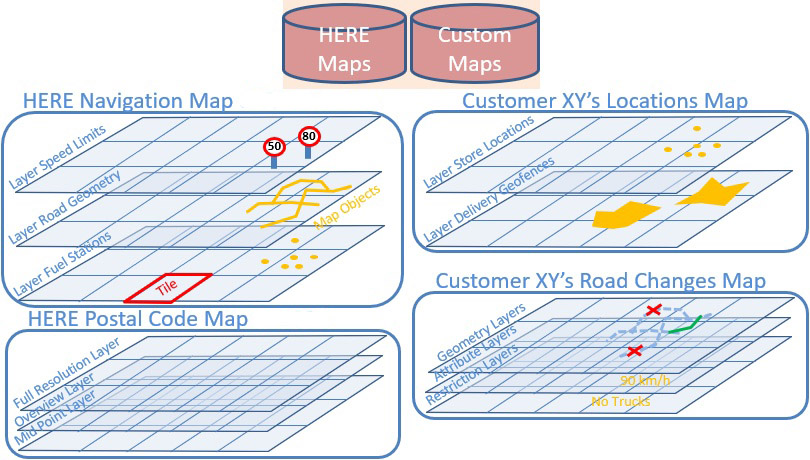
A map catalog is identified through its Here Resource Name (HRN). By default, the HERE SDK contains the OCM catalog with the HRN: "hrn:here:data::olp-here:ocm". Every catalog is a collection of layers that contain map objects with geometry and attributions. A layer's content is cut into tiles, for efficient search, map display, routing, map matching, driver warnings and other data. The core map content is divided into regional maps, but can always be used as a single, global map. Other content is delivered in dedicated - mostly worldwide - maps.
This data can be customized together with HERE and then made accessible via a custom catalog. Once the catalog is ready, you can access it by specifying the HRN value and scope. More information on the HRN catalog identifier and setting a scope can be found here.
On top, you may also want to adapt certain HERE online services such as routing and search to match the data of the offline maps data. In this case, HERE can help to setup a custom backend that hosts the adapted HERE services just for your company. Such a custom backend can be specified with a HashMap<EngineBaseURL, EngineOptions>. As a result, all requests made using classes like SearchEngine will use the specified backend.
NoteSetting custom backends via self-hosting is optional and only required when you want to use services such as custom routing or custom search online.
- When custom OCM data is installed on a device via
MapDownloaderor fully cached, then features like custom routing viaOfflineRoutingEngineare fully supported offline without the need for self-hosting of custom backends.- For online use a custom backend URL needs to be specified for the service (see below): Only with a custom backend you can create custom routes online with the
RoutingEngine. Same for other services like online search viaSearchEngine.
When a custom catalog is available on the HERE platform you can load and use your map data with a custom CatalogConfiguration. A CatalogConfiguration along with optional custom backend URLs needs to be specified via SDKOptions each time the HERE SDK is initialized - as the setting is not persisted.
The below code snippet shows how to do this:
private void initializeHERESDKWithCustomCatalogConfiguration() {
    // Note: Each catalog configuration may require special credentials.
    String accessKeyID = "YOUR_ACCESS_KEY_PROD";
    String accessKeySecret = "YOUR_ACCESS_KEY_SECRET_PROD";

    AuthenticationMode authenticationMode = AuthenticationMode.withKeySecret(accessKeyID, accessKeySecret);
    SDKOptions options = new SDKOptions(authenticationMode);

    // Specify one or more custom catalog configurations.
    options.catalogConfigurations = getCustomCatalogConfiguration();

    // Optionally, specify a custom routing backend that matches the custom OCM map for use with the (online) RoutingEngine.
    options.customEngineOptions = getCustomBackends();

    try {
        Context context = this;
        SDKNativeEngine.makeSharedInstance(context, options);
    } catch (InstantiationErrorException e) {
        throw new RuntimeException("Initialization of HERE SDK failed: " + e.error.name());
    }

    SDKNativeEngine.getSharedInstance().setAccessScope(getCustomCatalogScope());
}

private List<CatalogConfiguration> getCustomCatalogConfiguration() {
    List<CatalogConfiguration> catalogConfigurations = new ArrayList<>();

    // We want to start with the latest catalog version.
    boolean ignoreCachedData = true;
    CatalogVersionHint versionHint = CatalogVersionHint.latest(ignoreCachedData);

    String customHRN = "hrn:here:data::olp-namespace:your-company-ocm";
    DesiredCatalog customOCMCatalog = new DesiredCatalog(customHRN, versionHint);
    catalogConfigurations.add(new CatalogConfiguration(customOCMCatalog));

    // Optionally, set a patch HRN to enable incremental map updates.

    return catalogConfigurations;
}

// Note that self-hosting is optional.
private HashMap<EngineBaseURL, EngineOptions> getCustomBackends() {
    return new HashMap<EngineBaseURL, EngineOptions>() {{
        EngineOptions engineOptions = new EngineOptions();
        engineOptions.customBaseUrl = "https://your-company.router.hereapi.com";
        put(EngineBaseURL.ROUTING_ENGINE, engineOptions);
    }};
}

private String getCustomCatalogScope() {
    return "hrn:here:authorization::olp-here:project/your-company-hsdk";
}
private fun initializeHERESDKWithCustomCatalogConfiguration() {
    // Note: Each catalog configuration may require special credentials.
    val accessKeyID = "YOUR_ACCESS_KEY_PROD"
    val accessKeySecret = "YOUR_ACCESS_KEY_SECRET_PROD"

    val authenticationMode = AuthenticationMode.withKeySecret(accessKeyID, accessKeySecret)
    val options = SDKOptions(authenticationMode)

    // Specify one or more custom catalog configurations.
    options.catalogConfigurations = getCustomCatalogConfiguration()

    // Optionally, specify a custom routing backend that matches the custom OCM map for use with the (online) RoutingEngine.
    options.customEngineOptions = getCustomBackends()

    try {
        val context: Context = this
        SDKNativeEngine.makeSharedInstance(context, options)
    } catch (e: InstantiationErrorException) {
        throw RuntimeException("Initialization of HERE SDK failed: " + e.error.name)
    }

    SDKNativeEngine.getSharedInstance()!!.setAccessScope(getCustomCatalogScope())
}

private fun getCustomCatalogConfiguration(): List<CatalogConfiguration> {
    val catalogConfigurations: MutableList<CatalogConfiguration> = ArrayList()

    // We want to start with the latest catalog version.
    val ignoreCachedData = true
    val versionHint = CatalogVersionHint.latest(ignoreCachedData)

    val customHRN = "hrn:here:data::olp-namespace:your-company-ocm"
    val customOCMCatalog = DesiredCatalog(customHRN, versionHint)
    catalogConfigurations.add(CatalogConfiguration(customOCMCatalog))

    // Optionally, set a patch HRN to enable incremental map updates.
    return catalogConfigurations
}

// Note that self-hosting is optional.
private HashMap<EngineBaseURL, EngineOptions> getCustomBackends() {
    return new HashMap<EngineBaseURL, EngineOptions>() {{
        EngineOptions engineOptions = new EngineOptions();
        engineOptions.customBaseUrl = "https://your-company.router.hereapi.com";
        put(EngineBaseURL.ROUTING_ENGINE, engineOptions);
    }};
}

private fun getCustomCatalogScope(): String {
    return "hrn:here:authorization::olp-here:project/your-company-hsdk"
}
Initially, you need to specify a catalog version you want to start with. The DesiredCatalog provides a way to identify a catalog on the HERE platform. A developer can also specify the HERE Resource Name (HRN) for the catalog along with a CatalogVersionHint for the desired version. Once set up, you can use regular map updates via MapUpdater (not available for all licenses). This catalog version will then appear as part of the MapVersionHandle.
Make sure to set optionally catalogConfiguration.patchHrn = "hrn:here:data::olp-namespace:__your-patch-hrn-123__" when you want to enable incremental map updates for the custom OCM map. Use the appropriate patch HRN value for your project. Usually, incremental map updates are enabled by default, but when a CatalogConfiguration is set, then this behaves differently: setting the patchHrn to null will disable incremental map updates and for a CatalogConfiguration that is newly created, this is the default state.
More information on custom map data can be found in the HERE Map Attributes API which allows to access all HERE map data as well as the private map data of a customer.
Self-hosted services
With customEngineOptions (see above), it is possible to self-host services for the HERE SDK, for example, you can mirror the backend for HERE services on your own servers and access them by setting a URL via HashMap<EngineBaseURL, EngineOptions>.
The access to your own backend is fully customizable with configurable endpoints including authentication and proxy support (see here).
This step is only needed when you want to ensure that you can use the online feature engines of the HERE SDK. For example, if you want to insert a custom POI layer, you can search this customized map data already with the OfflineSearchEngine. Alternatively, you can also use the MyPlaces API to insert your data at runtime - or handle your requests in-app with your own REST code and your own (remote) databases or servers. On the other hand, if you want to make use of, for example, the SearchEngine, then you should consider the effort of self-hosting, because then each online request needs to be handled on your self-hosted backend. However, the most common use case for self-hosting is to have full control over the accessed servers that respond to the requests that the HERE SDK will initiate.
Note that this requires quite some effort and it is recommended to get in touch with the HERE SDK support team to discuss your setup and possible alternatives.
NoteDespite hosting selected HERE online services on your own backends, it is also possible to host custom OCM map catalogs on your backends (on-premise). Self-hosted maps may help when you need to move all HERE services to your own network behind a firewall. This requires to use a DS Proxy (see below). Please talk to your HERE representative about the details for such an option.
Set a DS proxy
By default, the data service proxy, in short DS_PROXY, is set to "https://direct.data.api.platform.here.com/direct/v1", which will be used as a prefix for HERE platform requests. When a custom catalog should be used, then the HERE SDK will internally do a lookup request to find out the corresponding URL to access a catalog. In order to bypass this extra request, we recommend to set the URL upfront when initializing the HERE SDK.
For example, a valid DS_PROXY for a custom catalog may look like this: "https://data.api.platform.yourcompany.com/direct/v1".
Set the custom proxy via HashMap<EngineBaseURL, EngineOptions>, then pass it as customEngineOptions to SDKOptions when initializing the HERE SDK.
In addition, for self-hosted backends and/or self-hosted maps (on-premise) an authentication token needs to be acquired manually by calling Authentication.authenticate(…). Before initializing the HERE SDK, set the token via AuthenticationMode.withToken(…).
NoteThe
DS_PROXYis not a network proxy setting: it only specifies the URL to access a catalog. If you do not want to load a custom catalog configuration (see above), you can ignore this setting.
Use custom catalogs together with Japan
Once your credentials are enabled by the HERE team for Japan, you can set the Japan map HRN string "hrn:here:data::olp-here:ocm-japan" to a DesiredCatalog instance. Then create a new CatalogConfiguration and pass it to sdkOptions.catalogConfigurations like already shown above.
Note that the below instructions are only relevant when you are using custom catalogs. If you do not use custom catalogs, you only need enabled credentials to see the enriched Japan map.
A Japan catalog can be set on it's own or together with a default map which is covering the whole world. By default, this is OCM, identified by this HRN value: "hrn:here:data::olp-here:ocm". Replace this with the custom HRN of your catalog. Below you can see how to use a Japan catalog together with a whole-world catalog.
private List<CatalogConfiguration> getDefaultCatalogConfigurationWithJapan() {
    List<CatalogConfiguration> catalogConfigurations = new ArrayList<>();

    // We want to start with the latest catalog version.
    boolean ignoreCachedData = true;
    CatalogVersionHint versionHint = CatalogVersionHint.latest(ignoreCachedData);

    // An OCM catalog is required, typically, use your own catalog HRN here.
    String defaultOCMHRN = "hrn:here:data::olp-here:ocm";
    DesiredCatalog defaultOCMCatalog = new DesiredCatalog(defaultOCMHRN, versionHint);
    catalogConfigurations.add(new CatalogConfiguration(defaultOCMCatalog));

    // Specify a rich Japan map, requires special HERE credentials.
    // If the credentials are not enabled for access, the map falls back to the Japan base map.
    String japanOCMHRN = "hrn:here:data::olp-here:ocm-japan";
    DesiredCatalog japanOCMCatalog = new DesiredCatalog(japanOCMHRN, versionHint);
    catalogConfigurations.add(new CatalogConfiguration(japanOCMCatalog));

    // Optionally, set a patch HRN to enable incremental map updates.

    return catalogConfigurations;
}
private fun getDefaultCatalogConfigurationWithJapan(): List<CatalogConfiguration> {
    val catalogConfigurations: MutableList<CatalogConfiguration> = ArrayList()

    // We want to start with the latest catalog version.
    val ignoreCachedData = true
    val versionHint = CatalogVersionHint.latest(ignoreCachedData)

    // An OCM catalog is required, typically, use your own catalog HRN here.
    val defaultOCMHRN = "hrn:here:data::olp-here:ocm"
    val defaultOCMCatalog = DesiredCatalog(defaultOCMHRN, versionHint)
    catalogConfigurations.add(CatalogConfiguration(defaultOCMCatalog))

    // Specify a rich Japan map, requires special HERE credentials.
    // If the credentials are not enabled for access, the map falls back to the Japan base map.
    val japanOCMHRN = "hrn:here:data::olp-here:ocm-japan"
    val japanOCMCatalog = DesiredCatalog(japanOCMHRN, versionHint)
    catalogConfigurations.add(CatalogConfiguration(japanOCMCatalog))

    // Optionally, set a patch HRN to enable incremental map updates.
    return catalogConfigurations
}
Make sure to set optionally catalogConfiguration.patchHrn = "hrn:here:data::olp-here:ocm-japan-patch" when you want to enable incremental map updates for the Japan map. Usually, incremental map updates are enabled by default, but when a CatalogConfiguration is set, then - for now - this behaves differently: Setting the
patchHrn to null will disable incremental map updates and for a CatalogConfiguration that is newly created, this is the default state.
For convenience, you can also get the default configuration like this:
List<CatalogConfiguration> catalogConfigurations = new ArrayList<>();

// By calling getDefault() you will automatically get the latest version
// at the time when the HERE SDK was built.
catalogConfigurations.add(CatalogConfiguration.getDefault(CatalogType.OPTIMIZED_CLIENT_MAP));

// Note: If the credentials are not enabled for access, the map falls back to the Japan base map.
catalogConfigurations.add(CatalogConfiguration.getDefault(CatalogType.OPTIMIZED_CLIENT_MAP_JAPAN));
val catalogConfigurations: MutableList<CatalogConfiguration> = ArrayList()

// By calling getDefault() you will automatically get the latest version
// at the time when the HERE SDK was built.
catalogConfigurations.add(CatalogConfiguration.getDefault(CatalogType.OPTIMIZED_CLIENT_MAP))

// Note: If the credentials are not enabled for access, the map falls back to the Japan base map.
catalogConfigurations.add(CatalogConfiguration.getDefault(CatalogType.OPTIMIZED_CLIENT_MAP_JAPAN))
You can also retrieve the details of a default catalog like shown below:
CatalogConfiguration catalogJapan = CatalogConfiguration.getDefault(CatalogType.OPTIMIZED_CLIENT_MAP_JAPAN);
CatalogIdentifier catalogIdentifier = catalogJapan.catalog.id;
Log.d(TAG, "Japan HRN: " + catalogIdentifier.hrn);
Log.d(TAG, "Japan version: " + catalogIdentifier.version);
val catalogJapan = CatalogConfiguration.getDefault(CatalogType.OPTIMIZED_CLIENT_MAP_JAPAN)
val catalogIdentifier = catalogJapan.catalog.id
Log.d(TAG, "Japan HRN: " + catalogIdentifier.hrn)
Log.d(TAG, "Japan version: " + catalogIdentifier.version)
Updated yesterday