
Use the Indoor Maps component
HERE Indoor Map provides functionality to load, show, and interact with private venues on a map. For more information on HERE Indoor Map, see the HERE Indoor Map Guide.
NoteIf you are a venue owner and are interested in leveraging HERE Indoor Map with the HERE SDK, contact us at
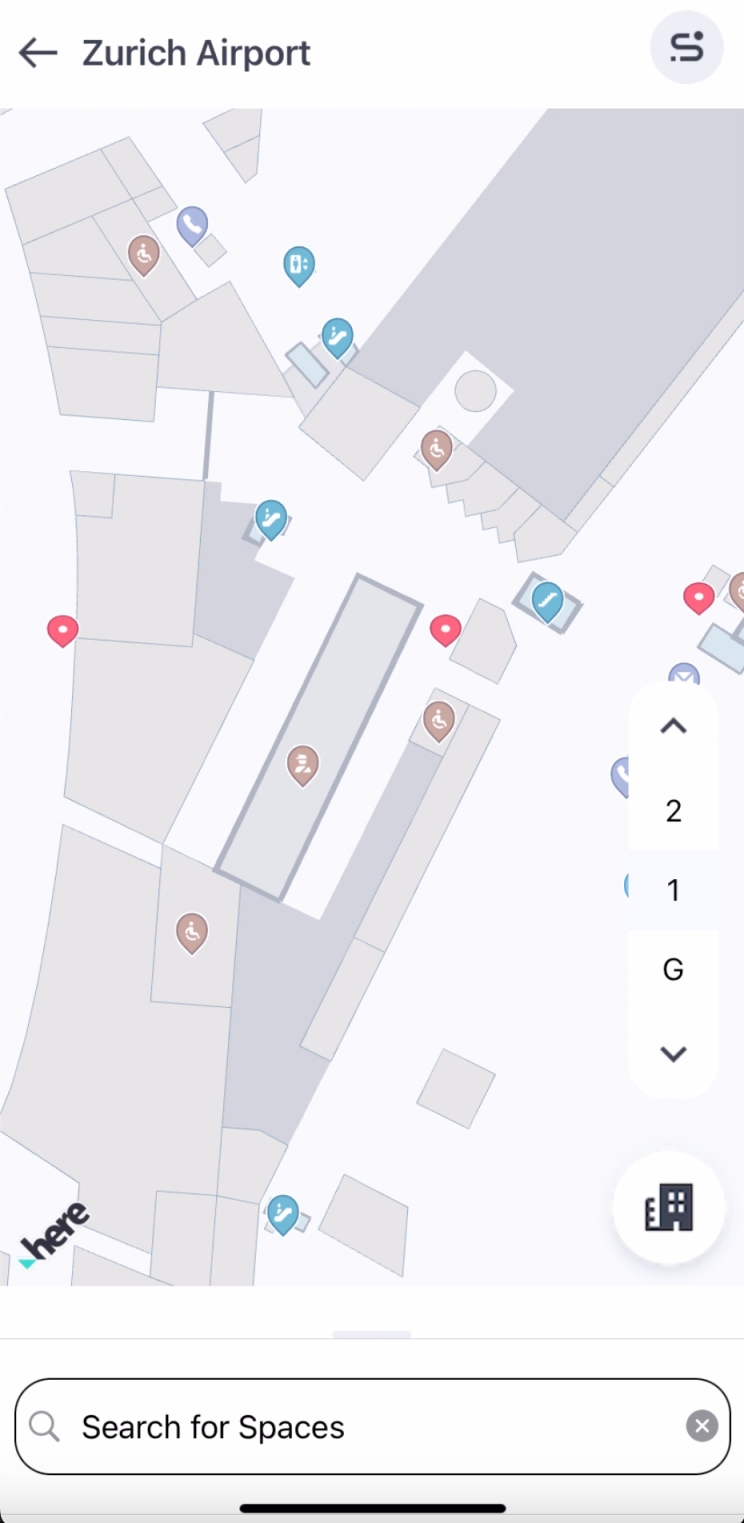
Currently, the HERE SDK only supports private venues, therefore your venue data will only be shown in your app. By default, no venues are visible on the map. Each of your venues receives a unique venue ID that is tied to your HERE SDK credentials.
Initialize the VenueEngine
Before you can begin using the HERE Indoor Map API, the VenueEngine instance must be created and started. This can be done after a map initialization, however The best time to create the VenueEngine is after the map loads a scene:
private void loadMapScene() {
    // Load a scene from the HERE SDK to render the map with a map scheme.
    mapView.getMapScene().loadScene(MapScheme.NORMAL_DAY, mapError -> {
        if (mapError == null) {
            // Hide extruded buildings layer, so it will not overlaps with venues.
            List<String> mapFeatures = new ArrayList<>();
            mapFeatures.add(MapFeatures.EXTRUDED_BUILDINGS);
            mapView.getMapScene().disableFeatures(mapFeatures);

            // Create a venue engine object. Once an initialization is done, the callback
            // will be called.
            try {
                venueEngine = new VenueEngine(this ::onVenueEngineInitCompleted);
            } catch (InstantiationErrorException e) {
                Log.e(TAG, "SDK Engine instantiation failed");
                e.printStackTrace();
            }
        } else {
            Log.d(TAG, "Loading map failed: mapError: " + mapError.name());
        }
    });
}
Once the VenueEngine is initialized, a callback is called. From this point on, there is access to both the VenueService and the VenueMap. A VenueService is used to load venues, and a VenueMap controls the venues on the map. Inside the callback, all required listeners can be added, and then the VenueEngine must be started. The platform map catalog HRN can be set once the VenueEngine is started if user does not want to use default collection HRN.
NoteSetting HRN is optional. If a user does not set HRN, default collection HRN is automatically selected. If a user want to use any other collection, respective HRN can be set. An error log is generated that indicates missing or invalid HRN values. For more information on how you can receive a valid HRN string for your project, see the HERE Indoor Map Guide.
private void onVenueEngineInitCompleted() {
    // Get VenueService and VenueMap objects.
    VenueService service = venueEngine.getVenueService();
    VenueMap venueMap = venueEngine.getVenueMap();

    // Add needed listeners.
    service.add(serviceListener);
    service.add(venueListener);
    venueMap.add(venueSelectionListener);

    //Lets user download topologies for current session.
    service.loadTopologies();

    // Start VenueEngine. Once authentication is done, the authentication callback
    // will be triggered. Afterwards, VenueEngine will start VenueService. Once VenueService
    // is initialized, VenueServiceListener.onInitializationCompleted method will be called.
    venueEngine.start((authenticationError, authenticationData) -> {
        if (authenticationError != null) {
            Log.e(TAG, "Failed to authenticate, reason: " + authenticationError.value);
        }
    });

    if(HRN != "") {
        // Set platform catalog HRN
        service.setHrn(HRN);
    }
}
Once the VenueEngine is started, it authenticates using the current credentials, and then starts the VenueService. Once the VenueService is initialized, the VenueServiceListener.onInitializationCompleted() method is called:
// Listener for the VenueService event.
private final VenueServiceListener serviceListener = new VenueServiceListener() {
    @Override
    public void onInitializationCompleted(@NonNull VenueServiceInitStatus result) {
        if (result == VenueServiceInitStatus.ONLINE_SUCCESS) {
            Log.d(TAG, "VenueService initialization is successful.");
        } else {
            Log.e(TAG, "Failed to initialize venue service.");
        }
    }

    @Override
    public void onVenueServiceStopped() {}
};
Start the VenueEngine using a token
The VenueEngine can be started using a valid HERE Indoor Platform project token. For additional information on the HERE platform project management and project workflows refer to HERE Platform Project management
private void onVenueEngineInitCompleted() {
    // Get VenueService and VenueMap objects.
    VenueService service = venueEngine.getVenueService();
    VenueMap venueMap = venueEngine.getVenueMap();

    // Add needed listeners.
    service.add(serviceListener);
    service.add(venueListener);
    venueMap.add(venueSelectionListener);

    // Start VenueEngine by replacing TOKEN_GOES_HERE with token you have in String data type.
    // Afterwards, VenueEngine will start VenueService. Once VenueService
    // is initialized, VenueServiceListener.onInitializationCompleted method will be called.
    venueEngine.start("TOKEN_GOES_HERE");
}
Try the Indoor Map example app
A full example showing usage of the map tap event with venues is available in the "IndoorMap" example app, available on GitHub.
Updated 4 hours ago