
Install map data
Below we describe how to get offline map data integrated into your application with the MapDownloader.
- Download a list of
Regionobjects. Optionally, this list can be localized with local region names. Once you have this list, you can pick theRegionIdyou want to download and pass it as download request to theMapDownloader. - Use the
MapDownloaderto download a singleRegionor a list of regions. You can also download several regions in parallel. Show the download progress to the user by setting aDownloadRegionsStatusListener. Consider sequential downloads on such devices to lower the RAM pressure. - Use the
MapUpdaterto update already downloaded regions and the map cache to a newer map version.
Once the download has completed, the map is ready to be used. If a device is offline, it will automatically show the downloaded region when the camera's target is pointed to that region.
NoteIf a download failed, the HERE SDK will still be in a fully operable state. Just try to download again, until the progress has reached 100% and the status finally indicates that the operation is completed. If the issues are more severe, you can try to repair: see the repair section below for more details.
It is not recommended to keep downloading or updating map data while an app is running in the background. As a best practice, users should be notified to
pause()orcancel()ongoing downloads if they cannot keep running the app in foreground. Additionally, consider providing aresume()option when the app is resumed after being paused.Consider writing platform-specific code to keep the device active (particularly the GPU and CPU) and prevent the app from entering an idle state. Alternatively, inform users to keep the screen on to maintain app functionality
Since map data for regions, countries, or entire continents can be several hundred megabytes, downloads may take a significant amount of time, depending on factors like available bandwidth. Additionally, a download may fail if the connection times out and cannot recover. For the best user experience, it is recommended to allow users to cancel ongoing operations and monitor the progress until the map download is successful.
NoteTo get a quick overview of how all of this works, you can take a look at the OfflineMapsExample class, provided in Java and Kotlin. It contains all code snippets shown below and it is part of the "OfflineMaps" example app you can find on GitHub for Java and Kotlin.
Use the MapDownloader
You can use the MapDownloader once per SDKNativeEngine:
SDKNativeEngine sdkNativeEngine = SDKNativeEngine.getSharedInstance();
if (sdkNativeEngine == null) {
    throw new RuntimeException("SDKNativeEngine not initialized.");
}

// Create MapDownloader in background to not block the UI thread.
MapDownloader.fromEngineAsync(sdkNativeEngine, new MapDownloaderConstructionCallback() {
    @Override
    public void onMapDownloaderConstructedCompleted(@NonNull MapDownloader mapDownloader) {
        // ...
    }
});
val sdkNativeEngine = SDKNativeEngine.getSharedInstance()
    ?: throw RuntimeException("SDKNativeEngine not initialized.")

// Create MapDownloader in background to not block the UI thread.
MapUpdater.fromEngineAsync(sdkNativeEngine, object : MapUpdaterConstructionCallback {
    override fun onMapUpdaterConstructe(mapUpdater: MapUpdater) {
        // ...
    }
})
Usually, the SDKNativeEngine is automatically initialized when you start the app to show a MapView. Therefore, you can access its instance at runtime and obtain the MapDownloader from it.
NoteConsider using a dedicated loader method or class, such as an
ExecutorService, to synchronize and ensure all instances are ready. Displaying a loading indicator during this process can enhance the user experience. This approach allows you to use the instance(s) in your class confidently, without the need for null checks. Typically, creating theMapDownloaderandMapUpdater(see below) completes in a negligible amount of time.
By default, the downloaded map data will be stored to a default location:
// Note that the default storage path can be adapted when creating a new SDKNativeEngine.
String storagePath = SDKNativeEngine.getSharedInstance().getOptions().cachePath;
Log.d("",  "StoragePath: " + storagePath);
// Note that the default storage paths can be adapted when creating a new SDKNativeEngine.
val storagePath = sdkNativeEngine.options.cachePath
Log.d(TAG, "Cache storagePath: $storagePath")
As stated in the comment, you can change that storage location, if you wish so - but then you need to create a new SDKNativeEngine instance as shown in the Key Concepts section and set the new cache path together with your credentials as part of the SDKOptions. Note that the storage path is unique for your credentials key.
The persistentMapStoragePath property defines the location where persistent map data is stored. By default, this returns an empty string, and the SDK uses the internal app storage. If set, it should be a valid directory path with read/write permissions. If the persistent map storage location has the read only permission, then the dataPath must be configured. Note, persistent map storage path should be located under app-specific directory. Using shared directories such as Documents is not recommended as it will expose HERE SDK files to the other apps.
// This is the default path for storing downloaded regions.
// The application must have read/write access to this path if updating it.
String persistentMapStoragePath = sdkNativeEngine.getOptions().persistentMapStoragePath;
Log.d(TAG, "PersistentMapStoragePath: " + persistentMapStoragePath);
// This is the default path for storing downloaded regions.
// The application must have read/write access to this path if updating it.
val persistentMapStoragePath = sdkNativeEngine.options.persistentMapStoragePath
Log.d(TAG, "PersistentMapStoragePath: $persistentMapStoragePath")
Download a list of regions
Each downloadable Region is identified by a unique RegionId. In order to know, which regions are available and which RegionID belongs to which Region, you need to download a list of all available offline maps. This contains regions from the entire world.
NoteEach
Regioncan contain multiple children and each child represents a subset of its parentRegion- when you download the parent, then the child regions are automatically included. If you are interested only in smaller portions of an area you can traverse the child regions. Usually, the top-level regions represent continents with countries as children. For the sake of simplicity, below we only look for downloadable countries and ignore any children of children and their children (and so on).
The code below downloads the list of downloadable regions and stores the available Region elements in a list for later use:
// Download a list of Region items that will tell us what map regions are available for later download.
mapDownloader.getDownloadableRegions(LanguageCode.DE_DE, new DownloadableRegionsCallback() {
    @Override
    public void onCompleted(@Nullable MapLoaderError mapLoaderError, @Nullable List<Region> list) {
        if (mapLoaderError != null) {
            String message = "Downloadable regions error: " + mapLoaderError;
            snackbar.setText(message).show();
            return;
        }

        // If error is null, it is guaranteed that the list will not be null.
        downloadableRegions = list;

        for (Region region : downloadableRegions) {
            Log.d("RegionsCallback", region.name);
            List<Region> childRegions = region.childRegions;
            if (childRegions == null) {
                continue;
            }

            // Note that this code ignores to list the children of the children (and so on).
            for (Region childRegion : childRegions) {
                long sizeOnDiskInMB = childRegion.sizeOnDiskInBytes / (1024 * 1024);
                String logMessage = "Child region: " + childRegion.name +
                        ", ID: "+ childRegion.regionId.id +
                        ", Size: " + sizeOnDiskInMB + " MB";
                Log.d("RegionsCallback", logMessage);
            }
        }

        String message = "Found " + downloadableRegions.size() +
                " continents with various countries. See log for details.";
        snackbar.setText(message).show();
    }
});
// Download a list of Region items that will tell us what map regions are available for later download.
mapDownloader.getDownloadableRegions(
    LanguageCode.DE_DE,
    object : DownloadableRegionsCallback {
        override fun onCompleted(
            maploaderError: MapLoaderError?,
            regions: List<Region>?
        ) {
            if (maploaderError != null) {
                val message = "Downloadable regions error: $maploaderError"
                snackbar.show(message)
                return
            }
            // If error is null, it is guaranteed that the list will not be null.
            downloadableRegions = regions!!

            for (region in downloadableRegions) {
                Log.d("RegionsCallback", region.name)
                val childRegions = region.childRegions ?: continue

                // Note that this code ignores to list the children of the children (and so on).
                for (childRegion in childRegions) {
                    val sizeOnDiskInMB = childRegion.sizeOnDiskInBytes / (1024 * 1024)
                    val logMessage = "Child region: " + childRegion.name +
                            ", ID: " + childRegion.regionId.id +
                            ", Size: " + sizeOnDiskInMB + " MB"
                    Log.d("RegionsCallback", logMessage)
                }
            }

            val message = "Found ${downloadableRegions.size} continents with various " +
                    "countries. Full list: $downloadableRegions."
            snackbar.show(message)
        }

    }
)
NoteThe response contains either an error or a result:
MapLoaderErrorandList<Region>can never be null at the same time - or non-null at the same time.
Each region can contain child regions. For example, Europe contains Germany, France and Switzerland - and many more child regions. The sizeOnDiskInBytes parameter tells you how much space the downloaded map will occupy on the device's file system when it's uncompressed after the download is completed. It makes sense to show this to the user before starting the download, as the available space on a device may be limited.
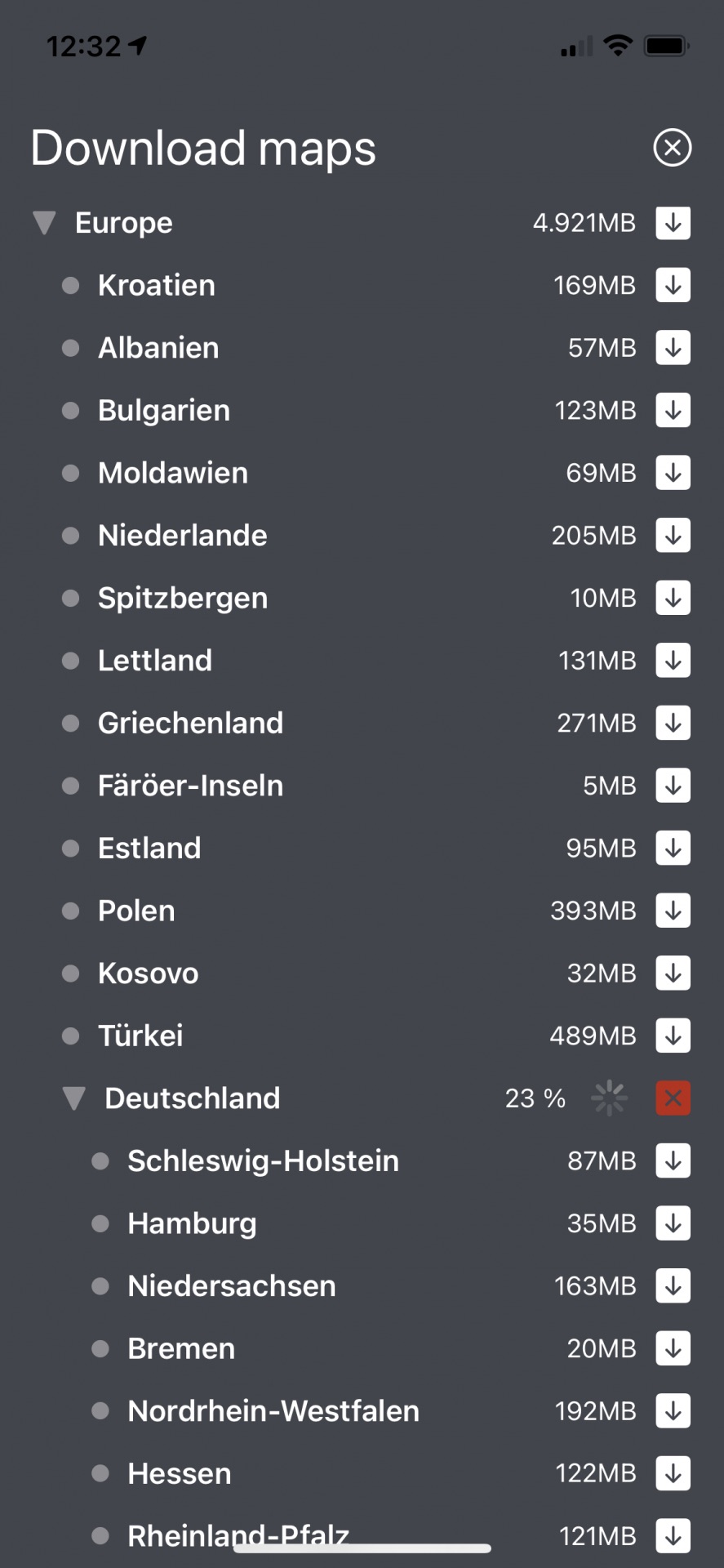
Download a region
Once you know the RegionId, you can use it to start downloading the map data. Each Region instance contains a localized name and other data, such as the size of the downloaded map. When the map data is downloaded, all data is compressed and will be unpacked automatically onto the device's disk once the download is complete.
Below we search in the downloaded list of regions to find the Region element for Switzerland. Note that we have requested the region list to be localized in German in the step above:
// Finds a region in the downloaded region list.
// Note that we ignore children of children (and so on).
private Region findRegion(String localizedRegionName) {
    Region downloadableRegion = null;
    for (Region region : downloadableRegions) {
        if (region.name.equals(localizedRegionName)) {
            downloadableRegion = region;
            break;
        }
        List<Region> childRegions = region.childRegions;
        if (childRegions == null) {
            continue;
        }
        for (Region childRegion : childRegions) {
            if (childRegion.name.equals(localizedRegionName)) {
                downloadableRegion = childRegion;
                break;
            }
        }
    }

    return downloadableRegion;
}
// Finds a region in the downloaded region list.
// Note that we ignore children of children (and so on).
private fun findRegion(localizedRegionName: String): Region? {
    var downloadableRegion: Region? = null
    for (region in downloadableRegions!!) {
        if (region.name == localizedRegionName) {
            downloadableRegion = region
            break
        }
        val childRegions = region.childRegions ?: continue
        for (childRegion in childRegions) {
            if (childRegion.name == localizedRegionName) {
                downloadableRegion = childRegion
                break
            }
        }
    }

    return downloadableRegion
}
Once you know the Region, you can use it's RegionId to start the download. You pass the unique ID into a list, so you can download multiple regions with the same request.
NoteDownloading multiple regions simultaneously can consume significant amounts of RAM, especially when downloading large regions or multiple regions at once. This high memory usage may cause the operating system to terminate your app to free up system resources. To prevent app termination, consider downloading regions sequentially (one at a time) or limit the number of concurrent downloads based on the device's available memory and the size of the regions being downloaded.
Here, we download only one region:
// Find region for Switzerland using the German name as identifier.
// Note that we requested the list of regions in German above.
String swizNameInGerman = "Schweiz";
Region region = findRegion(swizNameInGerman);

if (region == null ) {
    String message = "Error: The Swiz region was not found. Click 'Regions' first.";
    snackbar.setText(message).show();
    return;
}

// For this example we only download one country.
List<RegionId> regionIDs = Collections.singletonList(region.regionId);
MapDownloaderTask mapDownloaderTask = mapDownloader.downloadRegions(regionIDs,
        new DownloadRegionsStatusListener() {
            @Override
            public void onDownloadRegionsComplete(@Nullable MapLoaderError mapLoaderError, @Nullable List<RegionId> list) {
                if (mapLoaderError != null) {
                    String message = "Download regions completion error: " + mapLoaderError;
                    snackbar.setText(message).show();
                    return;
                }

                // If error is null, it is guaranteed that the list will not be null.
                // For this example we downloaded only one hardcoded region.
                String message = "Completed 100% for Switzerland! ID: " + list.get(0).id;
                snackbar.setText(message).show();
            }

            @Override
            public void onProgress(@NonNull RegionId regionId, int percentage) {
                String message = "Download for Switzerland. ID: " + regionId.id +
                    ". Progress: " + percentage + "%.";
                snackbar.setText(message).show();
            }

            @Override
            public void onPause(@Nullable MapLoaderError mapLoaderError) {
                if (mapLoaderError == null) {
                    String message = "The download was paused by the user calling mapDownloaderTask.pause().";
                    snackbar.setText(message).show();
                } else {
                    String message = "Download regions onPause error. The task tried to often to retry the download: " + mapLoaderError;
                    snackbar.setText(message).show();
                }
            }

            @Override
            public void onResume() {
                String message = "A previously paused download has been resumed.";
                snackbar.setText(message).show();
            }
        });

mapDownloaderTasks.add(mapDownloaderTask);
// Find region for Switzerland using the German name as identifier.
// Note that we requested the list of regions in German above.
val swizNameInGerman = "Schweiz"
val region = findRegion(swizNameInGerman)

if (region == null) {
    val message = "Error: The Swiz region was not found. Click 'Regions' first."
    snackbar.show(message)
    return
}

// For this example we only download one country.
val regionIDs = listOf(region.regionId)
val mapDownloaderTask = mapDownloader.downloadRegions(
    regionIDs,
    object : DownloadRegionsStatusListener {
        override fun onDownloadRegionsComplete(
            mapLoaderError: MapLoaderError?,
            list: List<RegionId>?
        ) {
            if (mapLoaderError != null) {
                val message =
                    "Download regions completion error: $mapLoaderError"
                snackbar.show(message)
                return
            }

            // If error is null, it is guaranteed that the list will not be null.
            // For this example we downloaded only one hardcoded region.
            val message = "Completed 100% for Switzerland! ID: " + list!![0].id
            snackbar.show(message)
        }

        override fun onProgress(regionId: RegionId, percentage: Int) {
            val message = "Download for Switzerland. ID: " + regionId.id +
                    ". Progress: " + percentage + "%."
            snackbar.show(message)
        }

        override fun onPause(mapLoaderError: MapLoaderError?) {
            if (mapLoaderError == null) {
                val message =
                    "The download was paused by the user calling mapDownloaderTask.pause()."
                snackbar.show(message)
            } else {
                val message =
                    "Download regions onPause error. The task tried to often to retry the download: $mapLoaderError"
                snackbar.show(message)
            }
        }

        override fun onResume() {
            val message = "A previously paused download has been resumed."
            snackbar.show(message)
        }
    }
)

mapDownloaderTasks.add(mapDownloaderTask)
The DownloadRegionsStatusListener provides four events. The second one tells us the progress while the download is ongoing, while the first one notifies once the download has completed. Note that the download can also complete with a MapLoaderError, so it's worth to check if something went wrong.
NoteThe response for
onDownloadRegionsComplete()contains either an error or a result:MapLoaderErrorandList<RegionId>can never be null at the same time - or non-null at the same time.
The pause event notifies when a download was paused by the user or the task itself. Internally, the HERE SDK will retry to download a region when it was interrupted, that is due to a bad network connection. If this happens too often, the MapLoaderError for onPause() is populated and the download pauses. A paused MapDownloaderTask can only be resumed by the user, which will be also indicated by the related event. Especially for larger regions it may be convenient to pause a download until the connection gets better, for example. When resumed, the download will continue at the progress where it stopped and no already downloaded map data will be lost. Note that calling downloadRegions() for a paused region will have the same effect as calling resume() on the original task and the progress will continue where it left off.
After kicking off the download, we get an immediate return value to be able to cancel the ongoing asynchronous download operation. Above, we store the MapDownloaderTask into a list, as a user might trigger the above code multiple times.
To cancel all ongoing downloads, you can use the following code snippet:
public void onCancelMapDownloadClicked() {
    for (MapDownloaderTask mapDownloaderTask : mapDownloaderTasks) {
        mapDownloaderTask.cancel();
    }
    String message = "Cancelled " + mapDownloaderTasks.size() + " download tasks in list.";
    snackbar.setText(message).show();
    mapDownloaderTasks.clear();
}
fun onCancelMapDownloadClicked() {
    for (mapDownloaderTask in mapDownloaderTasks) {
        mapDownloaderTask.cancel()
    }
    val message = "Cancelled " + mapDownloaderTasks.size + " download tasks in list."
    snackbar.show(message)
    mapDownloaderTasks.clear()
}
Note that a MapDownloaderTask that was cancelled cannot be resumed again, but you can start a fresh download request again.
NoteYou can find the "OfflineMaps" example app on GitHub in Java and Kotlin.
Delete downloaded regions
The following code snippet shows how to delete all installed regions using the MapDownloader:
public void deleteInstalledRegions() {
        List<InstalledRegion> installedRegionList = getInstalledRegionList();

        // Retrieving the RegionIds from the list of installed regions, which will be used for the deletion process.
        List<RegionId> regionIds = installedRegionList.stream()
                .map(region -> region.regionId)
                .collect(Collectors.toList());

        // Asynchronous operation to delete map data for regions specified by a list of RegionId.
        // Deleting a region when there is a pending download returns error MapLoaderError.INTERNAL_ERROR.
        // Also, deleting a region when there is an ongoing download returns error MapLoaderError.NOT_READY
        mapDownloader.deleteRegions(regionIds, new DeletedRegionsCallback() {
            @Override
            public void onCompleted(@Nullable MapLoaderError mapLoaderError, @Nullable List<RegionId> list) {
                // When error is null, the deletedRegions list is guaranteed to be non-null.
                if (mapLoaderError == null && list != null) {
                    for (RegionId regionID : list) {
                        Log.d("deleteRegions", "Successfully deleted region: " + regionID.toString());
                    }
                    snackbar.setText("Successfully deleted regions!").show();
                } else {
                    Log.e("deleteRegions", "Deleting regions failed:" + mapLoaderError.name());
                    snackbar.setText("Deleting regions failed: " + mapLoaderError.name()).show();
                }
            }
        });
    }
fun deleteInstalledRegions() {
    val installedRegionList = getInstalledRegionList()

    // Retrieving the RegionIds from the list of installed regions, which will be used for the deletion process.
    val regionIds = installedRegionList.stream()
        .map { region: InstalledRegion -> region.regionId }
        .collect(Collectors.toList())

    // Asynchronous operation to delete map data for regions specified by a list of RegionId.
    // Deleting a region when there is a pending download returns error MapLoaderError.INTERNAL_ERROR.
    // Also, deleting a region when there is an ongoing download returns error MapLoaderError.NOT_READY
    mapDownloader.deleteRegions(
        regionIds
    ) { mapLoaderError, list -> // When error is null, the list is guaranteed to be not null.
        if (mapLoaderError == null && list != null) {
            for (regionID in list) {
                Log.d(
                    "deleteRegions",
                    "Successfully deleted region: $regionID"
                )
            }
            snackbar.show("Successfully deleted regions!")
        } else {
            Log.e(
                "deleteRegions",
                "Deleting regions failed:" + mapLoaderError!!.name
            )
            snackbar.show("Deleting regions failed: " + mapLoaderError.name)
        }
    }
}
Before deleting, make sure no download is in progress for the regions you want to remove. Attempting to delete regions with ongoing or pending downloads may result in errors such as MapLoaderError.NOT_READY or MapLoaderError.INTERNAL_ERROR.
If you want to delete only selected regions, your application may need to store human-readable names for each RegionId.
Repair broken maps
It is not recommended to keep downloading or updating map data while an app is running in the background. Note that the HERE SDK offers methods to pause() and to resume() downloads as shown in the preceding section. For example, when an app is going to background or is resumed. It is recommended to inform users in such cases.
However, it may happen that an app gets closed before a map update operation can be completed - for example, due to a crash. So, in worst case an intermediate state may occur on the disk of the device.
The HERE SDK provides a convenient way to check for such issues with the getInitialPersistentMapStatus() method. It also allows to repair a broken map, if possible.
private void checkInstallationStatus() {
    // Note that this value will not change during the lifetime of an app.
    PersistentMapStatus persistentMapStatus = mapDownloader.getInitialPersistentMapStatus();
    if (persistentMapStatus != PersistentMapStatus.OK) {
        // Something went wrong after the app was closed the last time. It seems the offline map data is
        // corrupted. This can eventually happen, when an ongoing map download was interrupted due to a crash.
        Log.d("PersistentMapStatus", "The persistent map data seems to be corrupted. Trying to repair.");

        // Let's try to repair.
        mapDownloader.repairPersistentMap(new RepairPersistentMapCallback() {
            @Override
            public void onCompleted(@Nullable PersistentMapRepairError persistentMapRepairError) {
                if (persistentMapRepairError == null) {
                    Log.d("RepairPersistentMap", "Repair operation completed successfully!");
                    return;
                }

                // In this case, check the PersistentMapStatus and the recommended
                // healing option listed in the API Reference. For example, if the status
                // is PENDING_UPDATE, it cannot be repaired, but instead an update
                // should be executed. It is recommended to inform your users to
                // perform the recommended action.
                Log.d("RepairPersistentMap", "Repair operation failed: " + persistentMapRepairError.name());
            }
        });
    }
}
private fun checkInstallationStatus() {
    // Note that this value will not change during the lifetime of an app.
    val persistentMapStatus = mapDownloader.getInitialPersistentMapStatus()
    if (persistentMapStatus != PersistentMapStatus.OK) {
        // Something went wrong after the app was closed the last time. It seems the offline map data is
        // corrupted. This can eventually happen, when an ongoing map download was interrupted due to a crash.
        Log.d(
            "PersistentMapStatus",
            "The persistent map data seems to be corrupted. Trying to repair."
        )

        // Let's try to repair.
        mapDownloader.repairPersistentMap(object : RepairPersistentMapCallback {
            override fun onCompleted(persistentMapRepairError: PersistentMapRepairError?) {
                if (persistentMapRepairError == null) {
                    Log.d("RepairPersistentMap", "Repair operation completed successfully!")
                    return
                }

                // In this case, check the PersistentMapStatus and the recommended
                // healing option listed in the API Reference. For example, if the status
                // is PENDING_UPDATE, it cannot be repaired, but instead an update
                // should be executed. It is recommended to inform your users to
                // perform the recommended action.
                Log.d(
                    "RepairPersistentMap",
                    "Repair operation failed: " + persistentMapRepairError.name
                )
            }

        })
    }
}
NoteIt is recommended to inform the user that there might be an issue with the downloaded map data. Such a dialog can be shown on app side before performing a repair operation or any other follow-up action that might be necessary if the repair operation fails. However, calling
getInitialPersistentMapStatus()andrepairPersistentMap()can be performed silently to see if such a notification is necessary or not.
In worst case, if the repair operation fails, the map data needs to be removed and downloaded again. You can try to call deleteRegions() programmatically and clear the map cache via SDKCache by calling clearCache(). In this case, it is recommend to notify the user and to restart the application.
Alternatively, you can manually delete the data: the path for downloaded regions and the cache can be retrieved from the SDKOptions via the persistentMapStoragePath and cachePath properties.
Updated yesterday