

Enhance map content with KML
Developers often rely on standards to facilitate the seamless transfer of content between platforms when creating map overlays. One widely adopted standard is KML, which encapsulates data in XML format.
KML specification encompasses various objects, such as placemarks, images, and polygons, many of which have corresponding counterparts in the HERE Maps API for JavaScript. To effectively translate KML objects into map objects, the API provides the data module (mapsjs-data.js).
The Reader class in the data module loads KML from a file and parses it. Further, the class has a utility method that creates a map layer, using the parsed KML data. The layer can be added directly to the map. All map objects receive regular map events and can contain additional data, such as name and description (if such data is available in the KML file).
Supported KML elements
The following KML elements provide functionality and capabilities similar to the corresponding Maps API for JavaScript elements, allowing you to visualize and interact with KML data on a HERE map.
Note
The HERE Maps API for JavaScript supports import of KML files and data sets compliant with versions 2.1 and 2.2 of the KML standard. Any unsupported features in the KML data structure are ignored.
Point
The Point element in KML corresponds to a specific point location on the map and is represented as a H.map.Marker class object in the Maps API for JavaScript.
LineString
The LineString element in KML corresponds to a sequence of connected line segments and is represented as a H.map.Polyline class object in Maps API for JavaScript.
LinearString
The LinearRing element in KML represents a closed line string, typically used to define the boundary of a Polygon. In the Maps API for JavaScript, if a LinearRing is defined as a child of a Placemark, it can be represented using the H.map.Polyline class.
Polygon
The Polygon element in KML represents a closed shape consisting of one or more rings. In the Maps API for JavaScript, it is represented by the H.map.Polygon class, which allows you to draw a polygon by specifying the outer boundary and optional inner boundaries (holes) using the outerBoundaryIs and innerBoundaryIs elements respectively.
MultiGeometry
The MultiGeometry element in KML represents a collection of geometries such as points, lines, and polygons. In the Maps API for JavaScript, it can be represented using the H.map.Group class, which allows you to group multiple map objects together.
Folder
The Folder element in KML represents a container that holds multiple Placemark or other Folder elements. In the Maps API for JavaScript, Folder is represented using the H.map.Group class, which allows you to group multiple map objects together.
Placemark
The Placemark element represents a specific point or feature on the map. It can contain various properties and data associated with the location and is stored as kmlNode in the object's data property. The Maps API for JavaScript supports the following placemark properties:
description- Stores the description or information associated with the placemark. It can be displayed as a balloon or tooltip when the placemark is clicked or selected.visibility- Determines the visibility of the placemark on the map. You can set the value to eithertrueorfalse.
Style
The Style element defines the visual appearance of KML features, such as icons, lines, and polygons.
The Maps API for JavaScript supports the following style sub-objects:
IconStyle- Defines the style for icons used in placemarks. Supported properties include:scale- Specifies the scale factor of the icon. It is a multiplier applied to the original icon size.icon- Specifies the URL or path to the icon image.hotSpot- Specifies the position within the icon that corresponds to the hotspot coordinate.
LineStyle- Defines the style for lines or paths. Supported properties include:width- Specifies the width of the line in pixels.color- Specifies the color of the line using hexadecimal or RGB values.colorMode- Specifies whether to interpret the color as an alpha value or as an RGB color.
PolyStyle- Defines the style for polygons Supported properties include:fill- Specifies whether to fill the polygon with color.outline- Specifies whether the polygon outline should be displayed.color- Specifies the fill color of the polygon using hexadecimal or RGB values.colorMode- Specifies whether to interpret the color as an alpha value or as an RGB color.
BalloonStyle- Defines the style for balloons associated with placemarks and is stored asballoonStylein the object'sdataproperty Supported properties include:bgColor- Specifies the background color of the balloon.textColor- Specifies the text color of the balloon.text- Specifies the text content of the balloon.
StyleMap
The StyleMap element provides a way to define a set of styles and associate them with specific conditions. The Maps API for JavaScript supports the following StyleMap sub-object:
Pair- Defines a pair of key-value elements, and includes the following properties:key- Specifies the condition or mode used to select the appropriate style.styleUrl- Specifies the URL or reference to the style associated with the key.
Example: Render KML objects in HERE maps
The following code snippet demonstrates how to parse a KML file, add it as a layer to the map, and handle events associated with KML objects.
Consider the following points about the following code sample:
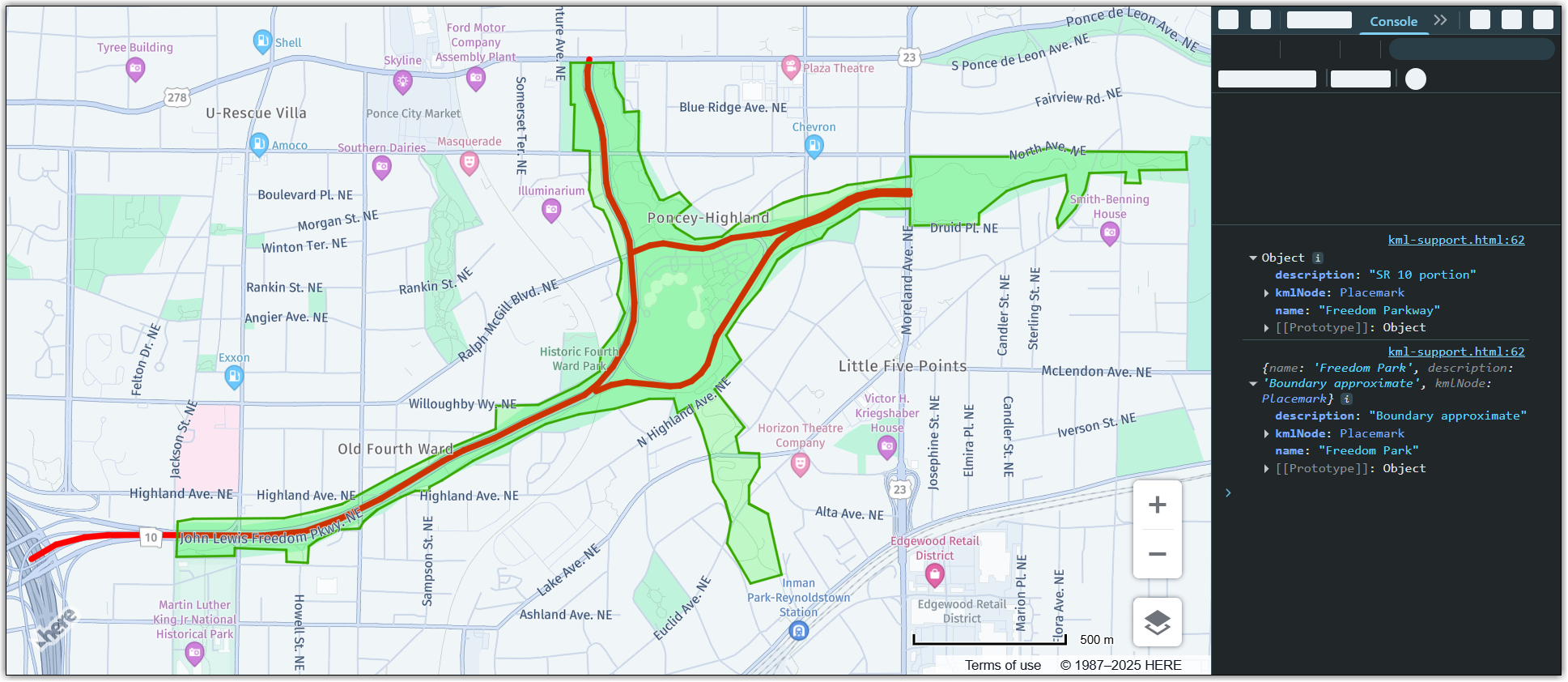
- The sample KML file comes from the Wikipedia entry for the Freedom Park (Atlanta, USA).
- The following sections build upon the base map described in Get started with HERE Maps API for JavaScript as the foundation for introducing code additions.
Perform the following steps to add KML content to your map:
-
In the
<head>element of the HTML file, import themapsjs-data.jslibrary, as shown in the following example:<script type="text/javascript" src="https://js.api.here.com/v3/3.2/mapsjs-data.js"></script> -
Parse the KML file and display its contents as a layer on a vector map:
// Create reader object initializing it with a document: const reader = new H.data.kml.Reader("path/to/kml/file.kml"); // Parse the document: reader.parse(); // Get KML layer from the reader object and add it to the map: const layer = reader.getLayer(); map.addLayer(layer); // KML objects receive regular map events, so add an event listener to the // KML layer: layer.getProvider().addEventListener("tap", function (ev) { // Log map object data to console. The data contains name, description (if present in // KML) and the KML node itself. console.log(ev.target.getData()); });Result: The following image shows the KML data from the preceding example rendered on a map, together with the console that displays object data in response to a tap event:
-
Optional: To automatically focus the map on the KML layer, add an event listener to ensure that the map fully loads the layer before computing the bounding box to which it needs to zoom in, as shown in the following example:
reader.addEventListener("statechange", function(evt) {
if (evt.state === H.data.AbstractReader.State.READY) {
  // Get KML layer from the reader object and add it to the map
  const layer = reader.getLayer();
  map.addLayer(layer);
  map.getViewModel().setLookAtData({bounds: layer.getProvider().getRootGroup().getBoundingBox()});
}

if (evt.state === H.data.AbstractReader.State.ERROR) {
  console.log(evt)
}
});
Next steps
For more information, see the H.data.kml.Reader documentation in the API Reference.
Updated 6 months ago