

Visualize routes with multiple stops by using the Waypoints Sequence service
Visually appealing and functional waypoints on a map can greatly enhance the usability of your mapping application in scenarios where users want to plan a trip with multiple stops, such as visiting multiple cities or landmarks in an optimal order to reduce travel time or distance.
Display customized waypoints
The following code example demonstrates how to utilize the WaypointsSequenceService from the HERE Maps API for JavaScript to calculate a sequence of waypoints between multiple destinations. The example also includes custom marker icons and polyline styling.
Note
The following sample builds upon the base map described in Get started with HERE Maps API for JavaScript as the foundation for introducing code additions.
// Instantiate the WaypointSequence service
const waypointsSequenceService = platform.getWaypointsSequenceService();
// Define the starting point, multiple destinations, and ending point
// Calculate the waypoint sequence
waypointsSequenceService.findSequence({
  start: 'WiesbadenCentralStation;50.0715,8.2434',
  destination1: 'FrankfurtCentralStation;50.1073,8.6647',
  destination2: 'DarmstadtCentralStation;49.8728,8.6326',
  destination3: 'FrankfurtAirport;50.0505,8.5698',
  destination4: 'HanauCentralStation;50.1218,8.9298',
  end: 'MainzCentralStation;50.0021,8.259',
  // Departure time
  departure: '2025-02-09T09:30:00+01:00',
  // Mode of transportation: fastest route by car with traffic enabled
  mode: 'fastest;car;traffic:enabled'
}, (response) => {
  // Create an SVG circle with the specified ID and center coordinates (15, 15)
  function getMarkerIcon(id) {
    const svgCircle = `<svg width="30" height="30" version="1.1" xmlns="http://www.w3.org/2000/svg">
  <g id="marker">
    <circle cx="15" cy="15" r="10" fill="#d80065ff" stroke="#d8007eff" stroke-width="4" />
    <text x="50%" y="50%" text-anchor="middle"
     fill="#FFFFFF" font-family="Arial, sans-serif" font-size="12px" dy=".3em">${id}</text>
  </g></svg>`;
    // Return a new H.map.Icon object with the SVG string and center coordinates
    return new H.map.Icon(svgCircle, {
      anchor: {
        x: 15,
        y: 15
      }
    });
  }
  // Create polylines between waypoints
  function createPolylines(results, style) {
    // Initialize an empty array to store line strings
    const lineStrings = [];
    // Extract the waypoints and interconnections from the results
    const {waypoints, interconnections} = results;
    // Create a new H.geo.LineString object with the coordinates of two consecutive waypoints
    for (let i = 0; i < waypoints.length - 1; i++) {
      const lineString = (new H.geo.LineString([
        waypoints[i].lat, waypoints[i].lng, 0,
        waypoints[i + 1].lat, waypoints[i + 1].lng, 0
      ]));
      // Add the line string to the array of line strings
      lineStrings.push(new H.map.Polyline(lineString, {style, data: interconnections[i]}));
    }
    // Return the array of line strings
    return lineStrings;
  }
  // Create an object group and populate it with markers
  const group = new H.map.Group();
  response.results[0].waypoints.forEach((y, i) => {
    const icon = getMarkerIcon(i + 1);
    const marker = new H.map.Marker({lat: y.lat, lng: y.lng}, {icon, data: y});
    group.addObject(marker);
  });
  // Create polylines and add them to the object group
  const routePolylines = createPolylines(response.results[0], {
    lineWidth: 10,
    strokeColor: 'rgba(100, 100, 250, 0.8)'
  });
  group.addObjects(routePolylines);
  // Add the group to the map and set the view to show the bounding box of the group
  map.addObject(group);
  map.getViewModel().setLookAtData({bounds: group.getBoundingBox()});
   // Display waypoint data in a table in the browser console
   group.addEventListener('tap', ({target}) => {
    console.table(target.getData())
  });
}, console.error);
Result: The following figure displays the resulting map, showcasing the custom waypoints and the polylines connecting them.
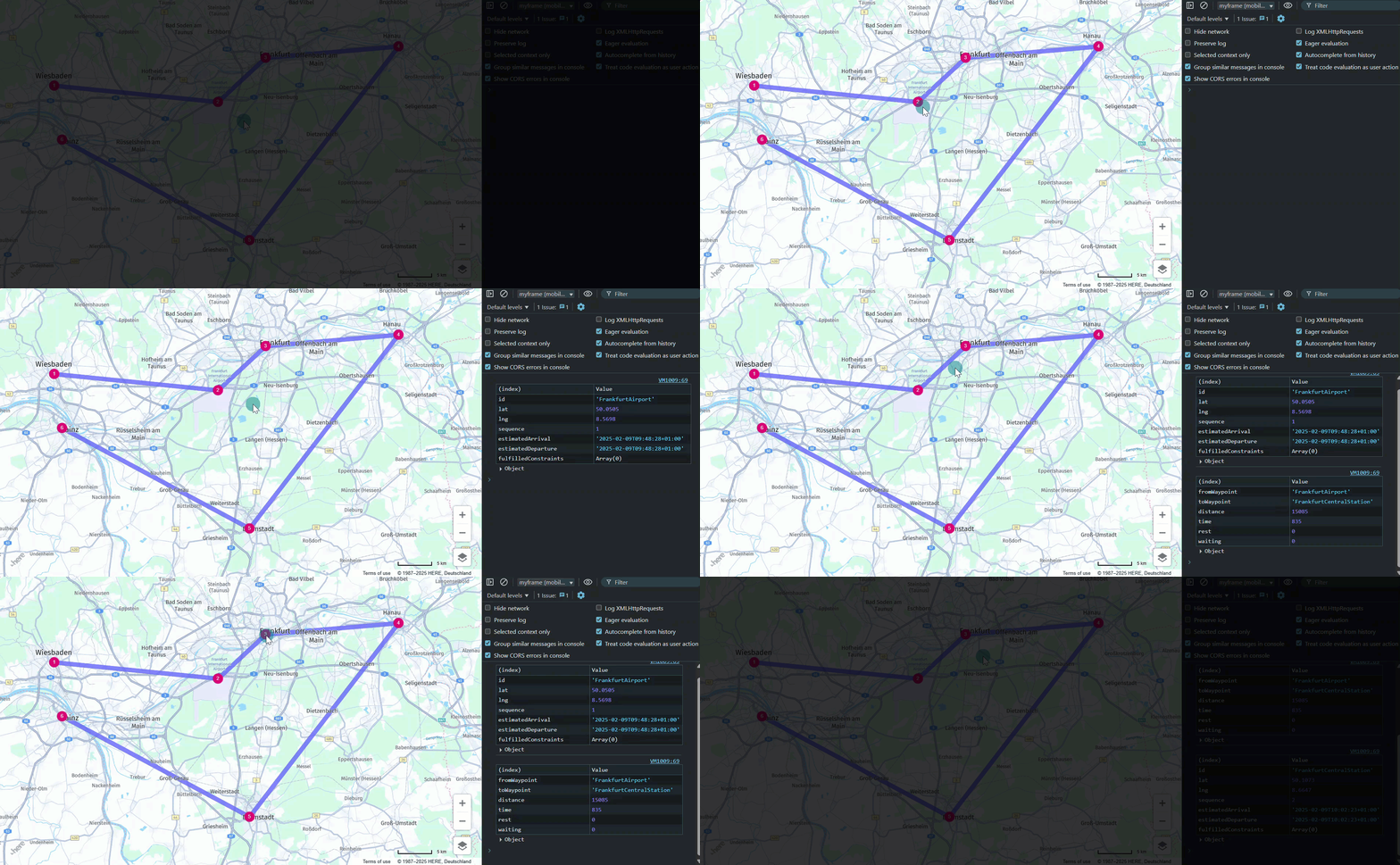
In addition, each waypoint and polyline responds to a click event by logging a data table to the console. The following examples demonstrate this behavior:
Waypoints:
| (index) | Value |
|---|---|
| id | DarmstadtCentralStation |
| lat | 49.8728 |
| lng | 8.6326 |
| sequence | 4 |
| estimatedArrival | 2025-02-09T11:01:20+01:00 |
| estimatedDeparture | 2025-02-09T11:01:20+01:00 |
| fulfilledConstraints | Array (0) |
Polylines:
| (index) | Value |
|---|---|
| fromWaypoint | HanauCentralStation |
| toWaypoint | DarmstadtCentralStation |
| distance | 49217 |
| time | 2017 |
| rest | 0 |
| waiting | 0 |
Next steps
For more information on waypoints, see the HERE Waypoints Sequence API v8 Developer Guide.
Updated 6 months ago