

Enable draggable directions
Allowing users to interact with the default routing by adding waypoints and drag markers can improve the efficiency and accuracy of navigation.
For example, draggable directions on a map can be a valuable tool for logistics managers in the warehouse industry. By customizing the routes based on specific delivery truck needs, you can ensure that deliveries are made efficiently and timely.
In addition, by dragging markers on the map, users can customize their route to include specific streets or areas they want to pass through. This level of personalization enables users to create a route that is tailored to their preferences and needs.
This tutorial demonstrates how use the HERE Maps API for JavaScript to plot markers for the origin and destination on the map and then calculate and display the fastest route between those markers. The tutorial then demonstrates how to dynamically recalculate the default route if a user adds or removes a waypoint marker or changes the location of any of the existing markers.
Note
The following sections build upon the base map described in Get started with HERE Maps API for JavaScript as the foundation for introducing code additions.
Plot the origin and destination points on the map
On your map, add markers that represent the origin and destination locations.
-
Create the
getMarkerIcon()function that applies custom SVG style to each marker:/** * Returns an instance of H.map.Icon to style the markers * @param {number|string} id An identifier that will be displayed as marker label * * @return {H.map.Icon} */ function getMarkerIcon(id) { const svgCircle = `<svg width="30" height="30" version="1.1" xmlns="http://www.w3.org/2000/svg"> <g id="marker"> <circle cx="15" cy="15" r="10" fill="#E80808" stroke="#D31010" stroke-width="2" /> <text x="50%" y="50%" text-anchor="middle" fill="#FFFFFF" font-family="Arial, sans-serif" font-size="12px" dy=".3em">${id}</text> </g></svg>`; return new H.map.Icon(svgCircle, { anchor: { x: 10, y: 10 } }); };The style produces a marker that is a circle with text in the center that corresponds to the marker ID.
-
Create the
addMarker()function that adds an object marker to the map and applies the custom SVG style:/** * Create an instance of H.map.Marker and add it to the map * * @param {object} position An object with 'lat' and 'lng' properties defining the position of the marker * @param {string|number} id An identifier that will be displayed as marker label * @return {H.map.Marker} The instance of the marker that was created */ function addMarker(position, id) { const marker = new H.map.Marker(position, { data: { id }, icon: getMarkerIcon(id), }); map.addObject(marker); return marker; }; -
Define the coordinates for the origin and destination markers, as shown in the following example:
const origin = { lat: 52.643233, lng: 13.30395 }; // Starting point const destination = { lat: 52.37688, lng: 13.56038 }; // Destination point -
Call the
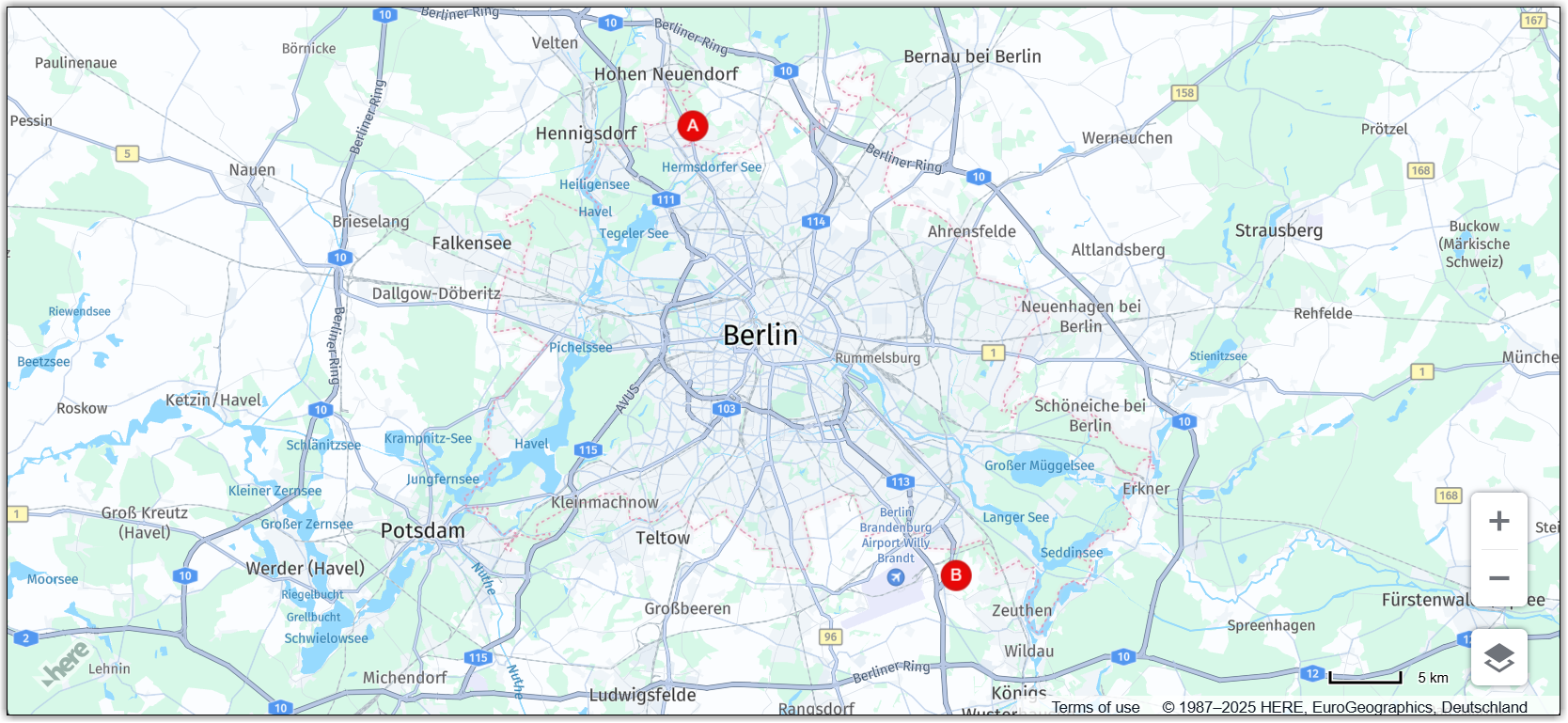
addMarker()function to plot the origin and destination markers on the map, at the locations that you specified, with different IDs:const originMarker = addMarker(origin, 'A'); const destinationMarker = addMarker(destination, 'B');
Result: The map now shows static markers for the origin and destination coordinates, as shown in the following figure:
For more information about markers, see Add markers.
Calculate the fastest route between the origin and destination points
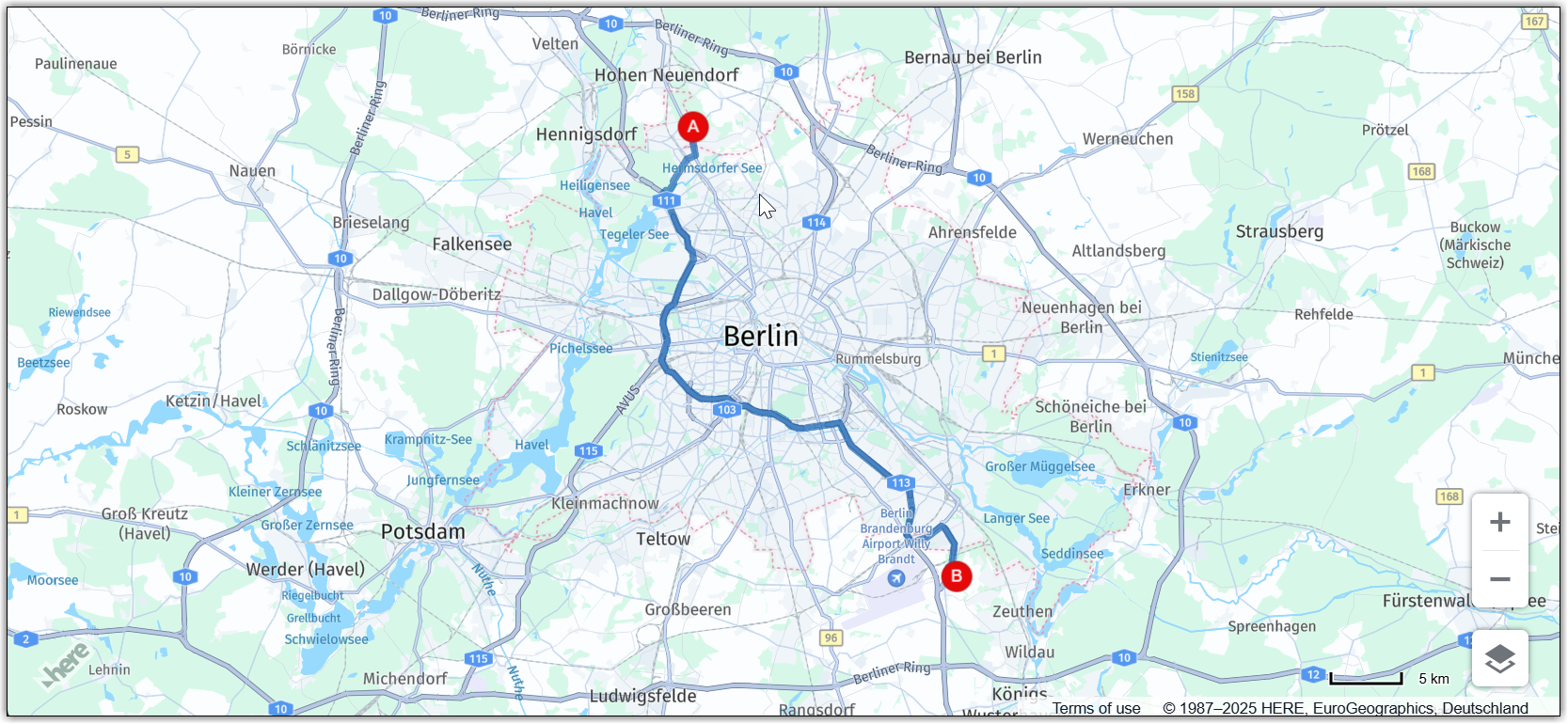
Use the HERE Routing API v8 to determine the fastest route between the origin and destination points.
-
Specify the routing parameters:
const routingParams = { 'origin': `${origin.lat},${origin.lng}`, 'destination': `${destination.lat},${destination.lng}`, 'transportMode': 'car', 'return': 'polyline' };where:
originis a string representing the latitude and longitude of the starting point of the route.destinationis a string representing the latitude and longitude of the destination of the route.transportModeis a string specifying the mode of transportation to be used for the route. In this example, it is set tocar, which means the route will be optimized for car travel.returnis a string indicating the format of the response from the API. In this example, it is set topolyline, which means the response is a string representing the route as a polyline.
-
Initialize
H.service.RoutingServiceobject:const router = platform.getRoutingService(); -
Initialize an empty variable for holding the polyline that represents the calculated route on the map:
let routePolyline; -
Define the
routeResponseHandler()function to use it as the callback function for thecalculateRoutemethod of theH.service.RoutingService8object:/** * Handler for the H.service.RoutingService#calculateRoute call * * @param {object} response The response object returned by calculateRoute method */ function routeResponseHandler(response) { const sections = response.routes[0].sections; const lineStrings = []; sections.forEach((section) => { // convert Flexible Polyline encoded string to geometry lineStrings.push(H.geo.LineString.fromFlexiblePolyline(section.polyline)); }); const multiLineString = new H.geo.MultiLineString(lineStrings); const bounds = multiLineString.getBoundingBox(); // Create the polyline for the route if (routePolyline) { // If the routePolyline we just set the new geometry routePolyline.setGeometry(multiLineString); } else { // routePolyline is not yet defined, instantiate a new H.map.Polyline routePolyline = new H.map.Polyline(multiLineString, { style: { lineWidth: 5 } }); } // Add the polyline to the map map.addObject(routePolyline); } -
Define the
updateRoutefunction to call the routing service with the defined parameters:function updateRoute() { router.calculateRoute(routingParams, routeResponseHandler, console.error); }The
calculateRoutemethod determines the fastest route between two or more points based on the parameters specified inroutingParams. When the route is calculated, therouteResponseHandler()function is called with the response object as a parameter. -
Call the
updateRoutefunction to display the route between the origin and destination points:updateRoute();
Result: The map displays the fastest route to get from the origin to the destination point by car, as shown in the following figure:
For more information about routing, see HERE Routing API v8.
Make markers draggable
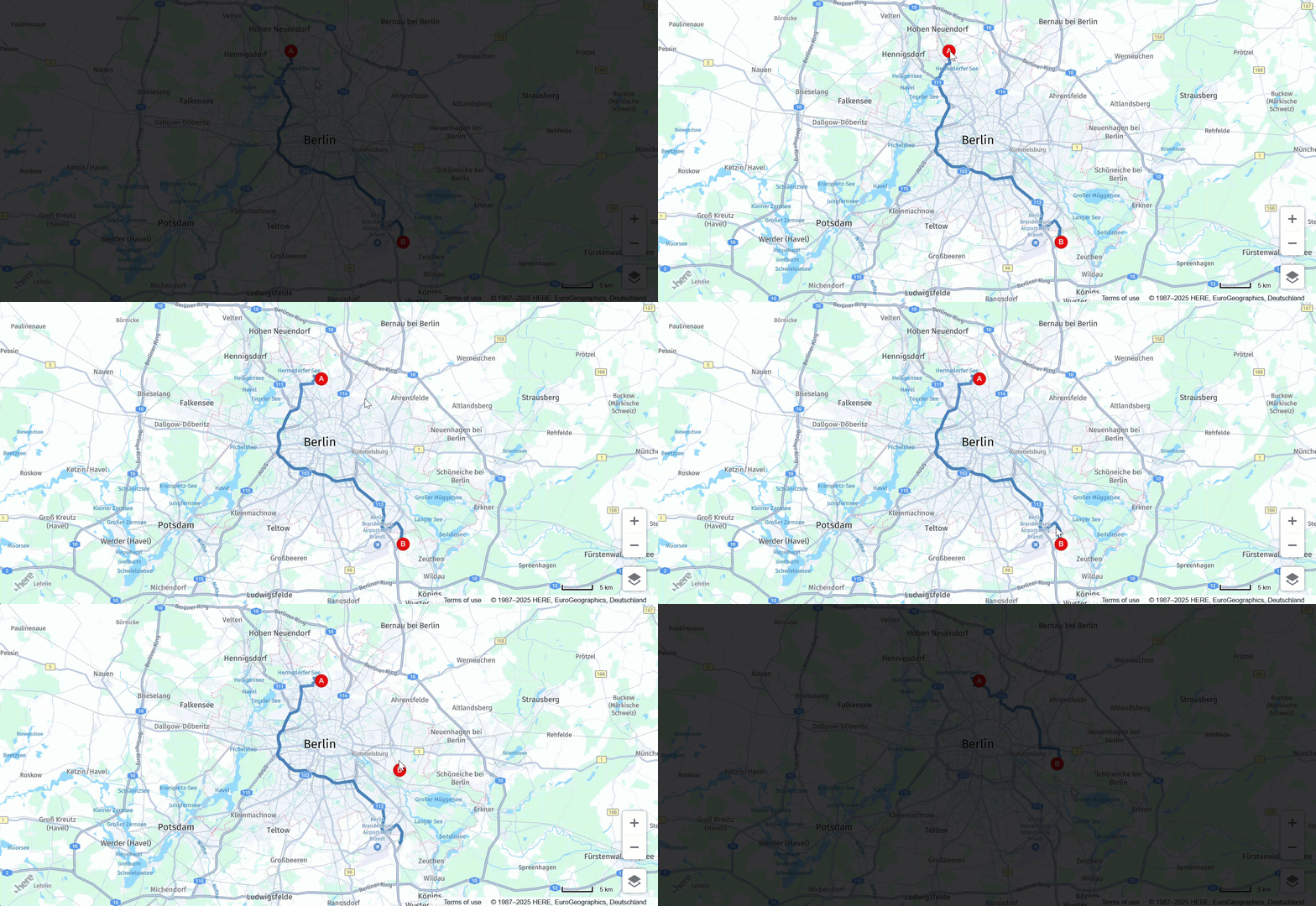
Allow users to edit the initial origin and destination points by dragging the corresponding markers to new locations. You can configure your map to dynamically recalculate the route as marker positions change.
-
Inside the
addMarkerfunction, enable dragging for marker objects:-
In the
markervariable, set thevolatileconfiguration option of theH.map.Markerobject to true to enable smooth dragging. -
Set the
marker.draggableproperty totrue.
See the updated function definition for reference:
function addMarker(position, id) { const marker = new H.map.Marker(position, { data: { id }, icon: getMarkerIcon(id), // Enable smooth dragging volatility: true }); // Enable draggable markers marker.draggable = true; map.addObject(marker); return marker; }; -
-
Add a map event listener for the
dragstartevent:/** * Listen to the dragstart and store the relevant position information of the marker */ map.addEventListener('dragstart', function(ev) { const target = ev.target; const pointer = ev.currentPointer; if (target instanceof H.map.Marker) { // Disable the default draggability of the underlying map behavior.disable(H.mapevents.Behavior.Feature.PANNING); const targetPosition = map.geoToScreen(target.getGeometry()); // Calculate the offset between mouse and target's position // when starting to drag a marker object target['offset'] = new H.math.Point( pointer.viewportX - targetPosition.x, pointer.viewportY - targetPosition.y); } }, false);This event triggers when a user starts dragging a marker on the map. The function in this event listener checks if the target of the event is a marker object. If true, the function disables the default draggability of the underlying map and calculates the offset between the mouse and the target position when starting to drag the marker object. The offset is used to calculate the new position of the marker as it is dragged across the map.
-
Add a map event listener for the
dragevent:/** * Listen to the drag event and move the position of the marker as necessary */ map.addEventListener('drag', function(ev) { const target = ev.target; const pointer = ev.currentPointer; if (target instanceof H.map.Marker) { target.setGeometry( map.screenToGeo(pointer.viewportX - target['offset'].x, pointer.viewportY - target['offset'].y) ); } }, false);The function in this event listener updates the position of the marker on the map as the marker is being dragged based on the current position of the pointer.
-
Add a map event listener for the
dragendevent:/** * Listen to the dragend and update the route */ map.addEventListener('dragend', function(ev) { const target = ev.target; if (target instanceof H.map.Marker) { // re-enable the default draggability of the underlying map // when dragging has completed behavior.enable(H.mapevents.Behavior.Feature.PANNING); const coords = target.getGeometry(); const markerId = target.getData().id; // Update the routing params `origin` and `destination` properties // in case we dragging either the origin or the destination marker if (markerId === 'A') { routingParams.origin = `${coords.lat},${coords.lng}`; } else if (markerId === 'B') { routingParams.destination = `${coords.lat},${coords.lng}`; } updateRoute(); } }, false);The
dragendevent is defined to trigger theupdateRoutefunction to dynamically recalculate and display the new route, based on the updated marker coordinates.
Result: You can now move origin and destination markers to new locations and the map dynamically recalculates the fastest route, as shown in the following figure:
Add or remove waypoints
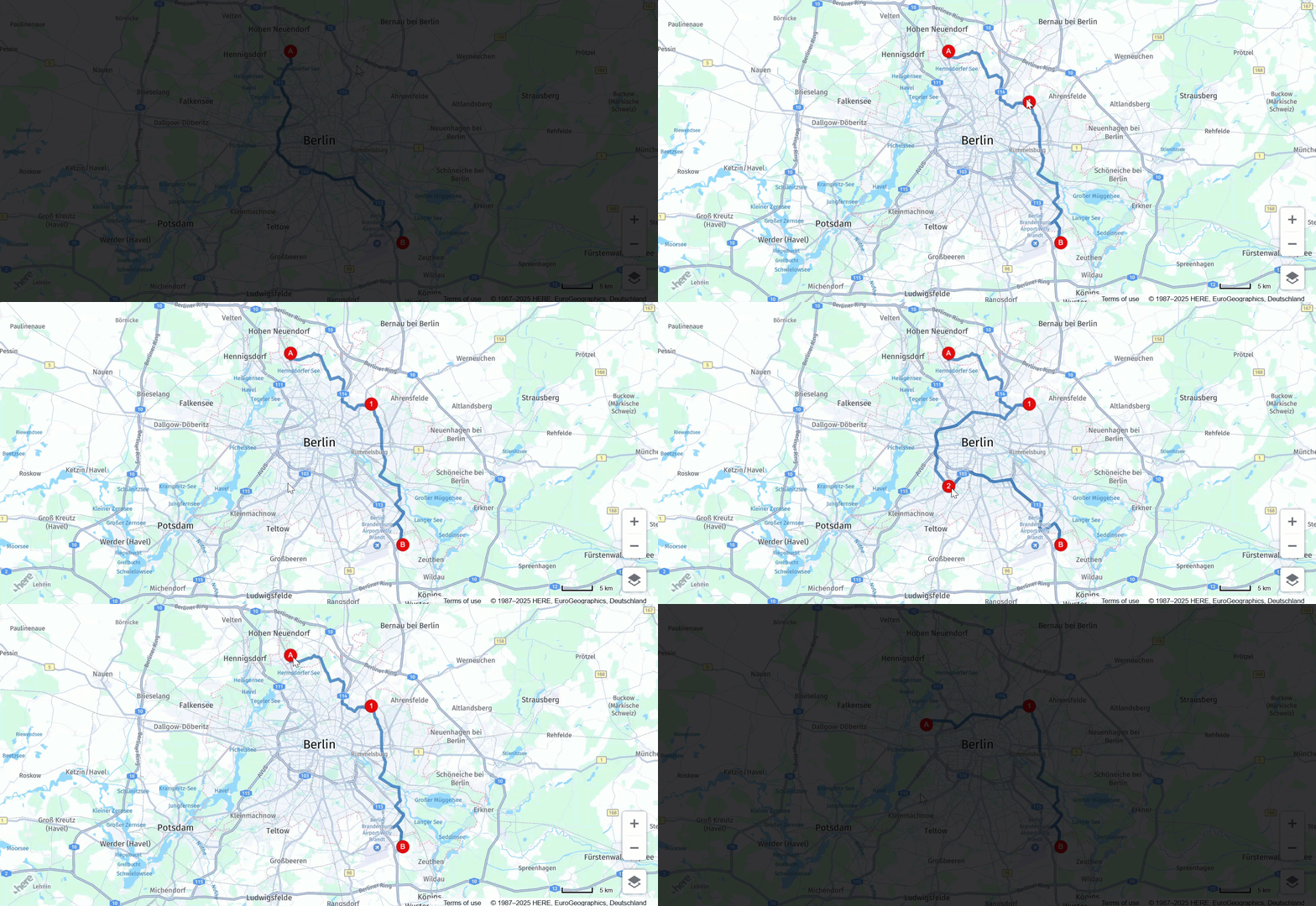
You can further increase map interactivity by enabling users to add or remove draggable waypoint markers. This functionality provides greater flexibility and efficiency in route planning.
-
Initialize an empty array for markers that correspond route waypoints:
// This array holds instances of H.map.Marker representing the route waypoints const waypoints = [] -
In the routing logic, update the
routingParamsvariable to include the newviaparameter, as shown in the following example:const routingParams = { 'origin': `${origin.lat},${origin.lng}`, 'destination': `${destination.lat},${destination.lng}`, // defines multiple waypoints 'via': new H.service.Url.MultiValueQueryParameter(waypoints), 'transportMode': 'car', 'return': 'polyline' };The
MultiValueQueryParametercreates a string parameter holding coordinates for multiple waypoints between the origin and destination points. Then, this string is appended to the HERE Routing API query. -
Adjust the
updateRoute()function to include the waypoints, as shown in the following example:function updateRoute() { // Add waypoints the route must pass through routingParams.via = new H.service.Url.MultiValueQueryParameter( waypoints.map(wp => `${wp.getGeometry().lat},${wp.getGeometry().lng}`)); router.calculateRoute(routingParams, routeResponseHandler, console.error); }The
viaparameter adds additional waypoints the route must pass through between the origin and destination locations. -
Add a map event listener for the
tapevent:/** * Listen to the tap event to add a new waypoint */ map.addEventListener('tap', function(ev) { const target = ev.target; const pointer = ev.currentPointer; const coords = map.screenToGeo(pointer.viewportX, pointer.viewportY); if (!(target instanceof H.map.Marker)) { const marker = addMarker(coords, waypoints.length + 1); waypoints.push(marker); updateRoute(); } });This event handler allows the user to add new waypoints as markers by clicking on the map at the desired location, which then updates the route accordingly.
-
Add a map event listener for the
dbltapevent:/** * Listen to the dbltap event to remove a waypoint */ map.addEventListener('dbltap', function(ev) { const target = ev.target; if (target instanceof H.map.Marker) { // Prevent the origin or destination markers from being removed if (['origin', 'destination'].indexOf(target.getData().id) !== -1) { return; } const markerIdx = waypoints.indexOf(target); if (markerIdx !== -1) { // Remove the marker from the array of way points waypoints.splice(markerIdx, 1) // Iterate over the remaining waypoints and update their data waypoints.forEach((marker, idx) => { const id = idx + 1; // Update marker's id marker.setData({ id }); // Update marker's icon to show its new id marker.setIcon(getMarkerIcon(id)) }); } // Remove the marker from the map map.removeObject(target); updateRoute(); } });The function in this event listener handles the removal of a waypoint when a user double-taps a marker.
When a user double-taps on a marker, the function first checks if the marker is an origin or destination marker. If it is, the function does not allow the marker removal. Otherwise, the function finds the index of the marker in the
waypointsarray and removes the marker from the array.After removing the marker from the
waypointsarray, the function updates the data and icon of the remaining markers in thewaypointsarray to reflect their new order. Finally, the function removes the marker from the map and calls theupdateRoute()function to update the route based on the new set of waypoints.For more information, see Add via waypoints to a route.
-
Add a map behavior to disable map zooming when double-tapping markers:
behavior.disable(H.mapevents.Behavior.Feature.DBL_TAP_ZOOM);
Result: You can now add, remove, or drag waypoint markers to new locations, while the map dynamically recalculates the fastest route after each event, as shown in the following example:
Source code
The following section provides the full source code that was used in this tutorial.
Note
Before trying out the following code, replace the value of the
apikeyparameter with your own API key.
//BOILERPLATE CODE TO INITIALIZE THE MAP
const platform = new H.service.Platform({
'apikey': 'Your API Key'
});
// Obtain the default map types from the platform object:
const defaultLayers = platform.createDefaultLayers();
// Instantiate (and display) a map:
const map = new H.Map(
document.getElementById("map"),
defaultLayers.vector.normal.map, {
zoom: 6,
center: {
lat: 53.480759,
lng: -2.242631
}
});
// MapEvents enables the event system
// Behavior implements default interactions for pan/zoom (also on mobile touch environments)
const behavior = new H.mapevents.Behavior(new H.mapevents.MapEvents(map));
// Disable zoom on double-tap to allow removing waypoints on double-tap
behavior.disable(H.mapevents.Behavior.Feature.DBL_TAP_ZOOM);
window.addEventListener('resize', () => map.getViewPort().resize());
// Create the default UI:
const ui = H.ui.UI.createDefault(map, defaultLayers);
// ROUTING LOGIC STARTS HERE
// This variable holds the instance of the route polyline
let routePolyline;
/**
* Handler for the H.service.RoutingService#calculateRoute call
*
* @param {object} response The response object returned by calculateRoute method
*/
function routeResponseHandler(response) {
const sections = response.routes[0].sections;
const lineStrings = [];
sections.forEach((section) => {
// convert Flexible Polyline encoded string to geometry
lineStrings.push(H.geo.LineString.fromFlexiblePolyline(section.polyline));
});
const multiLineString = new H.geo.MultiLineString(lineStrings);
const bounds = multiLineString.getBoundingBox();
// Create the polyline for the route
if (routePolyline) {
// If the routePolyline we just set has the new geometry
routePolyline.setGeometry(multiLineString);
} else {
// If routePolyline is not yet defined, instantiate a new H.map.Polyline
routePolyline = new H.map.Polyline(multiLineString, {
style: {
lineWidth: 5
}
});
}
// Add the polyline to the map
map.addObject(routePolyline);
}
/**
* Returns an instance of H.map.Icon to style the markers
* @param {number|string} id An identifier that will be displayed as marker label
*
* @return {H.map.Icon}
*/
function getMarkerIcon(id) {
const svgCircle = `<svg width="30" height="30" version="1.1" xmlns="http://www.w3.org/2000/svg">
<g id="marker">
<circle cx="15" cy="15" r="10" fill="#E80808" stroke="#D31010" stroke-width="2" />
<text x="50%" y="50%" text-anchor="middle" fill="#FFFFFF" font-family="Arial, sans-serif" font-size="12px" dy=".3em">${id}</text>
</g></svg>`;
return new H.map.Icon(svgCircle, {
anchor: {
x: 10,
y: 10
}
});
}
/**
* Create an instance of H.map.Marker and add it to the map
*
* @param {object} position An object with 'lat' and 'lng' properties defining the position of the marker
* @param {string|number} id An identifier that will be displayed as marker label
* @return {H.map.Marker} The instance of the marker that was created
*/
function addMarker(position, id) {
const marker = new H.map.Marker(position, {
data: {
id
},
icon: getMarkerIcon(id),
// Enable smooth dragging
volatility: true
});
// Enable draggable markers
marker.draggable = true;
map.addObject(marker);
return marker;
}
/**
* This method calls the routing service to retrieve the route line geometry
*/
function updateRoute() {
routingParams.via = new H.service.Url.MultiValueQueryParameter(
waypoints.map(wp => `${wp.getGeometry().lat},${wp.getGeometry().lng}`));
// Call the routing service with the defined parameters
router.calculateRoute(routingParams, routeResponseHandler, console.error);
}
// ADD MARKERS FOR ORIGIN/DESTINATION
const origin = {
lat: 52.643233,
lng: 13.30395
}; // Starting point
const destination = {
lat: 52.37688,
lng: 13.56038
}; // Destination point
const originMarker = addMarker(origin, 'A');
const destinationMarker = addMarker(destination, 'B');
// CALCULATE THE ROUTE BETWEEN THE TWO WAYPOINTS
// This array holds instances of H.map.Marker representing the route waypoints
const waypoints = []
// Define the routing service parameters
const routingParams = {
'origin': `${origin.lat},${origin.lng}`,
'destination': `${destination.lat},${destination.lng}`,
// defines multiple waypoints
'via': new H.service.Url.MultiValueQueryParameter(waypoints),
'transportMode': 'car',
'return': 'polyline'
};
// Get an instance of the H.service.RoutingService service
const router = platform.getRoutingService();
// Call the routing service with the defined parameters and display the route
updateRoute();
/**
* Listen to the dragstart and store relevant position information of the marker
*/
map.addEventListener('dragstart', function(ev) {
const target = ev.target;
const pointer = ev.currentPointer;
if (target instanceof H.map.Marker) {
// Disable the default draggability of the underlying map
behavior.disable(H.mapevents.Behavior.Feature.PANNING);
const targetPosition = map.geoToScreen(target.getGeometry());
// Calculate the offset between mouse and target's position
// when starting to drag a marker object
target['offset'] = new H.math.Point(
pointer.viewportX - targetPosition.x, pointer.viewportY - targetPosition.y);
}
}, false);
/**
* Listen to the dragend and update the route
*/
map.addEventListener('dragend', function(ev) {
const target = ev.target;
if (target instanceof H.map.Marker) {
// re-enable the default draggability of the underlying map
// when dragging has completed
behavior.enable(H.mapevents.Behavior.Feature.PANNING);
const coords = target.getGeometry();
const markerId = target.getData().id;
// Update the routing params `origin` and `destination` properties
// in case we dragging either the origin or the destination marker
if (markerId === 'A') {
routingParams.origin = `${coords.lat},${coords.lng}`;
} else if (markerId === 'B') {
routingParams.destination = `${coords.lat},${coords.lng}`;
}
updateRoute();
}
}, false);
/**
 * Listen to the drag event and move the position of the marker as necessary
 */
map.addEventListener('drag', function(ev) {
    const target = ev.target;
    const pointer = ev.currentPointer;
    if (target instanceof H.map.Marker) {
        target.setGeometry(
            map.screenToGeo(pointer.viewportX - target['offset'].x, pointer.viewportY - target['offset'].y)
        );
    }
}, false);
/**
 * Listen to the tap event to add a new waypoint
 */
map.addEventListener('tap', function(ev) {
    const target = ev.target;
    const pointer = ev.currentPointer;
    const coords = map.screenToGeo(pointer.viewportX, pointer.viewportY);

    if (!(target instanceof H.map.Marker)) {
        const marker = addMarker(coords, waypoints.length + 1);
        waypoints.push(marker);
        updateRoute();
    }
});
/**
* Listen to the dbltap event to remove a waypoint
*/
map.addEventListener('dbltap', function(ev) {
const target = ev.target;
if (target instanceof H.map.Marker) {
// Prevent origin or destination markers from being removed
if (['origin', 'destination'].indexOf(target.getData().id) !== -1) {
return;
}
const markerIdx = waypoints.indexOf(target);
if (markerIdx !== -1) {
// Remove the marker from the array of way points
waypoints.splice(markerIdx, 1)
// Iterate over the remaining waypoints and update their data
waypoints.forEach((marker, idx) => {
const id = idx + 1;
// Update marker's id
marker.setData({
id
});
// Update marker's icon to show its new id
marker.setIcon(getMarkerIcon(id))
});
}
// Remove the marker from the map
map.removeObject(target);
updateRoute();
}
});Next steps
To explore the design and features of the HERE Maps API for JavaScript, see the API Reference.
Updated 6 months ago