

Display custom overlays
The HERE Maps API for JavaScript enables you to overlay a region on the map with a bitmap image by using the H.map.Overlay object. This object allows rendering static or dynamic data, leveraging either static images fetched from the server or dynamically generated procedural bitmaps.
Furthermore, the overlay object provides an easy way to animate data, making that data suitable for applications that require updating information over time. Data examples can include weather information or other types of dynamic content.
Note
The following section builds upon the base map described in Get started with HERE Maps API for JavaScript as the foundation for introducing code additions.
Add an overlay to the map
The following example demonstrates how to add an image overlay to a map:
// Create an overlay that uses a weather map as a bitmap
var overlay = new H.map.Overlay(
  new H.geo.Rect(
    70.72849153520343, -24.085683364175395,
    29.569664922291, 44.216452317817016
  ),
  'https://heremaps.github.io/maps-api-for-javascript-examples/image-overlay/data/0.png'
);

// Add the overlay to the map
map.addObject(overlay);

// Automatically zoom the map to fit the entire extent of the overlay:
map.getViewModel().setLookAtData({bounds: overlay.getGeometry()});
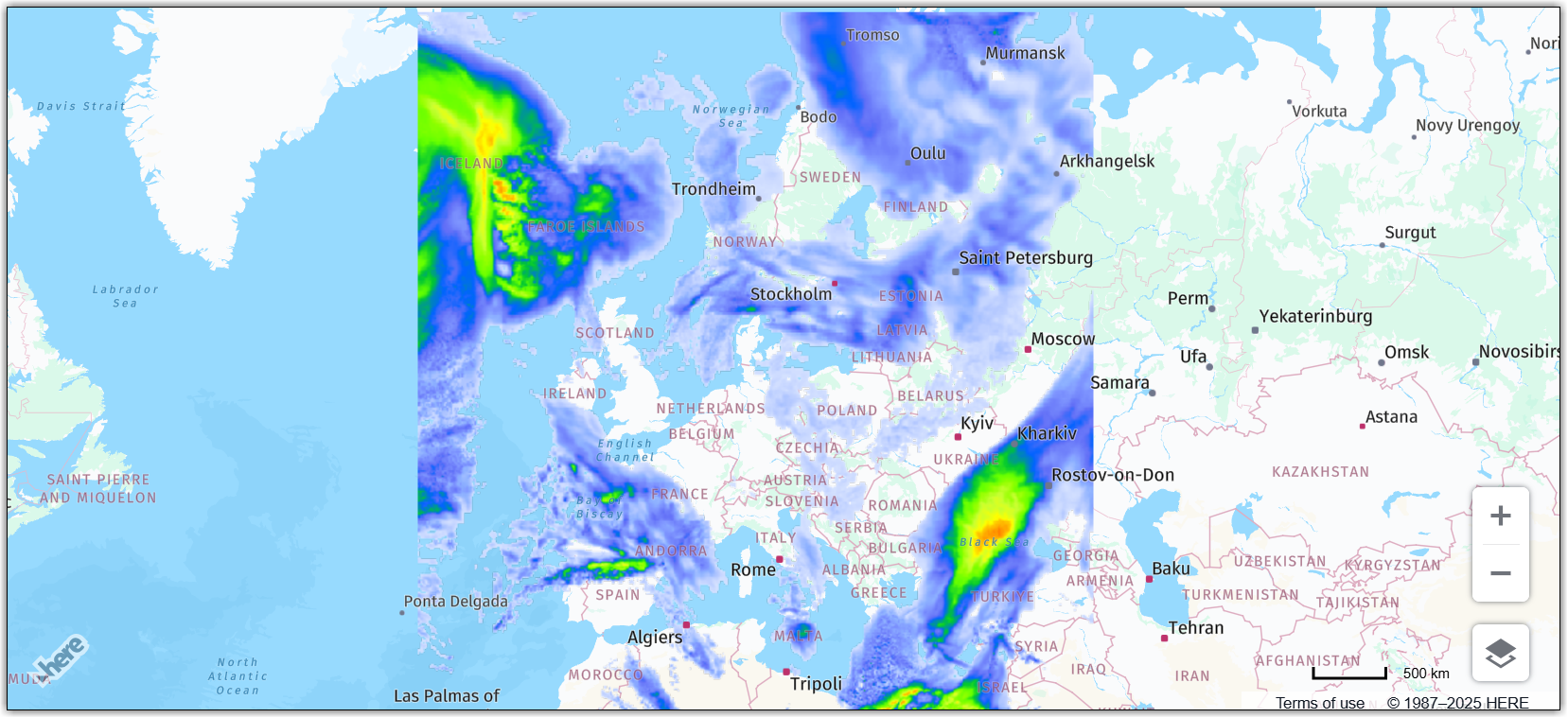
The code from the previous example instantiates an overlay, providing the bounding box of the area that it must cover and an image URL, and, finally, adds the overlay to the map.
The following image shows the resulting map:
Updated 7 months ago