

Configure region-specific maps
The HERE Maps API for JavaScript provides dedicated regional services for countries like Japan and South Korea. Regional services offer the same core capabilities as the worldwide version of HERE maps, with additional features or limitations that account for country-specific requirements and government regulations.
How to configure map region
You set the map region through the optional region property of the H.service.Platform.Options object, with the following values available:
"ROW"(default): The worldwide map version"JP": Japan"KR": South Korea
Example:
The following snippet sets the map region to South Korea:
const platform = new H.service.Platform({
  "apikey": "{YOUR_API_KEY}",
  "region": "KR"
});Note
Using a service other than the default worldwide version affects the service endpoints as well as the map styling and available features.
Regional limitations and considerations for South Korea
The South Korea regional map version has some key limitations due to government regulations:
- Geographic coverage is limited only to South Korea.
- Access is restricted to requests originating from South Korea using GeoIP-based filtering. This means that if you set the map region to South Korea, the API will automatically block requests from outside South Korea.
Service Endpoints
Switching the map region to KR automatically sets the following South Korea-specific service endpoints:
- HERE Vector Tile API:
https://vector.heremaps.kr - HERE Raster Tile API:
https://maps.heremaps.kr - HERE Routing API v8:
https://router.heremaps.kr/v8/routes - HERE Traffic Raster Tile API:
https://traffic.maps.heremaps.kr - HERE Traffic Vector Tile API:
https://traffic.vector.heremaps.kr - HERE Traffic API v7:
https://data.traffic.heremaps.kr - HERE Geocode and Search API:
https://search.heremaps.kr
For more information about specific features included in the South Korea map version for each service endpoint, see the documentation for the corresponding service.
Configure and initialize a regional map of Korea
Perform the following steps to create a vector map of Korea:
- Instantiate the Platform object with the region property set to
KR. - Set the base map language to Korean (
"ko").
The following snippet provides a working example of Korea-specific map instantiation:
const platform = new H.service.Platform({
  "apikey": "YOUR_HERE_API_KEY",
  "region": "KR"
});

const defaultLayers = platform.createDefaultLayers({ lg: "ko" });
const baseLayer = defaultLayers.vector.normal.map;

const map = new H.Map(document.getElementById("mapContainer"), baseLayer, {
  zoom: 16,
  center: { lat: 37.56, lng: 127.0 },
});
Regional considerations for Japan
The Japan regional map version offers enhanced features tailored for the Japanese market. These features are automatically applied when you set the platform region to JP. The features include:
-
Japan maps use Japan-specific map styles such as
tko.normal.day.json(Tokyo day theme) that better represent Japanese cartographic conventions. -
Map data includes Japan-specific roads, landmarks, and place names according to local standards.
-
Japan maps use the
corelayer endpoint (v2/vectortiles/core/mc) withtransitdata layer for enhanced public transportation information.Note
The transit layer is designed to provide detailed information about the locally available public transportation systems, such as buses, trains, subways, and other modes of public transit. For more information, see Optional content in the HERE Vector Tile API Developer Guide.
In addition, the default layers created through the H.service.Platform#createDefaultLayers method are all created with the TKO styles by default.
Configure and initialize a regional map of Japan
Create a vector map of Japan by following these steps:
- Instantiate the
Platformobject with theregionproperty set toJP. - Set the base map language to Japanese (
"ja"). - Enable the
'all systems'mode of the'public transit'style's feature to display all the Japanese public transit systems.
const platform = new H.service.Platform({
  "apikey": "{YOUR_API_KEY}",
  "region": "JP"
});

const defaultLayers = platform.createDefaultLayers({ lg: "ja" });

// Set feature/mode to show PT in Japan
const onChangeHandler = (event) => {
  if (event.target.getState() === H.map.render.Style.State.READY) {
      tkoNormalDayStyle.removeEventListener("change", onChangeHandler);
      const features = tkoNormalDayStyle.getEnabledFeatures();
      features.find((f) => f.feature === "public transit").mode = "all systems";
      tkoNormalDayStyle.setEnabledFeatures([...features]);
  }
}
const baseLayer = defaultLayers.vector.normal.map;
const tkoNormalDayStyle = baseLayer.getProvider().getStyle();
tkoNormalDayStyle.addEventListener("change", onChangeHandler);

const map = new H.Map(document.getElementById("mapContainer"), baseLayer, {
  zoom: 16,
  center: { lat: 35.68026, lng: 139.76744 },
});
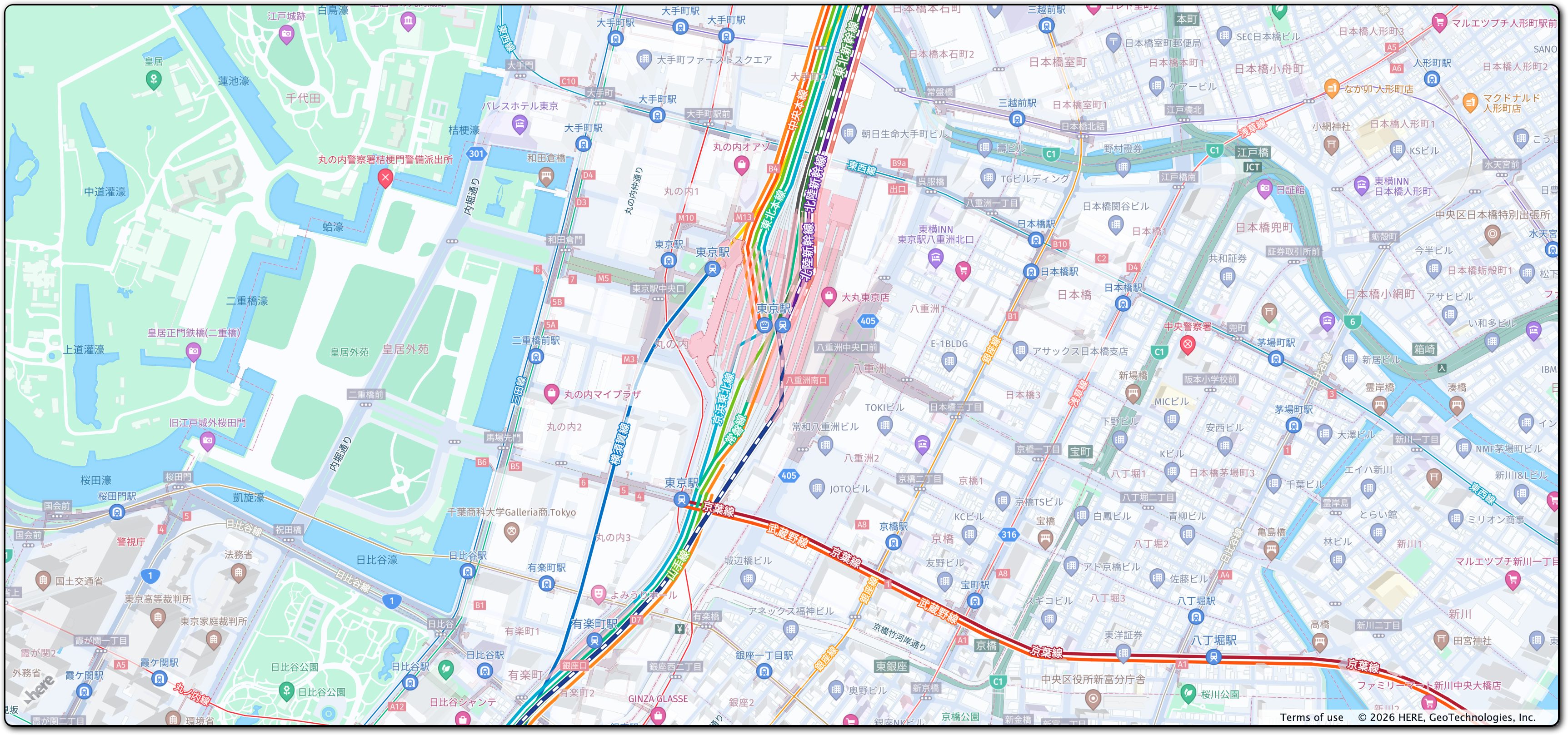
The resulting implementation creates the following non-interactive map:
Enable basic map interaction
Add interactive behavior to the map and ensure it dynamically resizes with the browser window by including the following code snippet:
// Implement default interactions for pan/zoom (also on mobile touch environments)
const behavior = new H.mapevents.Behavior(new H.mapevents.MapEvents(map));

// Enable dynamic resizing of the map, based on the current size of the enclosing container
window.addEventListener("resize", () => map.getViewPort().resize());
You can now scroll, pan, and zoom on the map.
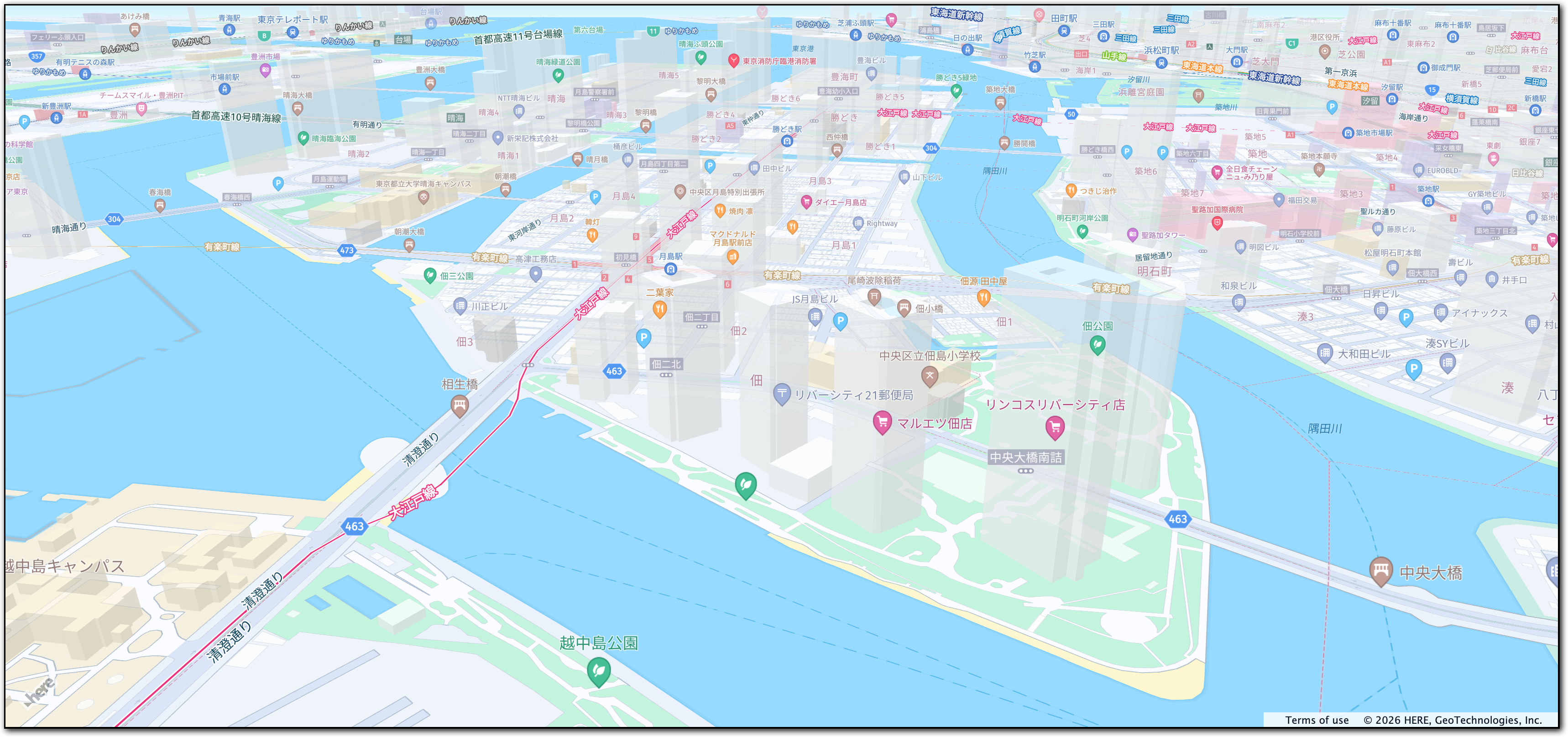
The following figure displays the interactive map tailored for the Japanese audience, created by following this tutorial:
Next steps
- For more information about the HERE Maps API for JavaScript features see the API Reference.
- For more information about the HERE Vector Tile API, see the corresponding documentation set.
Updated 6 months ago