

ポジショニングの使用を開始する
地図検索アプリケーションを使用する主な理由の1つは、現在地を確認するためです。HERE SDKによって提供される LocationEngine は、iOS プラットフォームのポジショニングを使用する包括的な位置情報リューションを実装し、GPS やその他の全地球衛星測位システム (GNSS) 受信機などの複数の位置情報ソースと連携します。
GNSS 精度を達成するための iOS デバイスの能力は、そのハードウェアに依存します。すべての iOS デバイスがこの機能をサポートするハードウェアを備えているわけではありません。サブメーターの精度は現在 iOS ではサポートされていないため、別途受信機が必要になります。
HERE SDK の位置情報機能を統合するには、少なくとも次の手順を実行する必要があります。
- 必要な iOS 権限を
.plistファイルに追加し、ユーザーからの許可を要求します。 LocationEngineを作成し、1 つ以上のLocationDelegateを設定します。LocationEngineを一度起動し、希望する精度レベルを設定します。Locationの更新を受信し、アプリで処理します。
Network Positioningは、ネットワークポジショニングAPI v2に基づいています。Network Positioningに基づくトランザクションの例:LocationEngineで携帯電話のWi-Fiポジショニングを使用して位置情報の更新を取得します。
注これらの機能の価格については、「HERE基本プランの価格表」を参照してください。Navigateライセンスを使用している場合、または価格についてご質問がある場合は、お問い合わせください。
権限を追加する
アプリで LocationEngine の使用を開始する前に、アプリの Info.plist ファイルに次のように必要な権限を追加する必要があります。
<key>UIRequiredDeviceCapabilities</key>
<array>
   <string>location-services</string>
   <string>gps</string>
</array>
<key>NSLocationAlwaysAndWhenInUseUsageDescription</key>
   <string>This app needs to access your current location to display it on the map.</string>
<key>NSLocationWhenInUseUsageDescription</key>
   <string>This app needs to access your current location to display it on the map.</string>
<key>NSMotionUsageDescription</key>
   <string>Motion detection is needed to determine more accurate locations, when no GPS signal is found or used.</string>
注権限
NSLocationAlwaysAndWhenInUseUsageDescriptionは、アプリケーションがバックグラウンド中に位置情報の更新を要求する場合にのみ必要です。
GPS などのネイティブ位置情報サービスを使用するアプリは、ユーザーの許可を求めます。すべてのデバイスが同じ性能を有しているわけではなく、特定のハードウェア制約により、さまざまな結果となる可能性があります。LocationEngine を使用する前に、ネイティブの位置情報サービスが有効になっているかどうかを確認することをお勧めします。ほとんどの iOS デバイスでは、ユーザーは [設定] > [プライバシー] > [位置情報サービス] に移動して、位置情報サービスがオンになっていることを確認できます。
注最近のiPadデバイスであっても、
gpsに必要なUIRequiredDeviceCapabilitiesがないことがあります。Info.plistファイルに存在する場合、アプリはこのようなデバイスにインストールされません。この機能を削除すると、アプリはインストールされますが、デバイスから受信されるLocation更新の精度範囲が広くなるため、精度がかなり低くなり、GPSレシーバーがない場合、デバイスはネットワークポジショニングなどにフォールバックする可能性があります。
以下のコードスニペットを使用して、アプリケーションのCLAuthorizationStatusを確認し、ユーザーの承認を要求します。iOSのドキュメントで、AppleのCLAuthorizationStatusについて確認します。
import CoreLocation

// ...

private func startLocating() {
    if locationEngine.start(locationAccuracy: .bestAvailable) == .missingPermissions {
        // App is missing location permission, let's request it.
        requestLocationAuthorization()
    }
}

// ...

public func requestLocationAuthorization() {
    // Get current location authorization status.
    let locationAuthorizationStatus = CLLocationManager.authorizationStatus()

    // Check authorization.
    switch locationAuthorizationStatus {
    case .restricted:
        // Access to location services restricted in the system settings.
        let alert = UIAlertController(title: "Location Services are restricted", message: "Please remove Location Services restriction in your device Settings", preferredStyle: .alert)
        let okAction = UIAlertAction(title: "OK", style: .default, handler: nil)
        alert.addAction(okAction)
        present(alert, animated: true, completion: nil)
        return

    case .denied:
        // Location access denied for the application.
        let alert = UIAlertController(title: "Location access is denied", message: "Please allow location access for the application in your device Settings", preferredStyle: .alert)
        let okAction = UIAlertAction(title: "OK", style: .default, handler: nil)
        alert.addAction(okAction)
        present(alert, animated: true, completion: nil)
        return

    case .authorizedWhenInUse, .authorizedAlways:
        // Authorization ok.
        break

    case .notDetermined:
        locationManager.requestWhenInUseAuthorization()
        break

    default:
        break
    }
}
HEREプライバシー通知の処理を確認する
現在のところ、iOSではHERE SDKがデータを収集することはありません。したがって、LocationEngineを使用するために、アプリケーションの利用規約にHEREプライバシー通知への参照が含まれていることをアプリケーションで確認する必要はありません。
LocationEngineを初期化する
新しい LocationEngine の作成は簡単です。
// Create instance of location engine.
do {
    try locationEngine = LocationEngine()
} catch let engineInstantiationError {
    fatalError("Failed to initialize LocationEngine. Cause: \(engineInstantiationError)")
}
位置情報を受信する
エンジンが初期化されると、エンジンが以前に少なくとも 1 回起動され、少なくとも 1 つの位置を受信している限り、最後の既知の位置を取得できます。それ以外の場合は、nil が返されます。この情報は残るため、アプリケーション セッション間でも最後の既知の位置が利用できます。
if let myLastLocation = locationEngine.lastKnownLocation {
    // Log the last known location coordinates.
    print("Last known location: '%f', '%f'", myLastLocation.coordinates.latitude, myLastLocation.coordinates.longitude)
}
注最後の既知の位置を取得するために、
LocationEngineを起動する必要も、リスナーを設定する必要もありません。以前のセッションでLocationEngineが一度正常に開始され、有効な位置情報イベントを一度でも受信していれば十分です。Locationオブジェクトにはその位置情報をいつ受信したかを示すtimestampが含まれています。
次に、LocationEngineを起動する前に、LocationStatusDelegateプロトコルに準拠し、位置情報エンジンのaddLocationStatusDelegate()メソッドに登録することで、エンジンのステータスの変更が通知されるようにすることをお勧めします。さまざまなステータスの詳細については、「APIリファレンス」を参照してください。
class PositioningExample: LocationStatusDelegate {

    func onStatusChanged(locationEngineStatus: LocationEngineStatus) {
        print("LocationEngineStatus: : \(locationEngineStatus)")
    }

    func onFeaturesNotAvailable(features: [LocationFeature]) {
        for feature in features {
            print("Feature not available: '%s'", String(describing: feature))
        }
    }

// ...

    locationEngine.addLocationStatusDelegate(locationStatusDelegate: self)

// ...

}
注正常に起動すると、
LocationStatusDelegateは常にLocationEngineStatus.engineStartedステータスを受け取り、正常に停止すると、常にLocationEngineStatus.engineStoppedステータスを受け取ります。
また、デリゲートの onFeaturesNotAvailable() コールバックを通じて、利用できない LocationFeature がある場合に通知されます。必要な機能が利用できない場合は、HERE 担当者にお問い合わせください。注:LocationFeature 列挙型 (enum) は現在保留中の機能です。
エンジンを起動する前に最後に考慮すべきことは、onLocationUpdated() コールバックを提供する LocationDelegate プロトコルに準拠していることであり、これにより、新しい Location が検出されると通知が送信されます。これは、次のように、前述の LocationStatusDelegate と同様の方法で行うことができます。
class PositioningExample: LocationDelegate {

    func onLocationUpdated(location: Location) {
        print("Location updated: \(location.coordinates)")
    }

// ...

    locationEngine.addLocationDelegate(locationDelegate: self)

// ...

}
注他のすべてのコールバックと同様に、コールバック
onLocationUpdated()はメイン スレッドで受け取ります。
現在の地理座標とタイムスタンプを除き、他のすべての Location フィールドはオプションです。たとえば、受信した Location オブジェクトには方位角や現在の速度に関する情報が含まれている場合がありますが、これが必ず取得できるとは限りません。使用できない値は nil として返されます。
LocationStatusDelegate と LocationDelegate は、それぞれに対応する addLocationStatusDelegate() メソッドと addLocationDelegate メソッドを呼び出すことで必要な数を追加できます。
これで、以下のコード スニペットで示されているように、事前定義された LocationAccuracy モードのいずれかに渡すことで、LocationEngine の start() メソッドを呼び出すことができるようになりました。
class PositioningExample: LocationStatusDelegate, LocationDelegate {

// ...

    private func startLocating() {
        locationEngine.addLocationStatusDelegate(locationStatusDelegate: self)
        locationEngine.addLocationDelegate(locationDelegate: self)
        if locationEngine.start(locationAccuracy: .bestAvailable) == .missingPermissions {
            requestLocationAuthorization()
        }
    }

// ...

}
注
start()メソッドは次のようにLocationStatusを返します。上のラインでLocationStatusDelegateを設定している場合でも、ステータスをすぐに消費して、アプリケーションに位置情報権限が付与されているかどうかを確認します。権限が付与されていない場合、OS はユーザーからの許可を要求します。
LocationEngine は iOS プラットフォームのポジショニングを使用して位置情報の更新を生成します。以下の表を参照して、iOS 独自の CLLocationAccuracy に対応する LocationAccuracy を確認するか、使用可能なすべてのモードの詳細については「API リファレンス」を確認してください。
以下の表は、CLLocationAccuracy に対応する LocationAccuracy を示しています。
| LocationAccuracy | CLLocationAccuracy |
|---|---|
| bestAvailable | kCLLocationAccuracyBest |
| navigation | kCLLocationAccuracyBestForNavigation |
| tensOfMeters | kCLLocationAccuracyNearestTenMeters |
| hundredsOfMeters | kCLLocationAccuracyHundredMeters |
| kilometers | kCLLocationAccuracyThreeKilometers |
LocationEngine が起動されると、stop() を呼び出すまで起動状態のままになります。まず stop() を呼び出さずにもう一度起動しようとすると、LocationEngineStatus.alreadyStarted を受け取ります。isStarted() メソッドを使用して、エンジンが開始しているかどうかを確認できます。同様に、LocationEngine を起動して、停止せずに別のエンジンを起動しようとすると、LocationEngineStatus.alreadyStarted エラーを取得します。同時に始動できるエンジンは 1 つのみです。
これ以上位置情報の更新を受信する必要がない場合は、stop() メソッドを呼び出してエンジンを停止できます。デリゲートが不要になった場合は、次のようにデリゲートを削除してください。
class PositioningExample: LocationStatusDelegate, LocationDelegate {

// ...

    public func stopLocating() {
        locationEngine.removeLocationDelegate(locationDelegate: self)
        locationEngine.removeLocationStatusDelegate(locationStatusDelegate: self)
        locationEngine.stop()
    }

// ...

}通常、アプリを破棄する場合は、LocationEngine を停止することをお勧めします。
停止中の更新を一時停止する
デフォルトでは、位置情報データの変更が期待されていない場合、LocationEngine は位置情報の更新を自動的に一時停止します。これにより、デバイスが静止しているときなど、バッテリーの充電頻度を下げることができます。この機能は、LocationEngine.setPauseLocationUpdatesAutomatically() を呼び出すことで制御できます。
地図に現在地を表示する
LocationIndicator は、デバイスの現在地を地図に表示するために使用します。インジケーターが現在の位置値で更新される前は、デフォルトの Location が設定されます。これは、最後の既知の位置、または最初の位置情報更が届く前にユーザーに表示される任意の場所のどちらかです。デフォルトでは、水平精度は半径 horizontalAccuracyInMeters の MapCircle で可視化されます。
//Default start-up location.
private static let defaultGeoCoordinates = GeoCoordinates(latitude: 52.520798, longitude: 13.409408)

// LocationIndicator object to represent device's current location.
private var locationIndicator: LocationIndicator!

// ...

private func addMyLocationToMap(myLocation: Location) {
    // Setup location indicator.
    locationIndicator = LocationIndicator()
    // Enable a halo to indicate the horizontal accuracy.
    locationIndicator.isAccuracyVisualized = true
    locationIndicator.locationIndicatorStyle = .pedestrian;
    locationIndicator.updateLocation(myLocation)
    locationIndicator.enable(for: mapView)
    // Point camera to current location.
    let distanceInMeters = MapMeasure(kind: .distanceInMeters,
                                      value: PositioningExample.defaultCameraDistance)
    mapCamera.lookAt(point: myLocation.coordinates,
                     zoom: distanceInMeters)
}

private func updateMyLocationOnMap(myLocation: Location) {
    // Update location indicator.
    locationIndicator.updateLocation(myLocation)
    // Point camera to current location.
    mapCamera.lookAt(point: myLocation.coordinates)
}

// ...

if let lastLocation = locationEngine.lastKnownLocation {
    addMyLocationToMap(myLocation: lastLocation)
} else {
    var defaultLocation = Location(coordinates: PositioningExample.defaultGeoCoordinates)
    defaultLocation.time = Date()
    addMyLocationToMap(myLocation: defaultLocation)
}

// ...

func onLocationUpdated(_ location: Location) {
    updateMyLocationOnMap(myLocation: location)
}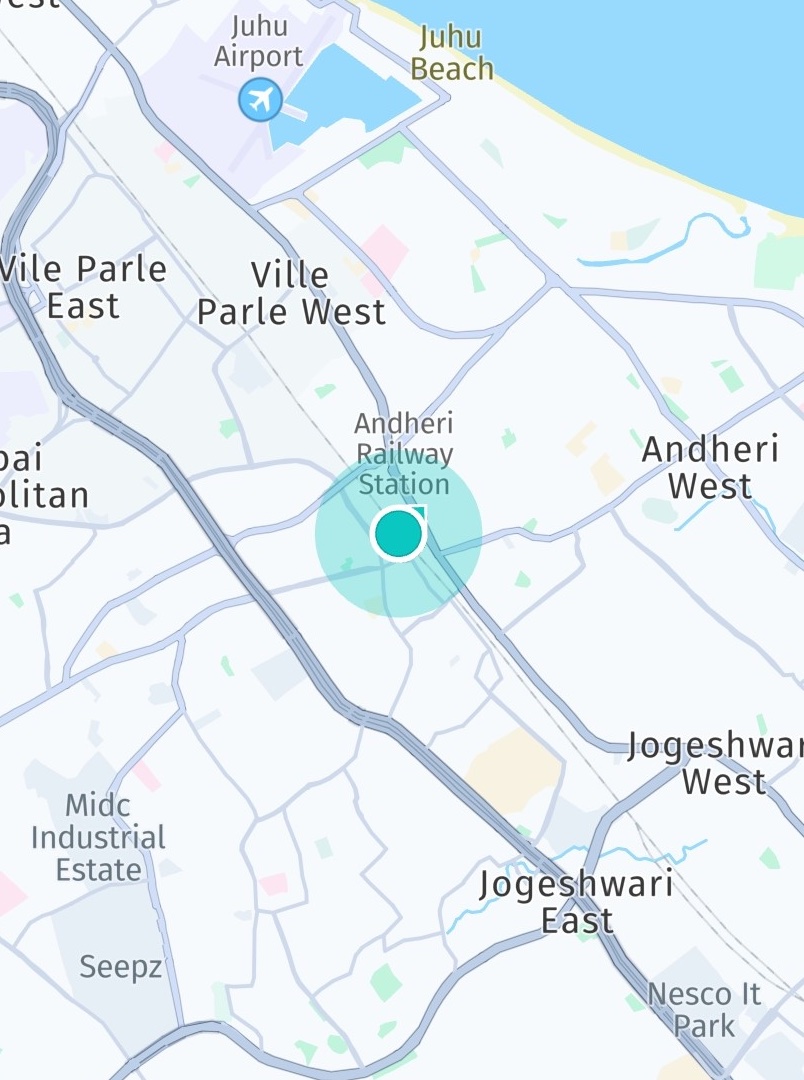
Screenshot: Location indicator showing current location on map.
上の実装で示したように、updateLocation() を呼び出すことで Location オブジェクトを位置情報インジケーターに渡すことができます。この例では、目的はユーザーの現在地を追跡することです。したがって、マップ ビューポートの中心位置も更新されます。
ポジショニングのサンプル アプリを試す
- GitHub には、上記のほとんどのコード スニペットをカバーする Positioning サンプル アプリがあります。
- HikingDiary アプリは、GPX トレースを記録する方法を示します。
2 か月前の更新