

How to deploy a pipeline
Deploy a pipeline
Deploying a pipeline to the HERE platform involves the following tasks:
- Create a pipeline object to which the pipeline service assigns a pipeline ID (or pipeline HRN if Pipelines API v3 is used).
- Select the application JAR file to be deployed.
- Create a template object that contains the default runtime configuration and the previously selected JAR file.
Let the pipeline service assign it a template ID (or template HRN if Pipelines API v3 is used).
NoteIf the template creation cannot be completed within 50 minutes, an error will be returned.
- Create the pipeline version to which the pipeline service assigns a version ID.
- Activate the pipeline version.
The deployment process is illustrated below:
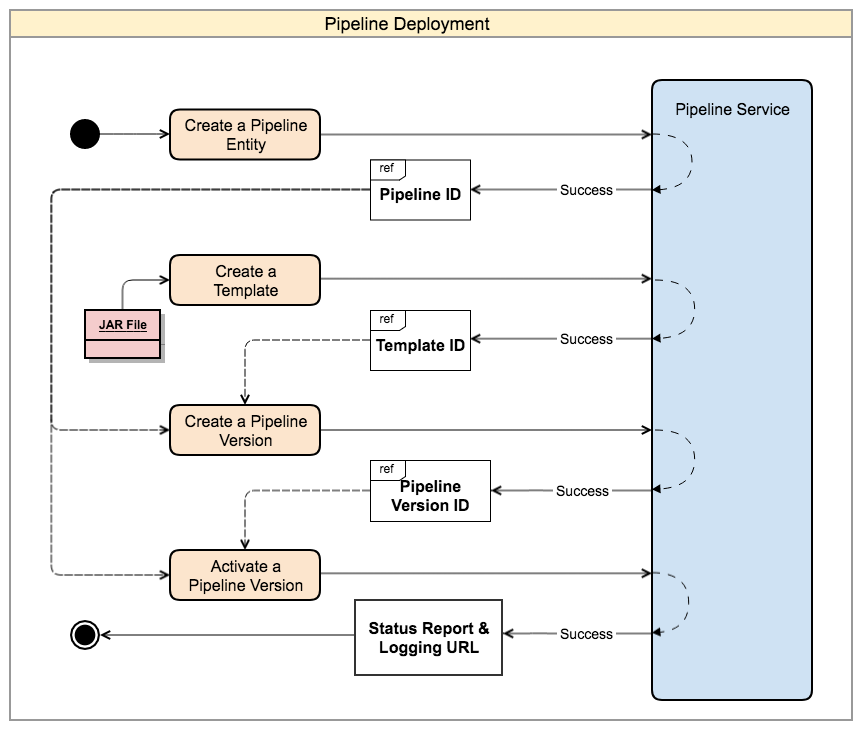
This illustration focuses on a single pipeline. However, real-world scenarios may deploy multiple pipelines that function
together in complex data workflows that we refer to as a topology.
For details about pipeline configuration files and their parameters, see Configurations available for pipeline developers.
For details on configuring checkpoints and savepoints, see Flink checkpointing and Externalized checkpoint feature.
Post-deployment
Once you have deployed the pipeline, it is ready to run and process the available data. This process is initiated by
activating the pipeline version. Pipeline activity is logged as data is processed and processed data is sent to the
output catalog.
For more information, please see the following articles: