

Processing multiple versions of the same catalog
Processing multiple versions of the same catalog
The Data Processing Library allows you to work with multiple versions of the same catalog so that
you can, for example, compare and process changes between those versions. Besides the version of the
catalog specified in the pipeline job configuration, a
compiler can access the versions of the same catalog used in previous runs of the pipeline. More
precisely, it can access all those versions that were used to compile earlier versions of the same
output catalog.
Catalog versions in the Data Processing Library
The job version of an input catalog is the version of the catalog provided to a batch pipeline
through the pipeline job configuration. A catalog ID
mentioned in the job configuration always refers to the job version of the catalog. There is no
guarantee that a pipeline processes every version of an input catalog at least once or at most once.
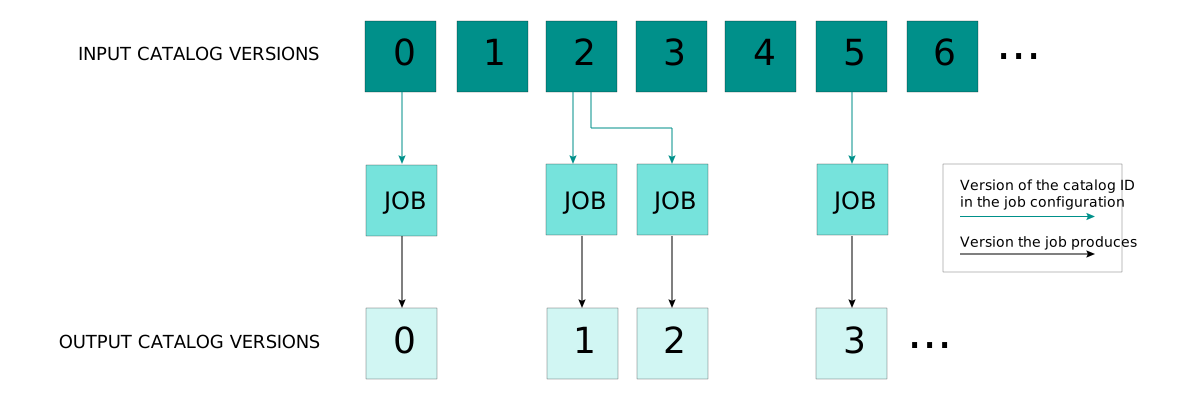
This is shown in the following diagram, where versions 1, 3, 4, and 6 of an input catalog are
skipped, while version 2 is processed twice by the pipeline - which can happen if the pipeline is
triggered manually, or another input catalog of the pipeline changed.
The Data Processing Library provides access to the versions of an input catalog used in previous
successful runs of the same pipeline. These versions can be accessed through a PreviousRunId. For
example, Default.PreviousRunId(inputA) derives a PreviousRunId from the catalog ID inputA
mentioned in the job configuration, referencing the version of inputA used in the previous run.
The following diagram shows which version the PreviousRunId refers to:
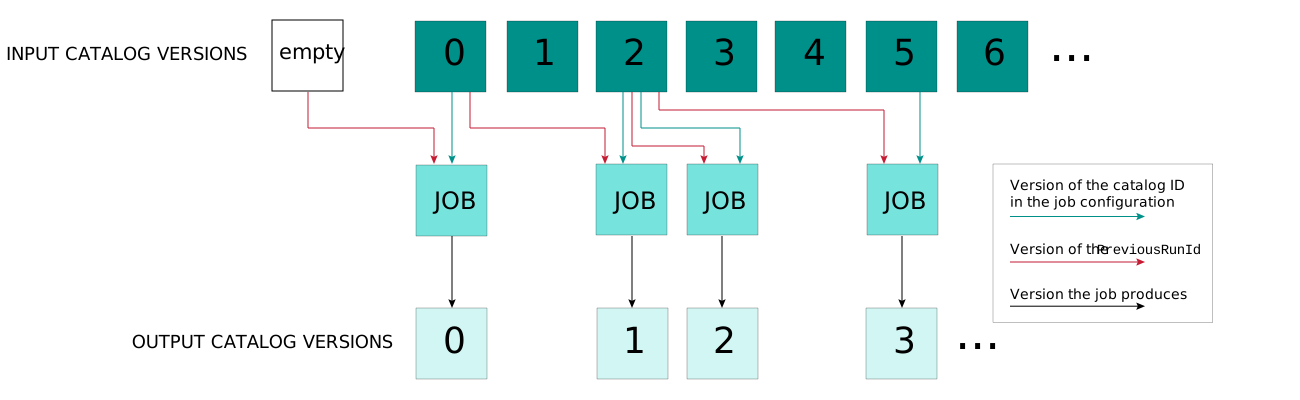
If the referenced version does not exist because the pipeline has not run before, the
PreviousRunId references an empty catalog instead. In the example above, for the first pipeline
job the PreviousRunId references an empty catalog, because the pipeline runs for the first time.
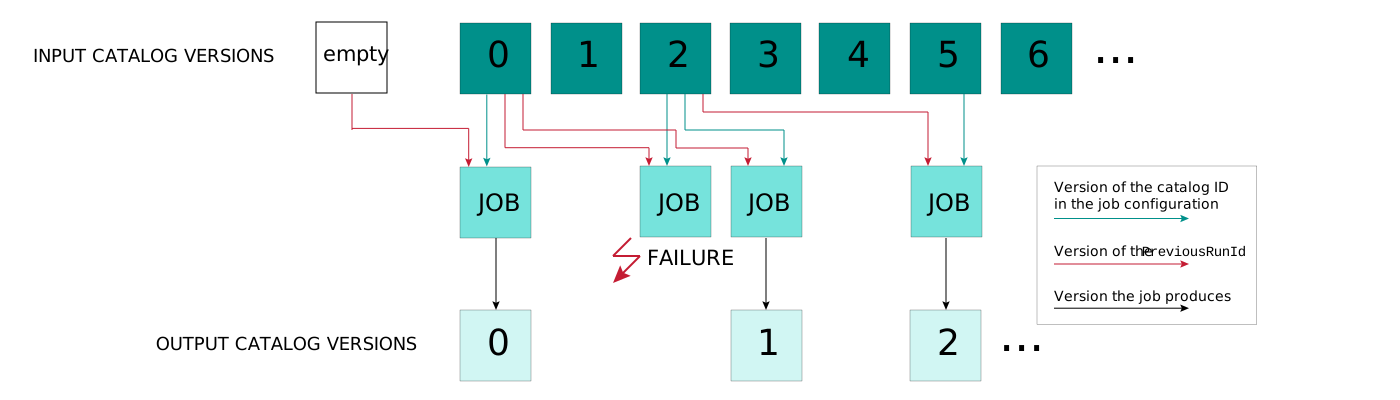
The diagram below illustrates that if a previous run fails, it is ignored. You can only use a
previous run if it resulted in a successful publication of an output catalog version.
The examples above show only a single input catalog and a PreviousRunId going back exactly one
run. Naturally, the concepts shown here extend to any number of input catalogs and going back any
number of runs. For example, Default.PreviousRunId(inputA, 2) refers to the version of inputA
processed two runs before the current run; the default is 1. Consequently, for the first two runs an
empty catalog will be accessed through this catalog ID.
Similarly, you can also use this functionality to access previous versions of the output catalog.
For example, the catalog ID Default.PreviousRunId(Default.OutCatalogId) refers to the output
catalog produced by the previous successful run of the batch pipeline. A shorthand for this catalog
ID is the feedback catalog ID Default.FeedbackCatalogId used for stateful
processing.
NOTE Similar to stateful processing, all compilation patterns in the processing
library still apply when you access a previous version of an input or output catalog. Moreover,
this feature does not impact any concept, functionality, or require any special configuration in
the environment where the application runs, typically the HERE platform.
Catalog views
Use CatalogViews to access a catalog in a specific version. A CatalogView corresponds to a
restricted variant of the Catalog interface through which one version of the catalog can be
accessed. The DriverContext can be used to acquire a CatalogView for any input catalog ID,
including PreviousRunIds.
NOTE You can acquire Retrievers for a PreviousRunId through the inRetrievers method of
the DriverContext.
Example: comparing catalog versions
This example shows you how you can build a compiler that computes the difference between two
versions of an input catalog using the Data Processing Library's ability to access multiple versions
of the same catalog.
The topology-geometry layer in the HERE Map Content catalog contains, among others, road topology
segments with unique IDs, as well as their geometry in the form of coordinate sequences. This
example loads two different versions of the layer and outputs a JSON document containing all IDs of
segments that were added, removed, or modified between these two versions.
Configuring input layers
To process a previous version in a compiler, use a PreviousRunId in the inLayers configuration,
as shown in the following snippet:
object In {
  val Rib = Catalog.Id("rib")
  val PreviousRib = Default.PreviousRunId(Rib)
  val LayerName = Layer.Id("topology-geometry")
}

def inLayers = Map(
  In.Rib -> Set(In.LayerName),
  In.PreviousRib -> Set(In.LayerName)
)
Accessing retrievers
Use the DriverContext to access a different catalog view, for each version of a catalog. Each
catalog view provides access to a retriever.
private val previousRetriever: Retriever = context.inCatalogView(In.PreviousRib).retriever
private val currentRetriever: Retriever = context.inCatalogView(In.Rib).retriever
Grouping partitions
We want to compare partitions with the same partition name, so we need to assign those partitions
the same output key in the compileIn phase of the compilation. Since each input partition is
mapped to exactly one output partition based on its partition name, we can employ a
DirectMToNCompiler (see for more information). The mappingFn is implemented by simply replacing
the catalog ID in the input key to construct the correct output key; the compileIn function is the
identity function.
override def mappingFn(inKey: Key): Iterable[OutKey] =
  Iterable(inKey.copy(catalog = Default.OutCatalogId))

override def compileInFn(in: (Key, Meta)): (Key, Meta) = in
For more information on the DirectMToNCompiler, see compilation
patterns.
Comparing partitions
In the compileOut phase of the compilation, we use the retrievers to load both versions of the
partition. The Key and Meta for both these partitions can be found in the intermediate data for
the corresponding OutKey. In the following snippet, we load a map from segment IDs to Segment
objects for both the previous and the latest version of the partition, using an empty map if one of
the partitions does not exist. Then, we derive the sets of segments added, removed, or modified.
def getSegments(retriever: Retriever)(keyMeta: (Key, Meta)): Map[String, Segment] = {
  val partition =
    TopologyGeometryPartition.parseFrom(retriever.getPayload(keyMeta.key, keyMeta.meta).content)
  partition.segment.iterator.map(x => (x.identifier, x)).toMap
}

def compileOutFn(outKey: OutKey, intermediate: Iterable[(Key, Meta)]): Option[Payload] = {

  val previousSegments =
    intermediate
      .find(_.key.catalog == In.PreviousRib)
      .map(getSegments(previousRetriever))
      .getOrElse(Map.empty)
  val latestSegments =
    intermediate
      .find(_.key.catalog == In.Rib)
      .map(getSegments(currentRetriever))
      .getOrElse(Map.empty)

  val addedSegments = latestSegments.keySet -- previousSegments.keySet
  val removedSegments = previousSegments.keySet -- latestSegments.keySet
  val modifiedSegments =
    (previousSegments.keySet intersect latestSegments.keySet).filter { segmentId =>
      previousSegments(segmentId).geometry != latestSegments(segmentId).geometry
    }

  ??? // TODO: Produce output payload from addedSegments, removedSegments, modifiedSegments
}
A complete version of this example is included in the
examples/data-processing/scala/heremapcontent-difftool directory of the SDK.
Processing fixed versions of a catalog
The Data Processing Library also provides FixedVersionIds, which always refer to the same
version of a given catalog, independently of the version provided in the pipeline job
configuration in current or in previous runs.
FixedVersionIds can be used, for example, to associate data from the current version of the
catalog with a fixed previous version of the catalog. For example, Default.FixedVersionId(inputA, 4) refers to version 4 of catalog ID inputA. Of course, the version passed to
Default.FixedVersionId does not have to be a constant, but can instead be a value that was read,
for example, from another input catalog or a configuration file.
You can use a FixedVersionId exactly like a PreviousRunId: you can use it when declaring input
layers of your compiler and acquire
a CatalogView for it using the
DriverContext.
NOTE If two subsequent runs of the same compiler use different fixed versions of a catalog,
for example, because the versions are read from a configuration file, in the second run incremental
compilation will be disabled. The Data Processing Library
automatically ensures this by registering a Fingerprint of the set
of all fixed versions used for a catalog. If the set of fixed versions remains the same between
two runs, but the way the versions are used in the compiler logic changes, incremental compilation
will not be disabled automatically, because the Fingerprints remain the same. In such cases, make
sure to manually add a Fingerprint of whichever external source triggered the change in
processing logic.