

Batch processing best practices
The HERE platform pipelines use the Apache Spark framework to implement batch data processing.
The following section examines the best practices for developers creating batch processing pipelines for the HERE platform using Spark.
Spark application development
To use the Spark framework during application development, a Maven Archetype
is available that provides a pre-configured project structure for creating a new batch data processing application.
The archetype itself is provided by the HERE Data SDK for Java & Scala.
For more information, see the following guides:
The following libraries provided by the HERE Data SDK for Java & Scala are designed for use with the Spark applications:
-
Data Processing Library
This library provides a means to easily interact with both the Pipeline API and the Data API via Spark to implement batch processing pipelines.
For more information, see the Data Processing Library Developer Guide -
Data Client Library
This is a multi-module library that uses both lower-level building blocks and higher-level APIs to provide asynchronous APIs, streaming, backpressure, and parallelism support, and includes built-in retries and resumes.
To run an application that uses the Data Client Library within a batch pipeline, use thespark-supportmodule as a dependency in your project.
Don't add any other Data Client Library modules to your project, as this will cause dependency conflicts that will cause your batch pipeline to fail.
For additional information, see the Data Client Library Developer Guide. -
Data Client Base Library
This library provides Scala/Java libraries that you can use in your projects to access the HERE platform. It provides a low-level,
stateless and thread-safe programmatic access to the platform Data and OLS (Open Location Services) APIs.
For additional information, see the Data Client Base Library Developer Guide. -
Location Library
This is a set of algorithms for location-based analysis, such as navigating a road network, accessing road attributes,
and geospatial queries. It is used to create location-based programs that run in batch or stream pipelines.
For more information, see the Location Library Developer Guide. -
Index Compaction Library
This library provides a solution for compacting files with the same index attribute values into one or more files.
For more information, see the Index Compaction Library Developer Guide
Even data partitioning
From a high-level perspective, Apache Spark RDDs (Resilient Distributed Datasets) consist of large amounts of data that exceed the capacity of a single node and require distribution across multiple nodes.
Spark automatically handles the partitioning of RDDs and allocates these partitions to different nodes.
By dividing the data into smaller chunks, Spark enables parallel processing, that reduces latency and improves performance.
When partitioning, you should avoid uneven data distribution across the nodes (or data skew), as this can lead to performance issues during the data processing, such as long tails or Out-of-memory errors.
This occurs when much of the data processing is done quickly, but the final chunk of the RDD takes much longer to process, often with very reduced parallelism.
In other words, the most complex or resource-intensive computations are concentrated in a few workers, leaving the rest of the cluster under-utilized.
There are several ways to configure partitioning for your Spark application:
-
You can set the number of partitions for RDDs using the
spark.default.parallelismproperty:SparkConf config = new SparkConf() .setAppName("ApplicationName") .set("spark.default.parallelism", "10"); // specify the number of partitions JavaSparkContext sparkContext = new JavaSparkContext(config); -
You can change the number of partitions of an RDD using the
repartition(int numPartitions)method:JavaRDD<String> rdd = sparkContext.textFile("PATH/TO/FILE"); JavaRDD<String> repartitionedRDD = rdd.repartition(10); // specify the number of partitionsThis method returns a new RDD with exactly
numPartitionspartitions.
Internally, it uses a shuffle to redistribute the data. -
You can change the number of partitions of an RDD using the
coalesce(int numPartitions)method:JavaRDD<String> rdd = sparkContext.textFile("PATH/TO/FILE"); JavaRDD<String> coalescedRDD = rdd.coalesce(10); // specify the number of partitionsThis method efficiently reduces the number of partitions by merging existing partitions. It is suitable for reducing the number of partitions without full shuffle.
-
You can also control partitioning by specifying the number of partitions when creating an RDD:
    List<String> data = Arrays.asList("a", "b", "c", "d", "e");
    JavaRDD<String> rdd = sparkContext.parallelize(data, 10); // specify the number of partitions
NotePlease note that the
repartitionandcoalescemethods can cause a data shuffle for your data processing pipelines.
Use the Spark UI to monitor task execution and partition sizes.
Look for tasks with long runtimes or uneven partition sizes to identify problems such as data skew.
Spark parallelism and cluster configuration
The Spark application is divided into several tasks, such as transformations and actions.
Each task operates on a subset of the data, with the entire dataset (or RDD) divided into partitions.
Each partition is processed simultaneously by different workers in the cluster and the number of partitions determines the level of parallelism.
This chapter describes the dependency between the parallelism of the application and the configuration of the batch pipeline cluster.
To explicitly configure parallelism for your application, you can use the spark.default.parallelism property as follows:
- During the
JavaSparkContextcreation:SparkConf config = new SparkConf() .setAppName("ApplicationName") .set("spark.default.parallelism", "10"); // sets the default parallelism JavaSparkContext sparkContext = new JavaSparkContext(config); - During the
SparkSessionbuilding:SparkSession spark = SparkSession.builder() .appName("ApplicationName") .config("spark.default.parallelism", "10") // sets the default parallelism .getOrCreate();
NotePlease note that if you specify a value for the
spark.default.parallelismparameter via the
Runtime parameterssection during pipeline version creation
this value won't be automatically read by your application - in this case you will need to do this programmatically.
Unlike steam pipelines, batch pipelines do not have a set of parameters that are automatically recognised by the application.
If the value of parallelism is too low, it can lead to under-utilisation of resources in a cluster.
Increased parallelism results in better utilisation of cluster resources and improved performance, especially for large datasets.
However, if too much parallelism is specified, the overhead of managing many small tasks can outweigh the benefits.
Even more - misconfigured parallelism leads to uneven data distribution, which can cause some tasks to run much longer than others, leading to long tails or Out-of-memory errors.
The best way to determine the level of parallelism for your application is to make it equal to the number of CPUs in the cluster,
which can be specified by setting up the cluster configuration for your pipeline.
During the pipeline deployment it's possible to specify not only the number of workers required for your pipeline, but also
the amount of resources (CPUs, RAM size, and disk space) that will be allocated to each worker:
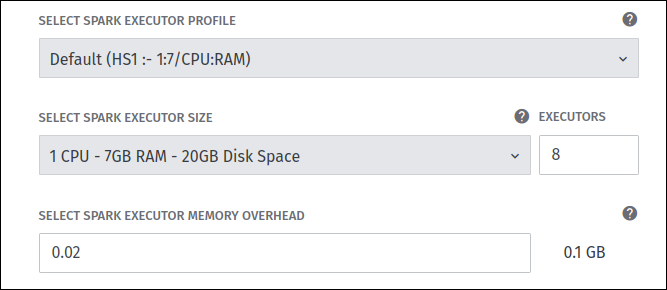
In the example above, the Spark pipeline is configured with 8 workers (for batch pipelines, workers are also called executors) and each worker is configured with 1 CPU.
In this case, it is better to set the parallelism level for such an application to 8, so that all partitions can be parallelized equally across all CPUs and resources can be used in the most efficient way.
For more information about all the cluster configuration options available, refer to the chapter Deploy a pipeline via the web portal - Cluster configuration.
Optimise data shuffle operations
Certain operations within Spark can trigger an event known as the shuffle.
The shuffle is the mechanism for re-distributing data so that it’s grouped differently across partitions.
This typically involves copying data across executors and machines, making the shuffle a complex and costly operation.
The following operations can cause a shuffle:
repartitionandcoalescebyKeyoperations (except for counting) likegroupByKeyandreduceByKeyjoinoperations likecogroupandjoin
The shuffle is an expensive operation as it involves disk I/O, network I/O, and data serialisation.
Certain shuffle operations can consume significant amounts of heap memory because they use in-memory data structures to organize records before or after transferring them.
In addition, if the data does not fit in memory Spark will offload these tables to disk, incurring the additional overhead of disk I/O and increased garbage collection.
Shuffle also generates a large number of intermediate files on disk, which means that long-running Spark jobs can take up a lot of disk space.
Shuffle can also introduce performance issues related to data skew, where some partitions become much larger than others.
Optimising shuffle for batch applications is critical for improving their performance and reducing the overhead associated with data redistribution.
Here are several strategies for it:
- Optimise data partitioning for more balanced data distribution
- Group multiple transformations that involve shuffle into a single stage, when possible
- For small datasets, use
broadcastjoins to avoid shuffle - For large datasets, use
bucketingandsort mergejoins to avoid shuffle
Use the Spark UI to identify and analyze shuffle.
You can use the Shuffle Read and Shuffle Write metrics on the Stages tab to check how much data is being shuffled between stages, thus identifying stages that involve shuffle.
On the same tab you can use the Duration metric - if you notice that some tasks in a stage have a high duration, this may indicate that shuffle is taking place.
You can also use the SQL tab and check the SQL query plans to see if there are any operations that cause shuffle.
For more information on shuffle operations and shuffle configuration, see the following guides:
- Apache Spark documentation on shuffle operations
- Apache Spark documentation on shuffle configuration
Data caching
If your batch application implements the 1:1 data processing algorithm (i.e. for one input catalog partition one output catalog partition is produced),
this linear transformation logic does not require the same data to be downloaded more than once.
However, when catalog partitions have references to some other neighbouring partitions, the application needs to resolve these references.
Resolving a reference means that the data of the referenced partitions needs to be downloaded.
So if you expect the catalog partitions to be downloaded multiple times, you can use application-level caching to optimise it.
You can control when and how to cache data by explicitly calling cache() or persist(StorageLevel level) methods
and choosing appropriate storage levels based on your application’s needs.
For more information, see the Apache Spark documentation on RDD persistence.