

Stream processing best practices
The HERE platform pipelines use the Apache Flink framework to implement stream data processing.
The following section examines the best practices for developers creating stream processing pipelines for the HERE platform using Flink.
Flink application development
To use the Flink framework during application development, a Maven Archetype
is available that provides a pre-configured project structure for creating a new stream data processing application.
The archetype itself is provided by the HERE Data SDK for Java & Scala.
For more information, see the following guides:
The following libraries provided by the HERE Data SDK for Java & Scala are designed for use with the Flink applications:
-
Data Client Library
This is a multi-module library that uses both lower-level building blocks and higher-level APIs to provide streaming, backpressure, parallelism support, built-in retries and resumes,
asynchronous APIs, and Akka Streams connectors.
To run an application that uses the Data Client Library within a stream pipeline, use theflink-supportmodule as a dependency in your project.
Don't add any other Data Client Library modules to your project, as this will cause dependency conflicts that will cause
your stream pipeline to fail.
For additional information, see the Data Client Library Developer Guide. -
Data Client Base Library
This library provides Scala/Java libraries that you can use in your projects to access the HERE platform. It provides a low-level,
stateless and thread-safe programmatic access to the platform Data and OLS (Open Location Services) APIs.
For additional information, see the Data Client Base Library Developer Guide. -
Data Archiving Library
This library assists with archiving messages ingested via a stream layer. It provides a data-agnostic workflow that
you can customize to produce and archive stream data in a variety of formats, including Google Protobuf, Apache Avro and Apache Parquet.
For more information, see the Data Archiving Library Developer Guide. -
Location Library
This is a set of algorithms for location-based analysis, such as navigating a road network, accessing road attributes,
and geospatial queries. It is used to create location-based programs that run in batch or stream pipelines.
For more information, see the Location Library Developer Guide. -
Sensor Data Ingestion Platform
Although not a library, the Sensor Data Ingestion Platform is a multi-functional web service for collecting and validating
data messages from various sensors. The Platform's API allows you to post messages with sensor data to the Sensor Data Ingestion Platform.
This data is then available for processing through a stream pipeline.
Flink checkpointing
Checkpointing is required to recover the state of a stream (Flink) pipeline. When enabled, Flink takes consistent snapshots of the pipeline
(or, in Flink terms, the job graph) at specified intervals. This feature is disabled by default. To enable checkpointing, use the
enableCheckpointing(interval) method of the StreamExecutionEnvironment class,
where interval is the checkpoint interval in milliseconds.
InfoAdditional Cost
Stream pipelines using checkpointing to read/write data from the underlying storage.
It is important to enable checkpointing so that Flink can create savepoints when pausing or upgrading the stream pipeline.
A savepoint is a collection of related checkpoints, and if there are no checkpoints, the savepoint is empty.
In addition, it is important to set IDs for each operator. Flink uses these IDs to compare the stored state with the operators upon restart.
If the operators do not match, Flink will not be able to restore the state.
For more information on how checkpoints work, refer to the following guides:
- Apache Flink documentation on checkpoints
- Apache Flink documentation on savepoints
- Apache Flink documentation on data streaming fault tolerance
Activate a stream pipeline from a snapshot
If you are looking for more advanced functionality of the activate operation for stream pipeline versions, this is available with the OLP CLI.
Stream pipelines that use Stream 7.0
runtime environment can be activated from a previously taken snapshot (or savepoint, in the Flink terminology).
As mentioned above, snapshots are taken by the system for stream pipelines during pause and upgrade operations.
OLP CLI provides the capability to list snapshots available for a particular pipeline using the olp pipeline snapshot list command.
During the pipeline version activation, the snapshot ID can be provided to run the pipeline from the state captured by
the snapshot. To do this, use the --snapshot-id parameter of the olp pipeline version activate command.
Externalized checkpoint feature
When you develop an application for your Stream 7.0 pipeline, you can configure periodic checkpoints to be persisted externally.
Externalized checkpoints write their metadata out to persistent storage and are not automatically cleaned up when the job fails.
This way, you will have a checkpoint around to proceed with if your job fails.
To enable externalized checkpoints which are retained after a job cancellation, you need to add the following code to your pipeline application:
    CheckpointConfig config = env.getCheckpointConfig();
    config.setExternalizedCheckpointRetention(
            ExternalizedCheckpointRetention.RETAIN_ON_CANCELLATION);
Once you have configured your application in this way, externalized checkpoints are stored in the underlying storage
by the system - no further configuration is required.
You can use such a checkpoint with the --with-latest-checkpoint parameter of the olp pipeline version activate command.
For more detail, refer to the Apache Flink retained checkpoints documentation.
Incremental checkpointing feature
Flink is purpose-built for stateful processing. To provide fault-tolerance, the state must be preserved during checkpointing. For applications with a large state, uploading the entire state on every checkpoint can be slow and resource-intensive.
Flink introduced incremental checkpointing feature to alleviate this problem. With incremental checkpointing enabled, Flink maintains the differences (or ‘delta’) between each checkpoint and stores only the differences between the last checkpoint and the current state.
Incremental checkpointing is recommended for the majority of HERE platform Stream pipelines and is enabled by default.
Incremental checkpointing has an overhead cost, which sometimes outweighs the benefits provided by the feature. For example, pipelines with a rapidly changing state, the 'delta' between state at checkpoint n and n-1 can be as large as the state at n, which erases the benefits of incremental checkpointing altogether.
In this case, incremental checkpointing leads to slower checkpointing and recovery times as well as additional data transfer costs when compared to full checkpointing.
Beginning with Stream-6, Flink UI's checkpoint history tab presents both Checkpointed Data Size (data persisted during given checkpoint) and Full Checkpoint Data Size (the total size of all data that makes up the checkpoint, including data persisted during previous checkpoints).
If the values are consistently close to each other for a given pipeline, we recommend turning off incremental checkpointing for that pipeline via stream configuration:
state.backend.incremental=falseFlink parallelism and cluster configuration
The Flink application consists of several tasks - operators, data sources, data sinks, etc.
For execution, a task is split into multiple parallel instances and each parallel instance processes a subset of the task’s input data.
The number of parallel instances of a task is called its parallelism.
This chapter describes the dependency between the configuration of the stream pipeline cluster and the parallelism of the application.
During the pipeline deployment, you have to configure enough cluster resources for your stream pipeline
to support the maximum parallelism set in the pipeline application code.
At the same time, this maximum parallelism must correspond to the total number of task slots in the pipeline cluster,
which is determined by the worker parameters (for stream pipelines, workers are also called TaskManagers).
By default, in the HERE platform pipeline, each worker gets only one task slot. The number of task slots per worker can be set
in the Runtime parameters section during pipeline version creation using the
taskmanager.numberOfTaskSlots parameter.
Let's consider an example of a Flink pipeline that has 3 operators - a source, a map, and a sink with parallelism of 3, 8, and 3 respectively.
In this example, to support the maximum parallelism of 8, the pipeline cluster should have at least 8 task slots.
This can be achieved by specifying a combination of workers and task slots to equal the value of 8 - for example,
setting 4 workers with 2 task slots or setting 8 workers with 1 task slot per worker.
During the pipeline deployment it's possible to specify the amount of resources that will be allocated to workers.
Resources are allocated as units, each containing a pre-defined number of CPUs, RAM size, and disk space.
The amount of resources per unit is defined by the chosen resource profile.
Our recommendation is to use higher parallelism and fewer resources per worker, rather than to use fewer workers, each with a large amount of resources.
It is also recommended that the number of task slots per worker be limited to the maximum number of CPUs allocated to the worker.
For more information about TaskManagers and task slots, see the Apache Flink architecture documentation.
Stream configuration
During the pipeline deployment, you can set up certain Flink configuration properties specifying them in the Runtime parameters section.
For example, set taskmanager.numberOfTaskSlots=2 to configure two task slots per worker.
The following is a list of Flink configuration properties supported by stream pipelines:
    # JobManager configuration
    jobmanager.memory.heap.size
    jobmanager.memory.off-heap.size
    jobmanager.memory.jvm-metaspace.size
    jobmanager.memory.jvm-overhead.min
    jobmanager.memory.jvm-overhead.max
    jobmanager.memory.jvm-overhead.fraction

    # Taskmanager configuration
    taskmanager.numberOfTaskSlots
    taskmanager.heap.size
    taskmanager.memory.flink.size
    taskmanager.memory.jvm-metaspace.size
    taskmanager.memory.framework.heap.size
    taskmanager.memory.task.heap.size
    taskmanager.memory.managed.size
    taskmanager.memory.managed.fraction
    taskmanager.memory.framework.off-heap.size
    taskmanager.memory.task.off-heap.size
    taskmanager.memory.network.min
    taskmanager.memory.network.max
    taskmanager.memory.network.fraction
    taskmanager.memory.jvm-overhead.min
    taskmanager.memory.jvm-overhead.max
    taskmanager.memory.jvm-overhead.fraction
    taskmanager.load-balance.mode

    # Pekko configuration
    pekko.framesize
    pekko.ask.timeout
    pekko.lookup.timeout
    pekko.tcp.timeout
    client.timeout

    # State backends configuration
    state.storage.fs.memory-threshold
    state.backend.rocksdb.predefined-options
    state.backend.incremental
    execution.checkpointing.incremental
    execution.checkpointing.data-inline-threshold

    # Stateful functions configuration
    statefun.message.serializer
    statefun.feedback.memory.size

    # Fault tolerance configuration
    heartbeat.interval
    heartbeat.timeout

    # Scheduling configuration
    cluster.evenly-spread-out-slots

    # Class loading configuration
    classloader.parent-first-patterns.additional
For more information, see the Apache Flink documentation on Configuration and Stateful functions configuration.
Enable notifications for stream pipelines
In a planned outage, a stream pipeline can get affected. To prevent any unexpected interruptions in the data processing,
it is recommended to update the email address associated with the pipeline so that a planned outage notification can be sent
with clear details about the incident and expected user actions, such as:
- Incident Summary
- Realm
- Pipeline ID
- Pipeline Name
- Pipeline Version ID
- Requested Action with supporting instructions
- Due Date and Time
- System Operation to be performed by HERE platform if the Requested Action is not performed
If the Requested Action is not performed by the due date and time, the System Operation listed in the outage email will be performed.
Once the System Operation has been initiated on the affected stream pipeline, a second email is sent with the following details:
- Realm
- Pipeline ID
- Pipeline Name
- Pipeline Version ID
- Incident Summary
- System Operation Date and Time
- System Operation Being Performed
If the pipeline does not return to the RUNNING state within the expected time window (15 minutes) after the restart, a follow-up notification email is sent to the pipeline owner.
For guidance on diagnosing and resolving restart failures, see What should I do if my pipeline did not return to the RUNNING state after a planned maintenance restart?.
During the System Operation, an attempt is made to save the current state and start a new job with the saved state.
If the Requested Action is performed by the due date and time, the System Operation will be dropped.
The state will be recovered for only those stream pipelines that use checkpointing.
Otherwise, if the requested action hasn't been performed by the due date and time, the pipeline job will be canceled and
the pipeline will be activated again. Therefore, it is recommended to use checkpointing in stream pipelines.
NoteTime to complete a savepoint
During an attempt to take a savepoint, 120 seconds are allocated to the pipeline to complete it.
If the pipeline is not able to complete the savepoint within that time, it is canceled and then activated again.
If an affected stream pipeline does not have an email address associated with it, a notification cannot be sent and the System Operation will
be performed as outlined in the planned outage notification.
Restart strategies
When a task failure happens, Flink needs to restart the failed and other affected tasks to recover the job to a normal state.
Restart strategies and failover strategies are used to control the task restart. Restart strategies decide whether and when the failed/affected tasks can be restarted.
Failover strategies decide which tasks should be restarted to recover the job.
Stream 5.0
If checkpointing is enabled, the default restart strategy is Fixed Delay, otherwise the No Restart restart strategy is used.
Stream 6.0
The default restart strategy used is Failure Rate with a 30-minute interval, 15-second delay and a maximum of 3 failures per interval.
This strategy applies to jobs both with and without checkpointing enabled.
To use a different strategy, it will need to be implemented in the pipeline application code.
The following example shows how we can set a Failure Rate restart strategy:
ExecutionEnvironment env = ExecutionEnvironment.getExecutionEnvironment();
env.setRestartStrategy(RestartStrategies.failureRateRestart(
  3, // max failures per interval
  Time.of(5, TimeUnit.MINUTES), //time interval for measuring failure rate
  Time.of(10, TimeUnit.SECONDS) // delay
));
In the event of a failure, the system will attempt to restart the job, but when failure rate is exceeded (3 failures per 5 minutes) , the job eventually fails.
NoteNote that choosing a different restart strategy with low thresholds can result in reduced fault tolerance and job stability.
For more information on how Flink supports different restart strategies, see the Apache Flink documentation on restart strategies.
Use unique metric operator naming
In earlier versions of Flink, metric operators were automatically named based on their associated task names.
But this system was found to be failure prone. It has been replaced by explicitly named metric operators that are stored
in the respective streamConfig. However, you must make your metric operator names unique to avoid naming conflicts that will
cause the duplicate metrics to not be reported.
It is also a good idea to limit the operatorName component of a metric name to no more than 80 characters.
This avoids unwieldy metric names being reported in the logs. This also avoids the known risk of metrics being ignored by
the Graphite Reporter when their names are too long.
For more information on operator naming and metric reporters, refer to the following guides:
Use same catalog for input and output
Unlike batch pipelines, stream pipelines can use the same catalog as data source and data sink.
However, the such a catalog must be configured with stream layers.
This is achieved by the Flink's End-to-End Exactly-Once Processing feature.
It extracts the common logic of the two-phase commit protocol and makes it possible to build end-to-end exactly-once applications
with Flink and a selection of data sources and sinks, including Apache Kafka versions 0.11 and beyond.
It provides a layer of abstraction and requires the user to implement only a handful of methods to achieve end-to-end exactly-once semantics.
For a complete overview of this feature, see An overview of End-to-End Exactly-Once Processing in Apache Flink.
And to learn more about how to put the TwoPhaseCommitSinkFunction to use, see the relevant Apache Flink API documentation.
Flink production readiness checklist
The production readiness checklist provides an overview of configuration options that should be carefully considered
before bringing a stream data processing application into production:
- Setting an explicit maximal parallelism
- Setting UUIDs for all operators for better savepointing and state restoring
- Choosing a right state backend
- Configuring high availability of
JobManager
The full checklist is available in the Apache Flink documentation on production readiness.
Multiple pipeline use
There are two use cases where it is desirable to use multiple stream pipelines and a single data source.
However, care must be taken in configuring these pipelines to achieve the desired results.
InfoApache Kafka is used by the stream pipelines as a data stream messaging system to enable real-time processing of streams.
This allows multiple pipelines to share a common input catalog data source where Kafka functions as a queuing model or as a publish-subscribe model.
For additional information, see the Kafka as a messaging system guide.
Use Case 1 - Shared processing
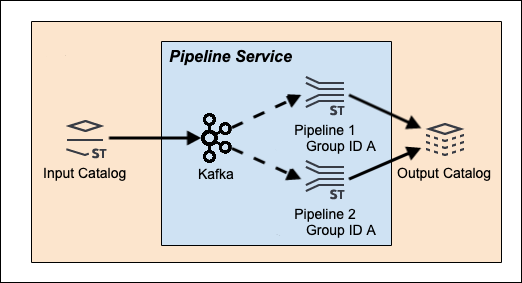
In this use case, the idea is to have multiple pipelines sharing the processing load of a single streaming data source.
Each pipeline processes data passed to it by the Kafka Stream Processor, so that each pipeline only has to process a portion of
the input catalog and layer data stream.
This allows new stream data to be processed more quickly as each pipeline only has to deal with a fraction of the total input data load.
Use Case 2 - Shared data source
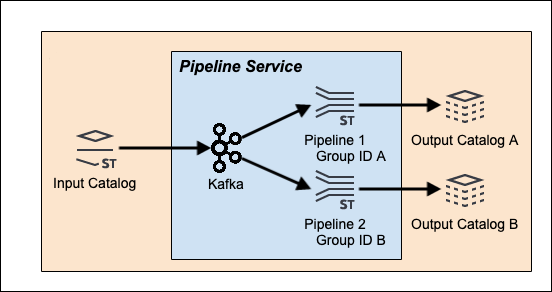
In this use case, the multiple pipelines each apply a different data processing workflow to the same source data.
The HERE platform Stream Services see the pipelines as unrelated except that they are using the same streaming data source.
Each pipeline consumes the entire input catalog data stream.
Configuration details
Each use case is executable in the HERE platform, but has a different pipeline configuration.
For the first shared processing use case, both pipelines have to be created in the same group or project in order to
share the processing load of a single data source.
For the second shared data source use case, both pipelines have to be created in the different groups or projects to
avoid partial data consumption per pipeline. If they are configured this way, every pipeline will consume all messages from the data source.
It's also not recommended to override the Kafka consumer group ID and use different IDs for each pipeline because it can result in unexpected behavior.
Note that a Kafka consumer group ID is automatically assigned to associate the Kafka cluster with the data consumer - data processing pipelines, in our case.