

Location Library high-level API
Location Library high-level API
The high-level API v2 of the Location Library provides a way to
instantiate various kinds of path matchers and a number of
factory methods to help you directly implement your algorithms using the
following interfaces:
ProximitySearchTo find topology segments (vertices) from coordinates.
DirectedGraphTo navigate the topology with an efficient data
structure.
PropertyMapTo access topology and ADAS attributes.
The API also introduces a new cache mechanism which allows re-using blobs that
are shared between different catalog versions. This allows a reduction in memory
usage compared to the previous approach. The eviction strategy is defined on a
catalog basis, allowing the evictions of the layers that are not used anymore.
Setting things up
Before you start using the API, you should add the
location-integration-optimized-map-dcl2 dependency:
libraryDependencies ++= Seq(
  "com.here.platform.location" %% "location-integration-optimized-map-dcl2" % "<version>"
)
<dependencies>
<dependency>
<groupId>com.here.platform.location</groupId>
<artifactId>location-integration-optimized-map-dcl2_${scala.compat.version}</artifactId>
</dependency>
</dependencies>dependencies {
compile group: 'com.here.platform.location', name: 'location-integration-optimized-map-dcl2_2.13', version:'<version>'
}Open a version of Optimized Map for Location Libraries
To start, you need to create an instance of
OptimizedMapLayers,
which is what the factory of all the algorithms require. You can do this based
on a BaseClient instance:
import com.here.platform.data.client.base.scaladsl.BaseClient
import com.here.platform.location.integration.optimizedmap.OptimizedMapLayers
import com.here.platform.location.integration.optimizedmap.dcl2.OptimizedMapCatalog

val baseClient = BaseClient()
val optimizedMap: OptimizedMapLayers =
  OptimizedMapCatalog.from(optimizedMapHRN).usingBaseClient(baseClient).newInstance.version(42)
import com.here.platform.data.client.base.javadsl.BaseClient;
import com.here.platform.data.client.base.javadsl.BaseClientJava;
import com.here.platform.location.integration.optimizedmap.OptimizedMapLayers;
import com.here.platform.location.integration.optimizedmap.dcl2.javadsl.OptimizedMapCatalog;
BaseClient baseClient = BaseClientJava.instance();
OptimizedMapLayers optimizedMap =
OptimizedMapCatalog.from(optimizedMapHRN)
.usingBaseClient(baseClient)
.newInstance()
.version(42);Proximity search
In order to associate places in the real world with vertices in the routing
graph,
ProximitySearch
allows you to search for vertices within a certain distance from a point on the
map.
You can create a
ProximitySearch
instance using its factory class
ProximitySearches:
import com.here.platform.location.core.geospatial._
import com.here.platform.location.inmemory.graph.Vertex
import com.here.platform.location.integration.optimizedmap.geospatial.ProximitySearches

val proximitySearches: ProximitySearches = ProximitySearches(optimizedMap)
val proximitySearch: ProximitySearch[Vertex] = proximitySearches.vertices
val brandenburgerTor: GeoCoordinate = GeoCoordinate(52.516268, 13.377700)
val projections: Iterable[ElementProjection[Vertex]] =
  proximitySearch.search(center = brandenburgerTor, radiusInMeters = 100)
import com.here.platform.location.core.geospatial.ElementProjection;
import com.here.platform.location.core.geospatial.GeoCoordinate;
import com.here.platform.location.core.geospatial.javadsl.ProximitySearch;
import com.here.platform.location.inmemory.graph.Vertex;
import com.here.platform.location.integration.optimizedmap.geospatial.javadsl.ProximitySearches;
ProximitySearches proximitySearches = new ProximitySearches(optimizedMap);
ProximitySearch<GeoCoordinate, Vertex> proximitySearch = proximitySearches.vertices();
GeoCoordinate brandenburgerTor = new GeoCoordinate(52.516268, 13.377700);
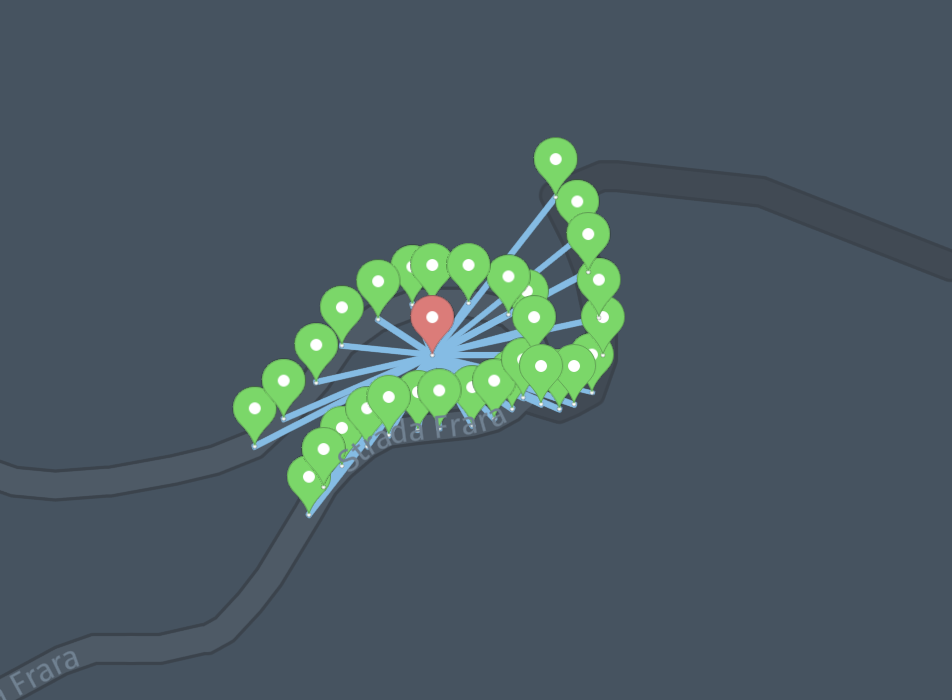
Iterable<ElementProjection<Vertex>> projections = proximitySearch.search(brandenburgerTor, 100);Since the geometries of the vertices are not always rectilinear, in some cases
you may want to get one
ElementProjection
for each segment of the geometry (the segment between consecutive pairs of
points).
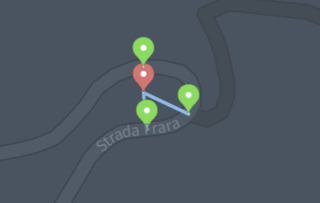
NoteThe following image shows the results from the
ProximitySearches.vertices.
The search only returns the closest point for each vertex:
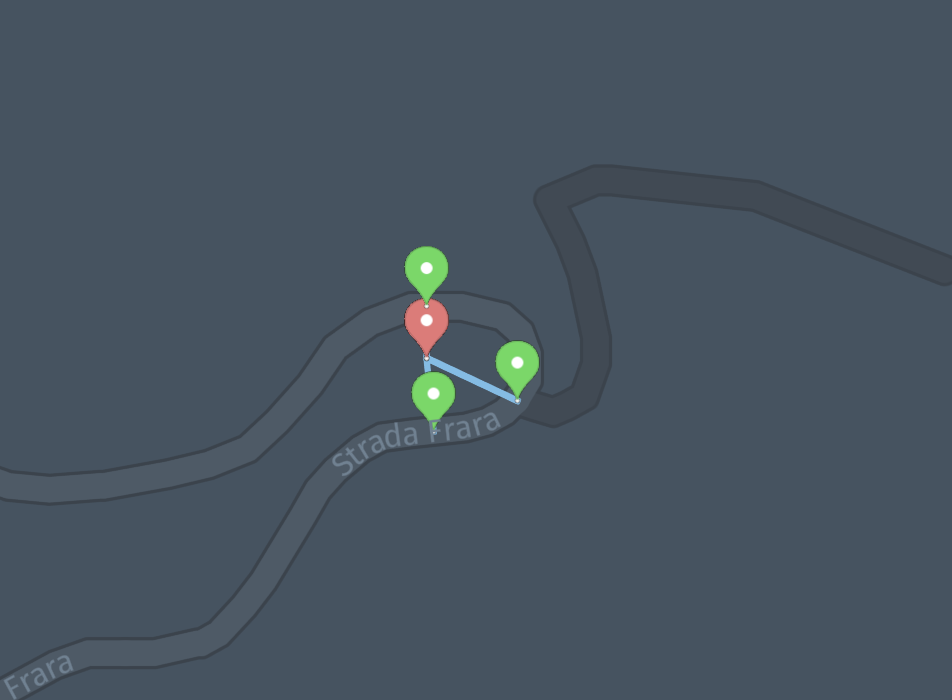
By using the
ProximitySearches.vertexGeometrySegmentsvariant, you have the
option to get more than one projection for each vertex:
Bounding box search
BoundingBoxSearch
allows you to search for vertices intersecting a bounding box:
import com.here.platform.location.core.geospatial._
import com.here.platform.location.inmemory.graph.Vertex
import com.here.platform.location.integration.optimizedmap.geospatial.BoundingBoxSearches

val boundingBoxSearches: BoundingBoxSearches = BoundingBoxSearches(optimizedMap)
val boundingBoxSearch: BoundingBoxSearch[Vertex] = boundingBoxSearches.vertices
val berlin = BoundingBox(52.52818, 52.504154, 13.416698, 13.384168)
val vertices: Iterator[Vertex] = boundingBoxSearch.intersecting(berlin)
import com.here.platform.location.core.geospatial.BoundingBox;
import com.here.platform.location.core.geospatial.javadsl.BoundingBoxSearch;
import com.here.platform.location.inmemory.graph.Vertex;
import com.here.platform.location.integration.optimizedmap.geospatial.javadsl.BoundingBoxSearches;
import java.util.Iterator;
BoundingBoxSearches boundingBoxSearches = new BoundingBoxSearches(optimizedMap);
BoundingBoxSearch<BoundingBox, Vertex> boundingBoxSearch = boundingBoxSearches.vertices();
BoundingBox berlin = new BoundingBox(52.52818, 52.504154, 13.416698, 13.384168);
Iterator<Vertex> vertices = boundingBoxSearch.intersecting(berlin);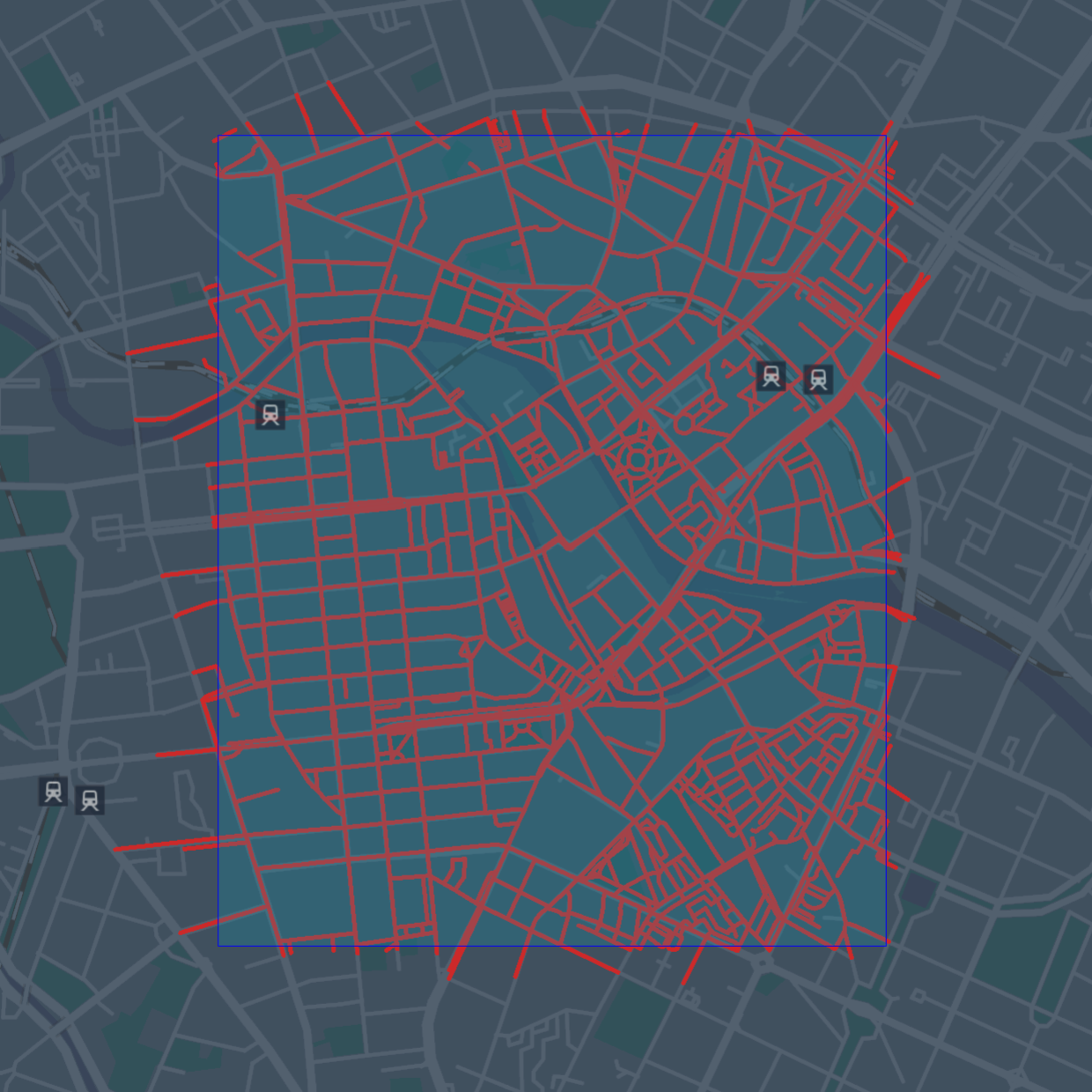
See GeoJSON Serialization to learn how to create GeoJSON
data.
NoteFor efficiency reasons the search may return duplicate vertices while
iterating. If the searched area is small or memory is not a concern, you may
want to convert theIteratorto aSetto remove duplicates.
Graph
You can navigate the road topology and geometry of the HERE Map Content using a
graph abstraction. Each vertex of the graph represents a road (topology segment)
in a direction, and each edge a physical connection between roads as explained
in the Routing Graph section.
To create a
DirectedGraph
instance, you can use its factory class
Graphs:
import com.here.platform.location.core.graph.DirectedGraph
import com.here.platform.location.inmemory.graph.{Edge, Vertex}
import com.here.platform.location.integration.optimizedmap.graph.Graphs

val graphs: Graphs = Graphs(optimizedMap)
val graph: DirectedGraph[Vertex, Edge] = graphs.forward
val outEdges: Iterator[Edge] = graph.outEdgeIterator(vertex)
import com.here.platform.location.core.graph.javadsl.DirectedGraph;
import com.here.platform.location.inmemory.graph.Edge;
import com.here.platform.location.inmemory.graph.Vertex;
import com.here.platform.location.integration.optimizedmap.graph.javadsl.Graphs;
Graphs graphs = new Graphs(optimizedMap);
DirectedGraph<Vertex, Edge> graph = graphs.forward();
Iterator<Edge> outEdges = graph.getOutEdgeIterator(vertex);
NoteThere are always two vertices associated with a road topology segment, one for
each physical direction of travel. PropertyMaps can be used to gather
attributes to make decisions, for examplePropertyMaps.roadAccessdescribed
below can be used to derive information about the direction of travel for
various modes of transport.
Path matcher
To resolve sequences of recorded geographical coordinates to paths on the road
topology graph, you can use a path matcher. The path matcher will return
information about the position on the road that most likely corresponds to each
input point, and the most likely connection (transition) between points.
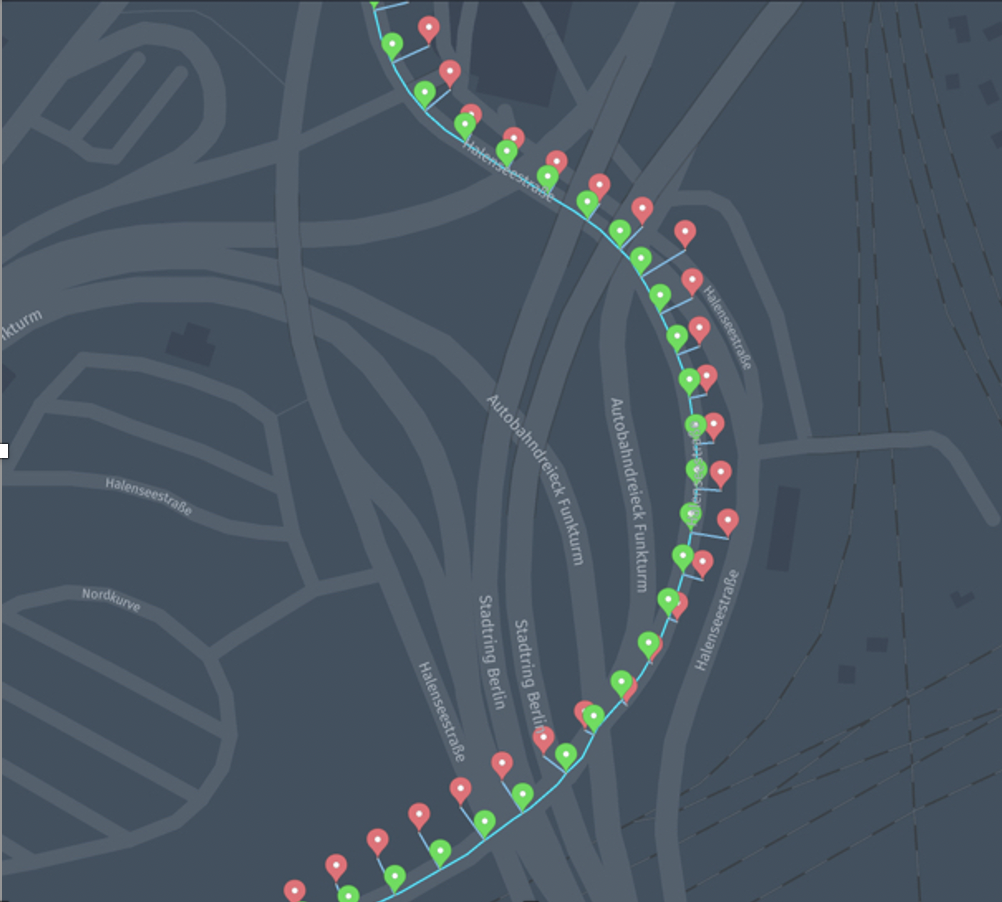
NoteDense and sparse traces of probe data
The sequence of recorded geographical coordinates is called trace or probe
trace. The path matchers distinguish between dense and sparse traces. Dense
traces are characterized by distances between consecutive probes that are
short compared to lengths of the road segments in the map. Typically, probes
collected every 1 to 5 seconds are considered dense.
You can create a
PathMatcher
instance using its factory class
PathMatchers:
import com.here.platform.location.core.geospatial.GeoCoordinate
import com.here.platform.location.core.mapmatching.{MatchedPath, PathMatcher}
import com.here.platform.location.inmemory.graph.Vertex
import com.here.platform.location.integration.optimizedmap.mapmatching.PathMatchers

val pathMatchers = PathMatchers(optimizedMap)
val pathMatcher: PathMatcher[GeoCoordinate, Vertex, Seq[Vertex]] =
  pathMatchers.carPathMatcherWithTransitions
val matchedPath: MatchedPath[Vertex, Seq[Vertex]] = pathMatcher.matchPath(Seq(coordinates))
import com.here.platform.location.core.geospatial.javadsl.GeoCoordinateHolder;
import com.here.platform.location.core.mapmatching.javadsl.MatchedPath;
import com.here.platform.location.core.mapmatching.javadsl.PathMatcher;
import com.here.platform.location.inmemory.graph.Vertex;
import com.here.platform.location.integration.optimizedmap.mapmatching.javadsl.PathMatchers;
PathMatchers pathMatchers = new PathMatchers(optimizedMap);
PathMatcher<GeoCoordinateHolder, Vertex, List<Vertex>> pathMatcher =
pathMatchers.carPathMatcherWithTransitions();
MatchedPath<Vertex, List<Vertex>> matchedPath =
pathMatcher.matchPath(Arrays.asList(coordinates));In order to create path matchers, you can use various methods:
-
The
unrestrictedPathMatcherWithoutTransitionscreates a map matcher that
produces results independent from any driving restriction, and is suitable for
dense GPS traces (at least one point every 5 seconds).The
unrestrictedPathMatcherWithoutTransitionsis the most effective method
to match to the most probably driven path for dense probes, and all vehicle
types. You will not necessarily be able to follow this path by driving, but
you can use the results to derive warnings about driving errors.The
unrestrictedPathMatcherWithoutTransitionsmay introduce disconnections
when consecutive points are not on directly connected topology segments, as it
does not use any routing algorithm to compute the transitions.The
unrestrictedPathMatcherWithTransitionsvariant will make a bigger effort
to reconnect points with a simple shortest path algorithm. -
The
carPathMatcherWithTransitionstakes most car driving restrictions into
consideration, and is a path matcher specifically configured for cars and
sparse data, but will also work on dense data. For example, this path matcher
will only match input points to vertices that are accessible by cars according
to theroadAccessproperty.The
carPathMatcherWithTransitionsworks better than the
unrestrictedPathMatcherWithTransitionsfor sparse data because it will route
between points using a shortest path algorithm that takes into consideration
road access and turn restrictions. In some situations, when consecutive points
are too far apart (more than about 30 kilometers of on-road distance), they
could be considered unreachable and one of them could be matched toUnknown.The
carPathMatcherWithoutTransitionvariant is similar but is only suitable
for dense data, where the distances between consecutive probes are short
compared to vertex lengths in the map.
Starting from the Data SDK for Java & Scala 2.62 and Optimized Map for Location
Libraries 5750 you can create the carPathMatcherWithoutTransitions or the
carPathMatcherWithTransitions excluding under construction roads by using
routingRoadAccess layer:
import com.here.platform.location.core.geospatial.GeoCoordinate
import com.here.platform.location.core.mapmatching.MatchedPath
import com.here.platform.location.inmemory.graph.Vertex
import com.here.platform.location.integration.optimizedmap.mapmatching.{
  CarPathMatcherLayers,
  PathMatchers
}

val layers = new CarPathMatcherLayers(optimizedMap.geometry,
                                      optimizedMap.length,
                                      optimizedMap.routingGraph,
                                      optimizedMap.restrictedManoeuvre,
                                      optimizedMap.routingRoadAccess)
val pathMatcher = PathMatchers.carPathMatcherWithTransitions[GeoCoordinate](layers)
val matchedPath: MatchedPath[Vertex, Seq[Vertex]] = pathMatcher.matchPath(Seq(coordinates))
import com.here.platform.location.core.geospatial.javadsl.GeoCoordinateHolder;
import com.here.platform.location.core.mapmatching.javadsl.MatchedPath;
import com.here.platform.location.core.mapmatching.javadsl.PathMatcher;
import com.here.platform.location.inmemory.graph.Vertex;
import com.here.platform.location.integration.optimizedmap.mapmatching.CarPathMatcherLayers;
import com.here.platform.location.integration.optimizedmap.mapmatching.javadsl.PathMatchers;
import org.junit.Test;
CarPathMatcherLayers layers =
new CarPathMatcherLayers(
optimizedMap.geometry(),
optimizedMap.length(),
optimizedMap.routingGraph(),
optimizedMap.restrictedManoeuvre(),
optimizedMap.routingRoadAccess());
PathMatcher<GeoCoordinateHolder, Vertex, List<Vertex>> pathMatcher =
PathMatchers.carPathMatcherWithTransitions(layers);
MatchedPath<Vertex, List<Vertex>> matchedPath =
pathMatcher.matchPath(Arrays.asList(coordinates));
NoteFor more details about the path matcher output, see the
API Guide.
- For advanced scenarios, you can construct an
HMMPathMatcher
directly, to specify desired path matcher dependencies.
Note: Path matcher performance in multi-threaded environmentsFor best performance in parallel processing scenarios, call the factory method
to create a dedicated path matcher instance per thread.
Property maps
Note: Migration to Topology AttributesThe Road Attributes, Navigation Attributes, and Advanced Navigation Attributes
layers are deprecated and will be removed in favor of the Topology Attributes
layer.If your application currently uses
roadAttributes,navigationAttributes,
oradvancedNavigationAttributesPropertyMaps, you need to replace them with
topologyAttributesPropertyMaps.For details and migration examples, see the
Migration to Topology Attributes page.
The Location Library provides property maps that allow you to access many map
features.
To create a
PropertyMap
instance, you can use its factory class
PropertyMaps
and with that you can retrieve, for example, the length of a vertex:
import com.here.platform.location.core.graph._
import com.here.platform.location.inmemory.graph.Vertex
import com.here.platform.location.integration.optimizedmap.graph.PropertyMaps

val propertyMaps = PropertyMaps(optimizedMap)
val length: PropertyMap[Vertex, Double] = propertyMaps.length
val lengthOfAVertex: Double = length(vertex)
import com.here.platform.location.core.graph.javadsl.PropertyMap;
import com.here.platform.location.inmemory.graph.Vertex;
import com.here.platform.location.integration.optimizedmap.graph.javadsl.PropertyMaps;
PropertyMaps propertyMaps = new PropertyMaps(optimizedMap);
PropertyMap<Vertex, Double> length = propertyMaps.length();
Double lengthOfAVertex = length.get(vertex);On top of getting the length of a vertex, you can also:
-
Convert between HERE Map Content references and vertices of the
Optimized Map for Location Library -
Retrieve the geometry associated with a vertex
-
Determine whether a position on a vertex is accessible to a particular vehicle
type -
Retrieve the speed with which traffic is usually flowing through the vertex
(free-flow speed) -
Determine whether the turn represented by a given edge is restricted for a
particular vehicle type -
Retrieve topology attributes, such as
- FunctionalClass
- OverpassUnderpass
- OfficialCountryCode
- PhysicalAttribute
- RoadClass
- SpecialTrafficAreaCategory
- UserDefinedCountryCode
- TrafficMessageChannelCodes
- RoadUsage
- IntersectionInternalCategory
- LaneCategory
- ThroughLaneCount
- PhysicalLaneCount
- LocalRoad
- LowMobility
- RoadDivider
- SpeedCategory
- SupplementalGeometry
- Urban
- TravelDirection
- SpecialExplication
- ThroughRoute
- RailwayCrossing
- GradeCategory
- SpeedLimit
- Scenic
- TrafficSignal
import com.here.platform.location.core.graph.{PointBasedProperty, RangeBasedProperty}
import com.here.platform.location.integration.optimizedmap.advancednavigationattributes._
import com.here.platform.location.integration.optimizedmap.commonattributes.SpeedLimit
import com.here.platform.location.integration.optimizedmap.graph.PropertyMaps
import com.here.platform.location.integration.optimizedmap.navigationattributes._
import com.here.platform.location.integration.optimizedmap.roadattributes._

val topologyAttributes = PropertyMaps(optimizedMap).topologyAttributes

val functionalClasses: Seq[RangeBasedProperty[FunctionalClass]] =
  topologyAttributes.functionalClass(vertex)
val overpassUnderpasses: Seq[RangeBasedProperty[OverpassUnderpass]] =
  topologyAttributes.overpassUnderpass(vertex)
val officialCountryCodes: Seq[RangeBasedProperty[OfficialCountryCode]] =
  topologyAttributes.officialCountryCode(vertex)
val physicalAttributes: Seq[RangeBasedProperty[PhysicalAttribute]] =
  topologyAttributes.physicalAttribute(vertex)
val roadClasses: Seq[RangeBasedProperty[RoadClass]] = topologyAttributes.roadClass(vertex)
val specialTrafficAreaCategories: Seq[RangeBasedProperty[SpecialTrafficAreaCategory]] =
  topologyAttributes.specialTrafficAreaCategory(vertex)
val userDefinedCountryCodes: Seq[RangeBasedProperty[UserDefinedCountryCode]] =
  topologyAttributes.userDefinedCountryCode(vertex)
val tmcCodes: Seq[RangeBasedProperty[Set[TrafficMessageChannelCode]]] =
  topologyAttributes.trafficMessageChannelCodes(vertex)
val roadUsages: Seq[RangeBasedProperty[RoadUsage]] =
  topologyAttributes.roadUsage(vertex)
val intersectionInternalCategories: Seq[RangeBasedProperty[IntersectionInternalCategory]] =
  topologyAttributes.intersectionInternalCategory(vertex)
val laneCategories: Seq[RangeBasedProperty[LaneCategory]] =
  topologyAttributes.laneCategory(vertex)
val throughLaneCounts: Seq[RangeBasedProperty[Int]] =
  topologyAttributes.throughLaneCount(vertex)
val physicalLaneCounts: Seq[RangeBasedProperty[Int]] =
  topologyAttributes.physicalLaneCount(vertex)
val localRoads: Seq[RangeBasedProperty[LocalRoad]] =
  topologyAttributes.localRoad(vertex)
val lowMobilities: Seq[RangeBasedProperty[LowMobility]] =
  topologyAttributes.lowMobility(vertex)
val roadDividers: Seq[RangeBasedProperty[RoadDivider]] =
  topologyAttributes.roadDivider(vertex)
val speedCategories: Seq[RangeBasedProperty[SpeedCategory]] =
  topologyAttributes.speedCategory(vertex)
val supplementalGeometries: Seq[RangeBasedProperty[SupplementalGeometry]] =
  topologyAttributes.supplementalGeometry(vertex)
val urban: Seq[RangeBasedProperty[Boolean]] =
  topologyAttributes.urban(vertex)
val travelDirection: Seq[RangeBasedProperty[TravelDirection]] =
  topologyAttributes.travelDirection(vertex)
val specialExplication: Option[SpecialExplication] =
  topologyAttributes.specialExplication(edge)
val throughRoute: Option[ThroughRoute] =
  topologyAttributes.throughRoute(edge)
val railwayCrossings: Seq[PointBasedProperty[RailwayCrossing]] =
  topologyAttributes.railwayCrossing(vertex)
val gradeCategory: Seq[RangeBasedProperty[GradeCategory]] =
  topologyAttributes.gradeCategory(vertex)
val speedLimit: Seq[RangeBasedProperty[SpeedLimit]] =
  topologyAttributes.speedLimit(vertex)
val scenic: Seq[RangeBasedProperty[Scenic]] =
  topologyAttributes.scenic(vertex)
val trafficSignals: Seq[PointBasedProperty[SignLocation]] =
  topologyAttributes.trafficSignal(vertex)
import com.here.platform.location.core.graph.javadsl.*;
import com.here.platform.location.inmemory.graph.Edge;
import com.here.platform.location.inmemory.graph.Vertex;
import com.here.platform.location.integration.optimizedmap.advancednavigationattributes.GradeCategory;
import com.here.platform.location.integration.optimizedmap.advancednavigationattributes.RailwayCrossing;
import com.here.platform.location.integration.optimizedmap.advancednavigationattributes.Scenic;
import com.here.platform.location.integration.optimizedmap.advancednavigationattributes.SignLocation;
import com.here.platform.location.integration.optimizedmap.commonattributes.SpeedLimit;
import com.here.platform.location.integration.optimizedmap.graph.javadsl.PropertyMaps;
import com.here.platform.location.integration.optimizedmap.navigationattributes.*;
import com.here.platform.location.integration.optimizedmap.roadattributes.*;
PropertyMaps.TopologyAttributes topologyAttributes =
new PropertyMaps(optimizedMap).topologyAttributes();
RangeBasedPropertyMap<Vertex, FunctionalClass> functionalClass =
topologyAttributes.functionalClass();
List<RangeBasedProperty<FunctionalClass>> functionalClasses = functionalClass.get(vertex);
RangeBasedPropertyMap<Vertex, OverpassUnderpass> overpassUnderpass =
topologyAttributes.overpassUnderpass();
List<RangeBasedProperty<OverpassUnderpass>> overpassUnderpasses = overpassUnderpass.get(vertex);
RangeBasedPropertyMap<Vertex, OfficialCountryCode> officialCountryCode =
topologyAttributes.officialCountryCode();
List<RangeBasedProperty<OfficialCountryCode>> officialCountryCodes =
officialCountryCode.get(vertex);
RangeBasedPropertyMap<Vertex, PhysicalAttribute> physicalAttribute =
topologyAttributes.physicalAttribute();
List<RangeBasedProperty<PhysicalAttribute>> physicalAttributes = physicalAttribute.get(vertex);
RangeBasedPropertyMap<Vertex, RoadClass> roadClass = topologyAttributes.roadClass();
List<RangeBasedProperty<RoadClass>> roadClasses = roadClass.get(vertex);
RangeBasedPropertyMap<Vertex, SpecialTrafficAreaCategory> specialTrafficAreaCategory =
topologyAttributes.specialTrafficAreaCategory();
List<RangeBasedProperty<SpecialTrafficAreaCategory>> specialTrafficAreaCategories =
specialTrafficAreaCategory.get(vertex);
List<RangeBasedProperty<UserDefinedCountryCode>> userDefinedCountryCodes =
topologyAttributes.userDefinedCountryCode().get(vertex);
RangeBasedPropertyMap<Vertex, Set<TrafficMessageChannelCode>> trafficMessageChannelCodes =
topologyAttributes.trafficMessageChannelCodes();
List<RangeBasedProperty<Set<TrafficMessageChannelCode>>> tmcCodes =
trafficMessageChannelCodes.get(vertex);
RangeBasedPropertyMap<Vertex, RoadUsage> roadUsage = topologyAttributes.roadUsage();
List<RangeBasedProperty<RoadUsage>> roadUsages = roadUsage.get(vertex);
RangeBasedPropertyMap<Vertex, IntersectionInternalCategory> intersectionInternalCategory =
topologyAttributes.intersectionInternalCategory();
List<RangeBasedProperty<IntersectionInternalCategory>> intersectionInternalCategories =
intersectionInternalCategory.get(vertex);
RangeBasedPropertyMap<Vertex, LaneCategory> laneCategory = topologyAttributes.laneCategory();
List<RangeBasedProperty<LaneCategory>> laneCategories = laneCategory.get(vertex);
RangeBasedPropertyMap<Vertex, Integer> throughLaneCount = topologyAttributes.throughLaneCount();
List<RangeBasedProperty<Integer>> throughLaneCounts = throughLaneCount.get(vertex);
RangeBasedPropertyMap<Vertex, Integer> physicalLaneCount =
topologyAttributes.physicalLaneCount();
List<RangeBasedProperty<Integer>> physicalLaneCounts = physicalLaneCount.get(vertex);
RangeBasedPropertyMap<Vertex, LocalRoad> localRoad = topologyAttributes.localRoad();
List<RangeBasedProperty<LocalRoad>> localRoads = localRoad.get(vertex);
RangeBasedPropertyMap<Vertex, LowMobility> lowMobility = topologyAttributes.lowMobility();
List<RangeBasedProperty<LowMobility>> lowMobilities = lowMobility.get(vertex);
RangeBasedPropertyMap<Vertex, RoadDivider> roadDivider = topologyAttributes.roadDivider();
List<RangeBasedProperty<RoadDivider>> roadDividers = roadDivider.get(vertex);
RangeBasedPropertyMap<Vertex, SpeedCategory> speedCategory = topologyAttributes.speedCategory();
List<RangeBasedProperty<SpeedCategory>> speedCategories = speedCategory.get(vertex);
RangeBasedPropertyMap<Vertex, SupplementalGeometry> supplementalGeometry =
topologyAttributes.supplementalGeometry();
List<RangeBasedProperty<SupplementalGeometry>> supplementalGeometries =
supplementalGeometry.get(vertex);
RangeBasedPropertyMap<Vertex, Boolean> urban = topologyAttributes.urban();
List<RangeBasedProperty<Boolean>> urbans = urban.get(vertex);
RangeBasedPropertyMap<Vertex, TravelDirection> travelDirection =
topologyAttributes.travelDirection();
List<RangeBasedProperty<TravelDirection>> travelDirections = travelDirection.get(vertex);
PropertyMap<Edge, Optional<SpecialExplication>> specialExplication =
topologyAttributes.specialExplication();
Optional<SpecialExplication> specialExplications = specialExplication.get(edge);
PropertyMap<Edge, Optional<ThroughRoute>> throughRoute = topologyAttributes.throughRoute();
Optional<ThroughRoute> throughRoutes = throughRoute.get(edge);
PointBasedPropertyMap<Vertex, RailwayCrossing> railwayCrossing =
topologyAttributes.railwayCrossing();
List<PointBasedProperty<RailwayCrossing>> railwayCrossings = railwayCrossing.get(vertex);
RangeBasedPropertyMap<Vertex, GradeCategory> gradeCategory = topologyAttributes.gradeCategory();
List<RangeBasedProperty<GradeCategory>> gradeCategories = gradeCategory.get(vertex);
RangeBasedPropertyMap<Vertex, SpeedLimit> speedLimit = topologyAttributes.speedLimit();
List<RangeBasedProperty<SpeedLimit>> speedLimits = speedLimit.get(vertex);
RangeBasedPropertyMap<Vertex, Scenic> scenic = topologyAttributes.scenic();
List<RangeBasedProperty<Scenic>> scenics = scenic.get(vertex);
PointBasedPropertyMap<Vertex, SignLocation> trafficSignal = topologyAttributes.trafficSignal();
List<PointBasedProperty<SignLocation>> trafficSignals = trafficSignal.get(vertex);-
Retrieve ADAS attributes, such as
import com.here.platform.location.core.graph.{PointBasedProperty, RangeBasedProperty}
import com.here.platform.location.integration.optimizedmap.adasattributes._
import com.here.platform.location.integration.optimizedmap.graph.PropertyMaps

val adasAttributes = PropertyMaps(optimizedMap).adasAttributes

val builtUpAreaRoad: Seq[RangeBasedProperty[BuiltUpAreaRoad]] =
  adasAttributes.builtUpAreaRoad(vertex)
val linkAccuracy: Seq[RangeBasedProperty[Int]] = adasAttributes.linkAccuracy(vertex)
val slope: Seq[PointBasedProperty[Slope]] = adasAttributes.slope(vertex)
val curvature: Seq[PointBasedProperty[Int]] =
  adasAttributes.curvature(vertex)
val heading: Seq[PointBasedProperty[Int]] =
  adasAttributes.heading(vertex)
val edgeCurvature: Option[Int] =
  adasAttributes.edgeCurvature(edge)
val edgeHeading: Option[Int] =
  adasAttributes.edgeHeading(edge)
val elevation: Seq[PointBasedProperty[Elevation]] =
  adasAttributes.elevation(vertex)
import com.here.platform.location.core.graph.javadsl.*;
import com.here.platform.location.inmemory.graph.Edge;
import com.here.platform.location.inmemory.graph.Vertex;
import com.here.platform.location.integration.optimizedmap.adasattributes.BuiltUpAreaRoad;
import com.here.platform.location.integration.optimizedmap.adasattributes.Elevation;
import com.here.platform.location.integration.optimizedmap.adasattributes.Slope;
import com.here.platform.location.integration.optimizedmap.graph.javadsl.PropertyMaps;
PropertyMaps.AdasAttributes adasAttributes = new PropertyMaps(optimizedMap).adasAttributes();
RangeBasedPropertyMap<Vertex, BuiltUpAreaRoad> builtUpAreaRoad =
adasAttributes.builtUpAreaRoad();
List<RangeBasedProperty<BuiltUpAreaRoad>> builtUpAreaRoads = builtUpAreaRoad.get(vertex);
RangeBasedPropertyMap<Vertex, Integer> linkAccuracy = adasAttributes.linkAccuracy();
List<RangeBasedProperty<Integer>> linkAccuracies = linkAccuracy.get(vertex);
PointBasedPropertyMap<Vertex, Slope> slope = adasAttributes.slope();
List<PointBasedProperty<Slope>> slopes = slope.get(vertex);
PointBasedPropertyMap<Vertex, Integer> curvature = adasAttributes.curvature();
List<PointBasedProperty<Integer>> curvatures = curvature.get(vertex);
PointBasedPropertyMap<Vertex, Integer> heading = adasAttributes.heading();
List<PointBasedProperty<Integer>> headings = heading.get(vertex);
PropertyMap<Edge, OptionalInt> edgeCurvature = adasAttributes.edgeCurvature();
OptionalInt edgeCurvatures = edgeCurvature.get(edge);
PropertyMap<Edge, OptionalInt> edgeHeading = adasAttributes.edgeHeading();
OptionalInt edgeHeadings = edgeHeading.get(edge);
PointBasedPropertyMap<Vertex, Elevation> elevation = adasAttributes.elevation();
List<PointBasedProperty<Elevation>> elevations = elevation.get(vertex);Cache configuration
Basic configuration and statistics
OptimizedMapCatalog
allows to set the amount of bytes to be used by the blob cache and the number of
entries to be used by the metadata cache. When the number of metadata cache
entries is not specified, a reasonable default based on blob cache size is used.
Once your cache is loaded with data, it can be inspected to know few important
statistics:
import com.here.platform.data.client.base.scaladsl.BaseClient
import com.here.platform.data.client.v2.api.scaladsl.versioned.CachingVersionedLayers
import com.here.platform.location.integration.optimizedmap.dcl2.OptimizedMapCatalog

val baseClient: BaseClient = BaseClient()
val optimizedMap: OptimizedMapCatalog =
  OptimizedMapCatalog
    .from(optimizedMapHRN)
    .usingBaseClient(baseClient)
    .withMaxBlobCacheSizeBytes(100L * 1024 * 1024)
    .withMaxMetadataCacheEntryCount(10000L)
    .newInstance
val versionedLayers: CachingVersionedLayers = optimizedMap.versionedLayers
println(versionedLayers.blobCacheStats)
println(versionedLayers.metadataCacheStats)
import com.here.platform.data.client.base.javadsl.BaseClient;
import com.here.platform.data.client.base.javadsl.BaseClientJava;
import com.here.platform.data.client.v2.api.javadsl.versioned.CachingVersionedLayers;
import com.here.platform.location.integration.optimizedmap.dcl2.javadsl.OptimizedMapCatalog;
BaseClient baseClient = BaseClientJava.instance();
OptimizedMapCatalog optimizedMap =
OptimizedMapCatalog.from(optimizedMapHRN)
.usingBaseClient(baseClient)
.withMaxBlobCacheSizeBytes(100 * 1024 * 1024)
.withMaxMetadataCacheEntryCount(10000)
.newInstance();
CachingVersionedLayers versionedLayers = optimizedMap.versionedLayers();
System.out.println(versionedLayers.getBlobCacheStats());
System.out.println(versionedLayers.getMetadataCacheStats());Retain only required attributes
When accessing attributes, for example via PropertyMaps.roadAttributes, all
available attributes in the layer are cached in memory by default. This can lead
to suboptimal memory usage, as unnecessary data consumes space within the
allocated cache budget.
To reduce memory overhead, specify only the attributes you need. Note that any
attributes not specified will be unavailable at runtime.
The following methods in the OptimizedMapCatalog DSL allow you to define which
attributes to retain:
withTopologyAttributeswithAdasAttributes
import com.here.platform.data.client.base.scaladsl.BaseClient
import com.here.platform.location.compilation.heremapcontent.TopologyAttributeDescription
import com.here.platform.location.core.graph.RangeBasedProperty
import com.here.platform.location.integration.optimizedmap.OptimizedMapLayers
import com.here.platform.location.integration.optimizedmap.dcl2.OptimizedMapCatalog
import com.here.platform.location.integration.optimizedmap.graph.PropertyMaps
import com.here.platform.location.integration.optimizedmap.roadattributes._

import scala.util.Try

val baseClient: BaseClient = BaseClient()
val optimizedMap: OptimizedMapLayers =
  OptimizedMapCatalog
    .from(optimizedMapHRN)
    .usingBaseClient(baseClient)
    .withTopologyAttributes(TopologyAttributeDescription.FunctionalClass,
                            TopologyAttributeDescription.PhysicalAttribute)
    .newInstance
    .latest

val topologyAttributes: PropertyMaps.TopologyAttributes =
  PropertyMaps(optimizedMap).topologyAttributes

val functionalClasses: Seq[RangeBasedProperty[FunctionalClass]] =
  topologyAttributes.functionalClass(vertex)

val physicalAttributes: Seq[RangeBasedProperty[PhysicalAttribute]] =
  topologyAttributes.physicalAttribute(vertex)

val officialCountryCodes: Try[Seq[RangeBasedProperty[OfficialCountryCode]]] =
  Try(topologyAttributes.officialCountryCode(vertex))

assert(officialCountryCodes.isFailure)
import com.here.platform.data.client.base.javadsl.BaseClient;
import com.here.platform.data.client.base.javadsl.BaseClientJava;
import com.here.platform.location.compilation.heremapcontent.TopologyAttributeDescription;
import com.here.platform.location.core.graph.javadsl.RangeBasedProperty;
import com.here.platform.location.integration.optimizedmap.OptimizedMapLayers;
import com.here.platform.location.integration.optimizedmap.dcl2.javadsl.OptimizedMapCatalog;
import com.here.platform.location.integration.optimizedmap.graph.javadsl.PropertyMaps;
import com.here.platform.location.integration.optimizedmap.roadattributes.FunctionalClass;
import com.here.platform.location.integration.optimizedmap.roadattributes.OfficialCountryCode;
import com.here.platform.location.integration.optimizedmap.roadattributes.PhysicalAttribute;
import java.util.List;
BaseClient baseClient = BaseClientJava.instance();
OptimizedMapLayers optimizedMap =
OptimizedMapCatalog.from(optimizedMapHRN)
.usingBaseClient(baseClient)
.withTopologyAttributes(
TopologyAttributeDescription.FunctionalClass(),
TopologyAttributeDescription.PhysicalAttribute())
.newInstance()
.latest();
PropertyMaps.TopologyAttributes topologyAttributes =
new PropertyMaps(optimizedMap).topologyAttributes();
List<RangeBasedProperty<FunctionalClass>> functionalClass =
topologyAttributes.functionalClass().get(vertex);
List<RangeBasedProperty<PhysicalAttribute>> physicalAttribute =
topologyAttributes.physicalAttribute().get(vertex);
try {
List<RangeBasedProperty<OfficialCountryCode>> officialCountryCodeRangeBasedProperty =
topologyAttributes.officialCountryCode().get(vertex);
} catch (IllegalArgumentException e) {
}Re-use an externally created cache
There are cases when you need to re-use an externally created cache for various
reasons, for example if you want to pass a pre-filled cache to
OptimizedMapLayers:
import com.here.platform.data.client.base.scaladsl.BaseClient
import com.here.platform.data.client.v2.api.scaladsl.versioned.CachingVersionedLayers
import com.here.platform.data.client.v2.caching.caffeine.scaladsl._
import com.here.platform.location.integration.optimizedmap.OptimizedMapLayers
import com.here.platform.location.integration.optimizedmap.dcl2.{
  OptimizedMapCatalog,
  OptimizedMapVersionedLayers
}

val baseClient = BaseClient()
val versionedLayerReadersConfiguration = OptimizedMapCatalog.versionedLayerReadersConfiguration(
  maxBlobCacheSizeBytes = 100 * 1024 * 1024)

val blobCache = BlobCacheBuilder(versionedLayerReadersConfiguration).build
val metadataCache = MetadataCacheBuilder(versionedLayerReadersConfiguration).build

val optimizedMapCatalog = OptimizedMapCatalog
  .from(optimizedMapHRN)
  .usingBaseClient(baseClient)
  .withVersionedLayerReadersCache(versionedLayerReadersConfiguration, blobCache, metadataCache)
  .newInstance

val optimizedMap: OptimizedMapLayers =
  new OptimizedMapVersionedLayers(optimizedMapCatalog.versionedLayers, 42)

val versionedLayers: CachingVersionedLayers = optimizedMapCatalog.versionedLayers
println(versionedLayers.blobCacheStats)
println(versionedLayers.metadataCacheStats)
import com.github.benmanes.caffeine.cache.Cache;
import com.here.platform.data.client.base.javadsl.BaseClient;
import com.here.platform.data.client.base.javadsl.BaseClientJava;
import com.here.platform.data.client.v2.api.javadsl.versioned.CachingVersionedLayers;
import com.here.platform.data.client.v2.caching.caffeine.javadsl.BlobCacheBuilder;
import com.here.platform.data.client.v2.caching.caffeine.javadsl.MetadataCacheBuilder;
import com.here.platform.data.client.v2.caching.javadsl.versioned.VersionedLayerReadersConfiguration;
import com.here.platform.data.client.v2.caching.model.versioned.LayerMetadata;
import com.here.platform.data.client.v2.caching.model.versioned.LayerMetadataKey;
import com.here.platform.data.client.v2.caching.model.versioned.OptionalLayerMetadata;
import com.here.platform.location.integration.optimizedmap.OptimizedMapLayers;
import com.here.platform.location.integration.optimizedmap.dcl2.javadsl.OptimizedMapCatalog;
BaseClient baseClient = BaseClientJava.instance();
VersionedLayerReadersConfiguration versionedLayerReadersConfiguration =
OptimizedMapCatalog.newVersionedLayerReadersConfigurationBuilder()
.withMaxBlobCacheSizeBytes(100 * 1024 * 1024)
.build();
Cache<LayerMetadata, Object> blobCache =
new BlobCacheBuilder(versionedLayerReadersConfiguration).build();
Cache<LayerMetadataKey, OptionalLayerMetadata> metadataCache =
new MetadataCacheBuilder(versionedLayerReadersConfiguration).build();
OptimizedMapCatalog optimizedMapCatalog =
OptimizedMapCatalog.from(optimizedMapHRN)
.usingBaseClient(baseClient)
.withVersionedLayerReadersCache(
versionedLayerReadersConfiguration, blobCache, metadataCache)
.newInstance();
OptimizedMapLayers optimizedMap = optimizedMapCatalog.version(42);
CachingVersionedLayers versionedLayers = optimizedMapCatalog.versionedLayers();
System.out.println(versionedLayers.getBlobCacheStats());
System.out.println(versionedLayers.getMetadataCacheStats());Find latest version of a catalog
The CatalogVersionInfo class provides information about the versions of a
given catalog. For detailed information, you can refer to the related
documentation in
java
or
scala.
The Location Library allows to obtain a CatalogVersionInfo object from an
OptimizedMapCatalog, which you can use to retrieve the latest version of a
catalog as follows:
import com.here.platform.data.client.base.scaladsl.BaseClient
import com.here.platform.data.client.v2.api.scaladsl.CatalogVersionInfo
import com.here.platform.location.integration.optimizedmap.dcl2.OptimizedMapCatalog

val baseClient = BaseClient()
val optimizedMapCatalog: OptimizedMapCatalog =
  OptimizedMapCatalog.from(optimizedMapHRN).usingBaseClient(baseClient).newInstance
val optimizedMapVersionInfo: CatalogVersionInfo = optimizedMapCatalog.versionInfo
val latestVersion: Option[Long] = optimizedMapVersionInfo.latestVersion
import com.here.platform.data.client.base.javadsl.BaseClient;
import com.here.platform.data.client.base.javadsl.BaseClientJava;
import com.here.platform.data.client.v2.api.javadsl.CatalogVersionInfo;
import com.here.platform.location.integration.optimizedmap.dcl2.javadsl.OptimizedMapCatalog;
BaseClient baseClient = BaseClientJava.instance();
OptimizedMapCatalog optimizedMapCatalog =
OptimizedMapCatalog.from(optimizedMapHRN).usingBaseClient(baseClient).newInstance();
CatalogVersionInfo optimizedMapVersionInfo = optimizedMapCatalog.versionInfo();
OptionalLong latestVersion = optimizedMapVersionInfo.latestVersion();For more advanced usages of CatalogVersionInfo, such as resolving compatible
catalog versions, see How to resolve catalog versions.