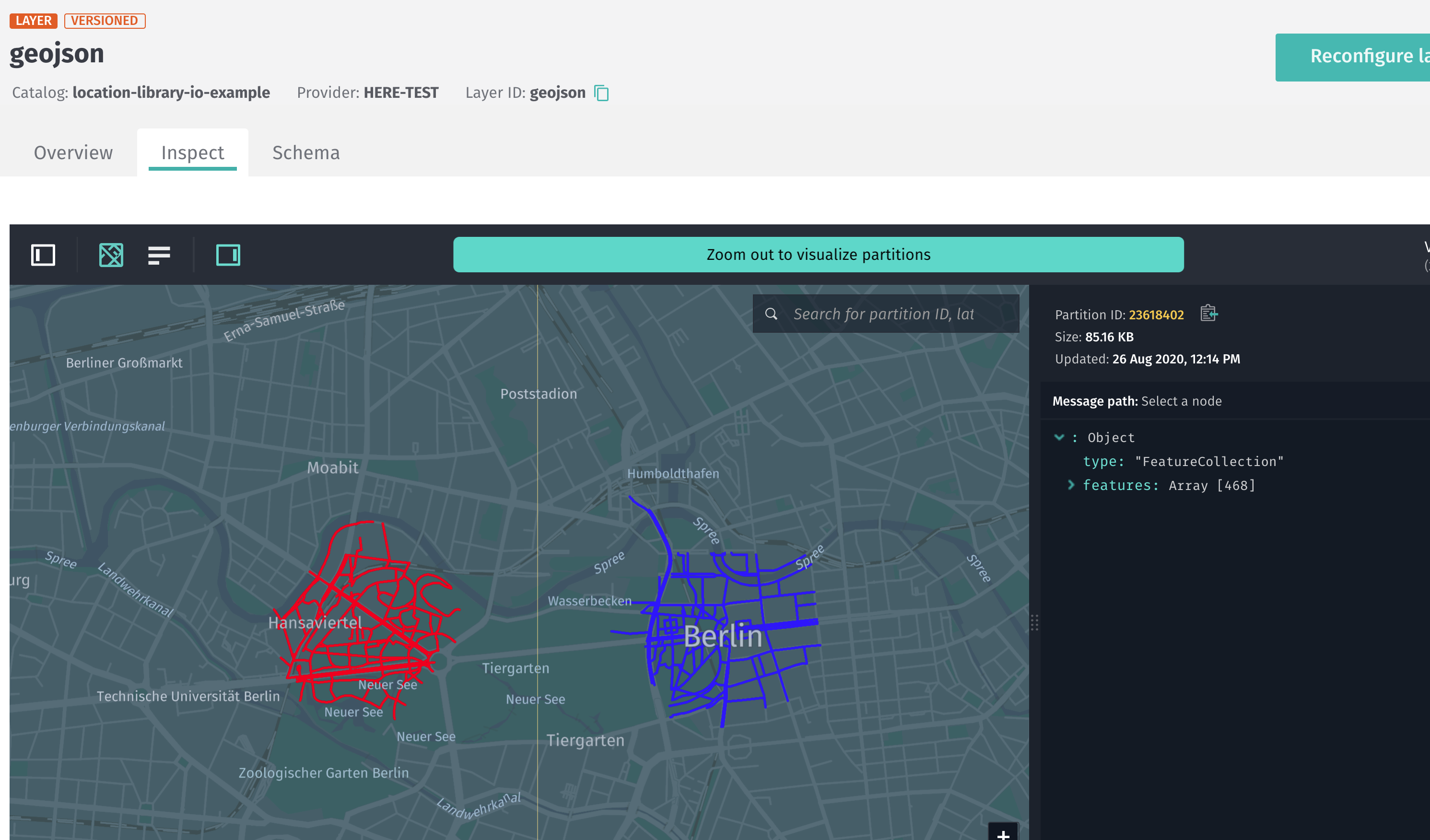
Location Library GeoJSON serialization
Location Library GeoJSON serialization
To easily serialize the library's geometry objects into GeoJSON format, you can
use the location-io package and store the resulting GeoJSON in a file. Use
your preferred viewer or store the GeoJSON in a versioned layer and view it
through https://platform.here.com/data.
The main entry point of the package is the
FeatureCollection
class, which you can use to add and serialize features.
You can add:
- Geo coordinates as point markers
- Line strings as geometries or arrows to highlight a line string direction
- Range based attributes on line strings, with one geometry (or an arrow) for
each range - Point based attributes on line strings, with one marker at each attribute
position - Bounding box to highlight a rectangle area on a map
- Custom marker images
Creating a marker
To add a marker at a certain location, you can add any geo-coordinate object as
a point.
import com.here.platform.location.io.scaladsl.Color
import com.here.platform.location.io.scaladsl.geojson.{FeatureCollection, SimpleStyleProperties}

FeatureCollection()
  .point(coordinates, SimpleStyleProperties().markerColor(Color.Green))
  .writePretty(new FileOutputStream("point-marker.json"))
import com.here.platform.location.io.javadsl.Color;
import com.here.platform.location.io.javadsl.geojson.FeatureCollection;
import com.here.platform.location.io.javadsl.geojson.SimpleStyleProperties;
new FeatureCollection()
.point(coordinates, new SimpleStyleProperties().markerColor(Color.GREEN))
.writePretty(new FileOutputStream("point-marker.json"));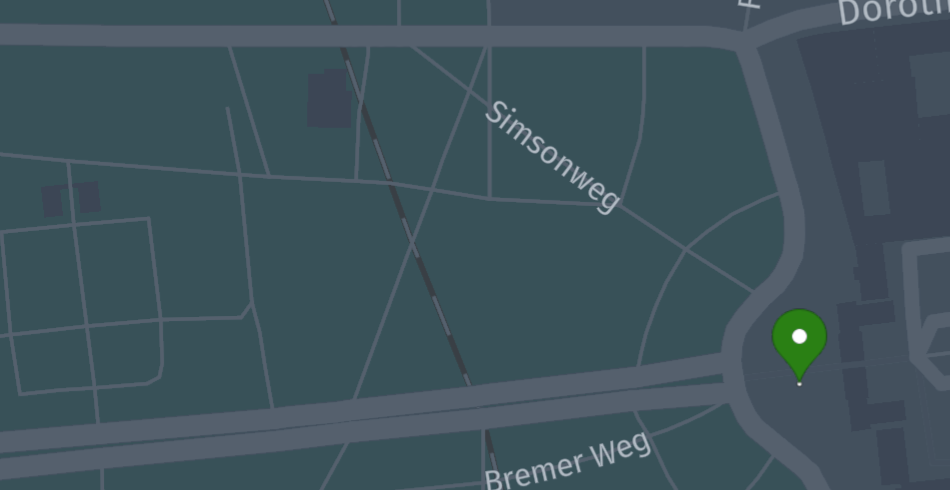
You can use
SimpleStyleProperties
or
HereProperties
and combine them also with your custom properties using the add method.
For Java, please use the corresponding similar classes from the javadsl
package.
NoteIn Scala, geospatial types need to implement the corresponding operations, e.g
GeoCoordinateOperations
for geo-coordinates or
LineStringOperations
for line strings.In Java, geospatial types need to implement the corresponding holder, e.g.
GeoCoordinateHolder
Drawing a road geometry for a vertex
The following code will result in a red segment geometry highlighting a vertex.
import com.here.platform.location.integration.optimizedmap.graph.PropertyMaps
import com.here.platform.location.io.scaladsl.Color
import com.here.platform.location.io.scaladsl.geojson.{FeatureCollection, SimpleStyleProperties}

val geometry = PropertyMaps(optimizedMap).geometry
FeatureCollection()
  .lineString(geometry(vertex), SimpleStyleProperties().strokeWidth(5.0).stroke(Color.Red))
  .writePretty(new FileOutputStream("vertex-geometry.json"))
import com.here.platform.location.core.geospatial.GeoCoordinate;
import com.here.platform.location.core.geospatial.javadsl.LineStringHolder;
import com.here.platform.location.core.graph.javadsl.PropertyMap;
import com.here.platform.location.inmemory.graph.Vertex;
import com.here.platform.location.integration.optimizedmap.graph.javadsl.PropertyMaps;
import com.here.platform.location.io.javadsl.Color;
import com.here.platform.location.io.javadsl.geojson.FeatureCollection;
import com.here.platform.location.io.javadsl.geojson.SimpleStyleProperties;
PropertyMap<Vertex, LineStringHolder<GeoCoordinate>> geometry =
new PropertyMaps(optimizedMap).geometry();
new FeatureCollection()
.lineString(
geometry.get(vertex), new SimpleStyleProperties().strokeWidth(5.0).stroke(Color.RED))
.writePretty(new FileOutputStream("vertex-geometry.json"));Drawing a range on a road geometry for a vertex
Most attributes are referenced using ranges on vertex geometries, and you can
use specific methods to highlight them.
import com.here.platform.location.integration.optimizedmap.graph.PropertyMaps
import com.here.platform.location.io.scaladsl.Color
import com.here.platform.location.io.scaladsl.geojson.{FeatureCollection, SimpleStyleProperties}

val geometry = PropertyMaps(optimizedMap).geometry
FeatureCollection()
  .lineStringRanges(geometry(vertex),
                    Seq(RangeBasedProperty(0, 0.5, Color.Red),
                        RangeBasedProperty(0.5, 1.0, Color.Green)))(colorRange =>
    SimpleStyleProperties().strokeWidth(5.0).stroke(colorRange.value))
  .writePretty(new FileOutputStream("vertex-range.json"))
import com.here.platform.location.core.geospatial.GeoCoordinate;
import com.here.platform.location.core.geospatial.javadsl.LineStringHolder;
import com.here.platform.location.core.graph.RangeBasedProperty;
import com.here.platform.location.core.graph.javadsl.PropertyMap;
import com.here.platform.location.inmemory.graph.Vertex;
import com.here.platform.location.integration.optimizedmap.graph.javadsl.PropertyMaps;
import com.here.platform.location.io.javadsl.Color;
import com.here.platform.location.io.javadsl.geojson.FeatureCollection;
import com.here.platform.location.io.javadsl.geojson.SimpleStyleProperties;
PropertyMap<Vertex, LineStringHolder<GeoCoordinate>> geometry =
new PropertyMaps(optimizedMap).geometry();
new FeatureCollection()
.lineStringRanges(
geometry.get(vertex),
Arrays.asList(
new RangeBasedProperty<>(0.0, 0.5, Color.RED),
new RangeBasedProperty<>(0.5, 1.0, Color.GREEN)),
colorRange -> new SimpleStyleProperties().strokeWidth(5.0).stroke(colorRange.value()))
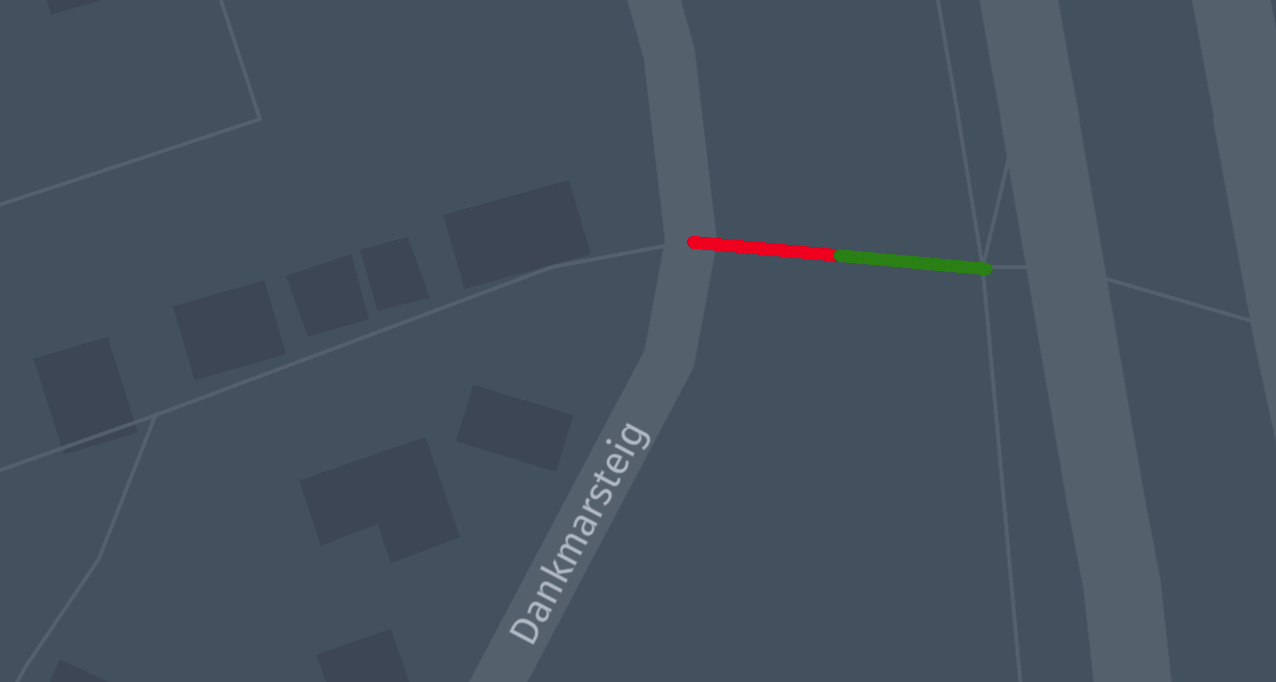
.writePretty(new FileOutputStream("vertex-range.json"));This results in the geometry of the vertex being red for the first half, and
green for the second.
Use arrows to display directional attributes on ranges
With the following code you can now show ranged attributes from a property map
in a GeoJSON file.
import com.here.platform.location.integration.optimizedmap.geospatial.ProximitySearches
import com.here.platform.location.integration.optimizedmap.graph.PropertyMaps
import com.here.platform.location.io.scaladsl.Color
import com.here.platform.location.io.scaladsl.geojson.{FeatureCollection, SimpleStyleProperties}

val geometry = PropertyMaps(optimizedMap).geometry
val automobileAccess =
  PropertyMaps(optimizedMap).roadAccess(RoadAccess.Automobile)
val proximitySearch = ProximitySearches(optimizedMap).vertices

proximitySearch
  .search(coordinates, 200)
  .foldLeft(FeatureCollection())((featureCollection, result) =>
    featureCollection.arrowRanges(geometry(result.element), automobileAccess(result.element))(
      access =>
        SimpleStyleProperties()
          .stroke(if (access.value) Color.Green else Color.Red)))
  .writePretty(new FileOutputStream("road-access.json"))
import com.here.platform.location.core.geospatial.ElementProjection;
import com.here.platform.location.core.geospatial.GeoCoordinate;
import com.here.platform.location.core.geospatial.javadsl.GeoCoordinateHolder;
import com.here.platform.location.core.geospatial.javadsl.LineStringHolder;
import com.here.platform.location.core.geospatial.javadsl.ProximitySearch;
import com.here.platform.location.core.graph.javadsl.PropertyMap;
import com.here.platform.location.core.graph.javadsl.RangeBasedPropertyMap;
import com.here.platform.location.inmemory.graph.Vertex;
import com.here.platform.location.integration.optimizedmap.geospatial.javadsl.ProximitySearches;
import com.here.platform.location.integration.optimizedmap.graph.RoadAccess;
import com.here.platform.location.integration.optimizedmap.graph.javadsl.PropertyMaps;
import com.here.platform.location.io.javadsl.Color;
import com.here.platform.location.io.javadsl.geojson.FeatureCollection;
import com.here.platform.location.io.javadsl.geojson.SimpleStyleProperties;
PropertyMap<Vertex, LineStringHolder<GeoCoordinate>> geometry =
new PropertyMaps(optimizedMap).geometry();
RangeBasedPropertyMap<Vertex, Boolean> automobileAccess =
new PropertyMaps(optimizedMap).roadAccess(RoadAccess.Automobile);
ProximitySearch<GeoCoordinateHolder, Vertex> proximitySearch =
new ProximitySearches(optimizedMap).vertices();
Iterable<ElementProjection<Vertex>> searchResults = proximitySearch.search(coordinates, 200);
FeatureCollection featureCollection = new FeatureCollection();
for (ElementProjection<Vertex> result : searchResults) {
featureCollection.arrowRanges(
geometry.get(result.getElement()),
automobileAccess.get(result.getElement()),
access -> new SimpleStyleProperties().stroke(access.value() ? Color.GREEN : Color.RED));
}
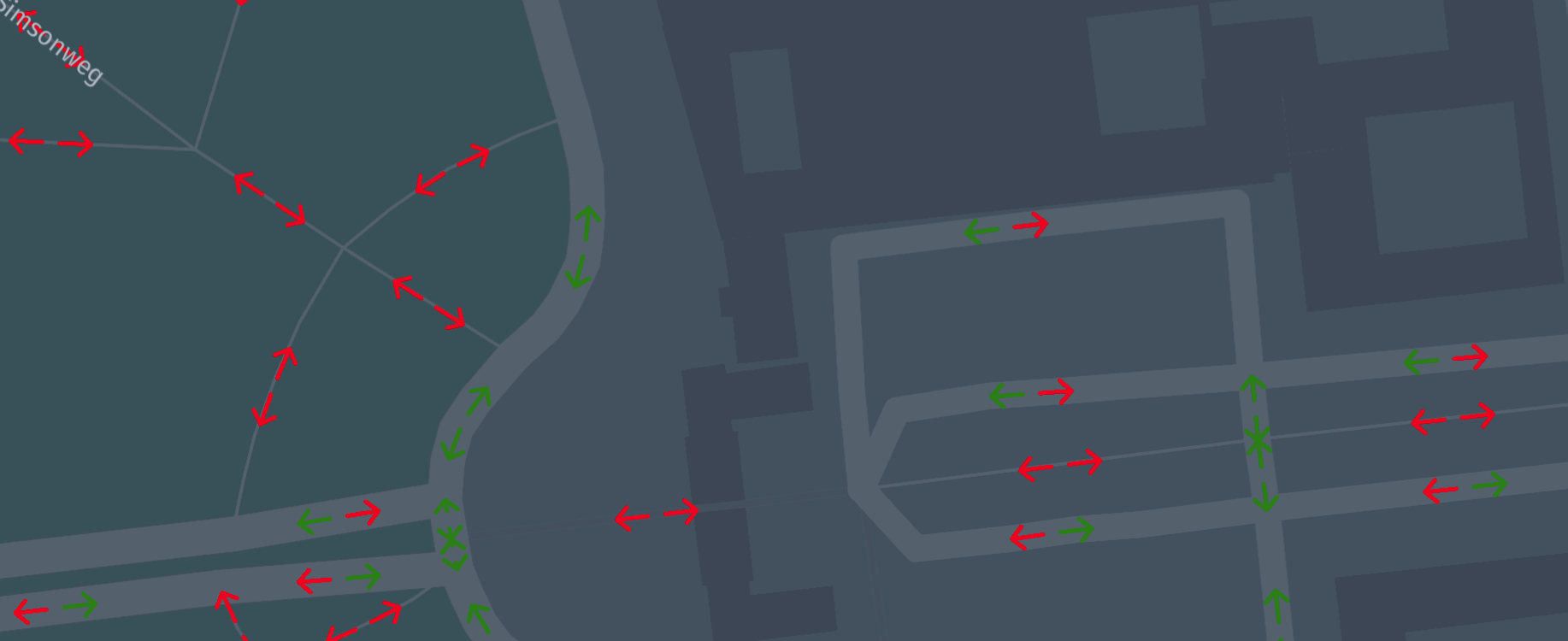
featureCollection.writePretty(new FileOutputStream("road-access.json"));Green arrows highlight roads traversable by cars.
Drawing a point based attributes on a road geometry for a vertex
Similarly to ranges, attributes can be referred by point-based properties on
vertex geometries.
import com.here.platform.location.integration.optimizedmap.graph.PropertyMaps
import com.here.platform.location.io.scaladsl.Color
import com.here.platform.location.io.scaladsl.geojson.{FeatureCollection, SimpleStyleProperties}

val geometry = PropertyMaps(optimizedMap).geometry
FeatureCollection()
  .lineStringPoints(geometry(vertex),
                    Seq(PointBasedProperty(0, Color.Red),
                        PointBasedProperty(0.5, Color.Green),
                        PointBasedProperty(1.0, Color.Blue)))(colorPoint =>
    SimpleStyleProperties().markerColor(colorPoint.value))
  .writePretty(new FileOutputStream("vertex-point.json"))
import com.here.platform.location.core.geospatial.GeoCoordinate;
import com.here.platform.location.core.geospatial.javadsl.LineStringHolder;
import com.here.platform.location.core.graph.PointBasedProperty;
import com.here.platform.location.core.graph.javadsl.PropertyMap;
import com.here.platform.location.inmemory.graph.Vertex;
import com.here.platform.location.integration.optimizedmap.graph.javadsl.PropertyMaps;
import com.here.platform.location.io.javadsl.Color;
import com.here.platform.location.io.javadsl.geojson.FeatureCollection;
import com.here.platform.location.io.javadsl.geojson.SimpleStyleProperties;
PropertyMap<Vertex, LineStringHolder<GeoCoordinate>> geometry =
new PropertyMaps(optimizedMap).geometry();
new FeatureCollection()
.lineStringPoints(
geometry.get(vertex),
Arrays.asList(
new PointBasedProperty<>(0.0, Color.RED),
new PointBasedProperty<>(0.5, Color.GREEN),
new PointBasedProperty<>(1.0, Color.BLUE)),
colorPoint -> new SimpleStyleProperties().markerColor(colorPoint.value()))
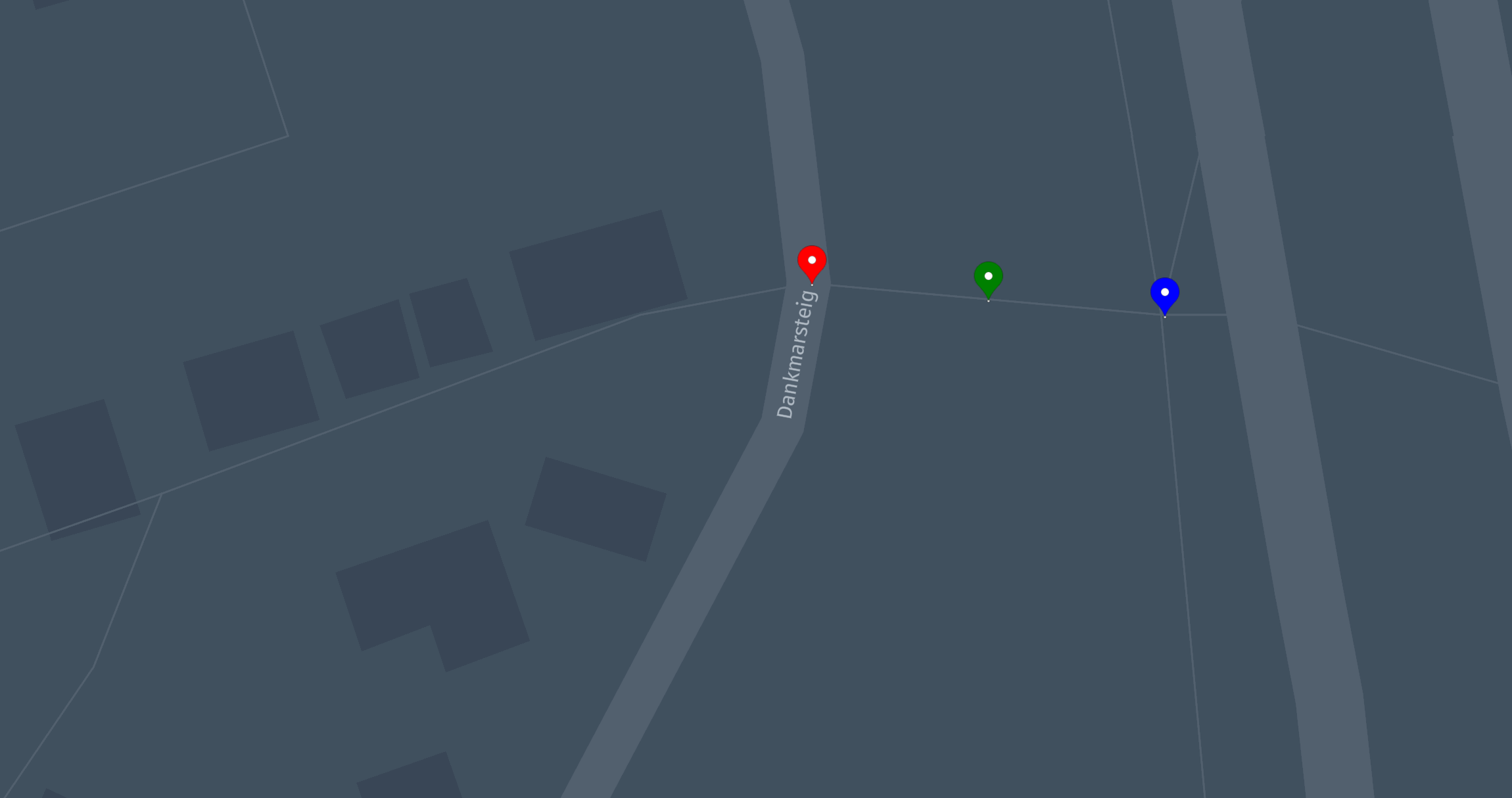
.writePretty(new FileOutputStream("vertex-point.json"));This results in the three point markers over a vertex geometry.
Drawing a bounding box to highlight a rectangle area
The following code will highlight a map area.
import com.here.platform.location.io.scaladsl.Color
import com.here.platform.location.io.scaladsl.geojson.{FeatureCollection, SimpleStyleProperties}

FeatureCollection()
  .boundingBox(boundingBox, SimpleStyleProperties().fill(Color.Green).fillOpacity(0.5))
  .writePretty(new FileOutputStream("bounding-box.json"))
import com.here.platform.location.io.javadsl.Color;
import com.here.platform.location.io.javadsl.geojson.FeatureCollection;
import com.here.platform.location.io.javadsl.geojson.SimpleStyleProperties;
new FeatureCollection()
.boundingBox(boundingBox, new SimpleStyleProperties().fill(Color.GREEN).fillOpacity(0.5))
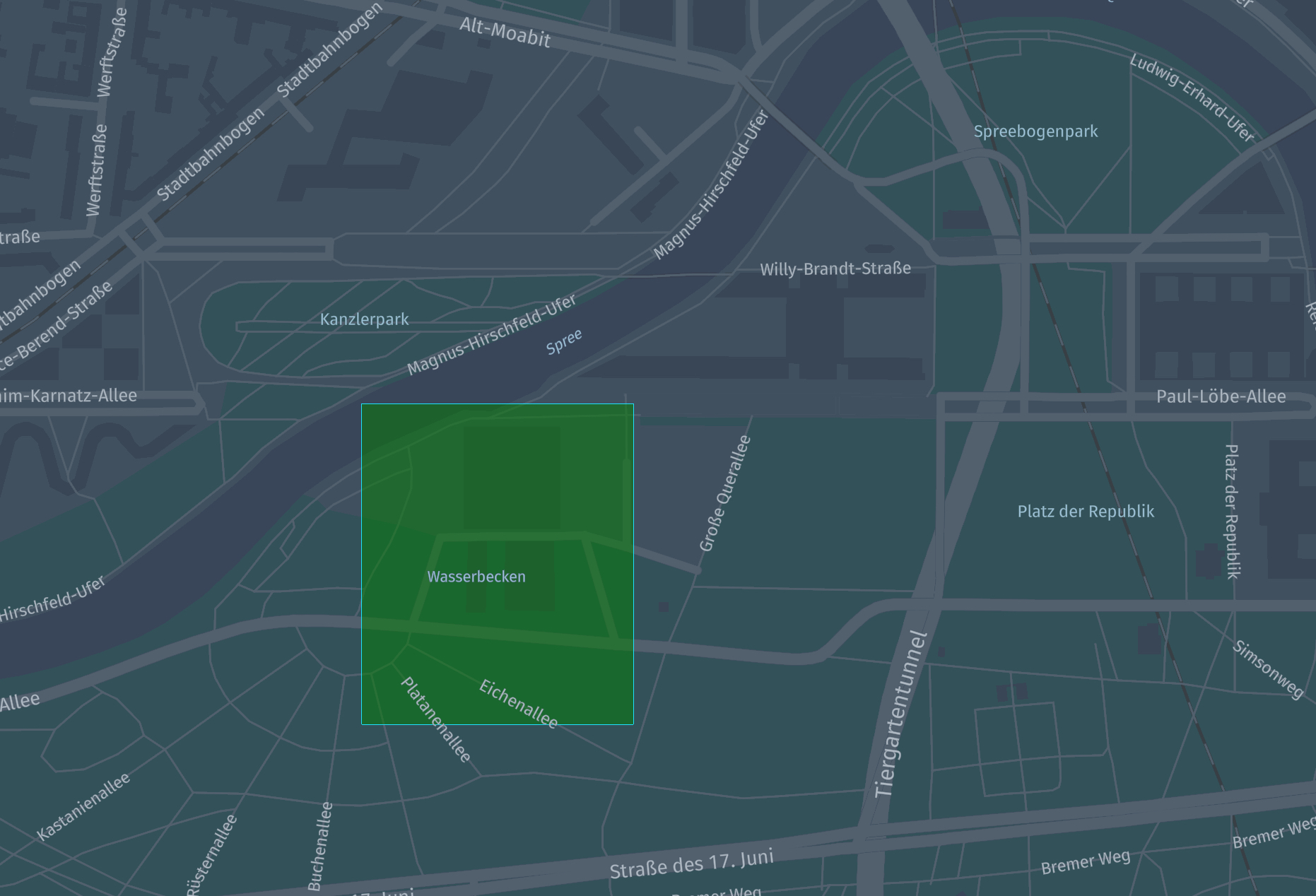
.writePretty(new FileOutputStream("point-marker.json"));This results in a transparent green rectangle on the map.
Custom marker symbol images
The markerImage method of
HereProperties
accepts a valid data URL or a web URL, making it possible to display an external
image as marker image.
Images can also be referenced by name through the markerSymbol method of
SimpleStyleProperties;
such names can be defined through the markerSymbolImages method of
FeatureCollection.
import com.here.platform.location.io.scaladsl.geojson.{
  FeatureCollection,
  MarkerSymbolImages,
  SimpleStyleProperties
}

FeatureCollection()
  .markerSymbolImages(
    MarkerSymbolImages()
      .add(
        "img",
        "data:image/svg+xml;utf8,<svg width='128' height='128' viewBox='0 0 26 26' version='1.1' xmlns='http://www.w3.org/2000/svg'><g style='fill:rgb(217, 217, 242); stroke:rgba(198, 203, 221, 0.5)' transform='translate(0,5)'><path d='M 5,7 C 4.5,4.5 7.5,1.5 10,3 c 5.5,-5 13,-1.5 12.5,5 4,2 3.5,7.5 -0,7.5 -6,0 -10.5,0 -18.5,0 -5,-0 -4.5,-8.5 1,-8.5 z'/></g></svg>"
      ))
  .point(coordinates, SimpleStyleProperties().markerSymbol("img"))
  .writePretty(new FileOutputStream("custom-marker.json"))
import com.here.platform.location.io.javadsl.geojson.FeatureCollection;
import com.here.platform.location.io.javadsl.geojson.MarkerSymbolImages;
import com.here.platform.location.io.javadsl.geojson.SimpleStyleProperties;
new FeatureCollection()
.markerSymbolImages(
new MarkerSymbolImages()
.add(
"img",
"data:image/svg+xml;utf8,<svg width='128' height='128' viewBox='0 0 26 26' version='1.1' xmlns='http://www.w3.org/2000/svg'><g style='fill:rgb(217, 217, 242); stroke:rgba(198, 203, 221, 0.5)' transform='translate(0,5)'><path d='M 5,7 C 4.5,4.5 7.5,1.5 10,3 c 5.5,-5 13,-1.5 12.5,5 4,2 3.5,7.5 -0,7.5 -6,0 -10.5,0 -18.5,0 -5,-0 -4.5,-8.5 1,-8.5 z'/></g></svg>"))
.point(coordinates, new SimpleStyleProperties().markerSymbol("img"))
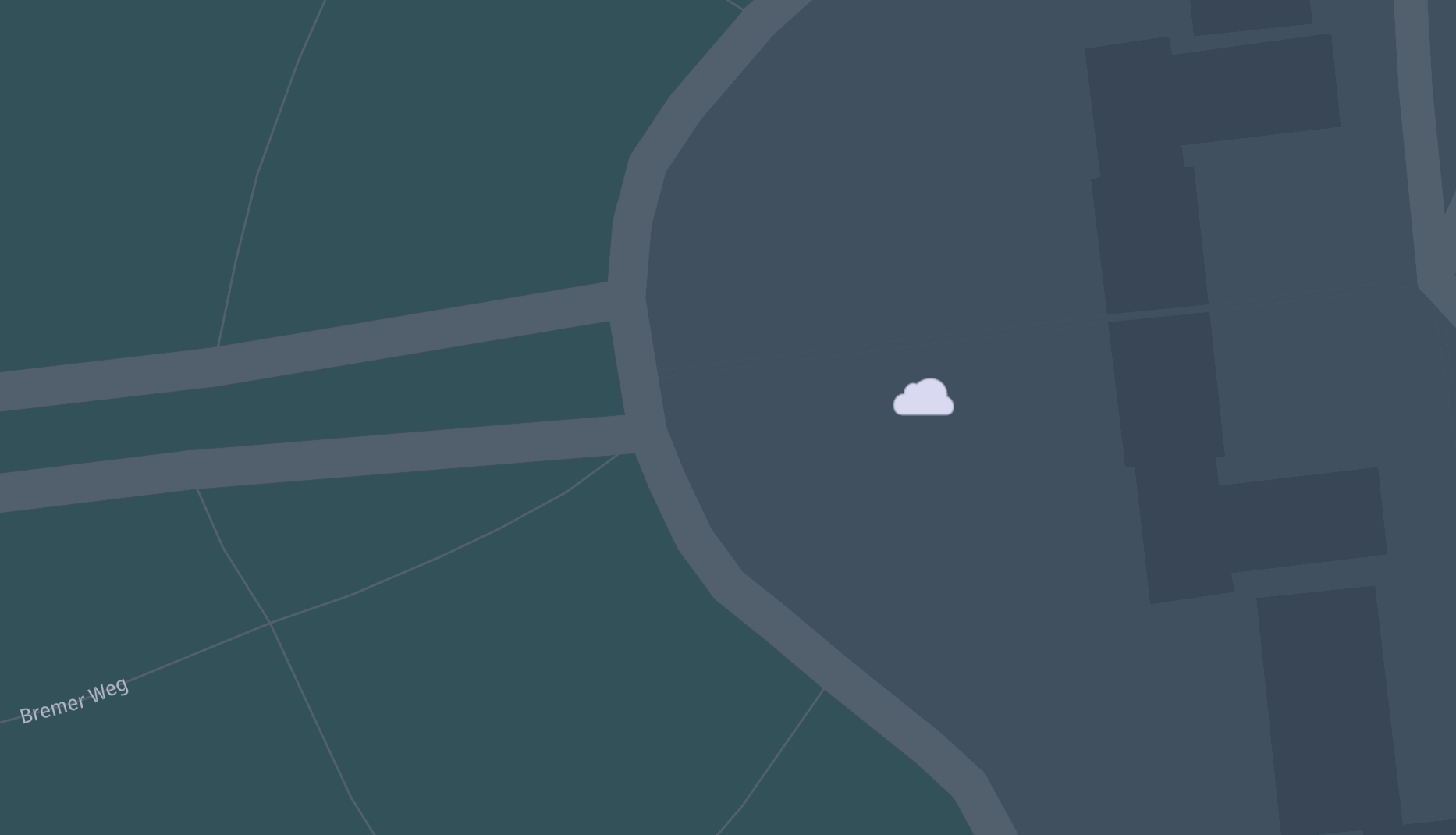
.writePretty(new FileOutputStream("custom-marker.json"));This results in a cloud logo being shown as marker symbol image.
Drawing on top of a background
If you add features to an already populated feature collection, the latter will
be used as a background for the former.
import com.here.platform.location.inmemory.graph.{Forward, Vertices}
import com.here.platform.location.integration.optimizedmap.geospatial.ProximitySearches
import com.here.platform.location.integration.optimizedmap.graph.PropertyMaps
import com.here.platform.location.io.scaladsl.Color
import com.here.platform.location.io.scaladsl.geojson.{FeatureCollection, SimpleStyleProperties}

val geometry = PropertyMaps(optimizedMap).geometry
val proximitySearch = ProximitySearches(optimizedMap).vertices

val searchResults = proximitySearch
  .search(coordinates, 200)

val background = searchResults
  .map(result =>
    Feature.lineString(geometry(result.element),
                       SimpleStyleProperties().strokeWidth(8.0).stroke(Color.Gray)))

val arrowsOnBackground = searchResults.map(result =>
  Feature.arrow(
    geometry(result.element),
    SimpleStyleProperties()
      .stroke(if (Vertices.directionOf(result.element) == Forward) Color.Blue else Color.Red)
  ))

FeatureCollection(background ++ arrowsOnBackground).writePretty(
  new FileOutputStream("arrows-on-geometries.json"))
import com.here.platform.location.core.geospatial.ElementProjection;
import com.here.platform.location.core.geospatial.GeoCoordinate;
import com.here.platform.location.core.geospatial.javadsl.LineStringHolder;
import com.here.platform.location.core.geospatial.javadsl.ProximitySearch;
import com.here.platform.location.core.graph.javadsl.PropertyMap;
import com.here.platform.location.inmemory.graph.Vertex;
import com.here.platform.location.inmemory.graph.Vertices;
import com.here.platform.location.inmemory.graph.javadsl.Direction;
import com.here.platform.location.integration.optimizedmap.geospatial.javadsl.ProximitySearches;
import com.here.platform.location.integration.optimizedmap.graph.javadsl.PropertyMaps;
import com.here.platform.location.io.javadsl.Color;
import com.here.platform.location.io.javadsl.geojson.FeatureCollection;
import com.here.platform.location.io.javadsl.geojson.SimpleStyleProperties;
PropertyMap<Vertex, LineStringHolder<GeoCoordinate>> geometry =
new PropertyMaps(optimizedMap).geometry();
ProximitySearch<GeoCoordinate, Vertex> proximitySearch =
new ProximitySearches(optimizedMap).vertices();
Iterable<ElementProjection<Vertex>> searchResults = proximitySearch.search(coordinates, 200);
FeatureCollection featureCollection = new FeatureCollection();
for (ElementProjection<Vertex> result : searchResults)
featureCollection.lineString(
geometry.get(result.element()),
new SimpleStyleProperties().strokeWidth(8.0).stroke(Color.GRAY));
for (ElementProjection<Vertex> result : searchResults)
featureCollection.arrow(
geometry.get(result.element()),
new SimpleStyleProperties()
.stroke(
Vertices.directionOf(result.element()) == Direction.FORWARD
? Color.BLUE
: Color.GREEN));
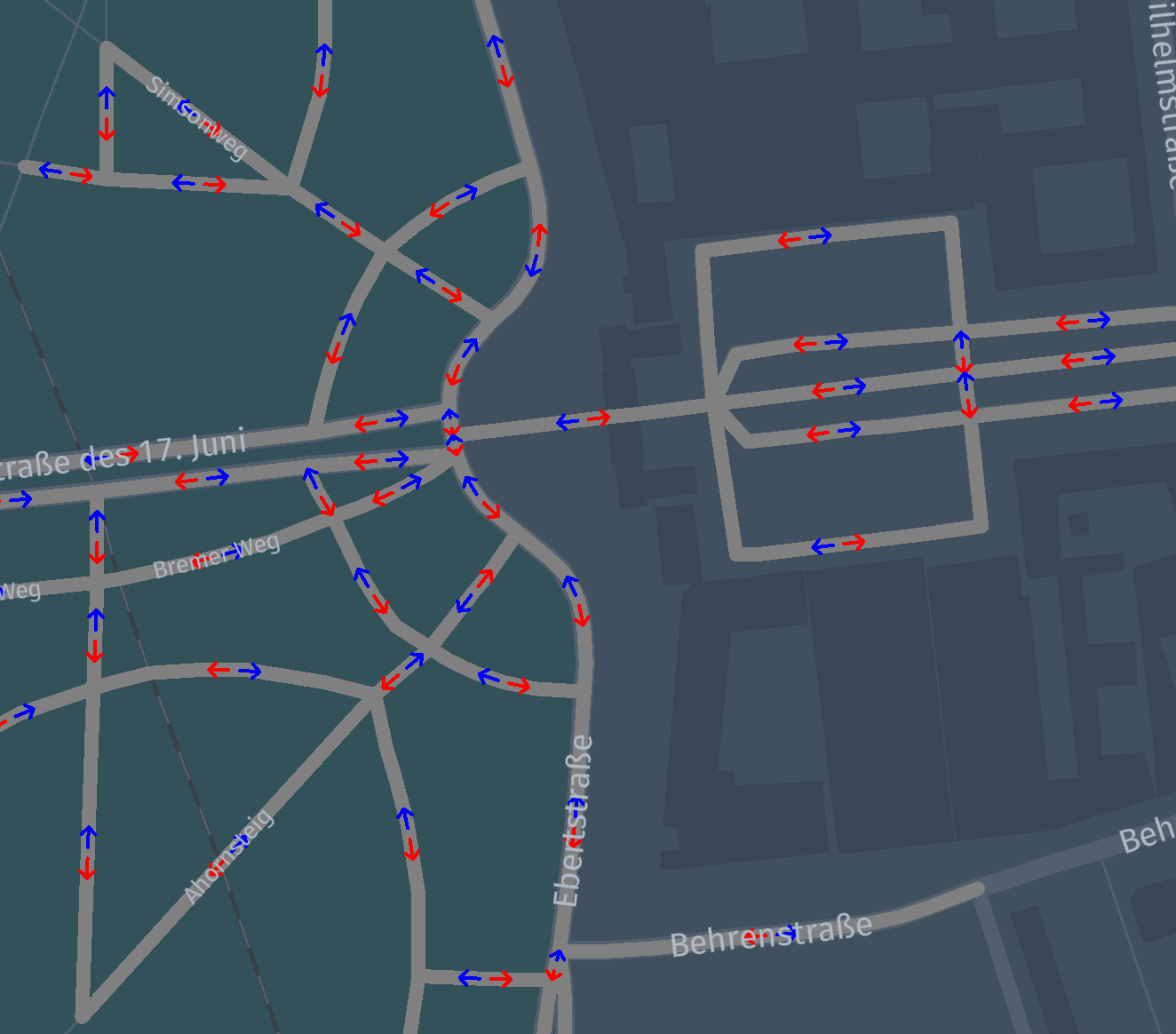
featureCollection.writePretty(new FileOutputStream("arrows-on-geometries.json"));This results in arrows being drawn over road geometry, with forward vertices
drawn in blue and backward vertices drawn in red.
Write a GeoJSON to a catalog in Spark
If you write GeoJSON to a versioned partition, you will be able to see the
results on https://platform.here.com/data.
In order to demonstrate this functionality we will use the
Data Client Spark Connector,
but you can choose to write the resulting GeoJSON using other Data Client
methods or the Data Processing Library.
import com.here.platform.data.client.spark.LayerDataFrameWriter._
import com.here.platform.location.integration.herecommons.geospatial.{
  HereTileLevel,
  HereTileResolver
}
import com.here.platform.location.integration.optimizedmap.geospatial.ProximitySearches
import com.here.platform.location.integration.optimizedmap.graph.PropertyMaps
import com.here.platform.location.io.scaladsl.Color
import com.here.platform.location.io.scaladsl.geojson.{FeatureCollection, SimpleStyleProperties}
val sparkSession: SparkSession =
  SparkSession
    .builder()
    .master("local")
    .appName("location-io-example")
    .getOrCreate()
import sparkSession.implicits._

case class StringConverter(field: String) extends VersionedDataConverter {
  override def serializeGroup(rowMetadata: VersionedRowMetadata, rows: Iterator[Row]) =
    GroupedData(rowMetadata, rows.next().getAs[String](field).getBytes("UTF-8"))
}

sparkSession.sparkContext
  .parallelize(Seq((berlinGeoCoordinates1, Color.Red), (berlinGeoCoordinates2, Color.Blue)))
  .flatMap {
    case (coordinate, color) =>
      val proximity = ProximitySearches(optimizedMapLayers).vertices
      val geometry = PropertyMaps(optimizedMapLayers).geometry
      val resolver = new HereTileResolver(HereTileLevel(12))
      proximity
        .search(coordinate, 500)
        .map(p => geometry(p.element))
        .map(g => (resolver.fromCoordinate(g(0)), g, color))
  }
  .groupBy(_._1)
  .map {
    case (tile, geometriesWithColor) =>
      tile.value.toString -> FeatureCollection(geometriesWithColor.map {
        case (_, g, c) => Feature.lineString(g, SimpleStyleProperties().stroke(c))
      }).toJson

  }
  .toDF("mt_partition", "geojson")
  .writeLayer(outputCatalogHrn, outputLayer)
  .withDataConverter(StringConverter("geojson"))
  .save()
sparkSession.stop()
In the following example, you start from an RDD of coordinates and colors,
perform a distributed proximity search for geometries around the points in the
RDD, and finally create a one GeoJSON string for each output partition,
using the colors from the input RDD.
The results can be observed in the target catalog, when the layer has HEREtile
partitioning and application/vnd.geo+json as mime-type.