

Streaming pipeline
Streaming pipelines
Streaming pipelines allow you to transform data in stream layers. Examples of
these pipelines include pipelines that process vehicle sensor data for
information to use immediately or to archive for historical analysis.
For more on stream layers, see the
Data API.
The figure below illustrates the streaming pipeline creation process.
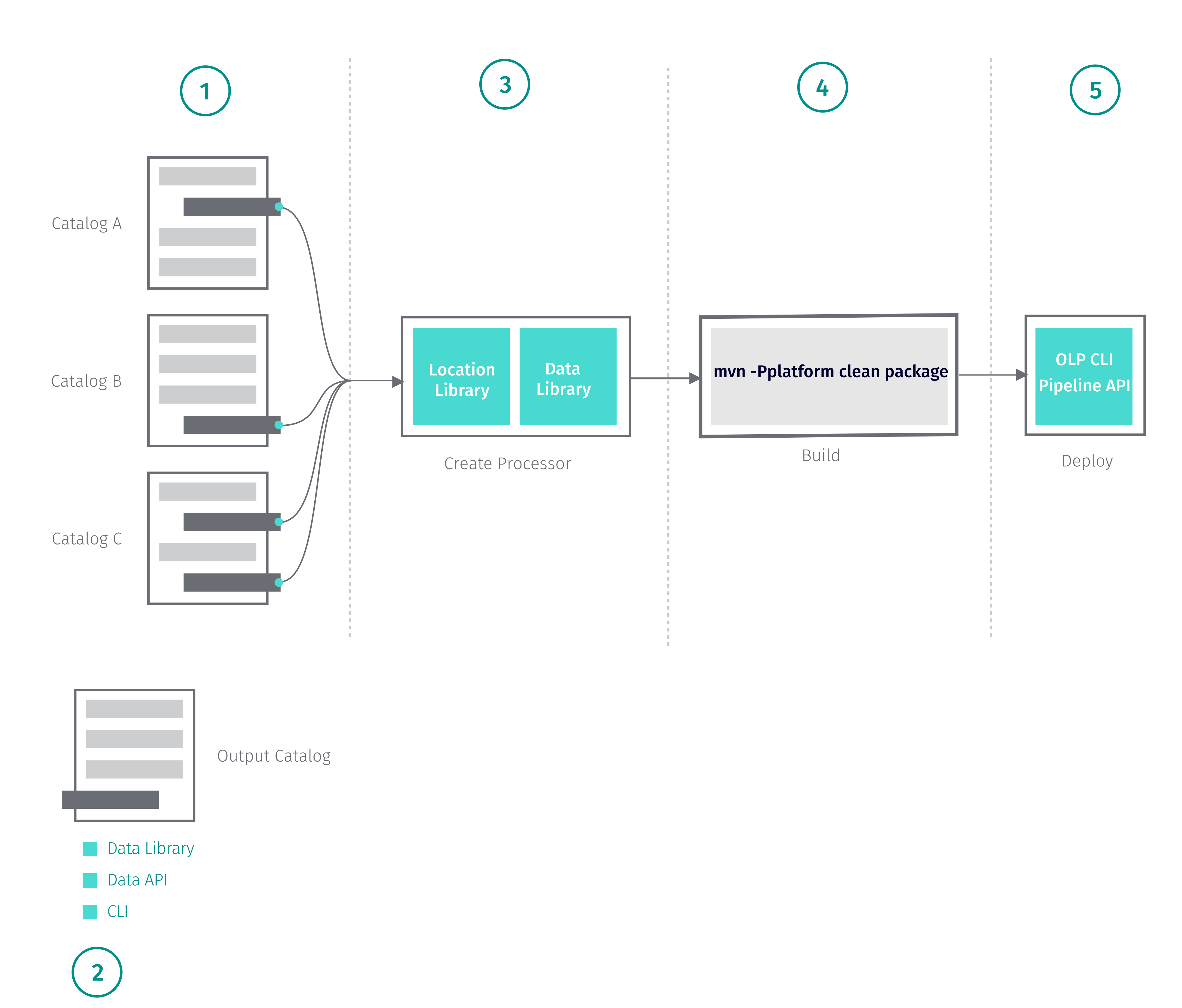
When you create a streaming pipeline, you need to go through the following
steps.
- Identify one or more stream layers to serve as your data source.
These may be versioned, volatile or streaming layers.- For more information on working with data catalogs, see the
Data API. - For example, HERE provides sensor data
catalogs based on the Sensor Data Ingestion Interface (SDII). For more
details on the SDII catalog data structures, see
SDII Data Specification.
- For more information on working with data catalogs, see the
- Create an output catalog.
- The portal provides a UI for managing data catalogs.
For more information on creating catalogs, see the
Data API. - The OLP CLI offers you command line options
For more information on OLP CLI data commands, see the
OLP CLI User Guide. - If you prefer to use REST requests, the Data API provides a series of
endpoints for managing data catalogs. For more information, see
Data API Developer's Guide.
- The portal provides a UI for managing data catalogs.
- Create your pipeline and write to your output catalog.
- The Location Library provides classes and methods for operations such as
clustering, map matching, and other features.
For more information on the Location Library, see the
Location Library Developer's Guide. - You can use the Data Client Library to retrieve your input and write to your
output. For more information on using the Data Client Library, see the
Data Client Library Developer's Guide. - For a tutorial that demonstrates how to create a streaming library, see
the Run a Flink Streaming Job Locally
tutorial.
- The Location Library provides classes and methods for operations such as
- Build your pipeline as a fat JAR file.
- To build your pipeline as a fat JAR, use the command below.
mvn -Pplatform clean package- Note that you can only use this command if you use the environment POM as
the parent POM. - For examples that show how to run your pipeline locally and how to build
your pipeline, see the
Code Examples page.
- Deploy
- The portal provides a UI for managing pipelines
For more information on deploying pipelines, see the
Pipelines Developer's Guide. - The OLP CLI provides you commands tool to deploy and manage your JAR file
in the Workspace. For more information on OLP CLI pipeline commands, see the
OLP CLI User Guide. - If you prefer to use REST requests, the Pipeline API provides a series of
endpoints. For more information, see
Pipeline API Developer's Guide.
- The portal provides a UI for managing pipelines
The SDK provides streaming pipeline Maven Archetypes for setting up a streaming
pipeline project. For more information on streaming pipeline Archetypes, see
Create Streaming Pipelines.
Updated last month
Did this page help you?