

Configurations available for pipeline developers
As mentioned in the Develop pipelines section, the end product of
the application development process is a JAR file that can be deployed to the pipeline service and used to process data.
There are several configuration options available during the application development, including setting up system variables and
creating configuration files such as:
SDK BOM files- are used to help manage dependencies during pipeline development.credentials.properties- is used to manage access to the services and resources provided by the HERE platform.logging configuration files- are used to control the amount of information reported in the pipeline logs.runtime parameters- are used to configure the pipeline runtime environment.pipeline-config.conf- contains the parameters describing the input catalogs, output catalog, and billing tags.pipeline-job.conf- is used to customise the execution mode of batch pipelines.configuration files for third-party services- are used to connect a pipeline to third-party services.egress connections configuration- is used to configure connections from pipelines to publicly hosted data sources or services
The following sections examine configuration options.
Use of the runtime environment
An essential part of the pipeline development process is the selection of the runtime environment.
The HERE platform provides two types of runtime environments - batch and stream.
Different versions of the stream and batch runtime environments are based on the different versions of the Apache Flink
and Apache Spark frameworks, with a number of additional libraries included.
For a list of libraries included in the latest versions of the runtime environments, see the following articles:
NoteIt is recommended to use the latest versions of runtime environments available and avoid using deprecated versions.
To ensure that library versions are aligned during the pipeline development, we recommend using the sdk-batch-bom_2.12.pom
and sdk-stream-bom_2.12.pom BOM files, depending on the chosen runtime environment.
For more information on these BOM files, please see this article.
credentials.properties
The credentials.properties file is used to manage access to services and resources provided by the HERE platform.
You can download this file from the platform portal when you create an access key for an application.
For more information, please see the Credentials setup.
Local development
For local development, you need to copy the credentials.properties file to the .here folder in your home directory.
For more information, see the Set up your credentials user guide.
Platform development
The credentials.properties file is not used during the platform pipeline development.
Instead, the HERE account token is provided, which is generated based on the application or user credentials that were selected
during the pipeline version activation:

This token is available to the Data Client library which resolves it and refreshes it before it expires.
This token has the same access level as the application or user selected when the pipeline version was activated.
For more information, see the Identity and Access Management - Developer Guide.
Logging configuration
For troubleshooting and other maintenance purposes, your data processing pipelines may need to track various custom events.
To control how events are logged and how logs are processed, you need to provide a logging configuration for your pipeline.
The configuration details depend on whether you develop your pipelines locally or via the HERE platform.
NoteThe user is charged for the amount of logs written during the execution of the pipeline.
Local development
During the local development, if you want to add logging to your application code, the slf4j-abstracted log API should be used.
You are free to provide any slf4j binding, although we recommend using logback.
To specify a logging configuration, it's possible to use the external configuration files in .xml, Java Properties,
or any other format.
Whichever option you choose, make sure that the configuration files you've added are not included in the application's
Fat JAR file - this can lead to unexpected application behavior and the loss of logs, as multiple logging configuration files
are present in the process classpath at the same time.
Another requirement is that no separate logging implementation JAR files should be included in the application JAR file artifact - such as slf4j-api or slf4j-log4j12.
For example, slf4j-api should be a provided JAR file defined in the BOM for the application's Fat JAR file.
Platform development
Files related to the logging configuration are not used during the platform pipeline development - the platform itself is responsible for this.
The amount of information reported in the logs depends on the logging level you select for each pipeline version when it is executed.
The Debug, Info, Warn, and Error logging levels are supported, with Warn being used by default.
Use the Logging configuration menu on the pipeline version page to update it:
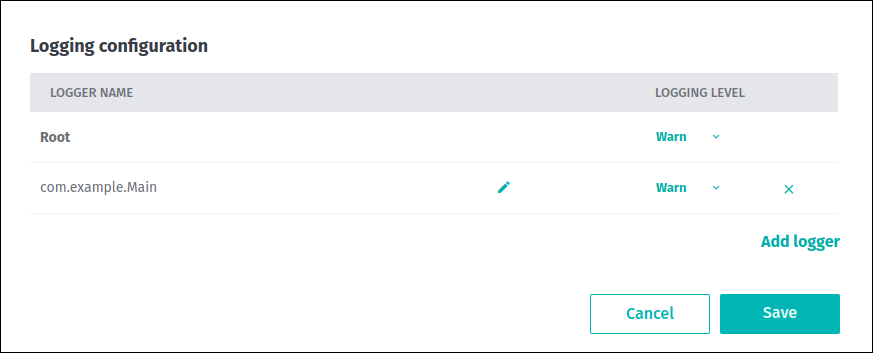
For more information about the basics of pipeline logging, changing and retrieving the pipeline version logging level, etc.,
see the Pipeline logging section.
Runtime parameters
During pipeline development, certain parameters can be specified at runtime to configure the pipeline runtime environment.
There are several ways to use them for your pipeline. All of these options are described below.
Local development
For local development, you can use the application.properties file to describe the runtime parameters in the Java Properties format.
You need to include this file in the process classpath, or specify its location on the development machine using the config.file system property:
mvn compile exec:java -D"exec.mainClass"="YourApplicationMainClass" -Dconfig.file=PATH/TO/application.propertiesPlatform development
For the platform development, this file is constructed from the value of the pipeline template’s defaultRuntimeConfig property
overridden on a key-by-key basis with the value of the pipeline version’s customRuntimeConfig property.
Please note, that the pipeline template’s defaultRuntimeConfig property could only be specified if the template was
created using the OLP CLI. If only platform portal is used for pipeline deployment, the values specified in the runtime parameters form
will be used as the contents of the application.properties file.
The example below demonstrates how the defaultRuntimeConfig and customRuntimeConfig properties interact during
the construction of application.properties:
    # Value of Pipeline Template's "defaultRuntimeConfig" property
    "myexample.threads = 3\nmyexample.language = \"en_US\"\nmyexample  .processing.window=300\nmyexample.processing.mode=stateless"

    # Value of Pipeline Version’s "customRuntimeConfig" property
    "myexample.threads=5\n\n myexample.processing.mode=    \"stateful\"\nmyexample.processing.filterInvalid = true"

    # The resulting Application.properties file on the pipeline classpath
    # (for the given values of "defaultRuntimeConfig" and "customRuntimeConfig")
    myexample.threads = 5
    myexample.language = "en_US"
    myexample.processing.window = 300
    myexample.processing.mode = "stateful"
    myexample.processing.filterInvalid = true
NoteFor stream applications, if the JAR contains
application.properties, then it will take precedence in the classpath over theapplication.propertiesprovided by the runtime if book.
pipeline-config.conf
The pipeline-config.conf is a configuration file that specifies output, input catalogs, and billing tags.
An example of the pipeline-config.conf is shown below:
{% codesnippet language="java" %}
    pipeline.config {
         billing-tag = "first-billing-tag,second-billing-tag"
         output-catalog { hrn = "hrn:here:data::realm:example-output" }
         input-catalogs {
             test-input-1 { hrn = "hrn:here:data::realm:example1" }
             test-input-2 { hrn = "hrn:here:data::realm:example2" }
             test-input-3 { hrn = "hrn:here:data::realm:example3" }
         }
     }
{% endcodesnippet %}
Where:
billing-tagspecifies cost allocation tags used to group billing records. If multiple tags are used, they should be separated by a comma (,).output-catalogspecifies the HRN that identifies the output catalog of the pipeline.input-catalogsspecifies one or more input catalogs for the pipeline. For each input catalog, its fixed identifier is provided along with the HRN of the actual catalog.
NoteThe format of the file is HOCON, a superset of JSON and Java properties.
It can be parsed by the open-source Typesafe Config library of Lightbend.
Local development
For local development, you can include the pipeline-config.conf file in the process classpath
or specify its location on the development machine using the pipeline-config.file system property:
mvn compile exec:java -D"exec.mainClass"="YourApplicationMainClass" -Dpipeline-config.file=PATH/TO/pipeline-config.confWhichever option you choose, make sure that the pipeline-config.file file you've added is not included in the application's Fat JAR file,
as explained in the next chapter.
If the data processing application is implemented using the Data Processing Library,
the parsing is handled automatically by the pipeline-runner package.
Platform development
The pipeline-config.conf file is not used during the platform pipeline development.
Instead, it is generated by the pipeline service based on the values of billing tags, input and output catalogs that are
specified during the pipeline template and pipeline version creation.
For more information about these properties, please the see following chapters in the Deploy a pipeline via the web portal section:
During platform development, we strongly recommend against using Fat JAR files that contain pipeline-config.conf files.
It is considered as a bad practice because:
- Pipeline implementations may bind to and distinguish between multiple input catalogs using fixed identifiers.
The fixed identifiers are defined in a pipeline template. An HRN is defined for each pipeline version so that the same
pipeline template may be reused in multiple setups. If thepipeline-config.conffile is included in the template's Fat JAR,
such a template may not be reusable for different pipeline versions, because the HRNs of the catalogs are hard-coded in the config file at the pipeline template level. - It can lead to unexpected application behaviour because two
pipeline-config.conffiles (one generated by the pipeline
service and another included in the template's Fat JAR) are available in the process classpath at the same time.
pipeline-job.conf
Batch pipelines perform a specific job and then terminate. Stream pipelines don't perform a specific, time-constrained job, but run continuously.
For batch pipelines, you may be interested in customizing the execution mode of the application, so that it only runs when certain conditions are met.
Use the pipeline-job.conf file to do this:
	pipeline.job.catalog-versions {
		output-catalog { base-version = 42 }
		input-catalogs {
			test-input-1 {
				processing-type = "no_changes"
				version = 19
				}
			test-input-2 {
				processing-type = "changes"
				since-version = 70
				version = 75
				}
			test-input-3 {
				processing-type = "reprocess"
				version = 314159
			}
		}
	}
Where:
-
base-versionofoutput-catalogindicates the already-existing version of the catalog on top of which new data should be published. -
input-catalogscontain, for each input, theversionof that input that is the most up-to-date. This is the version that should be processed.
In addition, information that specifies what has changed since the last time the job ran is also included. Catalogs can be distinguished via the same identifiers present in the pipeline configuration file. -
processing-typedescribes what has changed in each input since the last successful run. The value can beno_changes,changes, andreprocess.no_changesindicates that that input catalog has not changed since the last run.changesindicates that that input catalog has changed. A second parametersince-versionis included to indicate which version of that catalog was processed the last run.reprocessdoes not specify whether that input catalog has changed or not. The pipeline is requested to reprocess
that whole catalog instead of attempting any kind of incremental processing. This may be due to an explicit user request or to a system condition, such as the first time a pipeline runs.
Local development
For local development, you can include the pipeline-job.conf file in the process classpath
or specify its location on the development machine using the pipeline-job.file system property:
mvn compile exec:java -D"exec.mainClass"="YourApplicationMainClass" -Dpipeline-job.file=PATH/TO/pipeline-job.confWhichever option you choose, make sure that the pipeline-job.conf file you've added is not included in the application's Fat JAR file,
as explained in the next chapter.
Platform development
The pipeline-job.conf file is not used during the platform pipeline development.
Instead, it is generated based on the properties selected during the pipeline version activation, and then added to the process classpath.
Two activation modes are available. The first is the Run Now mode, which forces the pipeline version to run immediately
without waiting for the input data to change:
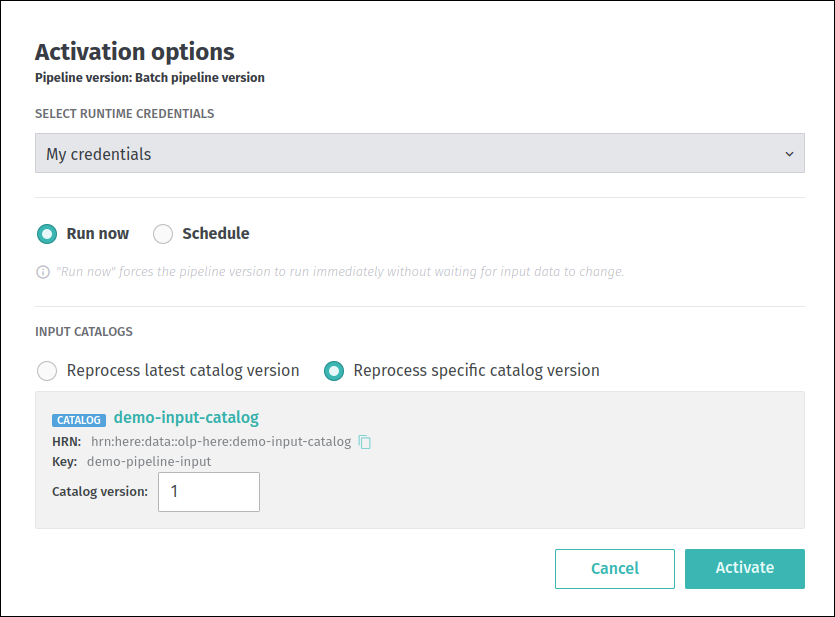
When this mode is selected, the contents of the generated pipeline-job.conf file will look like this:
    pipeline.job.catalog-versions {
       output-catalog { base-version = 1 }
       input-catalogs {
          input {
             processing-type = "reprocess"
             version = 2
          }
       }
    }
We can see that the content of the generated file is fully aligned with the values specified during the pipeline version
activation, the including input catalog key, its version, etc.
The other activation mode is Schedule. In this mode, the pipeline version only runs when the input data changes:
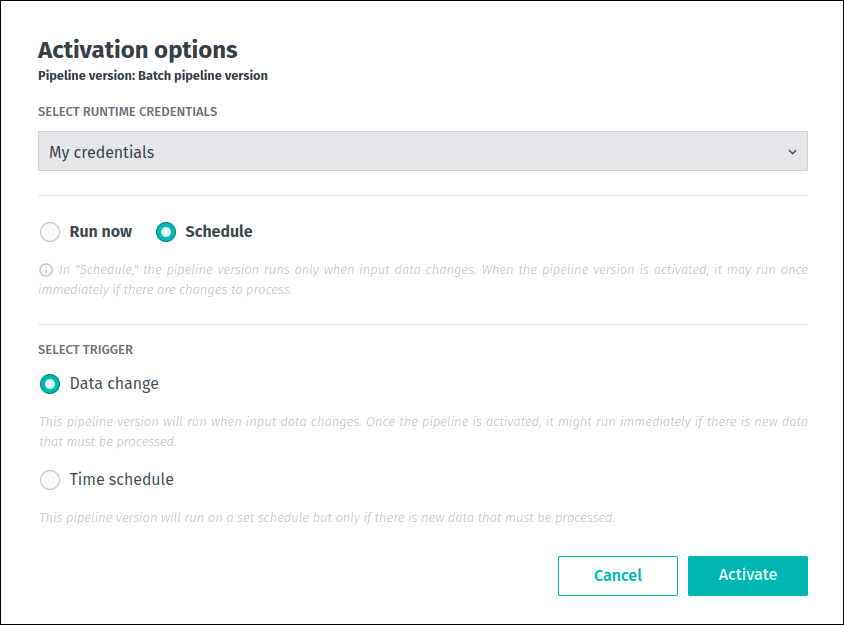
As you can see from the screenshot above, the web portal does not allow you to specify which catalog version you want to depend on.
It is determined automatically by the Pipelines API - when the input data changes, the new version of the catalog is created, then the
input catalogs are validated and an appropriate version is selected. Based on this information, the pipeline-job.conf file is generated:
    pipeline.job.catalog-versions {
      output-catalog { base-version = 1 }
       input-catalogs {
        input {
          processing-type = "changes"
          since-version = 1
          version = 2
        }
      }
    }
For more information about the batch pipeline activation options, see this article.
During platform development, we strongly recommend against using Fat JAR files that contain pipeline-job.conf files.
It is considered as a bad practice because:
- If the
pipeline-job.conffile is included in the template's Fat JAR, this may prevent the activation mode from
being customized for different pipeline versions, because the values of processing type and catalogs versions are
hard-coded in the config file at the pipeline template level. - It can lead to unexpected application behaviour because two
pipeline-job.conffiles (one generated by the pipeline
service and another included in the template's Fat JAR) are available in the process classpath at the same time.
System properties
The following JVM system properties are set by the Pipeline API when a pipeline is submitted as a new job to provide
integration with other HERE services.
They can be obtained using the System.getProperties() method, or the equivalent:
olp.pipeline.id: Identifier of the pipeline, as defined in the Pipeline API.olp.pipeline.version.id: Identifier of the pipeline version, as defined in the Pipeline API.olp.deployment.id: Identifier of the job, as defined in the Pipeline API.olp.realm: The customer realm.
Below are additional properties paths used by the platform:
env.api.lookup.hostakka.*here.platform.*com.here.*
In addition to these, other properties are set by the system to configure the runtime environment.
These include Spark or Flink
configuration parameters associated with the pipeline version configuration that you have selected.
These configuration parameters are specific to the chosen framework and its version.
Because these configuration parameters may change, they are considered implementation-specific and are left to your determination.
System properties specified in this section are visible from the main user process only.
These system properties are not necessarily replicated to the JVMs that run in worker nodes of the cluster.
Configuration for third-party services
Connecting your application to third-party services can offer several advantages and functionalities that might be challenging
or impractical to implement independently. This section presents the method of connecting a pipeline application to a third-party
service using the credentials for that service and the platform's secrets mechanism.
Local development
For example, you have developed an application that lists all available S3 buckets with an AWS credentials file:
    S3Client s3client = S3Client.builder()
            .region(Region.US_EAST_1)
            .httpClient(UrlConnectionHttpClient.builder().build())
            .build();

    List<Bucket> buckets = s3client.listBuckets().buckets();
    for (Bucket bucket : buckets) {
        LOGGER.info(bucket.name());
    }
The following dependencies are used for this application:
    <dependency>
        <groupId>software.amazon.awssdk</groupId>
        <artifactId>s3</artifactId>
        <version>2.20.37</version>
    </dependency>

    <dependency>
        <groupId>software.amazon.awssdk</groupId>
        <artifactId>url-connection-client</artifactId>
        <version>2.20.37</version>
    </dependency>
To run this application successfully and to allow interaction with S3 buckets, the location of the AWS credentials file must be provided to the pipeline application via the AWS_SHARED_CREDENTIALS_FILE
environment variable:
AWS_SHARED_CREDENTIALS_FILE=PATH/TO/AWS_CREDENTIALS_FILEPlatform development
As mentioned above, during the platform pipeline development, you can use the platform's secrets mechanism to securely upload and manage third-party
credentials that are used to connect your pipeline to third-party services. The platform supports two types of third-party credentials - custom and AWS.
Credentials of the custom type are used to connect pipeline applications to a variety of web services that are provided by different vendors.
The format of such a credentials file is defined by the vendor and may vary from one third-party service to another.
Credentials of the AWS type are used to connect to and use various Amazon web services - for example, to interact with S3 buckets.
For more information about AWS credentials, their format, etc., please see the AWS SDKs and Tools User Documentation.
NoteThe
AWScredentials must be in the form of AWS Key-Secret (AWS IAM roles are not supported at this time).
Contact yourAWSadministrator or manager to create it and set up the access.
To reduce the security risk, it is recommended to grant minimal privileges to this new identity.
To run an application from the above chapter as a platform pipeline, follow these steps:
- Create all the necessary resources such as pipeline, pipeline template, pipeline version, etc.
- Use the
olp secret create
command with the--grant-read-toparameter to create a new platformsecretfor the sameAWScredentials file that was used previously.
This grants read permission on thesecretto the HERE application or user whose HRN is specified by the--grant-read-toparameter. - During pipeline version activation, select the appropriate HERE application or user from the
SELECT RUNTIME CREDENTIALSdrop-down menu:
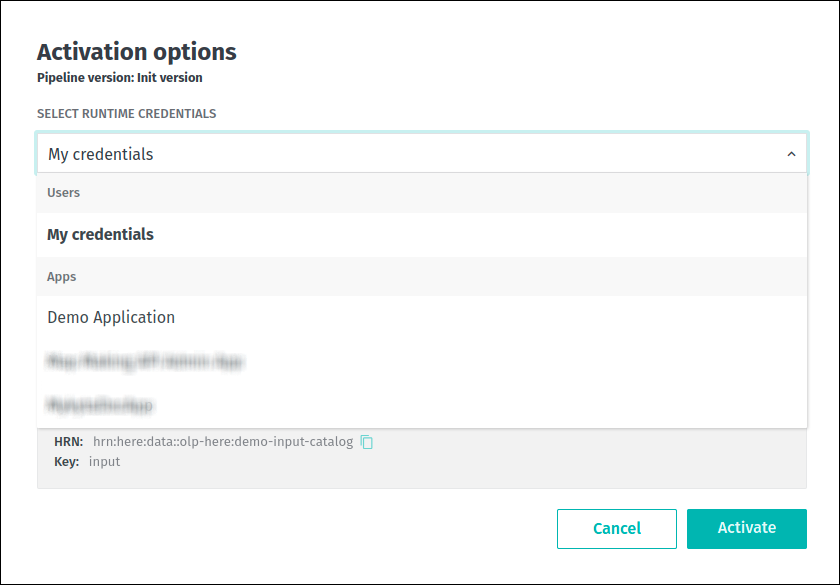
Once the pipeline is activated, the AWS SDK reads the credentials from the file whose location is specified by
the AWS_SHARED_CREDENTIALS_FILE variable, which is set by the platform.
If custom secrets have been used, the credentials are stored as credentials file in the /dev/shm/identity/.here/ directory.
Note that this file may not be read automatically by your pipeline application - in this case you will need to do this programmatically.
Third-party credentials are automatically refreshed every 12 hours to maintain pipeline functionality.
If the credentials were changed and needed to be consumed immediately, the pipeline version had to be manually reactivated, if book.product=internal.
Egress rules
The HERE platform implements a default-deny policy for internet egress as a security measure.
By default, your pipeline applications cannot directly access external resources outside the platform unless traffic is
explicitly routed through the platform's security proxy.
This security architecture serves several important purposes:
- Enhanced security: All outbound traffic is controlled and monitored, preventing unauthorized or unintended external connections.
- Network policy enforcement: Access to external services is managed through network policies that can be audited and controlled.
- Traffic visibility: Routing through the proxy provides visibility into what external resources your pipelines are accessing.
The proxy acts as a gateway for your pipeline applications to reach external services such as:
- HERE platform services (authentication, data services, APIs)
- AWS resources (S3 buckets, other AWS services)
- Third-party APIs and services required by your application
Without proper proxy configuration, your pipeline applications will not be able to:
- Authenticate with HERE Account services
- Access catalogs and layers from the HERE platform
- Download dependencies or access external data sources
- Communicate with any services outside the platform's internal networks
To enable your pipeline to access external resources, you must configure allowed external endpoints via egress rules.
Egress connections configuration
Data processing pipelines may require access to publicly hosted data sources or services.
For security reasons, connections from pipelines to resources like these are blocked by default unless the required resource is whitelisted.
These whitelists are managed individually for each realm by users or apps with the OrgAdmin role.
All interactions with the egress rules are possible via the OLP CLI.
To manage egress rules using OLP CLI, the Org Admin must create an app and assign it the OrgAdmin role.
For more information about this role or how to find OrgAdmins within the organization, see Manage users, Manage apps,
and Frequently Asked Questions sections of the Identity and Access Management developer guide.
Whitelists apply to all pipelines within that realm without any exception.
This section explains how to manage these whitelists, also known as egress rules lists.
NoteWhen egress rules functionality was introduced, frequently used resources were whitelisted for all existing realms.
Realms created after that point do not have any pre-configured egress rules.This feature is not supported by the Platform Portal.
Getting list of egress rules
Some publicly hosted resources have been whitelisted for specific realms.
In other words, egress rules have already been created for them, and these resources should be accessible from the pipelines.
To check which resources have been whitelisted for your realm, use the following OLP CLI command:
olp pipeline egress rule listThe command returns information on the created egress rules as follows:
ID                                            destination            destinationType          created                       description
591c3bfe-020f-4c55-a558-55507b7f4177          *.weather.gov          host                     2025-11-19T00:00:00Z          Rule to open up connections from pipeline to specified DNS hostname
82f75664-bb82-4a97-ac2d-fe755ae39456          8.8.8.8                ipAddress                2025-11-11T00:00:00Z          Rule to open up connections from pipeline to specified IP address

Use olp pipeline egress rule show <egress rule ID> to display more information about an egress rule
For more information on the command, its parameters and output modes, refer to the appropriate section of the OLP CLI User Guide.
To check a specific egress rule created within a realm, use the following OLP CLI command:
olp pipeline egress rule show 591c3bfe-020f-4c55-a558-55507b7f4177The command returns information on the egress rule as follows:
Details of the egress rule:
created                  2025-11-19T00:00:00Z
destination              *.weather.gov
description              Rule to open up connections from pipeline to specified DNS hostname
destinationType          host
realm                    realm
id                       591c3bfe-020f-4c55-a558-55507b7f4177
The destination property contains information on a publicly hosted resource that has been whitelisted.
Currently, two destination types are supported: DNS hostnames and IP addresses.
For more information on the command, its parameters and output modes, refer to the appropriate section of the OLP CLI User Guide.
If specific resources are missing from the list, you must create egress rules for them.
This process is explained in the next chapter.
Managing egress rules
To open up connections from pipelines within a realm to a specific publicly hosted resource, you need to create a new egress rule for this resource.
Unlike getting information on egress rules, the creation operations are only allowed for users or apps that have the OrgAdmin role within the realm.
For more information about this role or how to find OrgAdmins within the organization, see Manage users, Manage apps,
and Frequently Asked Questions sections of the Identity and Access Management developer guide.
To create egress rules within the realm, use the following OLP CLI command:
olp pipeline egress rule batch create "PATH/TO/config-file.json"The command above allows you to create egress rules in batches, with one rule for each resource specified in the configuration file as follows:
[
  {
    "description": "Example rule to open up connections from pipeline namespaces to specified IP address.",
    "destination": "8.8.8.8"
  },
  {
    "description": "Example rule to open up connections from pipeline namespaces to specified host.",
    "destination": "*.weather.gov"
  }
]
For more information on the command, its parameters, output modes, and configuration file properties, refer to the appropriate section of the OLP CLI User Guide.
The following limitations affect egress rules:
- Within the realm, creating more than one egress rule for the same resource is not allowed.
- If DNS name is specified as an egress rule's
destination, wildcards are only allowed in the leftmost part, and not immediately before a public suffix.
For example,*.example.comis allowed, but*.*.com,*.com, and*.co.ukare not.
Additionally, a DNS name cannot be a public suffix.
NoteCreating a rule makes the specified resource accessible from every pipeline in that realm.
It is not possible to restrict an egress rule to specific pipelines.
To block future access from pipelines within a realm to a publicly hosted resource, you must delete the appropriate egress rule.
Similar to creation, egress rule deletion is only permitted for users or apps with the OrgAdmin role.
For more information about this role or how to find OrgAdmins within the organization, see Manage users, Manage apps,
and Frequently Asked Questions sections of the Identity and Access Management developer guide.
To delete an egress rule from the realm, use the following OLP CLI command:
olp pipeline egress rule delete 591c3bfe-020f-4c55-a558-55507b7f4177For more information on the command, its parameters and output modes, refer to the appropriate section of the OLP CLI User Guide.
NoteDeleting an egress rule revokes access to the appropriate resource for all pipelines within the realm.
It is not possible to restrict an egress rule to specific pipelines.
If you want to reverse the deletion, recreate the egress rule for the resource.
Checking history of changes for the egress rules within the realm
Each time egress rules are created or deleted, information about these actions are logged by the system.
To show what actions were applied to egress rules within the realm, use the following OLP CLI command:
olp pipeline egress rule history showThe command returns information on the actions applied to egress rules within the realm as follows:
ruleId                                        action           ruleDestination              principal                     created
591c3bfe-020f-4c55-a558-55507b7f4177          deleted          *.weather.gov                vEtl0gTc56U2p8aLRzGn          2025-11-20T00:00:00Z
591c3bfe-020f-4c55-a558-55507b7f4177          created          *.weather.gov                vEtl0gTc56U2p8aLRzGn          2025-11-19T00:00:00Z
For more information on the command, its parameters and output modes, refer to the appropriate section of the OLP CLI User Guide.
All logs for both created and deleted types of actions older than six months
and related to removed egress rules, are automatically cleaned up.