How to perform incremental data validation
How to perform incremental data validation
NoteThis chapter describes a new feature of the Data Processing Library and the API might change in
future versions. Validation Suites are currently available for the Scala language only.
Data validation workflow
Validating datasets in the catalogs can prevent situations where data changes may cause libraries or
services to show unexpected behavior or stop working. In addition, large data sets like cartographic
data require systematic and full coverage testing.
In the Data Processing Library, the validation workflow comprises:
- Feature extraction — the extraction logic reads the input catalog's data and groups it in
self-contained partitions of data that can be validated in parallel. - Validation — the validation logic validates each test data partition against a set of
acceptance criteria. It outputs a test report and extracts a set of test metrics. - Assessment — the assessment logic inspects the test metrics to make a final decision about
the quality of the input data. The result is published and can be used to further gate or trigger a
live deployment of your original data release candidate's input catalog.
The Data Processing Library provides specific classes and transformations to implement these phases in
the com.here.platform.data.processing.validation
package.
Feature extraction
The validation module does not provide any specific API to extract test features from the input
data, but it relies on the extraction logic to provide a DeltaSet[K, TestData].
K is either Partition.HereTile
in case of geographically partitioned data or Partition.Generic
in case of non-geographical data. TestData is a user-defined type representing the data under
test. Each TestData value comprises a self-contained fully-specified subset of the input data that
can be tested in isolation (for example, the content of a tile and the tiles referenced from it).
The DeltaSet must be partitioned with a PartitionNamePartitioner,
which guarantees that all the transformations that
publish the test-reports and aggregate the metrics do not shuffle. The default partitioner provided
by a DeltaContext
is a PartitionNamePartitioner and can be safely used.
See the chapter about DeltaSets for a description of all the available
transformations.
Validation suite
Test scenarios operate on a single instance of TestData and interact with the module via a
TestContext
to register the outcome of each test case and log metric values. Test scenarios extend the base
class Suite
and implement their testing logic in the run method.
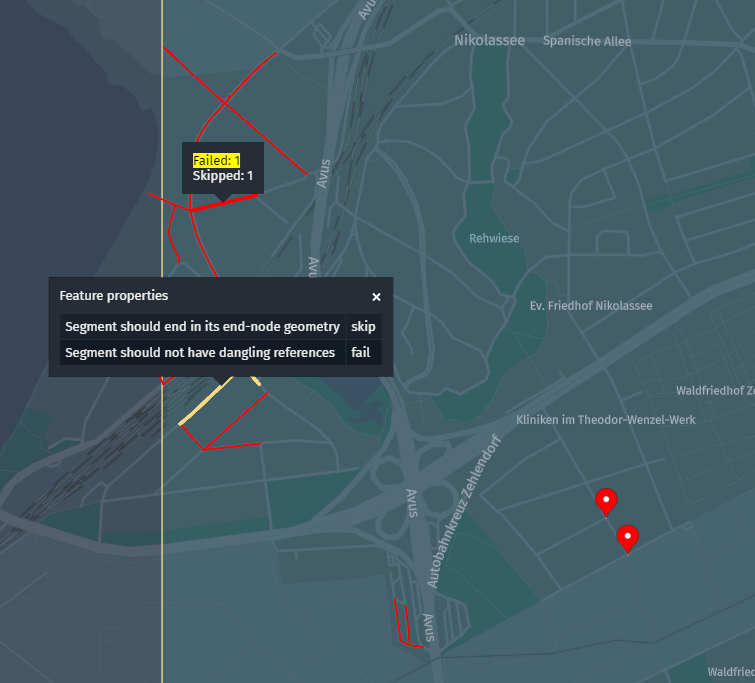
Custom data can be attached to each test outcome, as well as custom GeoJSON geometry, which can be
rendered when you inspect the test report layers in the platform portal.
The Suite
class can be subclassed and the TestContext
interface can be used directly to implement test scenarios. However, the intended usage is through
built-in extensions of the Suite interface which integrate with existing testing frameworks.
The module currently provides one such extension based on
Scalatest.
The following snippet shows how the Suite and TestContext interfaces can be used directly:
import com.here.olp.util.quad.HereQuad
import com.here.platform.data.processing.validation.Suite

case class TestData(tileId: Long, nodes: Seq[Node])

class SimpleSuite extends Suite[TestData] {

  private def test(title: String)(body: => Unit)(implicit context: TestContext): Unit = {
    try {
      body
      context.registerSucceeded(title)
    } catch {
      case e: Exception => context.registerFailed(title, payload = Some(e.getMessage))
    }
  }

  override def run(data: TestData, context: TestContext): Unit = {
    implicit val ctx = context

    val bbox = new HereQuad(data.tileId).getBoundingBox

    // Every node should be inside its host tile
    data.nodes.foreach { node =>
      test("node-inside-tile") {
        require(bbox.contains(node.geometry), s"Node $node is outside the tile")
      }
    }

    // Nodes should have distinct IDs
    test("distinct-ids") {
      require(data.nodes.map(_.id).distinct.size == data.nodes.size)
    }
  }
}
The snippet above shows the difference between partition-level test cases, that verify a global
property of the whole partition, and sub-partition-level test cases, which verify properties of
sub-features extracted from the partition (for example, single topology roads or nodes). Therefore,
even though a Suite is run on a TestData partition, the module tracks per test-case statistics,
which provides the best granularity during the assessment phase.
NoteImplementing a test
Suiteitself does not require knowledge of Spark,DeltaSet
transformations, nor partitioning concepts. Given the definition of aTestDatatype and the set
of acceptance criteria, a developer with no previous knowledge of the Data Processing Library can
immediately start writing test scenarios. This is further simplified by the integration of popular
test DSLs, like Scalatest.
Scalatest integration
The com.here.platform.data.processing.validation.scalatest
package contains a set of traits to mix in a org.scalatest.Suite that provide access to the
TestData instance and the TestContext. Tests can be written using any of the available Scalatest
domain specific languages and outcomes are automatically registered. In particular, the
Bindings
trait provides access to the current test context and data under test.
The PayloadAndGeometry
trait provides methods to register custom data and geometry that is automatically attached to each
test outcome. Nested org.scalatest.Suites can be implemented, to test sub-features extracted from
the TestData partition. The snippet below shows the same example described earlier, this time
implemented with Scalatest:
import com.here.olp.util.quad.HereQuad
import com.here.platform.data.processing.validation.scalatest.ScalatestSuite
import com.here.platform.data.processing.validation.scalatest.Bindings
import com.here.platform.data.processing.validation.scalatest.PayloadAndGeometry
import org.scalatest.Suite
import org.scalatest.funsuite.AnyFunSuite
import org.scalatest.matchers.should.Matchers
import com.here.platform.data.processing.validation.SuiteCompiler
import scala.collection.immutable

case class TestData(tileId: Long, nodes: Seq[Node])

class SuiteWithScalatest extends AnyFunSuite with Matchers with Bindings[TestData] {
  private val bbox = new HereQuad(data.tileId).getBoundingBox

  // partition level tests
  test("distinct-ids") {
    data.nodes.iterator.map(_.id).toSet.size shouldBe data.nodes.size
  }

  // feature level tests
  override val nestedSuites: immutable.IndexedSeq[Suite] =
    data.nodes.iterator.map(new NodeSpec(_)).toIndexedSeq

  class NodeSpec(node: Node) extends AnyFunSuite with Matchers with PayloadAndGeometry {
    override val onFailPayload: Option[Any] = Some(node)

    test("node-inside-tile") {
      bbox.contains(node.geometry) shouldBe true
    }
  }
}
NoteThe use of nested
org.scalatest.Suites is recommended over Scalatest's idiomatic
"should behave like", as the latter might create a large number of test-cases, which are less
efficiently run by Scalatest as opposed to a large number of nested suites.
An org.scalatest.Suite class can be adapted into a Suite
using the ScalatestSuite
class, as shown in the snippet below:
val suite = new ScalatestSuite(classOf[SuiteWithScalatest])Metrics and accumulators
For each suite, and for each test case, the validation module tracks the number of failures and
successes. This information is later stored and aggregated in a Metrics
object, together with custom accumulated metric values stored in generic Accumulators.
The library provides a set of built-in Accumulator implementations to accumulate and track Long
and Double values. You can use TestContext.withAccumulator
to create or update an existing accumulator:
import com.here.platform.data.processing.validation._

class MySuite extends Suite[TestData] {

  override def run(data: TestData, context: TestContext): Unit = {
    context.withAccumulator[LongAccumulator]("some-long-accumulator")(_ + 42)
    context.withAccumulator[DoubleAccumulator]("some-double-accumulator")(_ + 3.1415)
    context.withAccumulator[AggregatedLongAccumulator](
      "some-long-accumulator-with-aggregated-stats")(_ + 1)
  }
}
You can implement custom Accumulator classes, by subclassing the Accumulator
interface. If you use the default JSON serializers
you must then augment the Metrics serializer/deserializer with an additional type hint for your
custom Accumulator class:
import com.here.platform.data.processing.validation.Serialization.{Deserializer, Serializer}
import com.here.platform.data.processing.validation._
import org.json4s.{Formats, ShortTypeHints}

case class SetAccumulator(set: Set[Long]) extends Accumulator[SetAccumulator] {
  override def merge(other: SetAccumulator): SetAccumulator = SetAccumulator(set ++ other.set)

  def +(value: Long): SetAccumulator = SetAccumulator(set + value)
}

object MyMetricsSerializers {
  // augment default metrics formats with type hint for the custom accumulator
  val formats: Formats = DefaultJsonSerializers.metricsFormats + ShortTypeHints(
    List(classOf[SetAccumulator]))

  // Metrics serializer and deserializer that know how to serialize/deserialize the custom
  // accumulator
  implicit val metricsSerializer: Serializer[Metrics] = new JsonSerializer[Metrics](formats)
  implicit val metricsDeserializer: Deserializer[Metrics] =
    new JsonDeserializer[Metrics](formats)
}

case class TestData(poiCategories: Seq[Int])

class MySuite extends Suite[TestData] {

  override def run(data: TestData, context: TestContext): Unit = {
    data.poiCategories.foreach { category =>
      context.withAccumulator[SetAccumulator]("all-poi-categories")(_ + category)
    }
  }
}
Running, publishing and metrics aggregation
Given a DeltaSet[K, TestData] containing the distributed TestData partitions, and a
Suite[TestData] implementing a test scenario, you need to map the suite over all values of the
test deltaset, get the returned test Report
and Metrics,
serialize them into Payloads
and map the payloads to the right output layers.
A SuiteCompiler
takes care of all this. Given a Suite
or a collection of suites
and an instance of TestData it returns a Map[Layer.Id, Payload] with the encoded test reports
and metrics mapped to the report layer (or layers), and to the metrics layer.
A SuiteCompiler is typically mapped over the test data using DeltaSet mapValues
transformation, as the snippet below shows:
// implicit to enable the validation implicit transformations
implicit val deltaContext: DeltaContext = ???
val testData: DeltaSet[Partition.HereTile, TestData] = ???

import deltaContext.transformations._

import com.here.platform.data.processing.validation.DefaultJsonSerializers._

val compiler = new SuiteCompiler(new MySuite)

val reportAndMetricsPayloads: DeltaSet[Partition.HereTile, Map[Layer.Id, Payload]] =
  testData.mapValues(compiler.compile)
Alternatively, TestData may provide an API to retrieve additional input data referenced by the
current partition, without actually resolving all references beforehand. mapValuesWithResolver
can be used to achieve this, passing a Resolver
instance to the TestData constructor, as shown in the following code snippet:
class TestData(retriever: Retriever, resolver: Resolver, val partition: DecodedData) {

  def getReference(key: Partition.Key): Option[DecodedData] =
    resolver
      .resolve(key)
      .map(meta => DecodedData.parseFrom(retriever.getPayload(key, meta).content))
}

// implicit to enable the validation implicit transformations
implicit val deltaContext: DeltaContext = ???
val inputData: DeltaSet[Partition.Key, Partition.Meta] = ???
val catalogId: Catalog.Id = ???
val layerId: Layer.Id = ???
val retriever: Retriever = deltaContext.inRetriever(catalogId)

import deltaContext.transformations._
import com.here.platform.data.processing.validation.DefaultJsonSerializers._

val compiler = new SuiteCompiler(new MySuite)

val reportAndMetricsPayloads: DeltaSet[Partition.HereTile, Map[Layer.Id, Payload]] = inputData
  .mapValuesWithResolver(
    {
      case (resolver, key, meta) =>
        compiler.compile(
          new TestData(retriever,
                       resolver,
                       DecodedData.parseFrom(retriever.getPayload(key, meta).content)))
    },
    List(
      // resolution strategies
      DirectQuery(catalogId, Set(layerId))
    )
  )
  .mapKeys(OneToOne.toHereTile(catalogId, layerId), PreservesPartitioning)
Multiple Suite instances, parametrized on the same TestData can be grouped together in a
collection of suites
and used from the same SuiteCompiler:
class NodeSuite extends Suite[TestData] {
  override def run(data: TestData, context: TestContext): Unit = ???
}

class SegmentSuite extends Suite[TestData] {
  override def run(data: TestData, context: TestContext): Unit = ???
}

val suiteCompiler = new SuiteCompiler(Suites(new NodeSuite, new SegmentSuite))
By default, a SuiteCompiler will publish the test reports in the "report" layer, and the test
metrics in the "metrics" layer, but you can change these defaults. If you use a SuiteCompiler to
run multiple suites you can specify a different report layer for each suite.
A SuiteCompiler requires implicit serializers/deserializers for the Report and Metrics
classes. The snippets above use the default serializers
that use JSON to encode the test reports and metrics.
Applying a SuiteCompiler to a DeltaSet[K, TestData] will produce a DeltaSet[K, Map[Layer.Id, Payload]],
where K is again either Partition.HereTile or Partition.Generic, based on the original
partitioning of the input data or feature extraction logic. A DeltaSet[K, Map[Layer.Id, Payload]]
can be published using a choice of implicit transformations in Transformations.
All these transformations publish the test reports and the metrics in the corresponding output
layers, and recursively aggregate the published metrics partitions to build a single
fully-aggregated metrics partition. How the aggregation is realized depends on the partitioning of
the TestData (the type of K). HERE tile partitioned metrics are aggregated at progressively
higher zoom levels. The snippet below shows such scenario:
// implicit to enable the validation implicit transformations
implicit val deltaContext: DeltaContext = ???
val testData: DeltaSet[Partition.HereTile, TestData] = ???

import deltaContext.transformations._

import com.here.platform.data.processing.validation.DefaultJsonSerializers._
import com.here.platform.data.processing.validation.Transformations._

val compiler = new SuiteCompiler(new MySuite)

val (reportAndMetricsPublishedSet, aggregatedMetrics) = testData
  .mapValues(compiler.compile)
  .publishAndAggregateByLevel(compiler.outLayers, compiler.metricsLayer)
NoteBy default,
publishAndAggregateByLevelwalks all zoom levels configured in the output metrics
layer, up to zoom level 0. Level 0 (the root HERE tile covering the whole map) must be included
in the set of valid tile levels.
Generically partitioned metrics (for example, admin hierarchies, phonetics, any other
non-geographical data) are aggregated in a fixed number of steps, where you can specify the number
of aggregated partitions in each step:
// implicit to enable the validation implicit transformations
implicit val deltaContext: DeltaContext = ???
val testData: DeltaSet[Partition.Generic, TestData] = ???

import deltaContext.transformations._

import com.here.platform.data.processing.validation.DefaultJsonSerializers._
import com.here.platform.data.processing.validation.Transformations._

val compiler = new SuiteCompiler(new MySuite)

val (reportAndMetricsPublishedSet, aggregatedMetrics) = testData
  .mapValues(compiler.compile)
  .publishAndAggregateByHash(compiler.outLayers, compiler.metricsLayer, Seq(1000, 100, 10, 1))
Both these methods return the PublishedSet
of the test reports and metrics and a DeltaSet[Partition.Key, Metrics] containing a single
fully-aggregated Metrics partition, for later assessment.
Validation as part of compilation process
If needed, you can manually run a suite without a SuiteCompiler. For example, you may want to run
a test scenario from the same pipeline that is compiling the release candidate catalog, to
immediately abort the batch job if the output data does not comply with some strict acceptance
criteria or to add a quality marker to it:
val deltaContext: DeltaContext = ???

import deltaContext.transformations._

val outputLayer: Layer.Id = ???

val candidateOutputData: DeltaSet[Partition.Key, OutputData] = ???

val suite = new MySuite

// fail the pipeline if at least one test-case has failed
val validatedOutputPayloads = candidateOutputData.mapValues { data =>
  val (report, metrics) = suite.run(data)
  require(metrics.stats.failed == 0, "Validation failed")
  Payload(data.toByteArray)
}

val outputPublishedSet = validatedOutputPayloads.publish(Set(outputLayer))
Assessment
The assess
transformation can be applied on a DeltaSet[Partition.Key, Metrics] to compile a custom assessment
type containing the final quality assurance assessment. This typically contains a boolean value
indicating whether the validation has succeeded or not, but can also contain custom per use-case
evaluations:
case class MyAssessment(isSucceeded: Boolean, failureRate: Double)

val (reportAndMetricsPublishedSet, aggregatedMetrics) = testData
  .mapValues(compiler.compile)
  .publishAndAggregateByLevel(compiler.outLayers, compiler.metricsLayer)

implicit val assessmentSerializer = new JsonSerializer[MyAssessment](DefaultFormats)

val assessmentPublishedSet = aggregatedMetrics.assess[MyAssessment]() { metrics =>
  val failureRate = metrics.stats.failed.toDouble / metrics.stats.total.toDouble
  MyAssessment(failureRate <= 0.05, failureRate)
}
If you have multiple SuiteCompilers, mapped on different TestData types and/or different
partitioning schemes, you will end up with a sequence of DeltaSet[Partition.Key, Metrics], one
per SuiteCompiler. You can still use the assess transformation on the sequence of deltasets,
which will further aggregate the Metrics partitions generated by the different SuiteCompilers:
case class Assessment(isSucceeded: Boolean)
implicit val deltaContext: DeltaContext = ???
val roadTestData: DeltaSet[Partition.HereTile, RoadTestData] = ???
val adminTestData: DeltaSet[Partition.Generic, AdminTestData] = ???

import deltaContext.transformations._

import com.here.platform.data.processing.validation.DefaultJsonSerializers._
import com.here.platform.data.processing.validation.Transformations._

val roadTestCompiler = new SuiteCompiler(new RoadSuite)
val adminTestCompiler = new SuiteCompiler(new AdminSuite)

val (roadPublishedSet, roadMetrics) = roadTestData
  .mapValues(roadTestCompiler.compile)
  .publishAndAggregateByLevel(roadTestCompiler.outLayers, roadTestCompiler.metricsLayer)

val (adminPublishedSet, adminMetrics) = adminTestData
  .mapValues(adminTestCompiler.compile)
  .publishAndAggregateByHash(roadTestCompiler.outLayers,
                             roadTestCompiler.metricsLayer,
                             Seq(1000, 100, 10, 1))

implicit val assessmentSerializer = new JsonSerializer[Assessment](DefaultFormats)

val assessmentPublishedSet =
  Seq(roadMetrics, adminMetrics).assess[Assessment]()(metrics =>
    Assessment(metrics.stats.failed == 0))
NoteTwo different
SuiteCompilers cannot publish in the same report and metrics layers.
Rendering test reports and metrics
If you use the default JSON serializers, you can configure your HERE tiled report and metrics layers
with the following schema HRNs:
hrn:here:schema:::com.here.platform.data.processing.validation.schema:report_v2:1.0.0hrn:here:schema:::com.here.platform.data.processing.validation.schema:metrics_v2:1.0.0
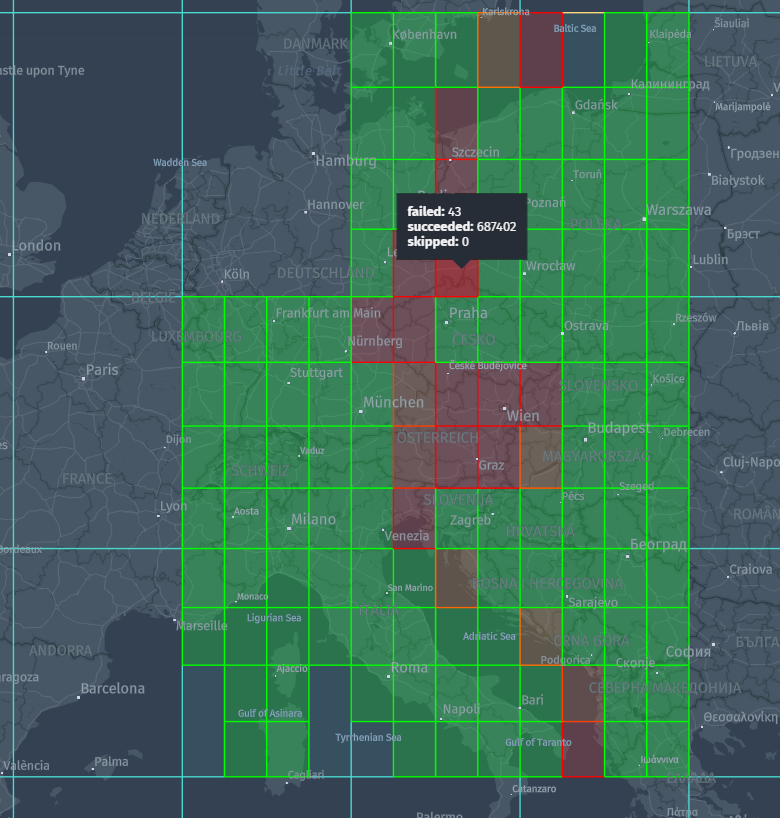
These schemas include rendering plugins that draw the geometry stored in the test reports and render
metrics as a heatmap.