

Batch pipeline
Batch Pipeline
The HERE Workspace
offers you a rich but strict batch processing model in the Workspace that goes beyond simply
processing data in chunks.
This assists you with most use cases that relate to processing
versioned data and creating versioned data as output. Another way
of saying this is that the Workspace supports snapshot
to snapshot compilations.
This model is valuable if your input data is regularly updated and you
need to process it over and over again.
However, there are also use cases where you simply want to process data only once.
Alternatively, you may be very experienced with Spark and RDDs and therefore would
prefer a purer experience. Therefore, the HERE Workspace also allows
you to work directly on Spark in Workspace by using the same components that you also use when
working directly on Flink when doing streaming processing in the Workspace.
The batch processing model is implemented on multiple levels in the Workspace
starting with the way the Workspace stores versioned data, continuing with how the Pipeline API triggers batch jobs on Spark and ending with the Data Processing Library that helps you build your batch processing application.
When you use the Data Processing Library all this is taken care of for you
and you can focus on your business logic. When only some of your input partitions
change, you may benefit from incremental compilation, saving processing
time and money. However, you cannot break out of this strict model.
When working on Spark directly, you need to make sure that when you write
to an output catalog that you also write the dependencies.
The figure below illustrates the creation of a batch pipeline.
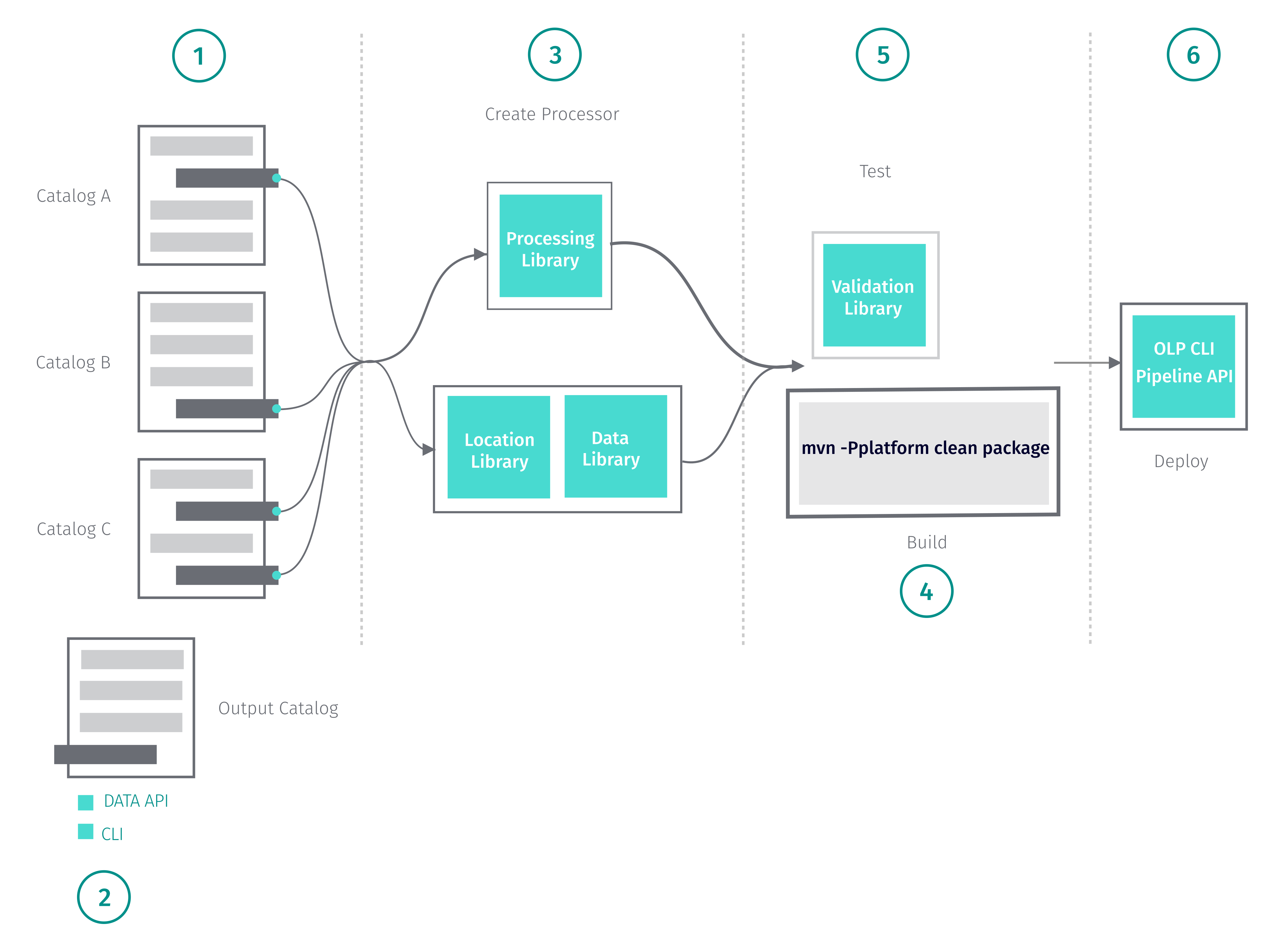
To create a batch pipeline, follow the steps below.
-
Identify one or more versioned layers to serve as your data source.
- For more information on working with data catalogs in the Workspace, see
the Data API. - The Workspace provides map data based on the HERE Map Content specification.
For more on the HERE Map Content catalog data structures, see the
HERE Map Content Data Specification. - Notice that the HERE Workspace also allows you to bring your own data.
For more information on using data in your own format, see the
Data API.
- For more information on working with data catalogs in the Workspace, see
-
Create your output catalog.
- The HERE portal provides a UI for managing data catalogs.
For more information on creating catalogs in the Workspace, see the
Data API. - The OLP CLI offers you command line options for managing data catalogs.
For more information on OLP CLI data commands, see the
OLP CLI User Guide. - If you prefer to use REST requests, the Data API provides a series of
endpoints for managing data catalogs. For more information, see
Data API Developer's Guide.
- The HERE portal provides a UI for managing data catalogs.
-
Create your pipeline and write to your output layer.
- The Data Processing Library provides classes and methods for defining,
implementing and deploying processing algorithms and custom logic for
transforming data and for writing to the output layer.
For more information on the Data Processing Library, see the
Data Processing Library Developer's Guide. - The Location Library provides classes and methods for operations such as
clustering, map matching, and other features.
For more information on the Location Library, see the
Location Library Developer's Guide. - When you use the Location Library, you can use the Data Client Library to
retrieve your data and to write your output to your output layer.
For more information on using the Data Client Library, see the
Data Client Library Developer's Guide.
- The Data Processing Library provides classes and methods for defining,
-
Build your pipeline.
- To build your pipeline as a fat JAR, use the command below.
mvn -Pplatform clean package- Notice that you can only use this command if you use the environment POM as the
parent POM. - For examples that show how to use the Data Processing Library and the Location
Library, see
Code Examples. - For a tutorial that demonstrates how to use the Data Processing Library, see
the Copy a Catalog
tutorial. - For a tutorial that demonstrates how to use the Location Library, see
the Path Match the Sensor Data to GeoJSON
tutorial.
- Test the output generated by your pipeline.
- The validation module of the Data Processing Library allows you to test versioned data layers in the Workspace.
For more information, see
Data Processing Library Developer's Guide.
- The validation module of the Data Processing Library allows you to test versioned data layers in the Workspace.
- Deploy.
- The HERE Workspace provides a UI for managing pipelines.
For more information on deploying pipelines in the portal, see the
Pipelines Developer Guide. - The OLP CLI provides you commands tool to deploy and manage your JAR file
in the Workspace. For more information on OLP CLI pipeline commands, see the
OLP CLI User Guide. - If you prefer to use REST requests, the Pipeline API provides a series of
endpoints. For more information, see
Pipeline API Developer Guide.
- The HERE Workspace provides a UI for managing pipelines.
The Data Processing Library Developer's Guide provides detailed information on
building a batch pipeline with Maven Archetypes using Java
and on
building a batch pipeline with Maven Archetypes using Scala.