

Architecture for batch pipelines
Architecture for batch pipelines
Batch pipelines are a particular type of pipelines used to process data in
batches.
When a pipeline is in the SCHEDULED state, the Pipeline API triggers its execution
when some conditions are met or external events are detected, such as a change in the input catalogs.
A job description holds the details of this change and is passed on to the pipeline.
Once triggered, the pipeline switches to the RUNNING state, processes the data and commits
the result to the output catalog. This process terminates and the pipeline returns
to the SCHEDULED state.
For more information on pipelines, their state, and state transitions, see the Pipeline API
Developer's Guide.
The Data Processing Library supports the development of batch pipelines on Apache Spark.
Internal structure
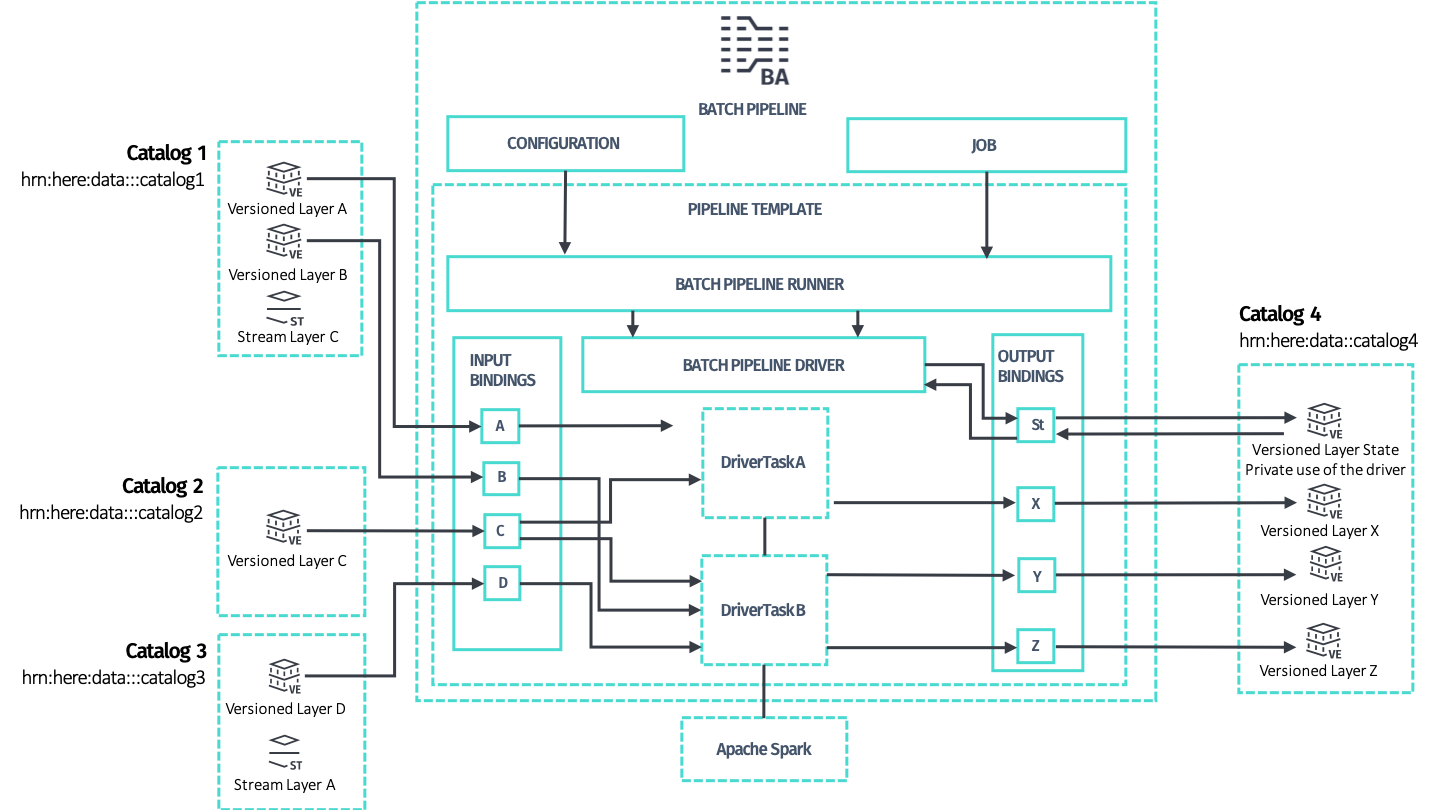
To develop a batch pipeline, start with these two classes:
-
PipelineRunner, the runnable class that implements themainmethod
and provides parsing of the command line and system properties to interface
with Pipeline API. Pipeline configuration and job description are
detected and provided to developer's code. Developers should use this class
as entry point both for running the code locally and for deploying the
pipeline to the HERE platform via the Pipeline API. -
Driver, the main class that controls the distributed processing,
provides access to Apache Spark and preconfigured Spark-friendly access
to the Data API of input and output catalogs in what is calledDriverContext.
TheDriversets up the context and provides it to the data processing code,
modeled in the form of one or moreDriverTaskattached to theDriver
that are executed sequentially.
You can build a Driver manually or using the recommended DriverBuilder
helper class, located in the package com.here.platform.data.processing.driver.
Configure the driver
The Driver can be configured either manually or via the DriverBuilder
to have one or more data processing DriverTasks attached to it. Each task
represents an end-to-end batch processing logic that produces data for
a set of output layers by consuming data from a set of input layers.
Each task specifies:
- a subset of layers for the input catalogs which the task intends to process
-- a task declares as input one or more layers among the layers available
in the input catalogs. Each layer is specified by the catalog's symbolic ID
and the layer ID. Multiple tasks may declare the same input layer as input,
since it is safe for a set of input layers of multiple tasks to overlap. - which output layers in the output catalog for the task to generate: each task
is responsible for producing one or more output layers in an exclusive way,
meaning that each output layer can be produced by one task only. Two or more
tasks cannot declare the same output layer, as this is configuration is not
supported.
The Data Processing Library supports incremental processing, such that a task
does not run as long as no changes are detected in its input layers. However,
other tasks may still run.
Configure the driver without PipelineRunner
The PipelineRunner class abstracts away all details about the
DriverContext construction and provides built-in support for some
command line options that come useful during local development. It is
the recommended way to plug your business logic to a pipeline.
Alternatively, you can manually instantiate a DriverContext, create a
Driver and run the processing job from an arbitrary main method:
def main(args: Array[String]): Unit = {

  // the application version, when it changes incremental compilation
  // is disabled
  val applicationVersion = "1.0.0"

  // build a driver context with the default configuration
  val driverContext = new DriverContext.Builder(applicationVersion).build()

  // create a driver builder and add a driver task
  val driverBuilder = new DriverBuilder(driverContext)

  driverBuilder.addTask(new MyTask(driverContext))

  // build the driver and run the processing job
  val driver = driverBuilder.build()

  driver.run()
}
public static void main(String args[]) {
// the application version, when it changes incremental compilation
// is disabled
String applicationVersion = "1.0.0";
// build a driver context with the default configuration
DriverContext driverContext = new DriverContext.Builder(applicationVersion).build();
// create a driver builder and add a driver task
DriverBuilder driverBuilder = new DriverBuilder(driverContext);
driverBuilder.addTask(new MyTask(driverContext));
// build the driver and run the processing job
Driver driver = driverBuilder.build();
driver.run();
}The Pipeline configuration, job description and complete configuration
are automatically detected when the DriverContext is built, but you
can override them using the corresponding setters of the
DriverContext.Builder class:
def main(args: Array[String]): Unit = {

  // the application version, when it changes incremental compilation
  // is disabled
  val applicationVersion = "1.0.0"

  // custom configuration
  val completeConfig = CompleteConfig(
    Seq("here.platform.data-processing.executors.compilein.threads=20",
        "here.platform.data-processing.executors.compileout.threads=10"))

  // build a driver context with a customized configuration
  val driverContext =
    new DriverContext.Builder(applicationVersion).setCompleteConfig(completeConfig).build()

  // create a driver builder and add a driver task
  val driverBuilder = new DriverBuilder(driverContext)

  driverBuilder.addTask(new MyTask(driverContext))

  // build the driver and run the processing job
  val driver = driverBuilder.build()

  driver.run()
}
public static void main(String args[]) {
// the application version, when it changes incremental compilation
// is disabled
String applicationVersion = "1.0.0";
// custom configuration
CompleteConfig completeConfig =
CompleteConfig.load(
Arrays.asList(
"here.platform.data-processing.executors.compilein.threads=20",
"here.platform.data-processing.executors.compileout.threads=10"));
// build a driver context with a customized configuration
DriverContext driverContext =
new DriverContext.Builder(applicationVersion).setCompleteConfig(completeConfig).build();
// create a driver builder and add a driver task
DriverBuilder driverBuilder = new DriverBuilder(driverContext);
driverBuilder.addTask(new MyTask(driverContext));
// build the driver and run the processing job
Driver driver = driverBuilder.build();
driver.run();
}During local development you must explicitly specify a Spark master URL.
This is not necessary when you run a Pipeline with Pipeline API:
def main(args: Array[String]): Unit = {

  // the application version, when it changes incremental compilation
  // is disabled
  val applicationVersion = "1.0.0"

  // build a driver context with support for local development
  val driverContextBuilder = new DriverContext.Builder(applicationVersion)

  if (isLocalRun) {
    driverContextBuilder.setSparkMaster("local[*]")
  }

  val driverContext = driverContextBuilder.build()

  // create a driver builder and add a driver task
  val driverBuilder = new DriverBuilder(driverContext)

  driverBuilder.addTask(new MyTask(driverContext))

  // build the driver and run the processing job
  val driver = driverBuilder.build()

  driver.run()
}
public static void main(String args[]) {
// the application version, when it changes incremental compilation
// is disabled
String applicationVersion = "1.0.0";
// build a driver context with support for local development
DriverContext.Builder driverContextBuilder = new DriverContext.Builder(applicationVersion);
if (isLocalRun) {
driverContextBuilder.setSparkMaster("local[*]");
}
DriverContext driverContext = driverContextBuilder.build();
// create a driver builder and add a driver task
DriverBuilder driverBuilder = new DriverBuilder(driverContext);
driverBuilder.addTask(new MyTask(driverContext));
// build the driver and run the processing job
Driver driver = driverBuilder.build();
driver.run();
}Compilation as a form of data processing
While you can directly implement DriverTask, it is recommended to implement
compilers instead, as this is a higher-level of abstraction provided by the
processing library.
In the context of the Data Processing Library, a compiler refers to batch
pipelines that functionally transform input layers to output layers. This type
of pipelines can only operate with input and output versioned layers.
This type of transformation is referred to as compilation or more
specifically, map compilation, where the layers involved represent input and
output map data in standard or custom formats.
The Data Processing Library not only helps you write compilers, but also
guides you with patterns that enable important features, such as
incremental compilation.
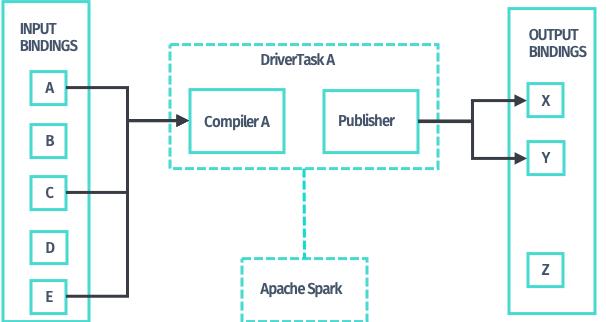
When you have expressed the required data processing logic in the form of a
compiler, the processing library provides implementations of DriverTask to
apply that data transformation logic to the input layers declared for a task;
you do not have to write any additional code. Use the newTaskBuilder method
of DriverBuilder and the TaskBuilder it returns.
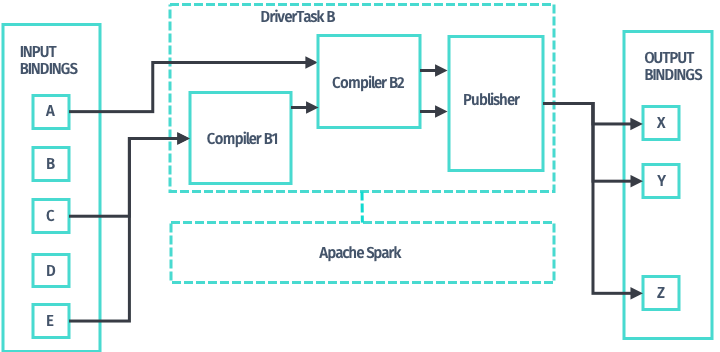
In addition, compilers may be chained together,
so that you can use the output layers produced by one compiler as input
of any other compiler down the chain. Use newMultiCompilerTaskBuilder
method of DriverBuilder and the corresponding MultiCompilerTaskBuilder
it returns to obtain a DriverTask implementation to chain compilers.
Distributed processing
Once you have configured the Driver by assigning one or more DriverTask
objects to it, the PipelineRunner starts processing. The Driver begins a
new publication on the output catalog via its Data API and then launches each
task on Spark, sequentially, usually one Spark job per task. This may be
different for your custom DriverTasks and for
RDD-based compilation patterns.
The Driver only handles version information and orchestrates the processing.
Neither metadata nor data payloads is processed by the Driver, as doing so
would hinder the scalability of the solution.
Sequentially, for each task:
- The
Driverqueries the Data API for the layers' metadata which the task
requires, optionally filters it, and passes it to the actualDriverTask
implementation. This process consists of Spark transformations that are
run in a distributed manner. Typically, the task implementation uses the
Retrievers located in aDriverContextto retrieve the payloads from the
Data Blob API. Retrieving also runs in parallel, as part of the Spark job.
The task continues processing the data by decoding the Protobuf payloads
and applying custom processing logic to it. - The compilation task produces payloads that should be committed to the
layers of the output catalog which the task owns. The result of processing
is returned by the compiler implementation and is handed over to a
built-in incremental publisher, always as part of the same Spark job. - The incremental publisher has access to
the output catalog metadata to compare the produced payloads with what is
already available via checksums. The incremental publisher then uploads
payloads that are different to the Data Blob API; payloads that are the same
are discarded. This process is always implemented in a distributed way,
as part of the Spark job. The incremental publisher also produces the commit
metadata to be used with the Data Publish API.
When the Driver has successfully finished running all of its attached
DriverTasks, the publication is now complete and the new data plus metadata
are published transactionally to the output catalog. If an error occurs, the
publication is aborted and the job is marked as FAILED.