

How to use in-memory tiles
How to use in-memory tiles
The inmemory module contains efficient in-memory data structures that
implement the Core interfaces.
libraryDependencies ++= Seq(
  "com.here.platform.location" %% "location-inmemory" % "<version>"
)
<dependencies>
<dependency>
<groupId>com.here.platform.location</groupId>
<artifactId>location-inmemory_${scala.compat.version}</artifactId>
</dependency>
</dependencies>dependencies {
compile group: 'com.here.platform.location', name: 'location-inmemory_2.13', version:'<version>'
}Graphs and TiledGraph
You can partition very large routing graphs by means of a partitioning scheme.
A partioning scheme specifies which part of the graph goes to which partition.
The routing graph is partitioned according to the
heretile partitioning scheme,
which is based on the geographical location associated with graph primitives and
a bounding box for each partition. Specifically, the 2D space of geocoordinates
is partitioned into rectangular tiles, and the graph primitives that are inside
the boundaries of the same tile go to the same partition.
A
TiledGraph
implements the Location Library
DirectedGraph
abstraction for data in
Compressed Sparse Row Format.
In particular,
TiledGraph
represents a partitioned incidence graph.
An incidence graph is a graph that only supports one operation on a vertex:
getting its outgoing edges. To implement this efficiently, you can store the
outgoing edges with their start vertex in the same partition. Outgoing edges may
end at a vertex that is not in the same partition.
TiledGraph
transparently handles the transition between partitions. For example for
seamless graph traversal, you can create a
TiledGraph
out of two
GraphTile
as follows:
import com.here.platform.location.inmemory.geospatial.TileId
import com.here.platform.location.inmemory.graph._

// Create the graph p3(1) <-- p1(0) --> p2(0).
val graph1 = new GraphTile(TileId(1),
                           firstEdgeIndices = Array(0, 2),
                           edges = Array(1, 2),
                           externalVertexTileIds = Array(2, 3),
                           externalVertexIndices = Array(0, 1))
val graph2 = new GraphTile(TileId(2),
                           firstEdgeIndices = Array(0, 0),
                           edges = Array.empty,
                           externalVertexTileIds = Array.empty,
                           externalVertexIndices = Array.empty)
// Only partition 1 and 2 are present.
val graphTiles =
  Map(graph1.tileId -> graph1, graph2.tileId -> graph2)

val graph = new TiledGraph(graphTiles.get)

val p1v0 = Vertex(TileId(1), VertexIndex(0))
val edges: Iterable[Edge] = graph.outEdgeIterator(p1v0).iterator.to(Iterable)

println(s"$p1v0 has ${edges.size} outgoing edges: ...")

val p2v0 = graph.target(edges.head)
println(s"... one to $p2v0")

val p2v0edges = graph.outEdgeIterator(p2v0)
println("which can be expanded")
When exploring a
TiledGraph
that does not contain the complete graph, you may still find a partition that is
missing. For example, while exploring the routing graph for a particular area,
you may reach a vertex that lies outside of the area. A plain
TiledGraph
throws an exception in that case.
val p3v1 = graph.target(edges.last)
println(s"... and one to $p3v1")
try {
  graph.outEdgeIterator(p3v1)
} catch {
  case _: NoSuchElementException =>
    println("which cannot be expanded")
    println("because its partition is not present")
}
In case you just want to filter out these vertices, you can construct the
TiledGraph
with
TiledGraph.CutBorders
val cutGraph = new TiledGraph(graphTiles.get) with TiledGraph.CutBorders

val cutEdges = cutGraph.outEdgeIterator(p3v1)
println(s"... unless we cut the graph's borders")
assert(cutEdges.isEmpty)
println("in which case the missing vertex will have no outgoing edges")
Vertices
To retrieve any information associated with a graph vertex, you can use
Vertex
as a key into a
PropertyMap.
A vertex is uniquely identified by a graph partition (represented by
TileId
and its index (represented by
VertexIndex
inside that partition.
TileResolver
In order to access a tiled map, there needs to be a way to calculate the tile
IDs of necessary partitions. There is no way to implement this generically
because you cannot know in advance the partitioning scheme or tile level of the
map data you are trying to use. Consequently, you should rely on a
TileResolver
that allows calculating tile IDs for various area queries.
import com.here.platform.location.inmemory.geospatial.TileResolver
import com.here.platform.location.integration.herecommons.geospatial.{
  HereTileLevel,
  HereTileResolver
}

// Construct a resolver for the HEREtile scheme on level 14
val outputLevel = HereTileLevel(14)
val resolver: TileResolver = new HereTileResolver(outputLevel)
import com.here.platform.location.integration.herecommons.geospatial.HereTileLevel;
import com.here.platform.location.integration.herecommons.geospatial.javadsl.HereTileResolver;
// Construct a resolver for the HEREtile scheme on level 14
HereTileLevel outputLevel = new HereTileLevel(14);
HereTileResolver resolver = new HereTileResolver(outputLevel);The following snippets show example queries.
- By point search:
import com.here.platform.location.core.geospatial.GeoCoordinate

val point = new GeoCoordinate(latitude = 0.0, longitude = 53.0)
val pointTile = resolver.fromCoordinate(point)

println(s"The $point is inside the level ${outputLevel.value} tile with id ${pointTile.value}")
import com.here.platform.location.core.geospatial.GeoCoordinate;
GeoCoordinate point = new GeoCoordinate(0.0, 53.0);
long pointTile = resolver.fromCoordinate(point);
System.out.printf(
"The %s is inside the level %s tile with id %s%n", point, outputLevel.value(), pointTile);- By radius search:
val radiusInMeters = 1000.0
val radiusTiles = resolver.fromCenterAndRadius(point, radiusInMeters)

println(s"The following tiles are within $radiusInMeters meters of $point:")
radiusTiles.foreach(println)
double radiusInMeters = 1000.0;
Set<Long> radiusTiles = resolver.fromCenterAndRadius(point, radiusInMeters);
System.out.printf(
"The following tiles are within %s meters of %s: %s%n", radiusInMeters, point, radiusTiles);- By bounding-box search:
import com.here.platform.location.core.geospatial.BoundingBox

val bb = BoundingBox(northLatitude = 52.53047,
                     southLatitude = 52.51708,
                     westLongitude = 13.39632,
                     eastLongitude = 13.42293)

val bbTiles = resolver.fromBoundingBox(bb)

println(s"The following tiles are intersecting $bb:")
bbTiles.foreach(println)
import com.here.platform.location.core.geospatial.BoundingBox;
BoundingBox bb = new BoundingBox(52.53047, 52.51708, 13.42293, 13.39632);
Set<Long> bbTiles = resolver.fromBoundingBox(bb);
System.out.printf("The following tiles are intersecting %s: %s%n", bb, bbTiles);HereTileResolver
allows getting Bounding Box that are covered by specified tile, using the
following query:
val boundingBox = HereTileResolver.boundingBoxOf(pointTile)

println(s"The following bbox are covered by tile ${pointTile.value}: $boundingBox")
import com.here.platform.location.core.geospatial.BoundingBox;
BoundingBox boundingBox = HereTileResolver.boundingBoxOf(pointTile);
System.out.printf("The following bbox are covered by tile %s: %s%n", pointTile, boundingBox);The compressed sparse row graph format
The
Compressed Sparse Row (CSR) Format
is an efficient storage format for matrices and graphs. In the Location Library
variant of this format, each partition consists of four integer arrays:
- firstEdgeIndices: The index of the first edge for each internal vertex
- edges: The destination vertex index for each edge
- partitionIds: The partition IDs for all external vertices that are
referenced from this partition - vertexIndices: The vertex indices in their respective partitions for all
external vertices
Vertex indices 0 through firstEdgeIndices.length - 2 refer to internal
vertices (vertices in this partition).
The last entry of firstEdgeIndices is always edges.length.
So each entry in firstEdgeIndices is the index of the edge after the last edge
of the previous vertex.
As a consequence, the edges starting at a given internal vertex with index idx
are determined by the index range from firstEdgeIndices(idx) (inclusive) to
firstEdgeIndices(idx + 1) (exclusive).
Vertex indices firstEdgeIndices.length - 1 through
firstEdgeIndices.length + partitionIds.length - 2 refer to external vertices
(vertices outside this partition that are referred to from inside this
partition). Therefore, the number of external vertices is partitionIds.length.
For vertex v with index idx, the following is valid:
-
If
idx < firstEdgeIndices.length - 1,vis in the current graph partition. -
Otherwise,
vbelongs to the partition with id
partitionIds(idx - firstEdgeIndices.length + 1)
and its index in that partition is
vertexIndices(idx - firstEdgeIndices.length + 1).
Example
The following image shows partition 1 of a given graph:
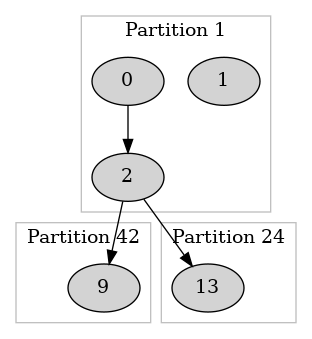
CSRG format represents this partition as follows:
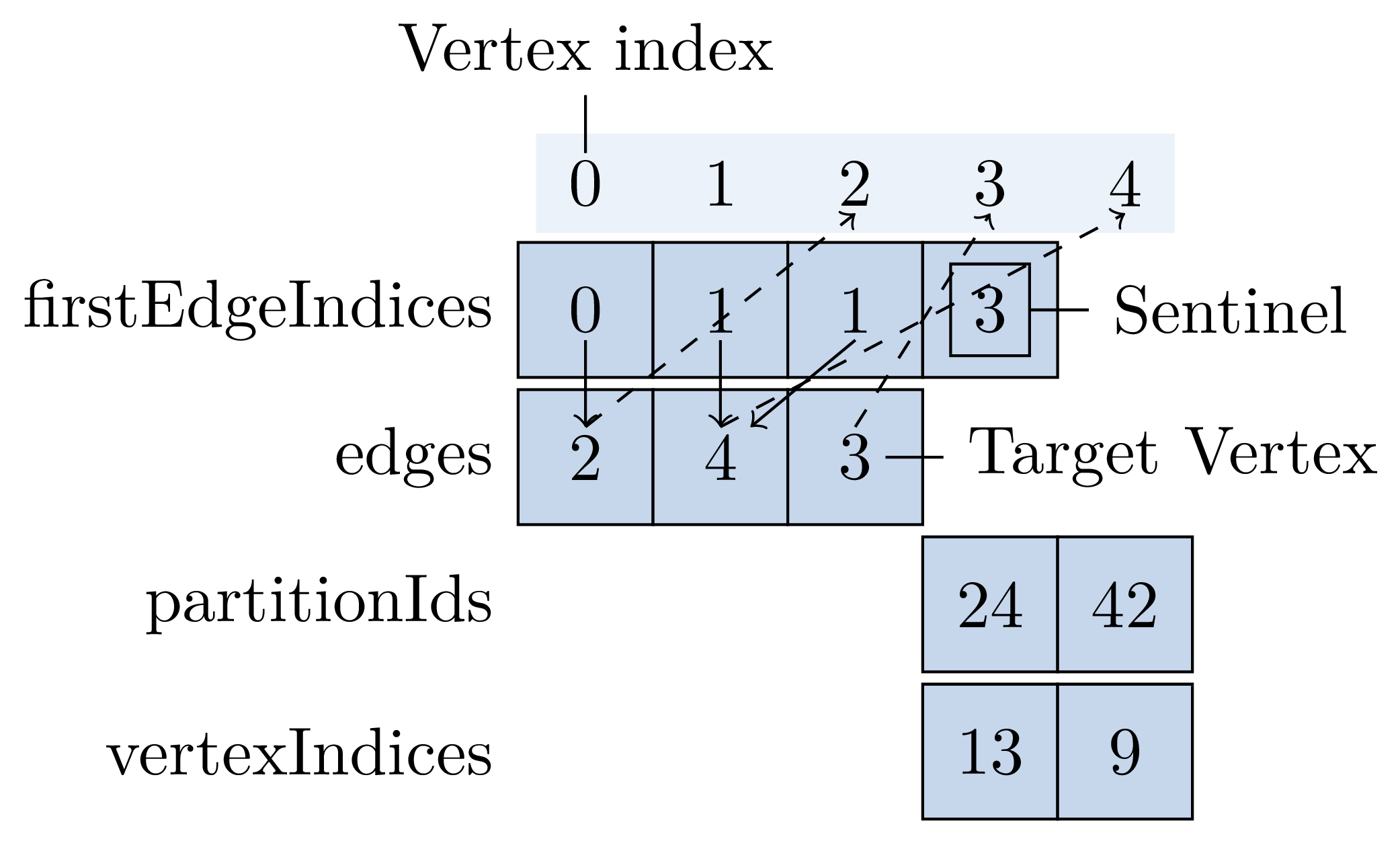
You can restore the graph partition by looking at its CSRG representation.
Let v(i) be the vertex with index i, so v(0) is the vertex with index 0,
and v(1) that with index 1, and so on.
-
Find out how many internal vertices this partition defines and which external
vertices it references.firstEdgeIndices.length - 1is 3, thus the verticesv(0),v(1)and
v(2)belong to the current partition.The vertex
v(3)corresponds to the external vertex in partition
partitionIds(0)at indexvertexIndices(0), which are partition 24 and
index 13.Similarly, the vertex
v(4)is the external vertex in partition
partitionIds(1)at indexvertexIndices(1), which are partition 42 and
index 9. -
Reconstruct the graph edges. For every internal vertex, decode its outgoing
edges.The outgoing edges of
v(0)have indices in the range [0, 1) (from
firstEdgeIndices(0)inclusive tofirstEdgeIndices(1)exclusive). So the
vertex has a single outgoing edge with index 0, and the edge's target is the
vertexv(edges(0))==v(2).The outgoing edges of
v(1)have indices in the (empty) range [1, 1) (from
firstEdgeIndices(1)inclusive tofirstEdgeIndices(2)exclusive).
Therefore, the vertex has no outgoing edges.Similarly, the outgoing edges of
v(2)have indices in the range [1, 3),
which correspond to target verticesv(edges(1))andv(edges(2))-- the
verticesv(4)andv(3).