

How to develop pipelines
Pipelines overview
The HERE platform uses data processing pipelines to process data from HERE geospatial resources and custom client resources to create new, useful data products.
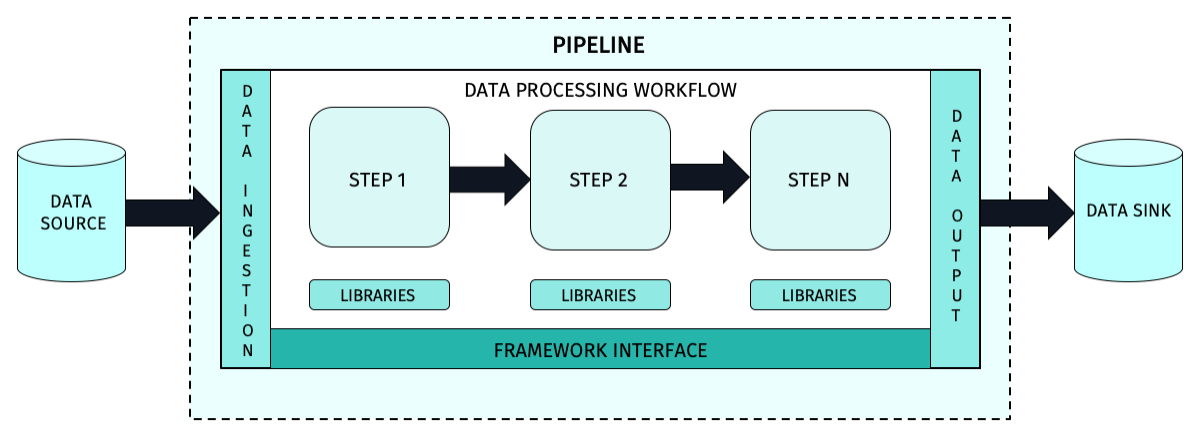
The structure of a typical HERE platform pipeline is shown in Figure 1.
Creating pipeline applications
You must design, develop and test your application before it can run on the pipeline service.
The end product of this process is a JAR file that can be deployed to the pipeline service and used to process data.
The process of creating pipeline applications is covered in the following tutorials:
CautionJAR file limits
The maximum size of the pipeline JAR file name is 200 characters. The maximum size of the pipeline JAR file is 500MB. If the JAR file upload cannot be completed within 50 minutes, the remote host will close the connection and return an error.
HERE platform pipelines can be simple or complex, depending on the data processing workflow being implemented.
The basic structure of the code application is well established and a new build project can be initiated using Maven Archetypes
for stream
or batch processing workflows.
Different archetypes are used so that the pipeline service instantiates the correct type of pipeline.
More advanced developers may choose not to use the Maven Archetypes for their new pipeline projects, but developers new
to the HERE platform are encouraged to use the Maven Archetypes for their initial projects.
A Maven archetype contains all the information needed to make it executable, including:
- the entry point, which is the name of the main class in the JAR file code.
- the definition and schema of the input and output catalogs that the implementation needs to be connected to.
- the type of runtime framework required.
- the default runtime configuration and parameters.
- any special runtime requirements needed by the pipeline's data processing code.
The structure of a typical HERE platform pipeline is shown below:
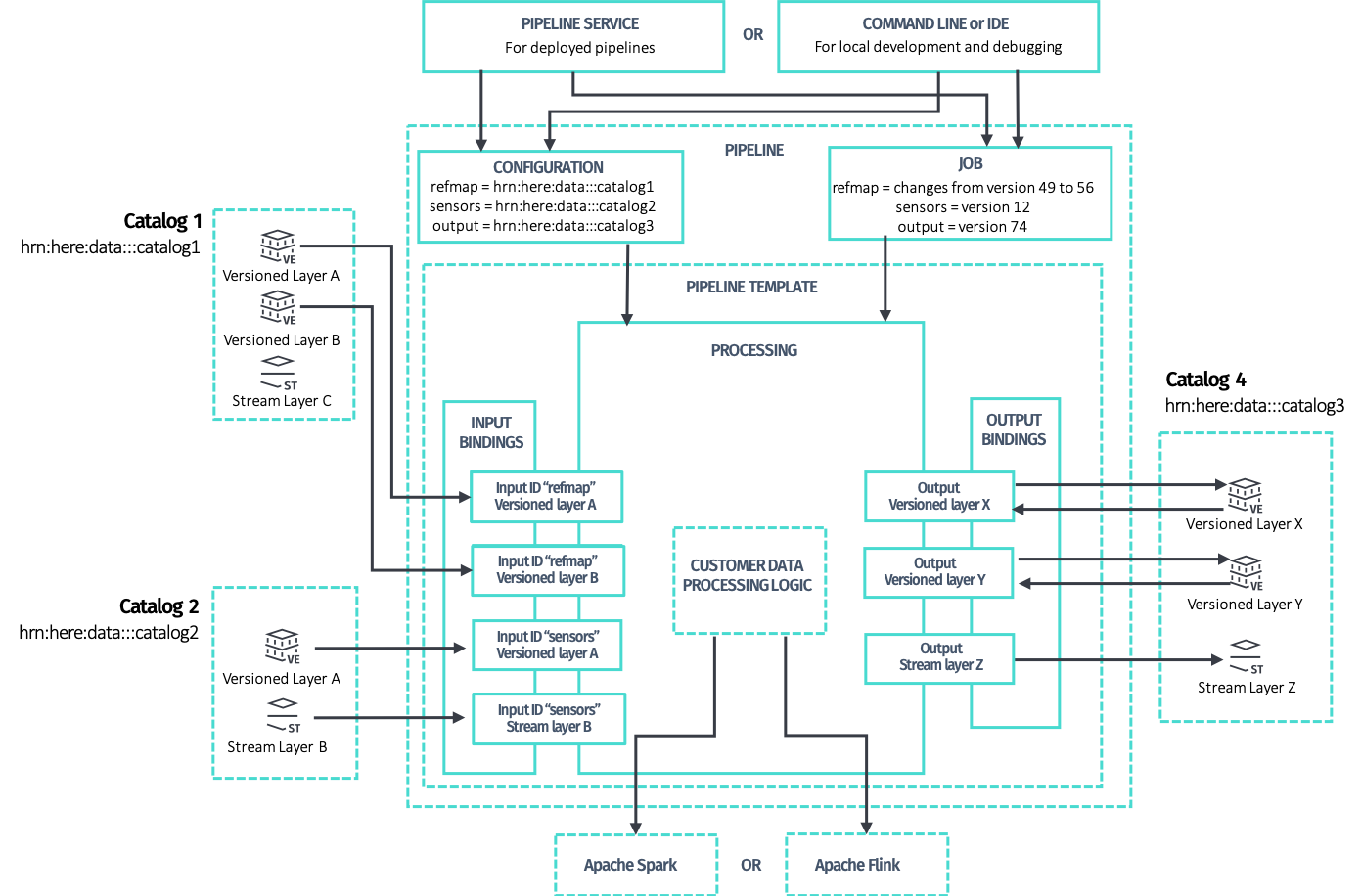
Much of this structure is taken care of by the Maven Archetypes supplied in the HERE Data SDK for Java & Scala (SDK).
But the Customer data processing logic block in the diagram is where the pipeline customization takes place.
It contains all the logic and data manipulation algorithms required to implement the desired processing workflow.
Detailed discussions on how to implement this workflow can be found in the following guides:
- The Data Client Library - Scala/Java libraries that you can use in your projects to access the HERE platform to implement stream processing pipelines.
- The Data Client Base Library - provides synchronous, stateless, plain and direct programmatic access to the Data and OLS (Open Location Services) APIs.
- The Data Processing Library - provides a means to easily interact with both the Pipeline API and the Data API via Spark to implement batch processing pipelines.
- The Data Archiving Library - assists to archive messages ingested via a stream layer.
- The Location Library - a set of algorithms for location-based analysis in stream or batch pipelines.
- The Index Compaction Library - provides a solution for compacting files with the same index attribute values into one or more files.
As shown in the diagram above, the data processing pipeline requires one or more data catalogs to process data from and
an output catalog to store the processed data.
To specify these, the pipeline-config.conf file should be created
for your application.
For the Apache Spark based applications, you may want to customize the application execution mode, in other words,
in running it only when certain conditions are met.
To do this, you need to create the pipeline-job.conf
configuration file for your application.
For additional details on configuring the logging level for your application, please see the Configurations available for pipeline developers - Logging configuration chapter
and Pipeline Logging section.
HERE platform pipelines
Creating a new pipeline is not an easy task, but the HERE platform and its tools have streamlined the process as much as possible.
The HERE platform developer workflow is divided into eight distinct phases that ensure high team velocity by allowing individual developers to work in local development environments:
- Determine the processing goals of the pipeline.
- Identify the pipeline parameters, such as the name, description, version, data source, and data destination.
- Outline the pipeline workflow by defining the processing activities that will take place in the pipeline and the order in which they will be performed.
- Develop the algorithms for manipulating the data to be processed in the pipeline.
- Integrate the workflow and algorithms into the executable pipeline JAR file in a local development environment.
- Define required and optional configuration parameters and files used by the pipeline.
- Test the new pipeline with development datasets.
- Release the pipeline for deployment in a production environment.
InfoMany types of data resources are provided in the HERE platform that can be processed in a pipeline. These include:
For more information on how to run your application as a HERE platform pipeline, see the following articles:
- Deploy pipelines
- Run pipelines
- Run a Flink application on the platform
- Run a Spark application on the platform
- Pipeline workflows
There are also many tutorials and examples that can provide guidance for specific programming tasks.
For more information, see HERE Workspace for Java and Scala Developers and Code Examples.
Develop stream pipelines
To develop a stream data pipeline, it is recommended to use the latest available Stream 7.0 (including Apache Flink 1.19.1 framework) runtime environment.
The basic guide for developing a Flink application is described in the Flink v1.19 DataStream API Programming Guide
and [Develop a Flink application]((https://docs.here.com/workspace/docs/tutorials-develop-spark-application-readme) tutorial.
For fixes and improvements added in Flink 1.19, see the following Flink release post.
For a list of libraries included in the Stream 7.0 runtime environment, see the following article.
CautionWhen a new stream runtime environment is released, the pipelines using the old stream runtime environment are supported for 6 months since the release of the new runtime environment in order to provide sufficient time to migrate the existing pipelines to the new runtime environment. For more information, see the
SDK migration guides.
Develop batch pipelines
To develop a batch data pipeline, it is recommended to use the latest available Batch 5.0 (including Apache Spark 3.4.4 framework) runtime environment.
The guide to the basics of developing a Spark pipeline application is described in Spark Quick Start 3.4.4 and
Develop a Spark application.
As the HERE platform does not yet support SQL, you should focus on the RDD Programming Guide.
For fixes and improvements added in Spark 3.4.4, see the following Spark release post.
For a list of libraries included in the Batch 5.0 runtime environment, see the following article.
CautionWhen a new batch runtime environment is released, the pipelines using the old batch runtime environment are supported for 6 months since the release of the new runtime environment in order to provide sufficient time to migrate the existing pipelines to the new runtime environment. For more information, see the
Migrate the SDK Projects from Spark 2.4.7 to 3.4.1guide.
Catalog considerations
Not all catalog layers are compatible with both batch and stream pipelines.
You should take this into account when designing the pipeline.
For further information, see Pipeline patterns and the Data API Developer Guide.
Also, most libraries have their own Developer Guides.