

Troubleshooting pipelines
The following section provides guidance on identifying and resolving common problems encountered when working with data processing pipelines.
Q: How do I investigate a pipeline that fails before a logging URL is created? #trbl1
A: Log in to the HERE platform portal, open the Launcher menu and select Logs in the Manage section:
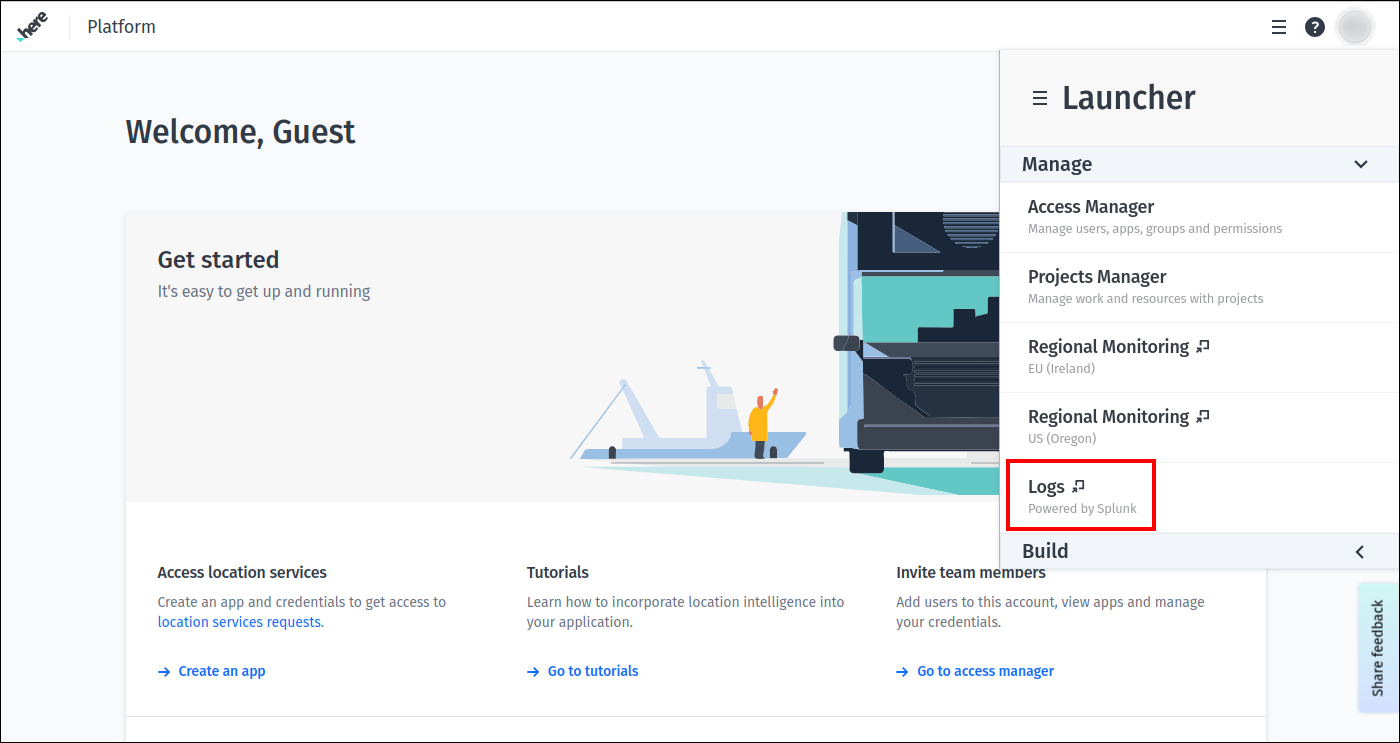
Now you can search for the logs in Splunk using the ID of the pipeline or pipeline version. See Pipeline logging section for more information.
Q: How do I find events in the log that came just before a failing pipeline error? #trbl10
A: First, locate the log entry for the failure event.
Then, click on the value in the Time column for this event and specify settings for the custom date and time range filter:
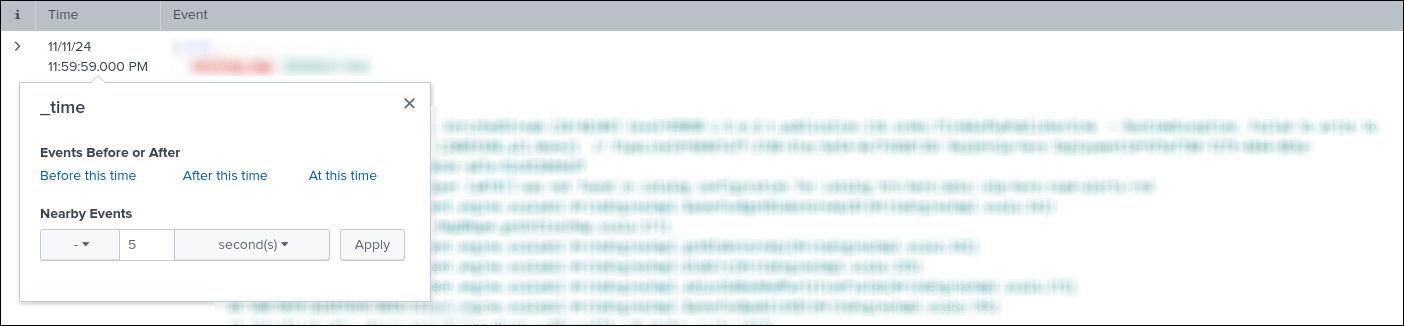
After clicking the Apply button, the log entries are filtered according to the specified date and time range filter.
Note that all values in the Time column are evaluated in UTC time zone.
Q: What does it mean when I have a Master URL exception when trying to run a data processing pipeline locally? #trbl5
Master URL exception when trying to run a data processing pipeline locally? #trbl5For example:
A master URL must be set in your configuration at org.apache.spark.SparkContext.<init>(SparkContext.scala:379)
at com.here.platform.data.processing.driver.DriverRunner$class.com$here$platform$data$processing$driver$DriverRunner$$newSparkContext
...
A: The error you are experiencing is a simple omission in the execution arguments of your Maven build.
Add the following to your Maven command line: -Dexec.args=--master local[*].
For example:
mvn exec:java -Dexec.cleanupDaemonThreads=false
-Dexec.mainClass=com.here.platform.examples.location.batch.Main
"-Dexec.args=--master local[*]"
-Dpipeline-config.file=config/pipeline-config.conf
-Dpipeline-job.file=config/pipeline-job.conf
Q: How can I include credentials in my pipeline JAR file? #trbl7
A: Adding credentials in the pipeline JAR file is strongly discouraged for security reasons.
The platform manages the credentials on behalf of the user - either platform credentials that
are used to access to services and resources provided by the HERE platform,
or the third-party credentials that are used to connect your pipeline to various third-party services.
Q: How do I control access to my pipeline? #trbl8
A: This can be achieved through groups or projects.
The Pipeline API supports specifying a group or project when creating a pipeline.
Users who are members of this group or project will have access to the pipeline, while external users will not.
Please note that pipelines created using the v3 API only support projects.
To learn more about setting up groups, projects and permissions, see the Identity & Access Management Guide.
Q: Why do I see some pipelines in the CLI but not in the platform portal, or in the platform portal but not in the CLI? #trbl2
A: Pipelines are only visible to the group or project that was specified when the pipeline was created.
The OLP CLI uses application credentials, while the platform portal uses user credentials.
If you want to interact with the same pipelines using both the CLI and the platform portal,
the client credentials and user credentials must have permissions to access resources in the same group or project.
For more information, see the Identity & Access Management Guide.
Q: Why does my pipeline JAR file fail to deploy? #trbl9
A: The most common reasons for a pipeline failing to deploy include one or more of the following:
- You do not have the rights or permissions to deploy a pipeline
- Your pipeline JAR file exceeds 500MB in size, making it too large to deploy
- Your pipeline JAR file has a filename that exceeds the 200-character limit and cannot be processed
- The pipeline is unavailable or has used up all available resources
- If the
POSTtransaction cannot be completed within 50 minutes, the remote host will close the connection and return an error
Q: A pipeline template create request fails with an HTTP 400 code and Package not found message. How can I fix it? #trbl21
Package not found message. How can I fix it? #trbl21A: This can happen if several days have passed since the package was originally uploaded.
Due to storage policies, unused packages are removed from storage.
Upload the package again and try to create a pipeline template from it.
Q: How do I fix my pipeline when I get these errors while running it - java.lang.NoSuchMethodError or java.lang.ClassNotFoundException? #trbl11
java.lang.NoSuchMethodError or java.lang.ClassNotFoundException? #trbl11A: One of the reasons you may see these errors is that some of the dependencies were not included in the application's Fat JAR file when you built it,
because you selected inappropriate scopes for them.
In this case, the solution is to check the dependencies and change the scope settings.
Another reason may be that you are overriding versions of dependencies that are defined in the SDK BOM file used by your application - this
can cause conflicts and lead to unexpected problems.
To prevent such conflicts, make sure that your application use the same versions of dependencies as specified in the SDK BOM file that is used by your application:
If your application explicitly requires a version of a dependency that is different from the version provided by the SDK BOM file,
and the application cannot be updated to use the latter, you need to add a relocation for such a dependency to the Apache Maven Shade plugin configuration in your application:
...
<build>
<plugins>
  <plugin>
    <groupId>org.apache.maven.plugins</groupId>
    <artifactId>maven-shade-plugin</artifactId>
    <version>${shade-plugin-version}</version>
    <executions>
      <execution>
        <phase>package</phase>
        <goals>
          <goal>shade</goal>
        </goals>
        <configuration>
          <relocations>
            <relocation>
              <pattern>ORIGINAL_PACKAGE_PATTERN_YOU_WANT_TO_RELOCATE</pattern>
              <shadedPattern>NEW_LOCATION_FOR_THE_PACKAGE</shadedPattern>
            </relocation>
          </relocations>
        </configuration>
      </execution>
    </executions>
  </plugin>
</plugins>
</build>
...
Q: How do I change the input catalogs used by a pipeline version? #trbl12
A: There is no way to change the input catalogs associated with a pipeline version, but there is a way to achieve the same result.
To do this, the pipeline version needs to be upgraded with a new version that uses the same template and configuration values, except for one or more specified input catalogs.
For example, you can use the CLI for it:
- Create a new pipeline version using the same pipeline template and a new configuration that specifies the new input catalogs.
It can be done viapipeline version createcommand. - Use the
pipeline version upgradecommand to replace the existing pipeline version with the new one.
Once the upgrade command has completed its execution, the pipeline version will start using new input catalogs.
Q: What does error code MSG1000 mean? #trbl13
MSG1000 mean? #trbl13A: There is timeout logic in place that waits for the Spark or Flink cluster to initialize for a new job.
If the Spark or Flink cluster is not initialized within the expected timeframe (currently 1 hour), then the pipeline job is marked as failed, and its resources are deleted.
The cause of this issue may be a lack of resources within the platform to create the Spark or Flink cluster with the specified number of workers, CPUs, etc.
You can monitor the overall platform health as well as statuses of different services on the Platform Status page.
Note that, the platform will automatically attempt to run the job again at the next 5-minute interval.
However, if this is a batch pipeline version configured to run only once, then the platform will not automatically
try to run it again after a failure unless the pipeline version has been explicitly reactivated by the user.
If this continues to be an issue, file a support ticket.
Q: What does error code MSG2000 mean? #trbl14
MSG2000 mean? #trbl14A: There is timeout logic in place that waits for the Spark or Flink pipeline to start running.
This timeout takes place after the Spark or Flink cluster has been successfully created.
If the data processing job does not start running within the expected timeframe (currently 6 minutes), then the pipeline job is marked as failed, and its resources are deleted.
You can review the Splunk logs using the pipeline Logging URL link to determine what might be preventing the data processing job from running.
Certain messages are logged once the data processing job has been submitted (for Spark pipelines) or started (for Flink pipelines) and can be used as indicators during the review.
For the Spark pipelines use the following Splunk query:
index=<YOUR_REALM>_common namespace=<NAMESPACE_WHERE_THE_JOB_IS_DEPLOYED> source="driver" "*usr/spark/bin/spark-submit*" Look for the following log entry:
{
  ...
  log: + /usr/spark/bin/spark-submit
  ...
}
For the Flink pipelines use the following Splunk query:
index=<YOUR_REALM>_common namespace=<NAMESPACE_WHERE_THE_JOB_IS_DEPLOYED> source="joblauncher" "*Running pipeline with class*" Look for the following log entry:
{
  ...
  log: Running pipeline with class - <MAIN_CLASS_OF_YOUR_APPLICATION>
  ...
}
Please note, that if the pipeline Logging URL link was used to access the Splunk page,
the values for the index and namespace properties are automatically populated.
The MSG2000 error message can appear for a number of reasons, but there are several specific causes that are covered below.
Time-consuming pre-check operations
Some applications are designed to perform a variety of checks and validations before they begin processing the data.
When these operations are particularly complex or involve time-consuming tasks (such as querying external resources, validating large datasets)
they may exceed the timeout threshold mentioned above and this can trigger MSG2000 errors.
It is therefore essential to carefully consider the potential duration of these operations while creating your application.
Leftover Thread.sleep() methods
Thread.sleep() methodsAnother source of MSG2000 errors are Thread.sleep() methods left in the application after development or debugging, which is later run as a platform pipeline.
Please review the application code before the deploying it.
Misconfiguration of Spark master
masterFor the Spark data processing pipelines, a common source of the MSG2000 messages is that the user has hardcoded the Spark master property to local[*], as shown here:
SparkConf conf = new SparkConf();
conf.setMaster("local[*]");
context = new JavaSparkContext(conf);
This causes the code to override the master configuration set by the platform, and not utilize the Spark cluster resources.
Pipeline management will not be able to monitor the status of the job, and it will fail after the timeout.
This type of misconfiguration can have several different symptoms:
- After the timeout period, the pipeline is reported as failed and an
MSG2000error is reported - All logs in Splunk are shown under
source=driverand no logs are shown undersource=executor - When looking at the Splunk logs, the Spark job seems to be running as you will see log messages indicating that tasks are being executed (requires
InfoorDebuglogging levels) - The pipeline may even produce data in the output catalog
- Because all the execution is done in the driver, the JVM may throw an
OutOfMemoryError
Although it is common to set the master configuration to local[*] for local testing purposes, this should be disabled when deploying the application to the platform.
One way of doing this shown below:
SparkConf conf = new SparkConf();
  if (!conf.contains("spark.master")) {
    LOGGER.warn("No master set, using local[*]");
    conf.setMaster("local[*]");
  }
  context = new JavaSparkContext(conf);
This will cause Spark to fall back to local[*] only if the master is not provided by spark-submit.
Q: What does error code MSG3000 mean? #trbl15
MSG3000 mean? #trbl15A: This problem only affects Spark jobs. It is based on a timeout (currently 5 minutes) that can occur when the Spark context is closed but the Spark driver hangs on exit.
When this happens, the return code from the Spark driver is not (yet) available because:
- The Spark driver may perform additional processing
- Cleanup is performed after the Spark context is closed
- Additional threads may have been created in the driver, preventing the JVM from exiting
NoteAlthough the job is marked as failed in the platform, the Spark job may actually have completed successfully.
You can review the Splunk logs using the pipeline Logging URL link to identify events that occur
after the Spark context is closed and that are preventing Spark driver from exiting.
For it, use the following Splunk query:
index=<YOUR_REALM>_common namespace=<NAMESPACE_WHERE_THE_JOB_IS_DEPLOYED> source="driver" "*Successfully stopped SparkContext*" Pay attention to the following message that is logged when the Spark context is closed:
{
  log: ...  org.apache.spark.SparkContext - Successfully stopped SparkContext
}
Please note, that if the pipeline Logging URL link was used to access the Splunk page,
the values for the index and namespace properties are automatically populated.
You can also do the following:
- Verify exit logic. For example, check for infinite or long-running loops after the Spark Context is closed
- Check to see if any custom threads are left behind. Make sure they are disposed of properly
- Remove explicit closing of the Spark context from the Spark job code, as it is automatically closed on exit
Q: What does error code MSG4000 mean? #trbl16
MSG4000 mean? #trbl16A: This issue only applies to Flink jobs. In the event of a failure, a running Flink job will first switch to the failing state and then to the failed state.
If it has not switched from failing to failed within the expected timeframe (currently 20 minutes), then the pipeline job is marked as failed with this message, and its resources are deleted.
Check the Splunk logs for more details using the pipeline Logging URL link.
You can also run the pipeline with the logging level set to Debug to capture more details.
For additional troubleshooting tips, see the Apache Flink documentation on restart strategies and Apache Flink documentation on job lifecycle.
Q: What does error code MSG5000 mean? #trbl17
MSG5000 mean? #trbl17A: MSG5000 error indicates an issue with initialization of a pipeline's accounting and monitoring metrics system.
The result is a failure to collect and report metrics, including billing data.
There is a timeout of 2 minutes on this initialization.
If the system is not initialized within that time, the pipeline is reported as failed to ensure that it does not run indefinitely without collecting monitoring and billing data.
Initialization of accounting and monitoring does not interfere with the startup of the pipeline job itself.
Therefore, it is likely that the pipeline itself will start successfully and start processing data.
For batch pipelines, it is possible for the pipeline job to complete successfully before the timeout occurs.
This is an error in the platform infrastructure. In most cases, it is sufficient to restart the pipeline:
- For stream and unscheduled batch pipelines - reactivate the pipeline
- For scheduled batch pipelines - the pipeline will be restarted at the next iteration of the schedule
If the problem persists, file a support ticket.
Q: What does error code MSG6000 mean? #trbl20
MSG6000 mean? #trbl20A: MSG6000 error highlights a problem with the provisioning of new realms.
There is a delay present between the moment when a new realm is provisioned and when a pipeline can be run on it.
This delay should not exceed 1 hour.
In most cases, it is sufficient to restart the pipeline after some time.
If the problem persists after an hour of waiting, contact the HERE support team.
Q: What does error code MSG9000 mean? #trbl21
MSG9000 mean? #trbl21A: This error only applies to batch pipelines that are scheduled to run according to cron expression or on data change - see Execution modes for activating a batch pipeline.
This error code confirms that your pipeline has been deactivated after failing multiple times. See Job failures in Scheduled and Time Scheduled batch pipelines
Refer to the Splunk logs for information about using the pipeline Logging URL link to identify failures and reactivate the pipeline.
Q: What is the proper way to consume a third-party service from a pipeline running in the HERE platform? #trbl18
A: The pipeline can access the third-party service using an HTTPS call from the pipeline.
However, the third-party service cannot access any of the HERE platform's pipeline components.
For more information about connecting to a third-party service, see Configuration for third-party services chapter.
Q: I am experiencing repeated pipeline failures due to failure to get blocks or failure to connect to node. Smaller jobs have run with no problem. What can cause this? #trbl19
A: This can happen on jobs with large amounts of data due to a lost worker (node). An OutOfMemory exception is the typical cause.
This may be the result of using a cluster that is too small, or it may be a problem with memory allocated to the JVM.
If there are no OutOfMemory messages in the logs, use Grafana to check the JVM metrics to see if you are actually running out of memory when the worker disappears.
You can try using a memory intensive resource profile for your pipeline to allocate more RAM to a supervisor and workers.
NoteFor Spark pipelines, you can also use the
Spark UIpage to analyse memory usage.
Q: Why does the AWS SDK not use the credentials I passed via olp secret when the AWS STS module is on the classpath?
olp secret when the AWS STS module is on the classpath?A: If no AwsCredentialsProvider is specified when building the AWS client, the AWS SDK uses DefaultCredentialsProvider
to find the credentials in the order described in the AWS documentation for this class.
If the AWS STS module is present on the classpath, the DefaultCredentialsProvider will use Web Identity Token that pipelines
mount for internal use before evaluating the credential profiles file mounted by the olp secret.
Configure the AWS SDK to use ProfileCredentialsProvider when building the client:
    S3Client s3client = S3Client.builder()
            .credentialsProvider(ProfileCredentialsProvider.create())
            .region(Region.US_EAST_1)
            .httpClient(UrlConnectionHttpClient.builder().build())
            .build();
Q: How do I fix the Profile file cannot be null error when running a pipeline that is configured to interact with Amazon Web Services?
Profile file cannot be null error when running a pipeline that is configured to interact with Amazon Web Services?A: If you configured your pipeline to connect to Amazon Web Services using the AWS type, olp secrets
and you receive a Profile file cannot be null error after activation, the application might not be using your credentials.
This error can occur when:
-
Your application uses the
AWS SDK v1.
TheAWS SDK v1automatically loads credentials when they are stored in the default credentials file location,
or when theAWS_CREDENTIAL_PROFILES_FILEenvironment variable is set with the full path to the credentials file.
For the platform pipelines, the path to the credentials file is specified by theAWS_SHARED_CREDENTIALS_FILEvariable.
This variable is only compatible withAWS SDK v2and is not used byAWS SDK v1.
When building the client, you must configure theAWS SDKto useProfileCredentialsProviderwith
the location of the provided credentials file and the profile name:String credsFileLocation = System.getenv("AWS_SHARED_CREDENTIALS_FILE"); String profileName = "default"; String region = "us-west-2"; AmazonS3 s3Client = AmazonS3ClientBuilder.standard() .withCredentials(new ProfileCredentialsProvider(credsFileLocation, profileName)) .withRegion(region) .build();In the example above, the profile name is specified as a
default. However, you must specify it in accordance with the
credentials file that was used to create the appropriateolp secret. -
Your application does not use the
AWS SDKto configure access to the web service.
If your application configures access to the web service without using theAWS SDK, the credentials file may not be read and used automatically.
In this case, you must add additional configuration in accordance with the framework you used.
For example, if your application uses Apache Hadoop to access data in anAWS S3bucket,
in addition to other settings, you must specify values for thefs.s3a.aws.credentials.provider,fs.s3a.access.key, andfs.s3a.secret.keyproperties in the
hadoop configuration used by your application. Values for thefs.s3a.access.key, andfs.s3a.secret.keyproperties (or their counterparts in other frameworks) should be parsed from the
credentials file, whose location is provided by theAWS_SHARED_CREDENTIALS_FILEenvironment variable:String credsFileLocation = System.getenv("AWS_SHARED_CREDENTIALS_FILE"); String profileName = "default"; String region = "us-west-2"; ProfileFile credentialsFile = ProfileFile.builder() .type(ProfileFile.Type.CREDENTIALS) .content(Paths.get(credsFileLocation)) .build(); Profile profile = credentialsFile.profile(profileName) .orElseThrow(() -> new RuntimeException("Profile " + profileName + " not found")); Map<String, String> properties = profile.properties(); String accessKey = properties.getOrDefault("aws_access_key_id", "defaultValue"); String secretAccessKey = properties.getOrDefault("aws_secret_access_key", "defaultValue"); Configuration hadoopConfig = sparkSession.sparkContext().hadoopConfiguration(); hadoopConfig.set("fs.s3a.impl", "org.apache.hadoop.fs.s3a.S3AFileSystem"); hadoopConfig.set("fs.s3a.aws.credentials.provider", "org.apache.hadoop.fs.s3a.SimpleAWSCredentialsProvider"); hadoopConfig.set("fs.s3a.access.key", accessKey); hadoopConfig.set("fs.s3a.secret.key", secretAccessKey); hadoopConfig.set("fs.s3a.endpoint.region", region);In the example above, the profile name is specified as a
default, but you must specify it in accordance with the
credentials file that was used to create the appropriateolp secret.
Q: How do I fix the 403 Forbidden error when running a pipeline that is configured to interact with publicly hosted resources?
403 Forbidden error when running a pipeline that is configured to interact with publicly hosted resources?A: If you configured your pipeline to connect to a publicly hosted resource, and you received a 403 Forbidden error
after activation, the resource was not whitelisted for the realm where you ran your pipeline.
For security reasons, connections from pipelines to resources like these are blocked by default.
To fix this, an egress rule for this resource should be created. For more information about egress rules and how to configure them,
see Managing egress connections for pipelines chapter.