

Cache tiles efficiently
Caching involves storing copies of maps locally on the client device to avoid repeated requests to the server for the same resources. This process significantly reduces network traffic and accelerates the rendering of maps within the application.
The following sections provide best practices for setting up the cache as well as request/response handling to achieve the optimal efficiency.
Understand how caching works
The most common caching method involves using the default browser cache. This is a simple method, sufficient for most use cases, which relies on standard HTTP headers for cache management.
Caching raster tiles in a web browser involves storing tiles after the browser loads them for the first time. When a user interacts with a map, the browser checks its cache for the required tiles before requesting them from the server. If the requested tiles are cached and are still valid, the browser loads the tiles directly from the cache, which reduces latency and server load.
This speeds up map rendering and enhances user experience by reducing the number of tile requests. While browser-based cache works consistently across all modern browsers without additional setup, you typically can't directly modify the cache behavior within the browser, except for configuring such HTTP headers as Cache-Control or ETag on the server side, which control how and for how long the browser caches resources like raster tiles.
Best practices for cache setup
The following list provides a set of best practices to set your caching mechanism in an efficient way:
-
Cache primarily based on tile key: The cache should store tile images based on unique identifiers (tile keys), with the flexibility to take into account additional factors such as the
style,ppi, or other tile parameters. -
Use ETag for cache validation: Each server response includes an ETag header field to determine whether the requested tile is still valid or needs to be regenerated. The following snippet provides a sample
ETagthat you can obtain from the response header:Etag: W/"1adc8-95377349-ef4a79f943364b44744012b5in189jp9fdtm10" -
Set expiry time for cache entries: Assign each cached tile a time limit after which it expires. Calculate this time limit based on the time you received the tile plus a predetermined maximum duration. HERE recommends that you set the maximum cache duration to
86400seconds (24 hours) to achieve maximum efficiency. -
Adhere to HERE restrictions on content caching: For example, caching or storing any location data for the purpose of building a repository of location assets or scaling one request to serve multiple end users is prohibited. For more information, see HERE Developer Terms and Conditions.
Request handling and optimization
The following points outline best practices for requesting tiles, accounting for scenarios where the tile is requested for the first time from the server or retrieved from the client's cache. These practices optimize tile management and enhance user experience by effectively handling cache hits and misses.
-
When requesting a tile for the first time, avoid sending an
ETagheader with the initial request to the server, simply fetch the tile. -
After you received the tile from the server, store both the image itself and the
ETagvalue provided in the server response. Additionally, set the expiration time for this cached entry to the current time plus the maximum duration allowed for caching, for example, the recommended86400seconds.GET https://maps.hereapi.com/v3/base/mc/10/583/404/png8?apiKey={YOUR_API_KEY} ETag: W/"1adc8-95377349-ef4a79f943364b44744012b5in189jp9fdtm10" Cache-Control: max-age=86400 -
If the cached tile has expired, send a tile request to the server with the cached
ETagvalue as part of theIf-None-Matchheader, as shown in the following snippet:GET https://maps.hereapi.com/v3/base/mc/10/583/404/png8?apiKey={YOUR_API_KEY} If-None-Match: W/"1adc8-95377349-ef4a79f943364b44744012b5in189jp9fdtm10" -
If the cached tile has changed, the server responds with the
200 OKmessage, together with a new tile that includes an updatedETagvalue. Include the newETagvalue stored with the cached entry as theIf-None-Matchheader for the subsequent requests sent to the server for that tile. -
If the server tile is still valid, the server responds with the
304 Not Modifiedstatus. In that case, update the cache expiry time only (the image andETagare the same as before).
Sequence diagram
The following sequence diagram illustrates the process of caching tile images on the client side (for example, a web browser) for efficient retrieval and usage:
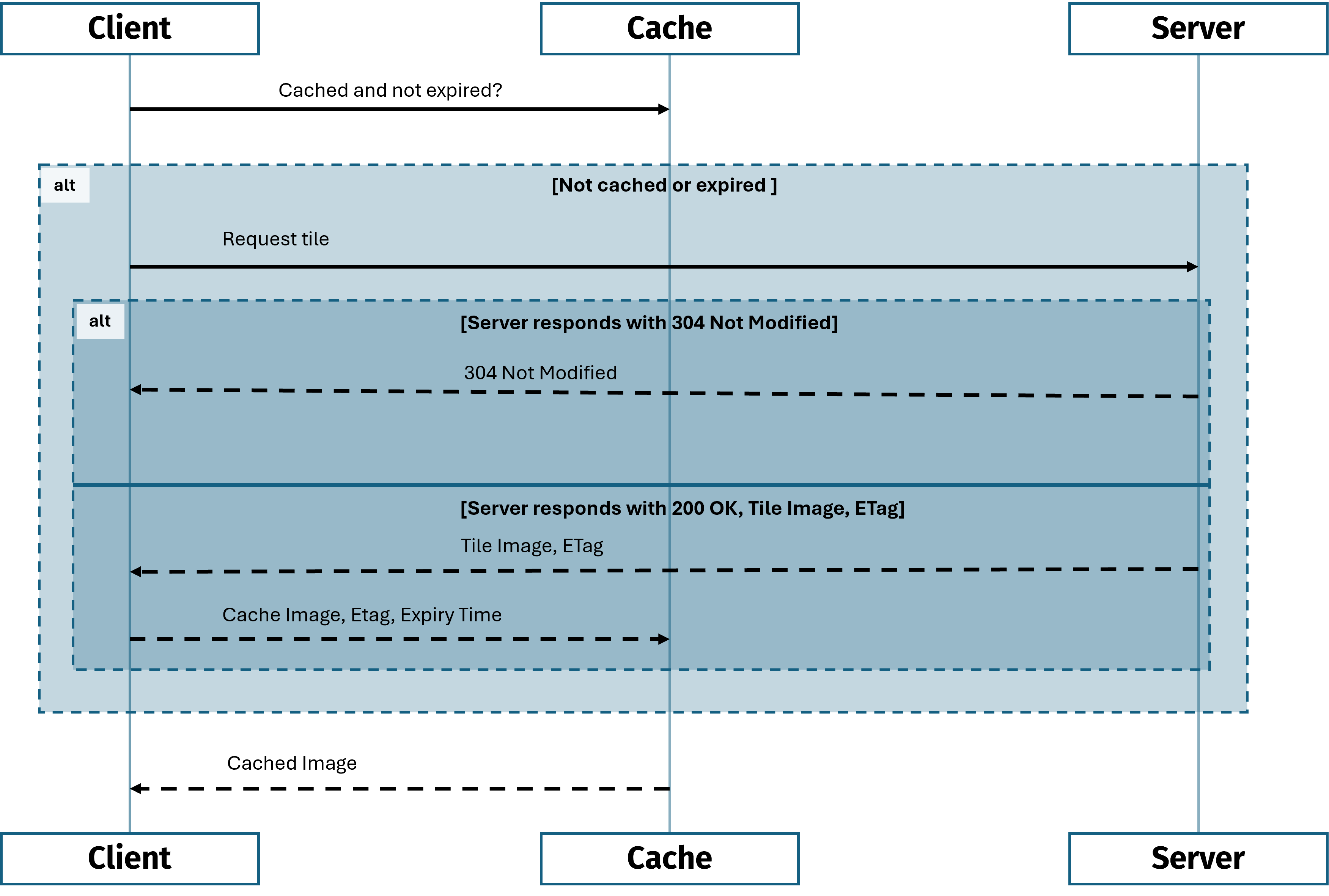
The following steps describe the sequence as presented by the preceding diagram:
- Client checks cache: The client checks if the requested tile is cached and not expired.
- Cache miss (Not cached or expired):
- Client requests tile from server
- Server response:
- If the tile has not been modified, the server responds with
304 Not Modified. - If the tile has been modified or it's the first request, the server responds with
200 OKalong with the tile image data andETag.
- If the tile has not been modified, the server responds with
- Handling server responses:
- If the server responds with
304 Not Modified, the client uses the cached image. - If the server responds with
200 OK, the client updates the cache with the new tile image andETag.
- If the server responds with
- Cache hit (Cached and not expired): The client successfully retrieves the tile from the cache.
Next steps
For more information, see the API Reference.
Updated last month