

Render raster maps with Leaflet
Learn how to display raster tiles through the HERE Raster Tile API v3 by using Leaflet, a JavaScript library for interactive maps.
Prerequisites
Obtain a HERE API Key: If you do not have one already, sign up for a HERE platform account and generate an API key. For more information, see the Identity & Access Management Developer Guide.
Set up the HTML structure
Create a new HTML file that contains the map object.
<!DOCTYPE html>
<html lang="en">
<head>
  <meta charset="UTF-8">

  <!-- Viewport settings for responsive design -->
  <meta name="viewport" content="width=device-width, initial-scale=1.0">
  <title>HERE Map with Leaflet</title>

  <!-- Link to Leaflet CSS for styling the map -->
  <link rel="stylesheet" href="http://unpkg.com/[email protected]/dist/leaflet.css">
</head>
<body onload="initialize_map()">

  <!-- Div element to contain the map. Set to 1000x500 pixels -->
  <div id="my_map_div" style="width:1000px; height:500px"></div>

  <!-- Link to Leaflet JavaScript library -->
  <script src="http://unpkg.com/[email protected]/dist/leaflet.js"></script>
  <script>
    // JavaScript code for initializing the map goes here
  </script>
</body>
</html>
Initialize the map with JavaScript
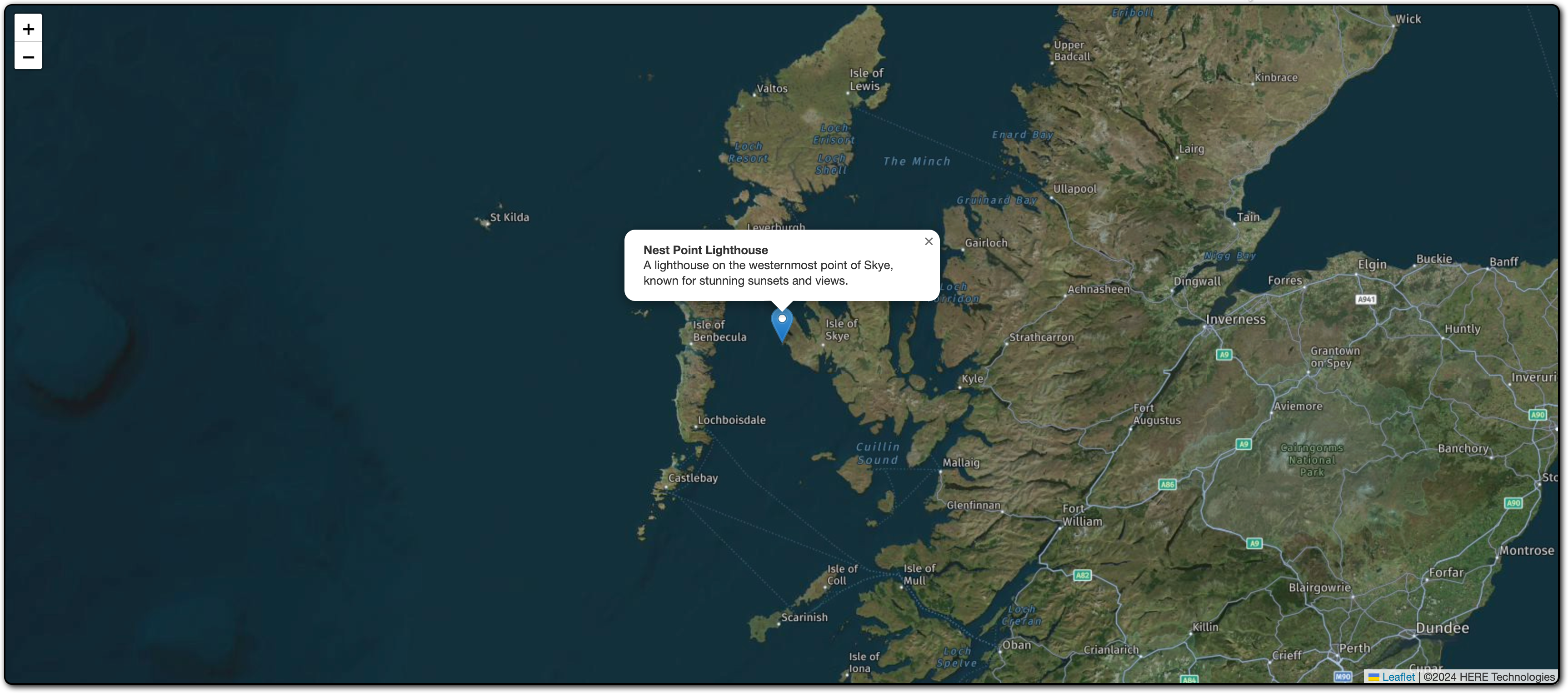
Add the JavaScript code to initialize the map inside the <script> tag in the <body> section. In addition to the basic raster map, the following code places a sample marker on the map.
function initialize_map() {

    // Center map at specific location and zoom level
    let map = L.map('my_map_div').setView([57.4235, -6.7879], 8);

    // URL template for HERE map tiles
    // {z} - zoom level, {x} - tile x coordinate, {y} - tile y coordinate
    let url = "https://maps.hereapi.com/v3/base/mc/{z}/{x}/{y}/jpeg";

    // Append additional query parameters: tile size, map style, and API key
    url += "?size=256&style=explore.satellite.day&apiKey={YOUR_API_KEY}";
    L.tileLayer(url, {
        maxZoom: 18,
        attribution: '©2024 HERE Technologies'
    }).addTo(map);

    // Add a marker at a specific location
    let marker = L.marker([57.4235, -6.7879]).addTo(map);

    // Attach a popup to the marker
    marker.bindPopup("<b>Nest Point Lighthouse</b><br>A lighthouse on the westernmost point of Skye, known for stunning sunsets and views.").openPopup();
}
The preceding script performs the following actions:
-
Inside the
initialize_map()function, the script creates a Leaflet map instance, sets its initial view to specific coordinates, and specifies the initial zoom level. -
The
urlvariable defines the URL template to fetch map tiles and appends additional query parameters for the tile size, map style, and the HERE API key. For more information about the available query parameters in the HERE Raster Tile API v3, see the API Reference.Note
Replace
{YOUR_API_KEY}with your actual HERE API key. -
The
L.tileLayer()function creates a tile layer using the defined URL, sets the maximum zoom value to 18, provides attribution for HERE Technologies, and then adds the tile layer to the map.
Display the map in a browser window
To use this HTML and JavaScript setup, save the HTML file and open it in a web browser. The browser displays a map centered on the specified coordinates with a raster tile layer and a custom marker, as shown in the following figure:
Note
You can use the HERE Maps API for JavaScript, a powerful tool for integrating interactive maps and location-based services into web applications, to render raster map with a wide range of features to create customized maps that suit your business needs. For more information, see Render raster maps with the HERE Maps API for JavaScript
Next steps
For more information on HERE Raster Tile API, see:
Updated last month