

Explore geopolitical views
With the HERE Map Image API, you can show borders from different perspectives, meeting various user preferences and geopolitical factors. Whether you aim to highlight borders following international agreements or present them from a specific country's viewpoint, the HERE Map Image API helps you make maps that accurately depict disputed boundaries.
Understand geopolitical view application
The default view configuration in the HERE Map Image API presents the international perspective, visually representing disputed territories with dashed borders. You can adjust your HERE Map Image API query to switch the map display from the international perspective to a geopolitical view of a particular country, depending on the underlying map resource.
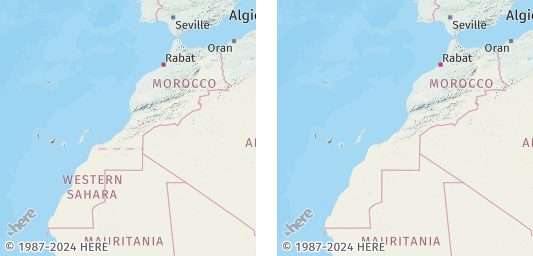
For example, see the following figure, which displays the dashed border between Morocco and Western Sahara in the international view and with the Moroccan geopolitical view applied:
Optional: Get the list of supported geopolitical views
To obtain the current list of geopolitical views in the HERE Map Image API, make a request to the /politicalViews endpoint, as shown in the following example:
https://image.maps.hereapi.com/mia/v3/politicalViews
?apiKey={YOUR_API_KEY}Result: The response body is a JSON file that provides a list of country codes following the ISO 3166-1 alpha-2 schema. Each code corresponds to a geopolitical view available for a given map resource type. The following snippet provides a simplified example of JSON response from the /politicalViews endpoint:
{
  "background":["AB","AR","CN","CY"],
  "base":["AB","AR","CN","CY"],
  "blank":["AB","AR","CN","CY"],
  "label":["AB","AR","CN","CY"]
}
You can utilize any of the country codes from the respective arrays to apply a geopolitical view to your map images based on your selected map resource type.
Apply a geopolitical view on map images
Customize the map display and highlight the political boundaries between India and Pakistan.
Note
The country codes for India and Pakistan are
INandPKrespectively, following the ISO 3166-1 alpha-2 country codes schema.
Consider the following query:
https://image.maps.hereapi.com/mia/v3/base/mc/center:32.632350,74.407587;zoom=5/300x300/png8
?apikey={YOUR_API_KEY}
&lang=en
This query returns a map centered on Jammu and Kashmir along with Ladakh, the subject of a dispute between India and Pakistan:
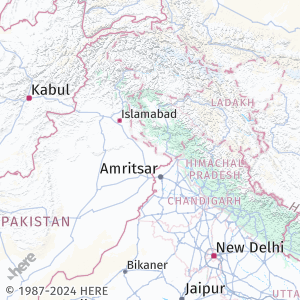
This default view applies the international perspective, with disputed borders styled as dashed lines.
Sample request #1:
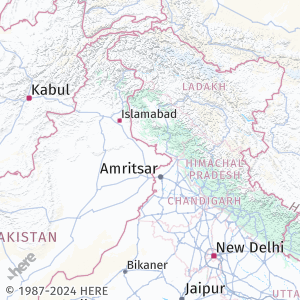
To apply the Indian geopolitical view to this map image, add the pview=IN parameter to the query, as shown in the following example:
https://image.maps.hereapi.com/mia/v3/base/mc/center:32.632350,74.407587;zoom=5/300x300/png8
?apikey={YOUR_API_KEY}
&lang=en
&pview=INResponse: The map image now displays the Indian geopolitical view, as shown in the following figure:
Sample request#2:
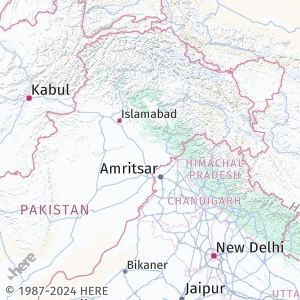
To apply the Pakistani geopolitical view, change the IN value of the pview parameter to PK, as shown in the following example:
https://image.maps.hereapi.com/mia/v3/base/mc/center:32.632350,74.407587;zoom=5/300x300/png8
?apikey={YOUR_API_KEY}
&lang=en
&pview=PKResponse: The map image now displays the Pakistani geopolitical view, as shown in the following figure:
Next steps
- To explore all supported endpoints and parameters, see the API Reference.
- To gain more hands-on experience with the HERE Map Image API see the
Tutorialssection of this guide.
Updated 7 months ago