

Migrate from Map Image API v1 to Map Image API v3
Note
To enable access to the HERE Map Image API v3 for an existing HERE platform account, create a support ticket in the HERE Support Portal.
Access pre-rendered map images, optimized for both desktop and mobile devices, through the HERE Map Image API v3. This upgraded API supersedes the HERE Map Image API v1. This guide assists you in seamlessly transitioning from the previous version to the HERE Map Image API v3, ensuring the continued operation of your location-based applications.
Changes overview
The following steps provide a high-level overview of the actions that you must perform to successfully complete the migration.
- Confirm that you are using API keys associated with your HERE platform account.
- Adjust or switch the authentication method as needed.
- Revise request parameters to align with the HERE Map Image API v3.
- Remove any parameters that are no longer supported.
Before you begin
Obtain a HERE platform account. Previously used HERE developer accounts do not work for the HERE Map Image API v3.
The subsequent sections of this guide, provide comprehensive details and instructions for each step.
Request URL format
The HERE Map Image API v3 features an updated request format. The following table provides a comparison of two API versions, including the URL structure, resource, or path specifications:
| Version | URL | Resource/Path | Parameters |
|---|---|---|---|
| V1 | https://image.maps.ls.hereapi.com/mia/1.6 | {resource} | ?apiKey={YOUR_API_KEY} ¶meter=value |
| V3 | https://image.maps.hereapi.com/mia/v3 | /{resource}/{projection}/{view}/{width}x{height}/{format} | ?apiKey={YOUR_API_KEY} ¶meter=value |
Examples
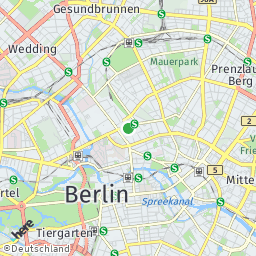
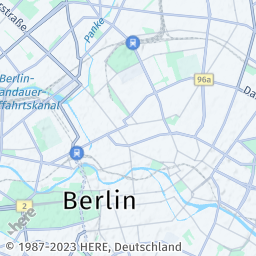
The following snippets provide a comparison between sample V1 and V3 requests to facilitate the understanding of the fundamental differences between the API versions:
-
Request (V1):
https://image.maps.ls.hereapi.com/mia/1.6/mapview ?apiKey={YOUR_API_KEY} &lat=52.53086 &lon=13.38662 &z=12 &w=256 &h=256 -
Response (V1):
-
Request (V3):
https://image.maps.hereapi.com/mia/v3/base/mc/center:52.53086,13.38662;zoom=12/256x256/png ?apiKey={YOUR_API_KEY} -
Response (V3):
Note
Consider the following V3 design features:
- In the HERE Map Image API v3, you must specify a parameter that sets the camera position, for example,
centerwithzoom/radius,overlay,bbox,bounds, and so on. - The value for the
projectionparameter must always bemcfor Mercator Projection.
- In the HERE Map Image API v3, you must specify a parameter that sets the camera position, for example,
Authentication method
The HERE Map Image API v3 supports the API key authentication method only.
For information on how to obtain an API key, see the Get started article in the HERE Map Image API v3 Developer Guide.
Image properties
As opposed to HERE Map Image API v1, in HERE Map Image API v3, you specify such parameters as the image format and size as part of the API path.
The following table provides a breakdown of supported image properties for each API version:
| V1 parameter | Description | Is supported | Additional information |
|---|---|---|---|
f | File type | ✅ | In V3, the file type is part of the API path. Available values include: - png - jpeg - png8 |
q | Image compression | ❌ | Not supported. |
h | Image height | ✅ | Part of the API path. |
w | Image width | ✅ | Part of the API path. |
Note
Consider the following design features and restriction that changed between the API versions:
- The maximum image width or height in both API versions is
2048pixels. The minimum image width and height in the HERE Map Image API v1 is0pixels, while in V3, it is64pixels. This means that in V3, you cannot obtain an image smaller than64x64pixels.- When you don't specify the image size, the HERE Map Image API v1 defaults to
240x300pixels. However, in the HERE Map Image API v1, you must provide an image size in the API path for the request to succeed.
Examples
The following requests show corresponding V1 and V3 request URL for obtaining a 380x460 pixel image in the PNG format:
-
Request (V1):
https://image.maps.ls.hereapi.com/mia/1.6/mapview
?apiKey={YOUR_API_KEY}
&lat=52.53086
&lon=13.38662
&z=12
&w=380
&h=480
&f=0
In the preceding example:
w=360is image width in pixelsh=480is image height in pixelsf=0is the format parameter value for the PNG format
-
Request (V3)
https://image.maps.hereapi.com/mia/v3/base/mc/center:52.53086,13.38662;zoom=12/380x460/png
?apiKey={YOUR_API_KEY}
In the preceding example:
380x460is{width_value}x{height_value}in pixelspngis the image format
For more information on image properties, see Image dimensions and file type in the HERE Map Image API v3 Developer Guide.
Map display
The HERE Map Image API v3 features a number of updates related to such properties as the map language, available styles, and so on.
Language
Both API versions enable specifying the primary map language as well as the secondary language for dual labelling. In the HERE Map Image API v3, the supported language code value is updated from the MARC three-letter format to the BCP47 two-letter format.
| V1 parameter | Description | Is supported | Additional information |
|---|---|---|---|
ml | Primary language | ✅ | In V3, use the lang parameter. |
ml2 | Secondary language | ✅ | In V3, use the lang2 parameter. |
Examples
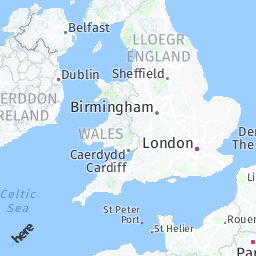
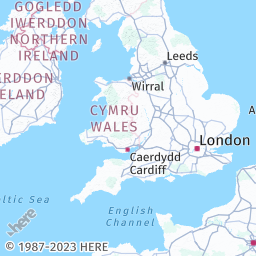
The following example requests show how language customization for map images differs between the API versions.
-
Request (V1):
The following request renders a map image with dual labels, where the primary language is Welsh and the secondary language is English:
https://image.maps.ls.hereapi.com/mia/1.6/mapview ?apiKey={YOUR_API_KEY} &t=5 &lat=52.067881 &lon=-3.172245 &z=5 &w=256 &h=256 &f=0 &nodot &ml=wel &ml2=eng -
Response (V1):
-
Request (V3):
The following example shows the corresponding V3 request:
https://image.maps.hereapi.com/mia/v3/base/mc/center:52.067881,-3.172245;zoom=5/256x256/png ?apiKey={YOUR_API_KEY} &lang=cy &lang2=en -
Response (V3):
For more information, see Language customization in the HERE Map Image API v3 Developer Guide.
Pixel density
In contrast to the HERE Map Image API v1, the HERE Map Image API v3 supports 100 and 400 values for the pixel per inch (ppi) parameter. The following table provides instructions on how to adjust the ppi parameter when migrating to the v3 version of the API:
| V1 PPI value | Is supported | Additional information |
|---|---|---|
72 | ⚠️ | In V3, use 100. |
250 | ❌ | Use 400. |
320 | ❌ | Use 400. |
500 | ❌ | Use 400. |
Geopolitical view
The HERE Map Image API v3 supports the display of maps adjusted according to a specific geopolitical view by using the pview parameter. The supported pview parameter value format changes from the ISO 3166-1 alpha-3 country code to the ISO 3166-1 alpha-2 country code.
Examples
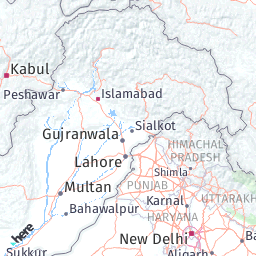
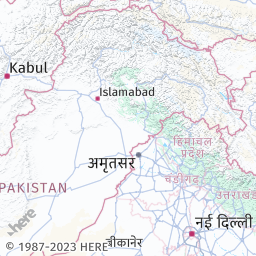
The following examples demonstrate how to request a specific political view in both versions of the API:
-
Request (V1):
https://image.maps.ls.hereapi.com/mia/1.6/mapview
?apiKey={YOUR_API_KEY}
&lat=32.632350
&lon=74.407587
&z=5
&w=256
&h=256
&nodot
&pview=PAK
In the preceding example,
pview=PAKapplies the Pakistani geopolitical view to the map image. -
Response (V1):
-
Request (V3):
The corresponding V3 example applies the same geopolitical view:
https://image.maps.hereapi.com/mia/v3/base/mc/center:32.632350,74.407587;zoom=5/256x256/png ?apiKey={YOUR_API_KEY} &pview=PK -
Response (V3):
Hint
To get the list of the available geopolitical views in the HERE Map Image API v3, make a request to the
/politicalViewsendpoint.
For more information, see Geopolitical views in the HERE Map Image API v3 Developer Guide.
Map style, scheme, and view
In the HERE Map Image API v3, you define the map style (style in the HERE Map Image API v1), the map scheme (t in V1), and map view (vt in V1) by using the style parameter. The style parameter is an optional parameter, with the default value set to explore.day.
Example - map view
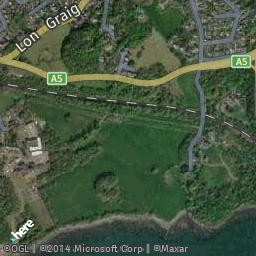
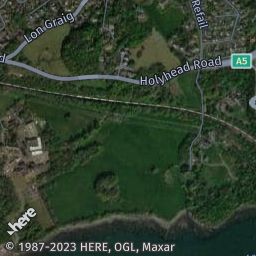
The following examples show how to render an image with a hybrid satellite view that highlights streets in the day mode.
-
Request (V1):
https://image.maps.ls.hereapi.com/mia/1.6/mapview
?apiKey={YOUR_API_KEY}
&lat=53.218849
&lon=-4.195021
&z=15
&w=256
&h=256
&nodot
&t=3
The preceding V1 example uses
t=3parameter value to render the map image by using thehybrid.dayscheme. -
Response (V1):
-
Request (V3):
https://image.maps.hereapi.com/mia/v3/base/mc/center:53.218849,-4.195021;zoom=15/256x256/png
?apiKey={YOUR_API_KEY}
&style=explore.satellite.day
The preceding example uses the
style=explore.satellite.dayparameter value to obtain the hybrid map style. -
Response (V3):
Hint
To get the list of the available styles in the HERE Map Image API v3, make a request to the
/infoendpoint.
For more information, see Styles in the HERE Map Image API v3 Developer Guide.
Example - truck map view
You can render the truck map view without public transportation (vt=2 in V1) information in the HERE Map Image API v3 by using the vehicle_restrictions:active_and_inactive parameter value, as demonstrated in the following comparison:
Note
You can use the
vehicle_restrictions:permanent_onlyparameter value as an alternative to thevehicle_restrictions:active_and_inactiveparameter value to hide any time-based vehicle restrictions, including the ones that are currently active. Although this behavior may not show the full extent of the currently active restrictions in a particular area, it is closer to the behavior of the HERE Map Image API v1.
-
Request (V1):
https://image.maps.ls.hereapi.com/mia/1.6/mapview ?apiKey={YOUR_API_KEY} &lat=52.370874 &lon=4.894419 &z=17 &w=256 &h=256 &f=0 &nodot &vt=2 -
Response (V1):
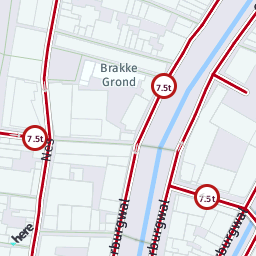
-
Request (V3):
https://image.maps.hereapi.com/mia/v3/base/mc/center:52.370874,4.894419;zoom=17/256x256/png ?apiKey={YOUR_API_KEY} &features=vehicle_restrictions:active_and_inactive -
Response (V3):
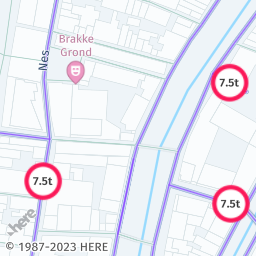
Camera position
The following table provides an overview of the HERE Map Image API v1 parameters for map image positioning and their direct counterparts in the HERE Map Image API v3:
| V1 parameter | Description | Is supported | Additional information |
|---|---|---|---|
ctr | Sets the image center with latitude and longitude. | ✅ | In V3, use the following format center:{latitude},{longitude};zoom={zoom}. You can use radius instead of zoom. |
ectr | The same as ctr but with encoded coordinates. | ❌ | - |
e | The same as c but with encoded coordinates. | ❌ | - |
lat | Latitude | ✅ | Specify the latitude coordinate as part of the center parameter, in the following format: center:{latitude},{longitude};zoom={zoom}. You can use radius instead of zoom. |
la | Latitude | ✅ | Specify the latitude coordinate as part of the center parameter, in the following format: center:{latitude},{longitude};zoom={zoom}. You can use radius instead of zoom. |
lon | Longitude | ✅ | Specify the longitude coordinate as part of the center parameter, in the following format: center:{latitude},{longitude};zoom={zoom}. You can use radius instead of zoom. |
lo | Longitude | ✅ | Specify the longitude coordinate as part of the center parameter, in the following format: center:{latitude},{longitude};zoom={zoom}. You can use radius instead of zoom. |
bbox | Positions the view so that entire bounding box is visible. | ✅ | In V3, use the bbox parameter to define the southwest (bottom-left) and northeast (top-right) corners of the map image in the following format: bbox:{west_longitude},{south_latitude},{east_longitude},{north_latitude}. To position the view so that all the coordinates given in the list are visible, use the bounds parameter in the following format: bounds:{latitude1},{longitude1},{latitude2},{longitude2}, ... {latitudeN},{longitudeN}. |
For more information, see Map view positioning in the HERE Map Image API v3 Developer Guide.
Geocoding
When using the HERE Map Image API v3, you must perform geocoding (also referred to as address look-up) before requesting a map image by following this process:
- Make a request to the /geocode endpoint of the HERE Geocoding & Search API v7.
- Extract any of the following parameter values from the response, depending on your use case:
mapView- You can use the value of this property to request a V3 bounding box.positionor one of theaccesscoordinates - You can use one of these values to determine the map center or place a marker on the map. In this case, you must specify thezoomorradiusparameters manually.
- Convert the extracted values into V3 parameters and make an image request.
Hint
For a practical application example of this process, see Obtain a map image through address look-up in the HERE Map Image API v3 Developer Guide.
As a consequence, the HERE Map Image API v3 removes support for the following V1 parameters:
| V1 parameter | Description |
|---|---|
ci | City name |
co | Country name |
s | Street name |
n | House number |
zi | Zip code |
maxhits | Maximum number of search results |
i | Display address in the box above the map |
Orientation
The HERE Map Image API v3 doesn't support the HERE Map Image API v1 ra parameter for specifying the map rotation angle.
Zoom
The HERE Map Image API v3 supports the following parameters to specify the map zoom, as compared with the HERE Map Image API v1:
| V1 parameter | Description | Is supported | Additional information |
|---|---|---|---|
z | Zoom level | ✅ | In V3, specify the map zoom in the following format: zoom={value} in the range from 1 to 20. The zoom parameter must always accompany the center parameter, for example, center:{latitude},{longitude};zoom={zoom} |
rad,rad0,rad1,... r | Radius from the map center to the edge. | ✅ | In V3, specify the radius in the following format: radius={value_in_meters}. The radius parameter must always accompany the center parameter, for example, center:{latitude},{longitude};radius={value} |
Camera tilt
The HERE Map Image API v3 doesn't support the camera tilt and the following parameter:
| Parameter | Description |
|---|---|
ta | Tilt angle ranging from 0 to 60 |
Custom labels
In the HERE Map Image API v1, you define custom labels through a series of dedicated parameters. In the HERE Map Image API v3, you define custom labels for map images as part of the custom overlay, either through GeoJSON objects or through the corresponding custom style encoding. Both formats are interchangeable, with GeoJSON being the standard choice.
However, GeoJSON tends to be more verbose and may exceed the maximum URL length quickly. On the other hand, custom encoding offers a more compact size.
The following table provides information on the support of various V1 parameters in the V3 custom overlay definition:
| V1 parameter | Description | Is supported | V3 overlay equivalent |
|---|---|---|---|
tx,tx0,tx1,... | Adds text labels to geographic spaces or locations. Allows you to specify where the label should be placed, what text it should contain, and optionally, you can specify the fill color, outline color, and font size to control the label's appearance on a map or within a geographic context. | ✅ | Define as the label property value in Point geometries. |
tx.xy,tx.xy0,tx.xy1,... | Adds text labels on a map image. You can specify where in the image to place the label, what text it should contain, and optionally, customize its appearance by specifying fill color, outline color, and font size. | ❌ | - |
txc, txsc, txs | Define the label text color, text outline color, and the text size, respectively. | ✅ | Defined as part of text-color, text-outline-color, and size properties of Point geometries of the marker style. |
Examples
The following examples show how rendering custom labels changes from V1 to V3:
-
Request (V1):
https://image.maps.ls.hereapi.com/mia/1.6/mapview ?apiKey={YOUR_API_KEY} &lat=53.218849 &lon=-4.195021 &z=12 &w=256 &h=256 &f=0 &nodot &tx=53.223122,-4.189936;Your Label &txc=red &txs=17 -
Response (V1):
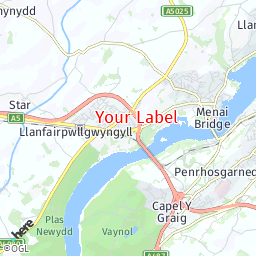
-
Request (V3) - GeoJSON:
https://image.maps.hereapi.com/mia/v3/base/mc/center:53.218849,-4.195021;zoom=12/256x256/png8 ?apikey={YOUR_API_KEY} &geojson={ "type": "FeatureCollection", "features": [ { "type": "Feature", "properties": { "icon": "", "label": "Your Label", "text-color":"%23FF4747", "text-outline-color":"%23FFF", "outline-width":2, "size":"large" }, "geometry": { "coordinates": [ -4.189936, 53.223122 ], "type": "Point" } } ] } -
Request (V3) - compact style encoding
https://image.maps.hereapi.com/mia/v3/base/mc/center:53.218849,-4.195021;zoom=12/256x256/png8 ?apikey={YOUR_API_KEY} &overlay=point:53.223122,-4.189936;icon=;label=Your Label;text-color=%23FF4747;text-outline-color=%23FFF;outline-width=2;size=large -
Response (V3):
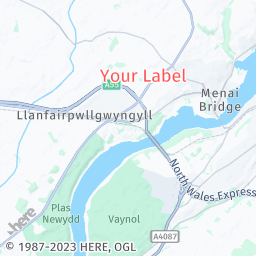
For more information, see the following articles in the HERE Map Image API v3 Developer Guide:
Points of interest (POIs) and markers
In the HERE Map Image API v3, you define custom POIs by overlaying Point geometries on a map image through GeoJSON or compact style encoding.
The following table provides information on the support of various V1 POI-related parameters in the V3 custom overlay:
| V1 parameter | Description | Is supported | V3 overlay equivalent |
|---|---|---|---|
poi | Marker coordinates | ✅ | Point geometry coordinates. |
poifc | Icon fill color | ✅ | The color property. |
poilbl | Label type: - numeric ( 1,2,3...) - alphabetic ( A,B,C...) | ✅ | The label property with either of the following values: - $num - $alpha |
poithm | Icon theme | ⚠️ | Available marker icon types include: - pin (default) - diamond - cp (dot) |
poitxc | Label color | ✅ | The text-color property. |
poitxs | Label font size | ⚠️ | The size property. Available label sizes include: - small - medium (default) - large |
poix0,poix1,... | POI-specific properties | ✅ | Defined as geometry-specific properties. |
nomrk | Flag to draw no markers | ❌ | Not needed because you must define markers explicitly. |
Examples
The following examples show practical examples for custom POI rendering in V1 and V3:
-
Request (V1):
https://image.maps.ls.hereapi.com/mia/1.6/mapview ?apiKey={YOUR_API_KEY} &w=256 &h=256 &f=0 &poi=47.531301,19.052621,47.518418,19.042362 &poilbl=1 &poithm=1 &poifc=red &poitxs=14 -
Response (V1):
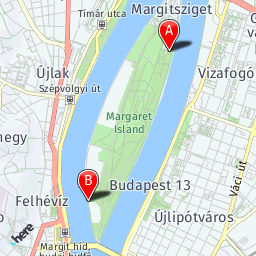
-
Request (V3):
https://image.maps.hereapi.com/mia/v3/base/mc/overlay:padding=40/256x256/png8 ?apikey={YOUR_API_KEY} &geojson={ "type": "FeatureCollection", "features": [ { "type": "Feature", "properties": { "label": "$alpha", "color": "%23F00", "size": "large" }, "geometry": { "type": "MultiPoint", "coordinates": [ [ 19.052621, 47.531301 ], [ 19.042362, 47.518418 ] ] } } ] } -
Response (V3):
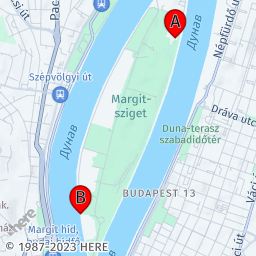
Default labels
The following sections outline the changes to such default API labels and overlays as the copyright information, scale bar, proximity circle, and so on.
Copyright label
The HERE Map Image API v3 provides the required copyright information by default. The information also includes any additional service owner-specific copyright, if applicable.
The following table provides the details:
| Parameter | Description | Is supported | Additional information |
|---|---|---|---|
nocp | Flag to hide the copyright | ✅ | In V3, use the copyright=false flag. |
scp | ID of the additional copyright provider. | ⚠️ | In V3, this information is incorporated within the copyright, and it can be shown or hidden alongside it. |
Scale bar
The HERE Map Image API v3 supports the scale bar overlay, as part of the scaleBar parameter. The following table provides an breakdown of changes between the API versions:
V1 sb= | V3 scaleBar= | Description |
|---|---|---|
k | km | kilometers only |
m | mi | miles only |
km | kmMi | kilometers and miles (km on top) |
mk | miKm | miles and kilometers (mi on top) |
Proximity circle
The HERE Map Image API v1 uses the u parameter to display a proximity circle around specific coordinates. In the HERE Map Image API v3, you use GeoJSON geometries to achieve the same output with some additional options available, such as setting the position marker size, proximity circle color, various types of available measurement units to define the proximity circle radius, or the label to display above the marker.
Examples
The following examples illustrate the evolution in drawing proximity circles between different API versions, showcasing the changes in approach.
-
Request (V1):
https://image.maps.ls.hereapi.com/mia/1.6/mapview?apiKey={YOUR_API_KEY} &lat=-12.064789 &lon=-77.038820 &z=18 &w=256 &h=256 &f=0 &u=25 -
Response (V1):
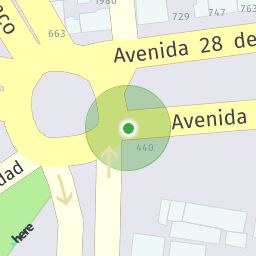
-
Request (V3):
The following GeoJSON creates two objects - a dot marker showing the most likely position and a circle showing the extent of the proximity circle:
{
  "type": "FeatureCollection",
  "features": [
    {
      "type": "Feature",
      "properties": {
        "icon":"cp",
        "size":"large",
      },
      "geometry": {
        "coordinates": [
          -77.038820,
          -12.064789
        ],
        "type": "Point"
      }
    },
    {
      "type": "Feature",
      "properties": {
        "style":"circle",
        "width":"25m",
        "color":"%231B9D2C60"
      },
      "geometry": {
        "coordinates": [
          -77.038820,
          -12.064789
        ],
        "type": "Point"
      }
    }
  ]
}
Example usage in a HERE Map Image API v3 request:
https://image.maps.hereapi.com/mia/v3/base/mc/overlay:radius=45/256x256/png8 ?apikey={YOUR_API_KEY} &features=pois:disabled &geojson={"type":"FeatureCollection","features":[{"type":"Feature","properties":{"icon":"cp","size":"large","color":"%231B9D2C60"},"geometry":{"coordinates":[-77.03882,-12.064789],"type":"Point"}},{"type":"Feature","properties":{"style":"circle","width":"25m","color":"%231B9D2C60"},"geometry":{"coordinates":[-77.03882,-12.064789],"type":"Point"}}]}Hint
The following snippet provides the same request, in the compact style encoding:
https://image.maps.hereapi.com/mia/v3/base/mc/overlay:radius=45/256x256/png8 ?apikey={YOUR_API_KEY} &overlay=point:-12.064789,-77.03882;icon=cp;size=large|-12.064789,-77.03882;style=circle;width=25m;color=%231B9D2C60 -
Response (V3):
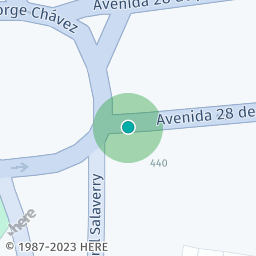
Label behavior
The following table provides details on the support for other label-related parameters in the HERE Map Image API v3:
| V1 parameter | Description | Is supported | V3 equivalent |
|---|---|---|---|
nocrop | Flag to hide cropped labels. | ✅ | Use the cropLabels=false parameter. |
nocmp | Flag to hide the compass in the rotated view. | ❌ | V3 doesn't support map rotation or compass. |
nodot | Hide the default position marker. | ⚠️ | V3 doesn't draw a position marker by default. |
pip | Display a Picture-in-Picture map. | ❌ | Not supported. |
Custom lines
In the HERE Map Image API v3, you define custom lines (for example, for displaying routes) by overlaying Line geometries on a map image through GeoJSON or compact style encoding.
The following table provides information on the support of various V1 line-related parameters in the V3 custom overlay:
| V1 parameter | Description | Is supported | V3 overlay equivalent |
|---|---|---|---|
lc,lc0,lc1,... | Line color | ✅ | The color property of the Line geometry. |
lw,lw0,lw1,... | Line width | ✅ | The width property. |
sc,sc0,sc1... | Outline color | ✅ | The outline-color property. |
r,r0,r1... | Route waypoint coordinates | ✅ | The Line geometry coordinates. |
Examples
The following sample requests showcase the change in the approach for drawing lines between the API versions.
-
Request (V1):
https://image.maps.ls.hereapi.com/mia/1.6/route ?apiKey={YOUR_API_KEY} &w=256 &h=256 &f=0 &r=-22.972936,-43.185419,-22.97199,-43.18453,-22.97179,-43.18431,-22.97108,-43.18357,-22.97094,-43.18341,-22.97081,-43.18324,-22.97019,-43.1824,-22.96958,-43.18149,-22.969,-43.18059,-22.96881,-43.18077,-22.96943,-43.18174,-22.968435,-43.182594 &lc=F00 &lw=6 &sc=0D0 -
Response (V1):
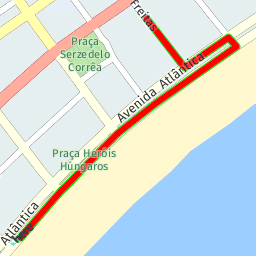
-
Request (V3):
https://image.maps.hereapi.com/mia/v3/base/mc/overlay:padding=16/256x256/png ?apiKey={YOUR_API_KEY} &overlay=line:-22.972936,-43.185419,-22.97199,-43.18453,-22.97179,-43.18431,-22.97108,-43.18357,-22.97094,-43.18341,-22.97081,-43.18324,-22.97019,-43.1824,-22.96958,-43.18149,-22.969,-43.18059,-22.96881,-43.18077,-22.96943,-43.18174,-22.968435,-43.182594;color=%23F00;outline-color=%230D0;width=6Hint
To reduce the request size in V3 when using compact style encoding, you can represent the
Linegeometry from the preceding example as a flexible polyline, as shown in the following snippet:overlay=line:BGvgl6rB1w6ryCk7By3BwM4NssBouB4IgKkI0K4mBw0BkmB84BokBo4B8LnL3mBz8Bm-Br1B -
Response (V3):
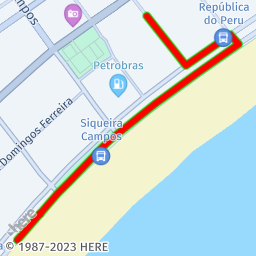
Route markers
Correspondingly to custom POIs, in V3 you define route markers through the Point geometry type and the associated properties.
The following table provides information on the support of various V1 marker-related parameters in the V3 custom overlay:
| V1 parameter | Description | Is supported | V3 overlay equivalent |
|---|---|---|---|
m,m0,m1,... | Marker coordinates | ✅ | Point geometry coordinates. |
mfc,mfcmfc1,... | Fill color | ✅ | The color property. |
mlbl | Marker label | ⚠️ | The label property. V3 only displays label text inside the marker icon for numerical ($num) or alphabetic ($alpha) automatic labels. |
mthm | Icon style | ⚠️ | The icon property with the following styles available: - pin (default) - diamond - cp (dot) |
mtxc,mtxc0,mtxc1,... | Label color | ✅ | The text-color property. |
mtxs,mtxs0,mtxs1,... | Font size | ✅ | The size property. Available values: - small - medium (default) - large |
noicon | Flag to hide the marker icon | ✅ | Set the icon value as empty. |
Examples
The following examples show how drawing route markers changes between the API versions.
-
Request (V1):
https://image.maps.ls.hereapi.com/mia/1.6/route ?apiKey={YOUR_API_KEY} &w=256 &h=256 &r=55.95229,-3.19995,55.952366,-3.199479,55.952242,-3.200226 &f=0 &m=55.952366,-3.199479,55.952242,-3.200226 &mlbl=0 &mthm=2 &mfc=EC93CE &lc=EC93CE &mtxs=16 -
Response (V1):
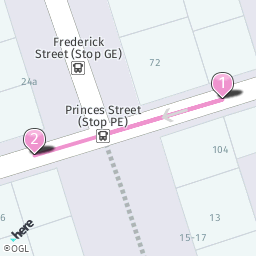
-
Request (V3):
https://image.maps.hereapi.com/mia/v3/base/mc/overlay:padding=40/256x256/png ?apiKey={YOUR_API_KEY} &overlay=multiPoint:55.9523662,-3.199479,55.952242,-3.2002259;label=$num;color=%23EC93CE;size=large &overlay=line:55.952366,-3.199479,55.952242,-3.200226,55.95229,-3.19995;color=%23EC93CE -
Response (V3):
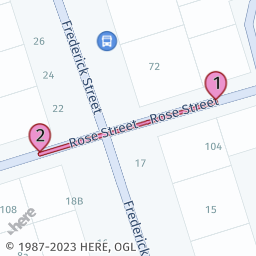
Route calculation
The HERE Map Image API v3 does not support the waypoint0,waypoint1... parameters. Therefore, you must obtain the routing coordinates before making an API request by following this high-level process:
- Make a request to the
/routesendpoint of the HERE Routing API v8 with the following parameters:- The
origincoordinates. Based on these coordinates, the HERE Routing API v8 provides thedeparturepoint coordinates for the route. - The
destinationcoordinates. Based on these coordinates, the HERE Routing API v8 provides thearrivalpoint coordinates for the route. - The
returnparameter set topolyline. This parameters ensures that the route that the API returns is represented as a flexible polyline, which is the format accepted by the compact style encoding of GeoJSON features in the HERE Map Image API v3. - The
transportationModeparameter set to the mode of transportation for your route, such as car, pedestrian, and so on.
- The
- Build a HERE Map Image API v3 request by using the parameter values that you obtained:
-
Use the
departureandarrivalcoordinates to place markers on the map image. -
Use
polylinevalue to overlay the route on the map image.Hint
For a practical application example of this process, see Display routing information on a map image in the HERE Map Image API v3 Developer Guide.
-
Region
In the HERE Map Image API v3, you highlight regions or areas by overlaying Polygon geometries on a map image through GeoJSON or compact style encoding.
The following table provides information on the support of various V1 region-related parameters in the V3 custom overlay:
| V1 parameter | Description | Is supported | V3 overlay equivalent |
|---|---|---|---|
a,a0,a1,,... | Area or region coordinates | ✅ | Polygon geometry coordinates. |
fc,fc0,fc1... | Fill color | ✅ | The color property. |
Examples
The following examples show how overlaying regions or areas on map images changes between the API versions.
-
Request (V1):
https://image.maps.ls.hereapi.com/mia/1.6/region? apiKey={YOUR_API_KEY} &w=256 &h=256 &f=0 &t=3 &a=52.519799,13.413835,52.52083,13.415358,52.519289,13.417075,52.518062,13.417976,52.517331,13.415809,52.518976,13.414929,52.519799,13.413835 &fc=00E8 -
Response (V1):
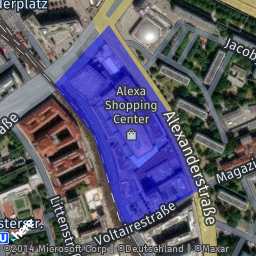
-
Request (V3):
https://image.maps.hereapi.com/mia/v3/base/mc/overlay:padding=15/256x256/png ?apiKey={YOUR_API_KEY} &style=explore.satellite.day &overlay=polygon:52.519799,13.413835,52.52083,13.415358,52.519289,13.417075,52.518062,13.417976,52.517331,13.415809,52.518976,13.414929,52.519799,13.413835;color=%2300E8 -
Response (V3):
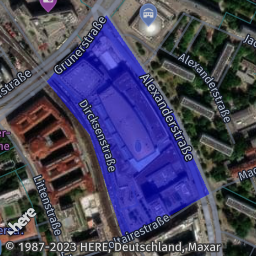
Road shield icons
To obtain road shield icons in the HERE Map Image API v3, use the /icons endpoint, as described in the Retrieve road shield icons article in the HERE Map Image API v3 Developer Guide.
| V1 parameter | Description | Is supported | V3 Equivalent |
|---|---|---|---|
category | Road sign category. | ✅ | Use the {iconType} parameter in the request path. |
label | Road sign label. | ✅ | Use the label parameter. |
region | Region MARC three-letter language code. | ⚠️ | Use the stateCode parameter. |
route_level | The priority setting for the route. | ✅ | Use the routeLevel parameter. |
Unsupported parameters
The following sections list unsupported parameters in the HERE Map Image API v3. Modify your code to remove the unsupported parameters from your API requests.
Statistics
| V1 parameter | Description |
|---|---|
o,o0,o1... | Statistical objects with coordinates, value, fill color, and an outline. |
ofc | Default fill color. |
osc | Default border color. |
olp | Anchor (with center, or bottom-center). |
ot | Shape (circle or bar). |
shd | Flag to remove shadow for the shape. |
Heat map properties
| V1 parameter | Description |
|---|---|
l | Heat value/level from 1 to 4. |
noblur | Flag to turn off blur. |
op | Opacity setting for the heat layer. |
plt | Color palette. |
tp | Transparency setting for the heat layer. |
Company logos
| V1 parameter | Description |
|---|---|
logoid | Internal ID for the company logo request. |
Strict mode
| V1 parameter | Description |
|---|---|
strict | Flag for validating the request in the strict mode (In V3, the strict mode is enabled by default). |
Next steps
For more information on the HERE Map Image API v3, see the following resources:
Updated 6 months ago