

Introduction
Note
To enable access to the HERE Map Image API for an existing HERE platform account, create a support ticket in the HERE Support Portal.
The HERE Map Image API lets you generate high-quality, static map images with customization options. You can adjust the map appearance to match your branding and add extra layers of information by using GeoJSON. It's a practical solution for applications needing customized static map snapshots.
Explore the HERE Map Image API v3 with this interactive example. Test parameters and see real-time results:
Try It OutThe following paragraphs provide some of the benefits associated with the HERE Map Image API:
Customizable Maps:
- Tailor maps to your needs by adjusting parameters like location, zoom level, map style, and image size.
Responsive Design:
- Generate map images in various sizes and resolutions to ensure they look great on all devices, including mobile phones and desktop computers.
Custom Overlays:
- Enhance your maps with custom overlays such as markers, polygons, or lines, which allows you to add extra information or highlight specific areas.
Ease of Integration:
- Easily embed static map images into web and mobile applications without the need for complex JavaScript or interactive map components.
Cost-Effective Solution:
- Benefit from cost savings with static map images, which offer a more affordable option compared to interactive mapping solutions, especially for applications that do not require real-time map interaction.
Example
This example demonstrates the potential of the HERE Map Image API in creating clear and concise representations of geographic data. This happens using simple, easy-to-construct requests.
Sample request:
https://image.maps.hereapi.com/mia/v3/base/mc/overlay:padding=32/800x350/png
?apiKey={YOUR_API_KEY}
&overlay=point:52.3664941,4.9086908;label=Departure|52.3656179,4.9142159;label=Arrival|size=large;text-color=%23972E2B;text-outline-color=%23FFF;outline-width=2
&overlay=line:BG8pm8jDmpzrJwNuMwW0UgK4InBoLA4DjSk1BzZ4pCjDsJvHoVvWoiC3D0K3DoL7LkhBnD4J;color=%2300B0FFCC;outline-color=%231967D2CC;width=4
&style=lite.day
&scaleBar=kmResponse:
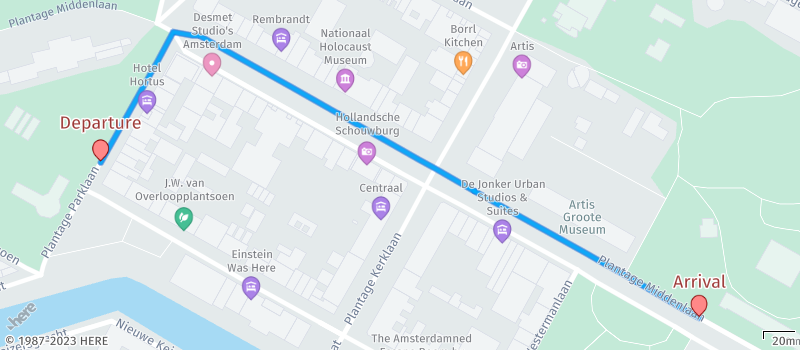
The preceding example effectively uses a combination of various parameters. It seamlessly overlays routing information onto a map through the integration of markers and polylines. They are all within the context of a thoughtfully selected map style designed to provide a clear and transparent backdrop for these overlays. This approach ensures that the resulting map is not only informative but also visually intuitive and easy to comprehend for users.
Next steps
- To get hands-on experience with the HERE Map Image API, see the Get started with the HERE Map Image API guide.
- To explore all supported endpoints and parameters, see the API Reference.
Updated 4 months ago