

Render raster maps with the HERE Maps API for JavaScript
The HERE Maps API for JavaScript is a robust library that enables developers to integrate HERE's mapping features into web applications. It acts as the client-side framework, using services like the HERE Raster Tile API to display interactive maps.
One of the most compelling use cases for raster maps is their ability to provide highly detailed visual representations of geographical features like terrain, vegetation, and urban areas through satellite imagery. When combined with vector data containing information such as roads, landmarks, and boundaries, raster maps provide a comprehensive view of their surroundings.
As the following example demonstrates, in the HERE Maps API for JavaScript, you can combine satellite images provided by the HERE Raster Tile API with vector data to compose visually appealing and informative maps through the use of hybrid layers.
Prerequisites
Obtain a HERE API Key: If you do not have one already, sign up for a HERE platform account and generate an API key. For more information, see the Identity & Access Management Developer Guide.
Set up the HTML structure
Create a new HTML file that contains the map object. The <script> objects nested within <head> element import the required JavaScript libraries from HERE.
<!DOCTYPE html>
<html>
  <head>
    <script type="text/javascript" src="https://js.api.here.com/v3/3.2/mapsjs-core.js"></script>
    <script type="text/javascript" src="https://js.api.here.com/v3/3.2/mapsjs-service.js"></script>
    <script type="text/javascript" src="https://js.api.here.com/v3/3.2/mapsjs-mapevents.js"></script>
    <script type="text/javascript" charset="utf-8" src="https://js.api.here.com/v3/3.2/mapsjs-ui.js" ></script>
    <link rel="stylesheet" type="text/css" href="https://js.api.here.com/v3/3.2/mapsjs-ui.css" />
  </head>
  <body>
    <div style="width: 1000px; height: 500px" id="mapContainer"></div>
    <script>
    // JavaScript code for initializing the map goes here
    </script>
  </body>
</html>
Initialize the map with JavaScript
Add the JavaScript code to initialize the map inside the <script> tag in the <body> section. The following code combines raster satellite imagery and vector data from HERE through the use of hybrid map layers and places an info bubble marker onto the map.
// Initiate and authenticate your connection to the HERE platform:
const platform = new H.service.Platform({
    'apikey': '{YOUR_API_KEY}'
});

// Obtain the default map types from the platform object:
const defaultLayers = platform.createDefaultLayers();

// Instantiate (and display) a map:
const map = new H.Map(
    document.getElementById("mapContainer"),
    defaultLayers.hybrid.day.raster, {
        zoom: 14,
        pixelRatio: 2,
        center: {
                lat: 45.5048,
                lng: -73.5870
            }
    });

map.addLayer(defaultLayers.hybrid.day.vector);

// MapEvents enables the event system.
// The behavior variable implements default interactions for pan/zoom (also on mobile touch environments).
const behavior = new H.mapevents.Behavior(new H.mapevents.MapEvents(map));

// Enable dynamic resizing of the map, based on the current size of the enclosing cntainer
window.addEventListener('resize', () => map.getViewPort().resize());

// Create the default UI:
const ui = H.ui.UI.createDefault(map, defaultLayers)

// Create an info bubble with the HTML content
const coords = { lat: 45.5048, lng: -73.5870 };
const infoBubble = new H.ui.InfoBubble(coords, {
    content: '<b>Mount Royal</b><br>A hill in Montreal with stunning city views'
});

ui.addBubble(infoBubble);
In the preceding code snippet:
- The
platformvariable initializes and authenticates the connection to the HERE platform using the HERE API key. - The
createDefaultLayersfunction is called to retrieve the default map layers from theplatformobject. - The
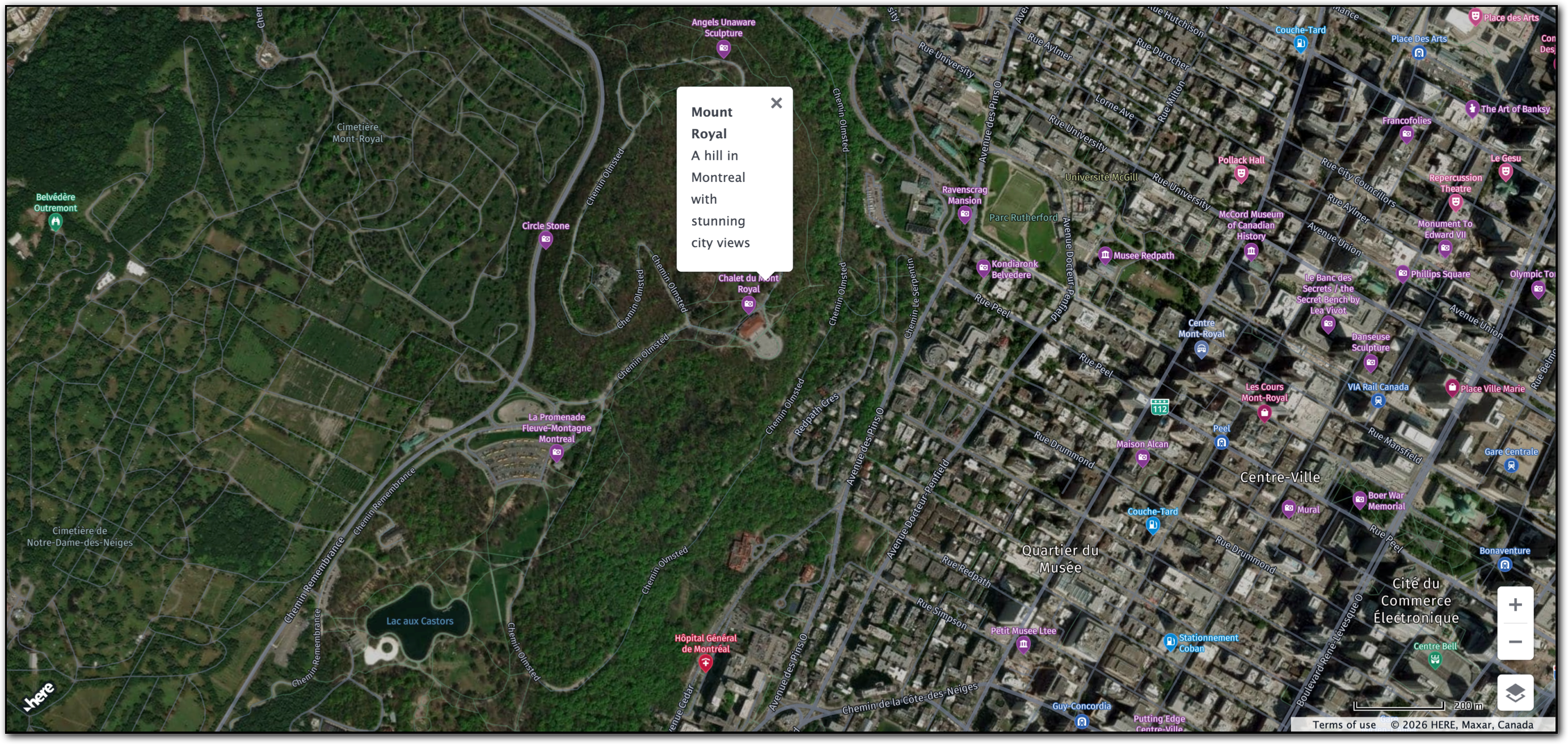
H.Mapobject creates and displays the map inside the element with the IDmapContainer. The map uses a satellite raster map layer calledhybrid.day.rasteras the base layer providing the satellite imagery. The map's center coordinates are set to Mount Royal in Montreal, Canada, with the initial zoom level set to14. - The
map.addLayermethod adds the vector layer on top of the raster layer. - The
H.mapevents.Behaviorclass enables such default map interactions as pan and zoom. - An event listener is configured to dynamically resize the map when you resize the browser window.
- The
H.ui.UI.createDefaultmethod adds such default user interface components as zoom controls, map types control, and so on, to the map. - The
infoBubblevariable creates an info bubble at the coordinates of Mount Royal.
Display the map in a browser window
To use this HTML and JavaScript setup, save the HTML file and open it in a web browser. The browser displays an interactive map centered on the specified coordinates, with a raster tile layer in the form of satellite images, combined with vector data, and a custom info bubble, as shown in the following figure:
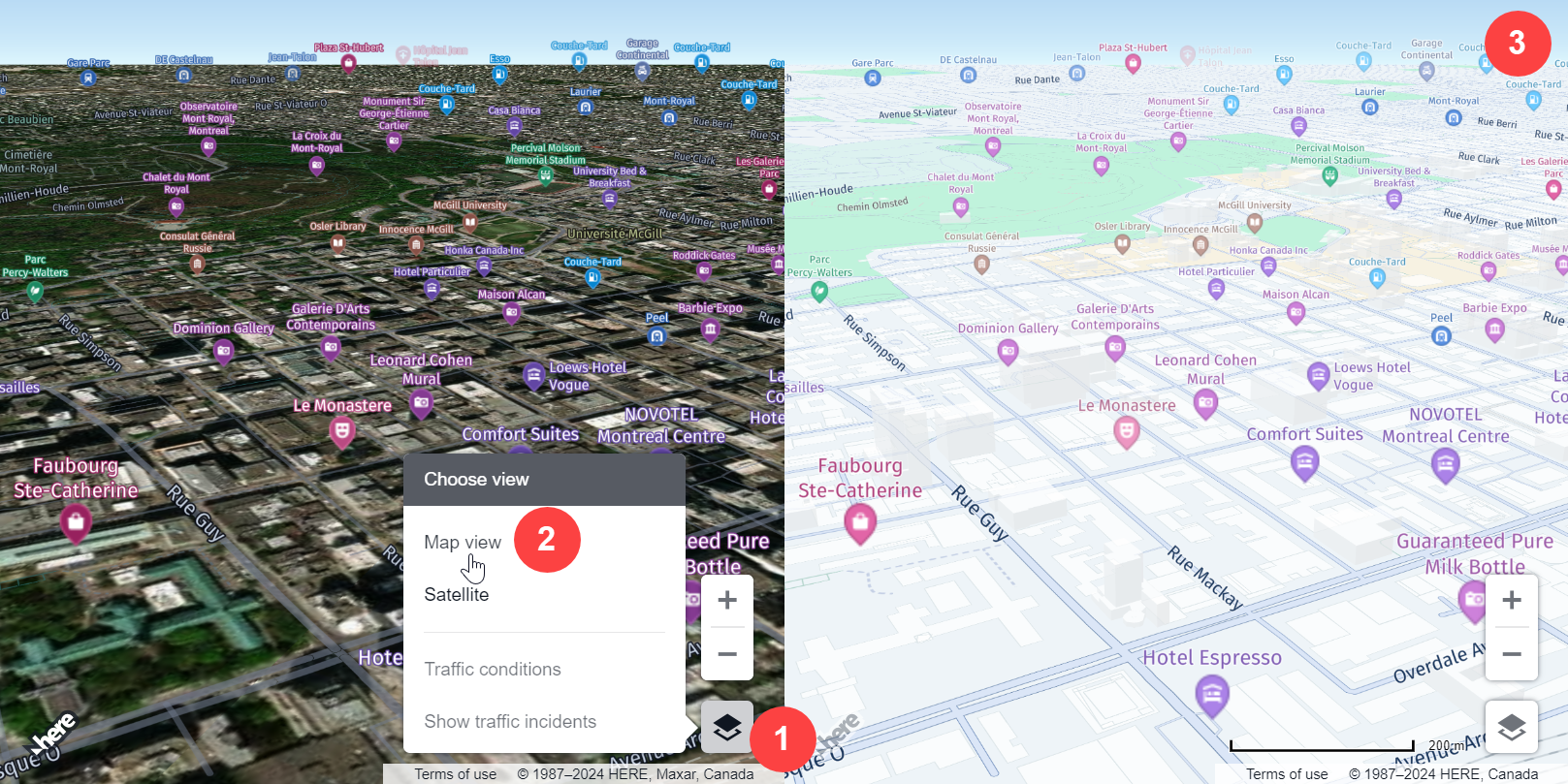
The default UI elements offer another levels of map interactivity by providing an additional means to control the zoom level, as well as options to toggle the map view, and display the current traffic conditions and ongoing incidents, as shown in the following example:
Next steps
- For more information about the HERE Maps API for JavaScript, see the corresponding Developer Guide.
- For more information about raster maps in the HERE Maps API for JavaScript, see Understand map types.
- For more information about HERE Rater Tile API endpoints and parameters, see the corresponding API Reference.
Updated last month