

contours
Content: contours
Geometry: line
Zoom: 9–14
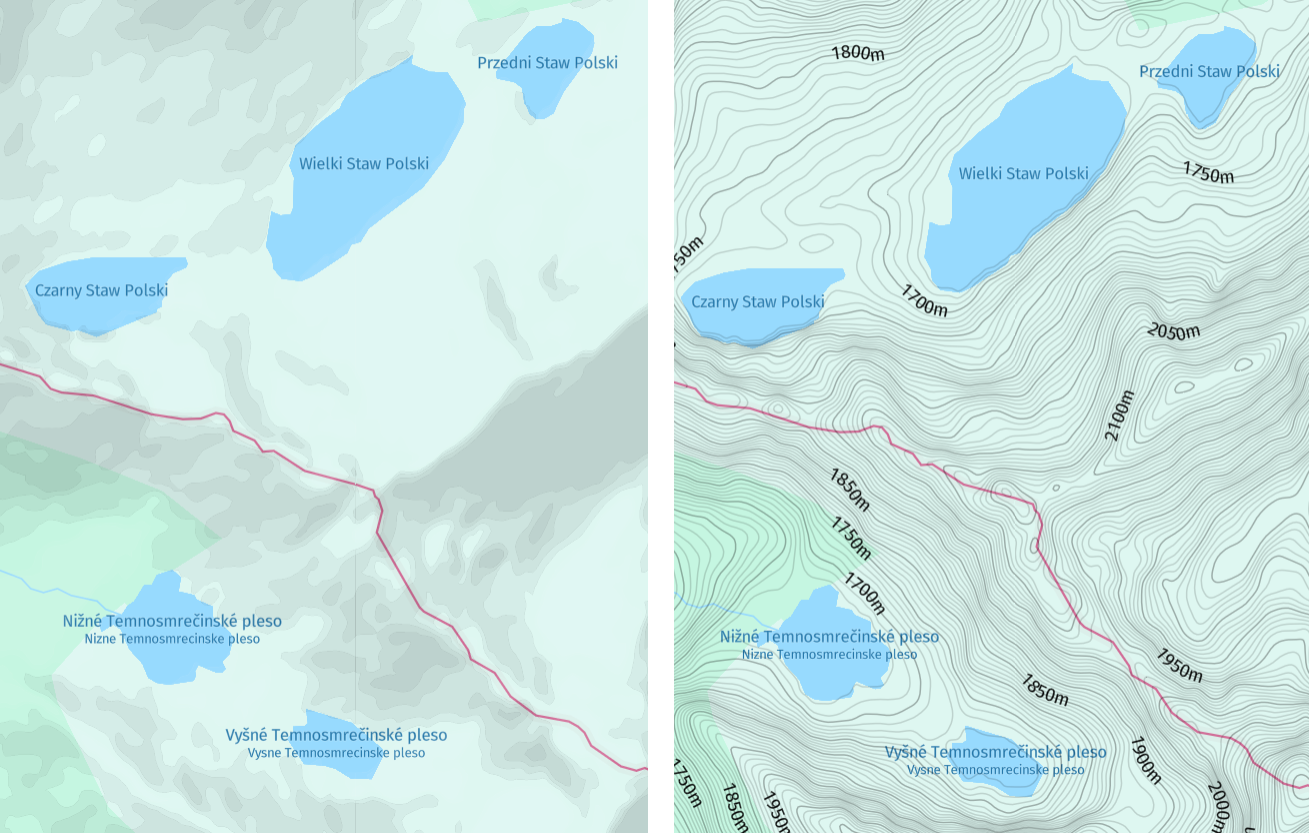
Contour lines connect points of equal elevation relative to mean sea level and play a crucial role in understanding and interacting with the Earth's surface in a wide range of applications. For example, contour lines enable visualizing the shape and steepness of the terrain. By examining the spacing and set up of contour lines, you can identify valleys, ridges, slopes, and other landforms.
The following figure shows a comparison of hillshaded vector maps without and with the contour layer:
Hint
Contours are often used in conjunction with
hillshadeto provide a comprehensive depiction of terrain, combining elevation data with realistic shading to create informative and appealing representations of the landscape.To display both layers in your map, include
hillshadeas an additional value of thecontentparameter, as shown in the following example:content=default,contours,hillshade
Properties
Common properties
kind
Type: string
Always present
Currently, contour is the only available value.
| Value |
|---|
contour |
height
Type: int
Always present
The elevation, measured in meters, indicates the height relative to the mean sea level. Elevations below sea level are denoted by negative values.
index
Type: int
Range: 0–9
Always present
The unit digit of the contour's sequential number, which ranges from 0 to 9. For example, the initial contour at a height of 0 corresponds to an index of 0, while the subsequent contour at a height of 10 corresponds to an index of 1. This sequential pattern continues until a height of 90 is reached, with an index of 9. Subsequently, at a height of 100, the index resets to 0.
The contours are stored on levels from 9 to 14. The storage levels 15 and higher return a subset of contours from level 14. The height difference between the two neighboring contours or step depends on the storage level, as demonstrated in the following table:
| Zoom | Step | Sequence using all indices | Sequence using only every 5th index (index 0 and 5) |
|---|---|---|---|
| <= 8 | n/a | n/a | n/a |
| 9 | 500m | 0m, 500m, 1000m... | 0m, 2500m, 5000m... |
| 10 | 200m | 0m, 200m, 400m... | 0m, 1000m, 2000m... |
| 11 | 100m | 0m, 100m, 200m... | 0m, 500m, 1000m... |
| 12 | 50m | 0m, 50m, 100m... | 0m, 250m, 500m... |
| 13 | 20m | 0m, 20m, 40m... | 0m, 100m, 200m... |
| >= 14 | 10m | 0m, 10m, 20m... | 0m, 50m, 100m... |
Common properties
sort_rank
Type: int
Always present
The ordering of features, which determines which features are rendered "on top of" other features, can be an important issue when rendering maps. To assist map rendering, there is a sort_rank property on some features that suggests in what order the features should appear.
A feature with a higher sort_rank value is displayed on top of feature with a lower sort_rank value.
| Value |
|---|
200 |
Updated 5 months ago