
Advanced vector tile
HERE Vector Tile API uses the pay-per-transaction model, which means that you are charged based on the number of tile requests (transactions) made. The type of requested features is another factor that affects pricing as using certain advanced features in your requests can result in your account being placed in a different pricing category and lead to additional charges in accordance with the HERE pay-per-transaction model.
In the HERE Vector Tile API, tile requests that include such optional content as advanced points of interest or advanced roads fall under the Advanced Vector Tile pricing category of HERE Map Rendering.
For more information, see HERE platform pricing.
Advanced Points of Interest
Advanced Points of Interest layer extends the default pois layer with POIs of additional PDS categories.
You can request the layer containing advanced POIs by adding the content parameter to your queries, with the value as shown in the following example: content=default,advanced_pois.
Note
The order of attributes in the
contentparameter is important. Specifically, ensure that you position thedefaultattribute as the first one.
Advanced shared properties
chain- Unique identifier of a chain.pds_id- Unique place identifier in thedomain:system:type:idformat, for example,here:cm:place:1a2b3c4d5e.
You can use the H.service.SearchService interface for lookup to fetch additional place details.
Note
The
idproperty is deprecated and will be removed on March 31, 2025. Usepds_idinstead.
PDS categories
The following PDS categories are part of advanced POIs:
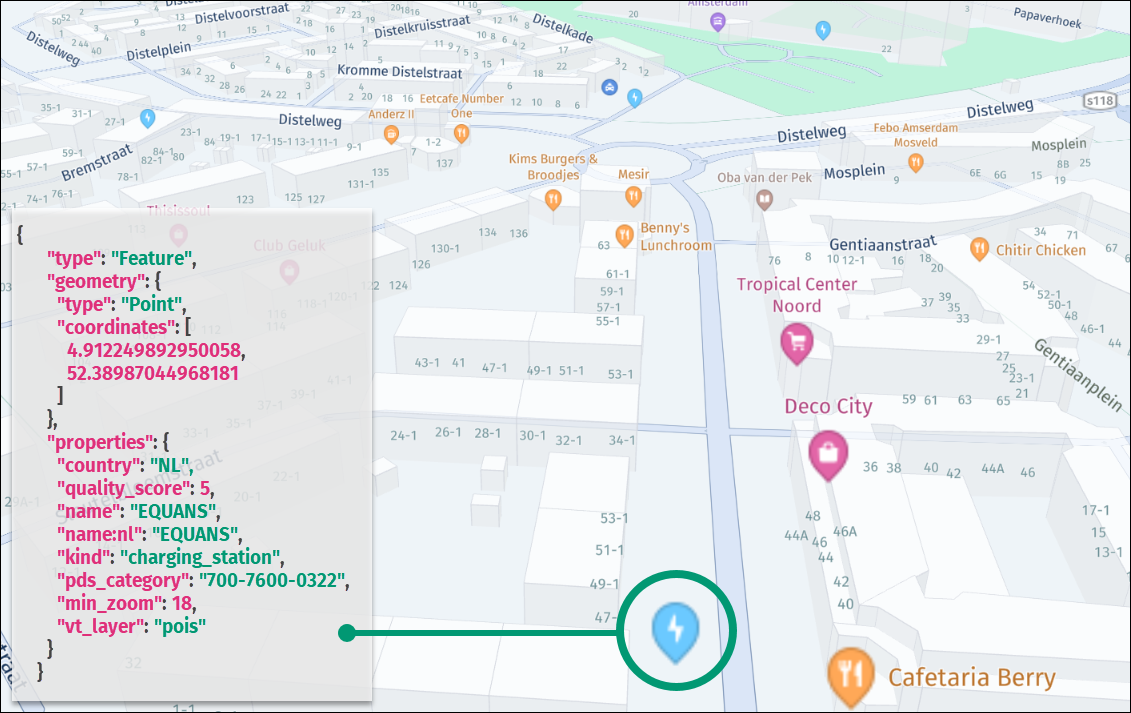
400-4100-0326- tollbooth (toll_boothkind)400-4200-0048- weigh station (weigh_stationkind)400-4200-0049- cargo center (cargo_transportationkind)400-4200-0050- rail yard (cargo_transportationkind)400-4200-0051- seaport or harbour (harbourkind)400-4200-0052- airport cargo (cargo_transportationkind)400-4200-0241- cargo transportation (cargo_transportationkind)400-4200-0311- delivery entrance (delivery_entrancekind)400-4200-0312- loading dock (loading_zonekind)400-4200-0313- loading zone (loading_zonekind)700-7600-0322- electric vehicle (EV) charging station. It has thecharging_stationkind and is associated with an E-Mobility Service Provider (eMSP) namekind_detailvalue.700-7600-0323– electric vehicle (EV) charging station for trucks. It has thecharging_stationkind and is associated with an eMSPkind_detailvalue.700-7600-0324– electric vehicle (EV) charging station for 2-wheelers. It has thecharging_stationkind and is associated with an eMSPkind_detailvalue.700-7600-0325- electric vehicle (EV) battery swap station. It has thecharging_stationkind and is associated with an eMSPkind_detailvalue.700-7850-0126- truck repair (car_repairkind)700-7900-0000- truck and semi-truck dealer or services (carkind)700-7900-0130- truck dealership (carkind)700-7900-0131- truck parking (parkingkind)700-7900-0132- truck stop or plaza (parkingkind)700-7900-0323- truck wash (car_washkind)
Note
The
kind_detailattribute for EV charging stations contains the eMSP (E-Mobility Service Provider) name.
The following figure shows a sample rendition of an advanced point representing an EV charging station, together with the associated vector data, in the JSON format:
Advanced roads layer
The Advanced Roads layer extends the roads layer with premium properties that offer enhanced map functionality specifically tailored for heavy goods vehicles (HGVs). These premium properties provide valuable information to optimize routes, improve navigation, and ensure compliance with HGV-specific requirements.
You can request this layer by specifying the following additional query parameter: content=default,advanced_roads.
The Advanced Roads layer content has the following definition:
- Layer name:
roads - Geometry types:
line,point
This layer contains the same data as the roads layer, with the following new properties:
-
hgv- Indicates access for general heavy goods vehicles. Available only forLinegeometries. Values include:no,delivery.Note
If the
hgvproperty has the valueno, then the road has nohgv_restrictionandhgv_restriction_shield_textproperties. In other cases, the road can have thehgv_restrictionandhgv_restriction_shield_textproperties.deliveryhgv value indicates road is forbidden for trucks transitional driving, but allows deliveries. -
hgv_restriction- This optional property indicates limitations to heavy goods vehicle truck access. Available for bothPointandLinegeometries. For more information, seehgv_restrictionvalues and thehgv_restriction_shield_textproperty definition. -
hgv_restriction_shield_text- This optional property is always paired withhgv_restrictionand indicates limitations to heavy goods vehicle access. Because the units are different per restriction, an abbreviation is provided next to the value, for example,5.1mor16'9"(US),4tor4.4 T(US). Such values are specified with one decimal precision, but the value of 5.0m is given as 5m. For more information, seehgv_restriction_shield_textvalues. -
hgv_time_restrictions- This optional property specifies when heavy goods vehicle access is restricted. For more information, seehgv_time_restrictionsvalues. -
hgv_direction- This optional property indicates restriction is one-way and specifies the direction in relation to road line. This property can be forwardFor backwardB. -
hgv_road_kind- This property is available only forPointfeatures and mirrors thekindproperty of the road the restriction is applied to. -
hgv_road_kind_detail- This property is available only forPointfeatures and mirrors thekind_detailproperty of the road the restriction is applied to. -
toll_hgv- An optional boolean property that indicates whether a toll applies to certain classes of heavy goods vehicles. This property is present only when its value istrue. -
toll_hgv_time_restrictions- An optional property that is always paired with thetoll_hgvproperty and indicates the time period when a HGV access fee is collected. -
all_hgv_restrictions- This property is always paired with theall_shield_textsproperty and contains a semicolon-separated (;) list ofhgv_restrictionvalues (only forhgv_restriction:multiple). -
all_hgv_restriction_shield_text- This property is always paired with theall_hgv_restrictionsproperty and contains a semicolon-separated (;) list ofhgv_restriction_shield_textvalues (only forhgv_restriction:multiple). -
all_hgv_time_restrictions- This property is always paired with theall_hgv_restrictionsproperty and contains a semicolon-separated (;) list ofhgv_time_restrictionsvalues (only forhgv_restriction:multiple). -
all_tpr- An optional property for designating roads or pathways that are approved and recommended for heavy vehicle traffic. It contains a semicolon-separated (;) list oftprcodes. For example,all_tpr:"21;27;30"means that the road is suggested for the following heavy vehicle types:21- PBS Level 2A,27- B-Double, not exceeding 23 meters in length under General Mass Limits (GML), and30- B-Double, not exceeding 26 meters in length under Higher Mass Limits (HML). The supported values with descriptions are available by accessing this link. -
hgv_applied_to_delivery- An optional property to indicate whether restrictions apply to delivery traffic as well as through traffic. This property is present only when its value isfalse. -
all_hgv_applied_to_delivery- An optional property for roads with multiple restrictions and contains a semicolon-separated (;) list ofhgv_applied_to_deliveryvalues (only forhgv_restriction:multiple). -
hgv_gross_weight_mass- This is an optional property that is always paired with thehgv_restrictionproperty set toweightand specifies the type of weight restriction. Whentruethe property indicates a Gross Vehicle Mass (GVM) restriction. Iffalse, it indicates a Current weight restriction. The absence of this property results in an undetermined weight restriction type.
hgv_restriction values
hgv_restriction valuesThe hgv_restriction property indicates general restrictions to heavy goods vehicle access. The following list provides the available values:
weight- vehicle weight, including trailers and shipped goods when loaded at capacityheight- height restrictionlength- length restrictionwidth- width restrictionaxles- number of axles restrictionkpra- kingpin to rear axle length restrictionhazmat- restriction for vehicles that carry hazardous materialstrailers- trailers restrictionother- other restrictionsmultiple- if more than one restriction is present (represented by points along the line, where every point indicates specific restriction that applies to this road)
Restrictions for the total HGV weight:
wpan_two_axles- Specifies the weight limit for HGVs with two axles.wpan_three_axles- Specifies the weight limit for HGVs with three axles.wpan_four_axles- Specifies the weight limit for HGVs with four axles.wpan_five_axles- Specifies the weight limit for HGVs with five axles.wpan_six_axles- Specifies the weight limit for HGVs with six axles.wpan_seven_axles- Specifies the weight limit for HGVs with seven axles.wpan_two_or_more_axles- Specifies the weight limit for HGVs with two or more axles.wpan_three_or_more_axles- Specifies the weight limit for HGVs with three or more axles.wpan_four_or_more_axles- Specifies the weight limit for HGVs with four or more axles.wpan_five_or_more_axles- Specifies the weight limit for HGVs with five or more axles.wpan_six_or_more_axles- Specifies the weight limit for HGVs with six or more axles.
Weight per Axle Group:
wpag_single_axle- Indicates the weight limit per axle group for HGVs with a single axle group.wpag_tandem_axle- Indicates the weight limit per axle group for HGVs with tandem axle groups.wpag_triple_axle- Indicates the weight limit per axle group for HGVs with triple axle groups.wpag_quad_axle- Indicates the weight limit per axle group for HGVs with quad axle groups.wpag_quint_axle- Indicates the weight limit per axle group for HGVs with quint axle groups.
Prohibited Axle Groups:
axles_group_single_axle- Prohibited access for HGVs with a single axle group.axles_group_tandem_axle- Prohibited access for HGVs with tandem axle groups.axles_group_triple_axle- Prohibited access for HGVs with triple axle groups.axles_group_quad_axle- Prohibited access for HGVs with quad axle groups.axles_group_quint_axle- Prohibited access for HGVs with quint axle groups.
These extended values provide detailed information regarding weight restrictions, weight restrictions per axle group, and prohibited access for specific axle configurations. These values enable users to accurately assess whether their HGVs comply with weight restrictions and whether certain axle configurations are allowed on particular roads or within specific areas.
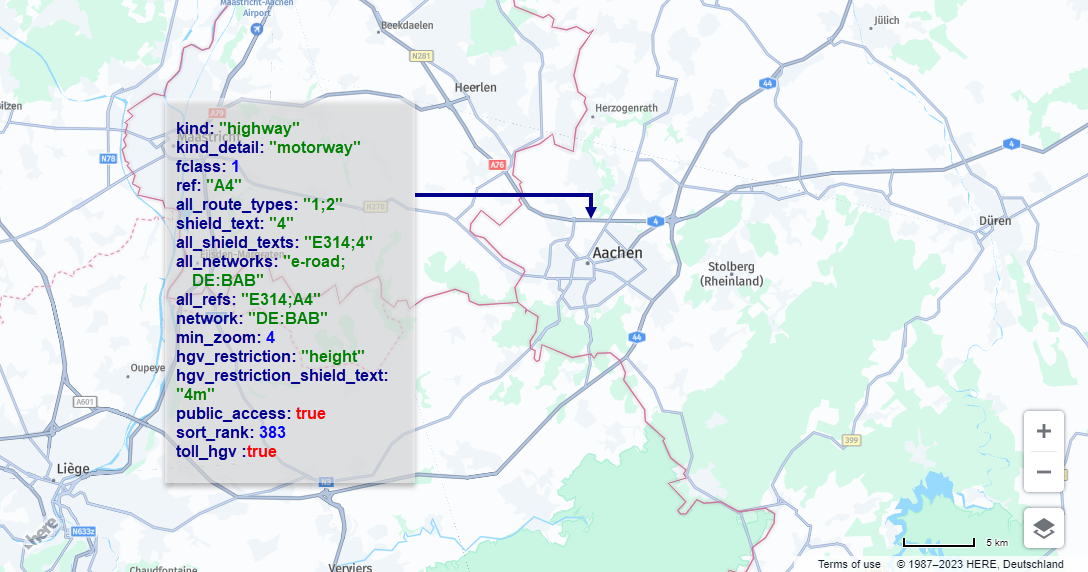
The following figure shows sample vector data for a road with HGV restrictions:
hgv_restriction_shield_text values
hgv_restriction_shield_text valuesThe following HGV-related shield text values are available in the HERE Vector Tile API:
For weight restriction:
weight value- value, for example,4tor4.4 T(US)
For height, length, width, and kpra restrictions:
dimensions value- height, length, or width value, for example,5.1mor16'9"(US, GB)
For wpa (weight per axle) restriction:
weight value- for example,1.8tor2 T(US)
For axles restriction:
Two or more axlesThree or more axlesFour or more axlesFive or more axlesSix or more axles
For hazmat restriction:
Hazardous material type unknownUnspecified hazardous material typeExplosivesGasFlammableFlammable solid combustibleOrganicPoisonRadioactiveCorrosiveOtherAny hazardous materialPoisonous inhalation hazardGoods harmful for waterExplosive and flammableTunnel category bTunnel category b1000cTunnel category b dTunnel category b eTunnel category cTunnel category c5000dTunnel category c dTunnel category c eTunnel category dTunnel category d eTunnel category e
For trailers restriction:
One or moreTwo or moreThree or moreSemi or tractor with trailers
multiple restrictions have hgv_road_kind and hgv_road_kind_detail properties with values corresponding to related road kind and kind_details properties.
For other and multiple restrictions, hgv_restriction_shield_text is omitted.
hgv_time_restrictions values
hgv_time_restrictions valuesThe property specifies the date and time period during which the condition applies. The value is a string formatted according to the Time Domain format, which is a part of the GDF (Geographic Data Files) specification. The current standard for GDF is version 5.1, which corresponds to ISO 20524-1:2020.
A basic Time Domain is represented by a Starting Date and a Time Duration, and it is denoted as [(Starting Date) {Time duration}]. For example, the notation [(M5d1){d1}] can be explained as follows:
- Starting Date: Any year, in the month of May (month 5), on the 1st day, starting from 12:00 a.m. (midnight).
- Duration: The time period lasts for a complete day, which is equivalent to 24 hours or 1440 minutes.
Starting Dates and time intervals are represented using graphical symbols that allow the description of various time units, including years, months, weeks, days, and even seconds.
These symbols are arranged in a sequential order, starting from the longest time unit and progressing to the smallest unit. When combined with a starting date, these symbols form a basic Time Domain.
If no starting date is provided, the notation only indicates a duration. If the first time type code in the duration section is preceded by a minus sign, it signifies that the duration is counted in reverse order. The following list provides a description of the starting date and time interval unit types:
ynn- Denotes a year. This symbol can denote a specific year, denoted asnnnn, within a starting date, or it can indicate a duration ofnnyears. For example, the notation[(y1991M11d14h5m30s19){y1}]signifies a time period from 14th November 1991, 5:30:19 a.m. to 14th November 1992, 5:30:19 a.m. In cases where there is no corresponding calendar date in the year specified, such as 29th February, the addition of "plus 1 year" results in the date being considered as 28th February of the following year. Note that{y1}is equivalent to{M12}in terms of representing a one-year duration.Mnn- Denotes a month. It can indicate a specific month within a given year (ranging from 1 to 12) when the year information is provided in the starting date. Alternatively, it can represent any year when noyinformation is specified. It can also denote a duration ofnnmonths.
For example, the notation [(y1991M11d14h5m30s19) {M3}] signifies a time period from 14th November 1991, 5:31:19 a.m. to 14th February 1992, 5:30:19 a.m. This indicates a duration of three months, starting from November 1991 and ending in February 1992.
wnn- Denotes a week. It can denote a specific week (ranging from 1 to 53) within a given year, if the year information is provided in the starting date. Alternatively, it can represent any year when noyinformation is specified. It can also indicate a duration ofnnweeks, which is equivalent tonn * 7days.
For example, the notation [(y1991M11d14h5m30s19) {w2}] indicates a time period from 14th November 1991 at 5:30:19 a.m. to 28th November 1991 at 5:30:19 a.m. This represents a duration of two weeks, starting from the specified date and spanning 14 days. {w1} is equivalent to {d7} as both represent a duration of one week, which is equal to seven days.
dnn- Represents a day. It can indicate a specific day (ranging from 1 to 28, 29, 30, or 31) within a given month if the month information is provided using theMformat in the starting date. Alternatively, it can represent a duration ofnndays, which is equal tonn * 24hours.
For example, the notation [(y1991M11d14h5m30s19) {d2}] denotes a time period from 14th November 1991 at 5:30:19 a.m. to 16th November 1991 at 5:30:19 a.m. This represents a duration of two days, starting from the specified date and spanning 48 hours. {d1} is equivalent to {h24}, as both represent a duration of one day, which equals 24 hours.
tn- Represents a weekday within the starting date. It is used to specify a particular weekday using numeric values:1for Sunday,2for Monday,3for Tuesday,4for Wednesday,5for Thursday,6for Friday, and7for Saturday. This notation is only used within the starting date and defines the weekday within a previously defined week, if applicable.
For example, (M5t2) signifies every Monday in the fifth month (May) of any year, starting at 12:00 a.m. This indicates that the condition applies to all Mondays occurring in the month of May, regardless of the year.
-
fxn- This symbol is used within the starting date to specify a particular weekday within a previously defined month. Its format follows these rules:- The variable
nrepresents the weekday, ranging from1(Sunday) to7(Saturday), similar to the "t" format. - The variable
xis replaced with one of the following values:1for the first occurrence,2for the second occurrence,3for the third occurrence,4for the fourth occurrence, and5for the fifth occurrence. For example,(...f12)indicates the first Monday at 12:00 a.m. This means that the condition applies to the first Monday that occurs within the previously defined month.
- The variable
-
lxn- The symbol is used to specify a particular weekday within a previously defined month. The format follows these rules:- The variable
nrepresents the weekday, ranging from1(Sunday) to7(Saturday), as in the "t" format. - The variable
xis chosen from the following set:1for the first occurrence,2for the second occurrence,3for the third occurrence,4for the fourth occurrence, and5for the fifth occurrence. These values are given in reverse order starting from the end of the month, indicating the position of the occurrence relative to the last day of the month.
For example,
(...l12)indicates the last Monday at 12:00 a.m. - The variable
-
hnn- Represents an hour. It can denote a specific hour (ranging from 0 to 23) within a particular day if the day has been previously defined in the starting date. Alternatively, it can indicate a duration ofnnhours, which is equivalent tonn * 60minutes.For example,
[(y1991M11d14h5m30s19) {h10}]signifies a time period from 14th November 1991, 5:30:19 a.m. to 14th November 1991 at 3:30:19 p.m. This represents a duration of 10 hours, starting from the specified time and ending 10 hours later.{h1}is equivalent to{m60}as both represent a duration of one hour, which is equal to 60 minutes. -
mnn- Represents a minute. It can indicate a specific minute (ranging from 0 to 59) within a particular hour if the hour has been previously defined in the starting date. Alternatively, it can represent a duration ofnnminutes, which is equal tonn * 60seconds.For example,
[(y1991M11d14h5m30s19) {m11}]denotes a time period from 14th November 1991 at 5:30:19 a.m. to 14th November 1991 at 5:41:19 a.m. This represents a duration of 11 minutes.{m1}is equivalent to{s60}as both represent a duration of one minute, which is equal to 60 seconds. -
snn- Represents a second. It can indicate a specific second (ranging from 0 to 59) within a particular minute if the minute has been previously defined in the starting date. Alternatively, it can represent a duration ofnnseconds.For example,
[(y1991M11d14h5m30s19) {s21}]denotes a time period from 14th November 1991 at 5:30:19 a.m. to 14th November 1991 at 5:30:40 a.m. This represents a duration of 21 seconds.{m1}is equivalent to{s60}as both represent a duration of one minute, which is equal to 60 seconds. -
znn- Represents fuzzy symbols for special time terms. Currently, there are two variants in use:[(z1){z51}]denotes "dawn til dusk" or nighttime.[(z2){z52}]denotes "dusk til dawn" or daytime.
The usage and interpretation of these fuzzy symbols may vary depending on the context or future extensions to the specification.
-
string_value- Externally specified string value. For example[*EASTER(h8){h14}]means from 8:00 am to 10:00 pm during Easter.
Starting Dates which are composed of several time units (e.g., 14 November 1991) are defined by placing the symbols sequentially in a hierarchical order.
Time periods (duration) which are composed of several time interval units are represented by listing the individual symbols sequentially in hierarchical order. The total time duration of a particular combination of symbols is the sum of all single time intervals.
For example, {y2M1w2} means a period of 2 years, 1 month, and 2 weeks. Becasue Time Domains can be considered as a set of the smallest time unit described here, the second, Time Domains might also be combined with set operations, such as:
- Union of sets notation:
+ - Intersection of sets notation:
* - Subtraction of sets notation:
-
All Time Domain strings are stored in the prefix form which uses the polish/prefix operator notation and omits brackets made redundant by this.
For example:
[[(d1){w1}]-[(d3){d1}]]has the prefix form-(d1){w1}(d3){d1}[[(d1){w1}]*[(d3){-w1}]]has the prefix form*(d1){w1}(d3){-w1}
The following figure provides a sample road feature extended with advanced properties:
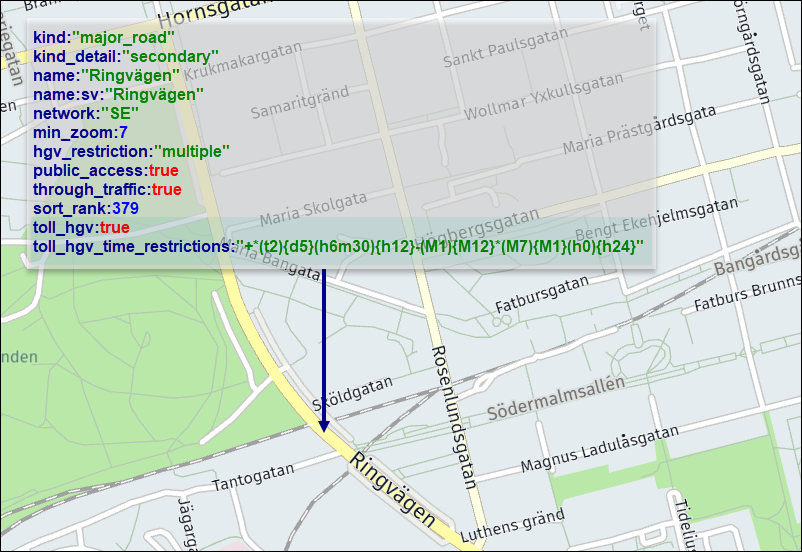
In this example, as indicated by the advanced toll_hgv and toll_hgv_time_restrictions properties, a fee applies to HGV vehicles during specific hours, weekdays, and months, as specified in the Time Domain format.
Next steps
- For more information about other layer feature types available in the HERE Vector Tile API, see Tile Layers.
Updated 6 days ago