

Set map bounds
In this method, you can specify the bounds of a geographic area to generate a map image that encompasses that specific area. The HERE Map Image API supports setting the map bounds based on either bbox (for bounding box) or bounds parameters.
Explore the HERE Map Image API v3 with this interactive example. Test parameters and see real-time results:
Try It OutIn both methods, the HERE Map Image API automatically calculates the appropriate zoom level based on the specified coordinates. This ensures that the entire area is visible within the generated map image.
Hint
You can combine the
bboxandboundsparameters with thepaddingparameter to prevent map features near the edges from getting cut off or partially visible.
Map position with bounding box
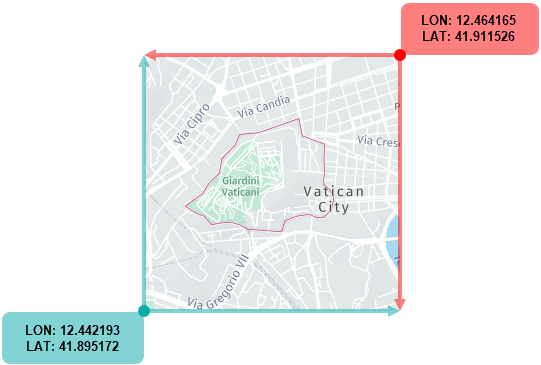
In this method, the bbox parameter allows you to define the coordinates for the southwest (bottom-left) and northeast (top-right) corners of the map image.
These following figure provides a visual example of how to use a bounding box to capture a map image:
-
Format:
bbox:{southwest_longitude},{southwest_latitude},{northeast_longitude},{northeast_latitude};padding={value} -
Sample request:
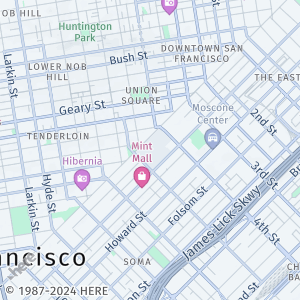
https://image.maps.hereapi.com/mia/v3/base/mc/bbox:-122.4194,37.7749,-122.3940,37.7935/300x300/png8
?apiKey={YOUR_API_KEY}
The preceding request sets the map position based on the bounding box for downtown San Francisco.
-
Response:
Map position with bounds
This method uses the bounds parameter to position the view so that all the coordinates given in the list (in any order) are visible.
-
Format:
bounds:{latitude1},{longitude1},{latitude2},{longitude2}, ... {latitudeN},{longitudeN};padding={value} -
Sample request:
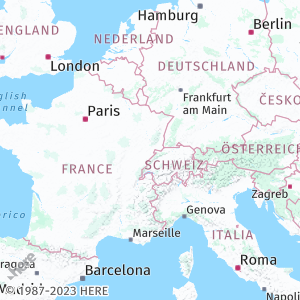
https://image.maps.hereapi.com/mia/v3/base/mc/bounds:51.50,-0.11,52.52,13.40,41.90,12.49;padding=32/300x300/png8
&apiKey={YOUR_API_KEY}
In the preceding example:
51.50,-0.11are the coordinates for London, United Kingdom.52.52,13.40are the coordinates for Berlin, Germany.41.90,12.49are the coordinates for Rome, Italy.
-
Response:
Note
The HERE Map Image API effectively handles use cases where the map bounds determined either through the
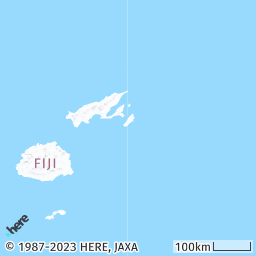
bboxorboundsparameter crosses the anti-meridian, so that you don't have to manually manage the complexity where longitude values can wrap around from positive to negative or vice versa. The API provides built-in capability and algorithms specifically designed to interpret and render areas defined by bounds that span the anti-meridian.The following map image showcases this capability, illustrating a region defined by the bounds coordinates
bbox:178,-20,-178,-14:
The image displays an area that spans across the anti-meridian, allowing for seamless representation of geographical data across this significant longitude line.
Best practices for bbox and bounds parameters
- Ensure that the geographic bounds you define accurately represent the area of interest for your map. Any inaccuracies in the bounds can result in portions of the desired area being cut off or excluded from the map view.
- Because the zoom level is automatically adjusted based on the specified bounds or bounding box, you must verify that the resulting zoom level provides an appropriate level of detail and visibility for the entire area of interest.
- You can use
bboxorboundswith custom overlays. In this case, ensure that the extent of the GeoJSON features is visible within the resulting map image.
Next steps
To explore other methods for positioning map images, see the following articles:
Updated 6 months ago