

Tangram
Learn how to create a map using Leaflet, a JavaScript library for interactive maps, and Tangram, a rendering engine for 2D & 3D maps, to display HERE map data.
Prerequisites
Obtain an API Key: If you do not have one already, sign up for a HERE platform account and generate an API key. For more information, see the Identity & Access Management Developer Guide.
Set up the HTML structure
Create a new HTML file that contains the map object.
<!DOCTYPE html>
<html lang="en">
<head>
  <meta charset="UTF-8">
  <meta name="viewport" content="width=device-width, initial-scale=1.0">
  <title>HERE Map with Tangram</title>
  <!-- Include Leaflet CSS -->
  <link rel="stylesheet" href="https://unpkg.com/[email protected]/dist/leaflet.css" crossorigin="">
</head>
<body onload="initialize_map()">
  <!-- Create a div to hold the map -->
  <div id="my_map_div" style="width:1000px; height:500px"></div>
  <!-- Include Tangram and Leaflet JavaScript libraries -->
  <script src="https://unpkg.com/tangram/dist/tangram.min.js"></script>
  <script src="https://unpkg.com/[email protected]/dist/leaflet.js" crossorigin=""></script>
  <script>
    // JavaScript code for initializing the map goes here
  </script>
</body>
</html>
Specifically for this use case, the HTML definition must include the following elements:
- The
<link>element that includes the Leaflet CSS stylesheet. - The
<script>element that includes the Tangram JavaScript library. - The
<script>element that includes the Leaflet library.
Note
As demonstrated in the previous HTML snippet, ensure that you place the
<script>elements importing the Tangram and Leaflet libraries after the<link>element importing the Leaflet CSS stylesheet.
Initialize the Map with JavaScript
Add the JavaScript code to initialize the map inside the <script> tag in the <body> section. This code creates a Leaflet map and adds a Tangram layer to it.
// Function to initialize the map
function initialize_map() {
  // Create a Leaflet map instance
  // Set the initial view to downtown New York coordinates (latitude: 40.707160, longitude: -74.008227)
  // Set the initial zoom level to 13
  var map = L.map('my_map_div', {
  }).setView([40.707160, -74.008227], 13);

  // Construct the URL for the Tangram scene
  var sceneUrl = 'https://assets.vector.hereapi.com/styles/berlin/base/tangram/tilezen';
  sceneUrl += '?apiKey=YOUR_API_KEY'; // Replace YOUR_API_KEY with your actual HERE API key

  // Add a Tangram layer to the map
  Tangram.leafletLayer({
    scene: sceneUrl, // Specify the URL of the Tangram scene
    attribution: '©2024 HERE Technologies' // Attribution text for the map data
  }).addTo(map); // Add the Tangram layer to the Leaflet map
}
This script performs the following actions:
-
Inside the
initialize_map()function, the script creates a Leaflet map instance, sets its initial view to specific coordinates, and specifies the initial zoom level. -
The script constructs the URL for the Tangram scene.
Note
Replace
YOUR_API_KEYwith your actual HERE API key. -
Finally, the script adds a Tangram layer to the map using
Tangram.leafletLayer()andaddTo(map)methods.
Display the map in a browser window
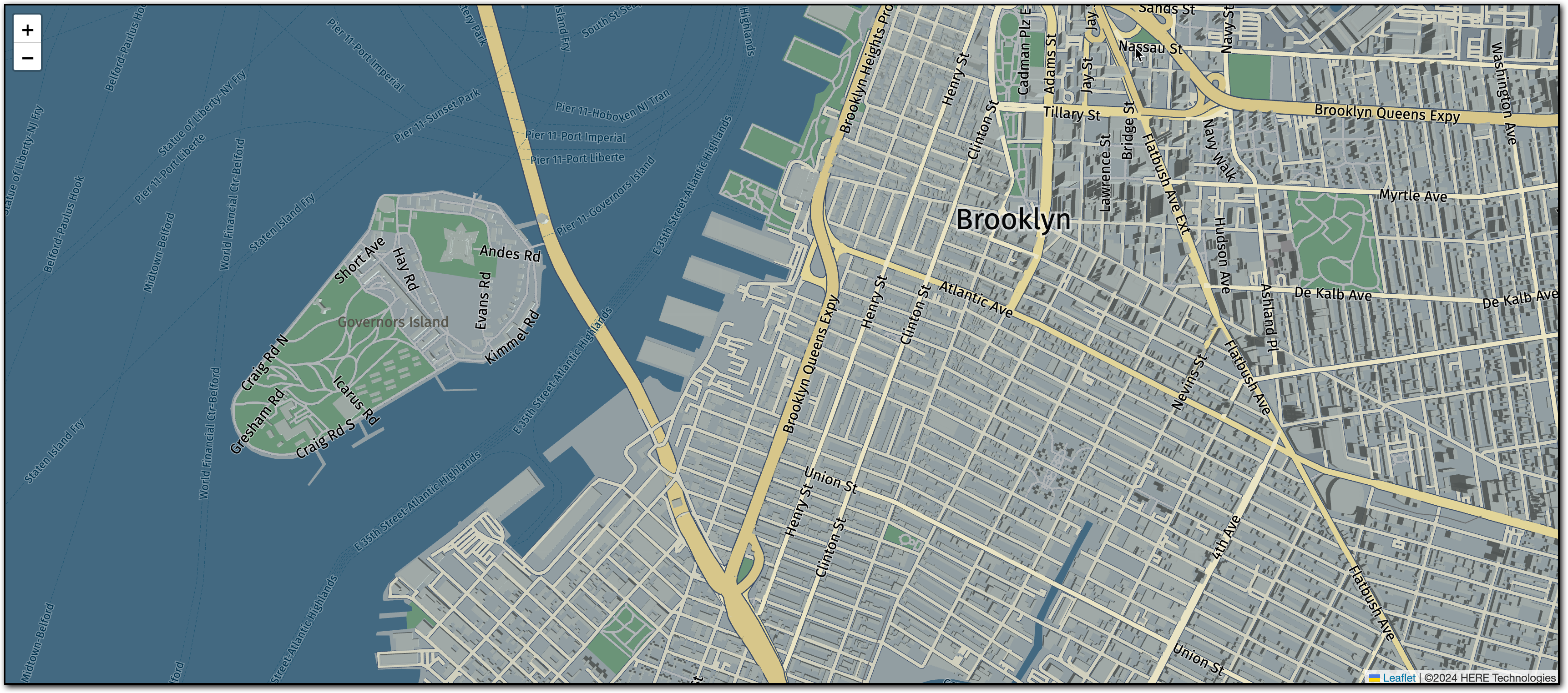
To use this HTML and JavaScript setup, save the HTML file and open it in a web browser. The browser displays a map centered on the specified coordinates with a Tangram layer, as shown in the following figure:
Hint
The map in this tutorial uses the
basestyle. To view other HERE styles available for Tangram maps, access the following URL:https://assets.vector.hereapi.com/styles/berlin
Next steps
For more information on other map rendering use cases involving data provided by the HERE Vector Tile API, see Examples.
Updated 4 months ago