
Roads layer (transportation)
The roads layer contains comprehensive transportation data, encompassing various types like highways, major and minor roads, paths, railways, and ferries. For example, this dataset is important in fleet management applications, ensuring vehicles comply with regulations by following approved routes and restrictions.
The following figure illustrates an example of a road rendered from vector data:
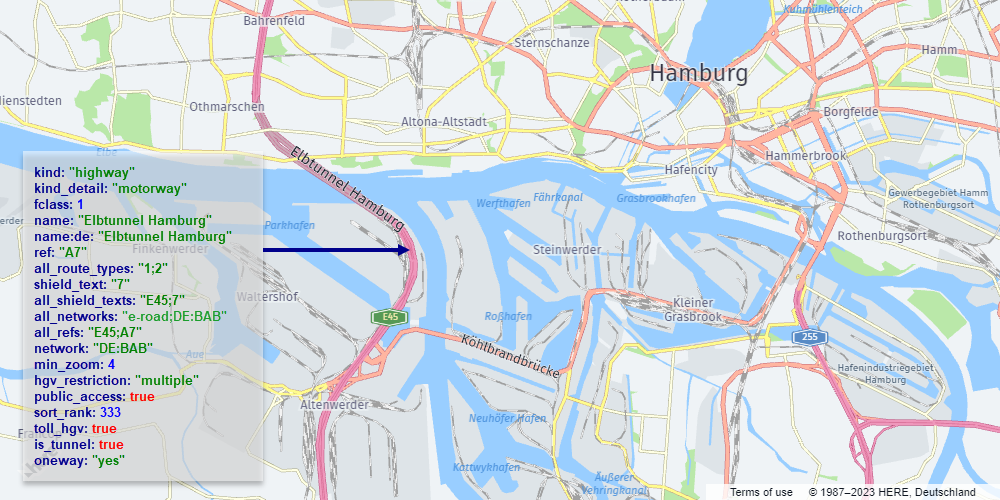
The layer content has the following definition:
- Layer name:
roads - Geometry types:
line,point
The following sections provide an overview of the roads layer in the HERE Vector Tile API.
Note
When working with the
roadslayer, consider the following design features and restrictions:
- To accurately represent layered overpasses, bridges, and tunnels, ensure to apply the
sort_rankfor proper layering.- To improve performance, some road segments are merged at low and medium zoom values. This means that certain properties are removed at those zoom levels, for example,
is_bridgeandis_tunnel,name,network,oneway, andref. The exact zoom level at which a property is no longer relevant varies by feature class.- The Advanced Roads layer expands upon the
roadslayer by providing specialized information specifically designed to meet the requirements of heavy goods vehicles (HGVs). For more information, see Advanced roads layer.
Shared properties
Every feature in the roads layer includes a set of properties that define it, regardless of the specific type of road it represents.
Note
These properties are referred to as
commonproperties in the Tilezen schema. For more information, see Tile layers.
name- The name of the road,in the local language. The name might be provided in multiple languages, depending on the the available data.kind- The general type of road. For more information, see Kind values for theroadslayer.kind_detail- Additional details about thekindof road. For example, theminor_roadkind can haveresidential,service, orunclassifiedkind_detailvalues. For more information, seekind_detailvalues for theroadslayer.landuse_kind- Property calculated by intercuttingroadswith thelanduselayer to determine if a road segment is over a park, hospital, university or other landuse feature. Use this property to modify the visual appearance of roads over these features. For example, light grey minor roads might not be legible over most landuse colors unless darkened.sort_rank- A value used to prioritize the display order of different types of features on the map. A feature with a highersort_rankvalue is displayed on top of a feature with a lowersort_rankvalue. At zoom level14and higher,sort_rankis adjusted to realistically model bridges and tunnels. For example, for anis_bridge=truefeature, thesort_rankvalue at zoom level13is337, while at zoom level14thesort_rankvalue changes to427.min_zoom- Indicates the suggested minimum zoom level at which aroadsbecomes visible.ref- A commonly used reference for aroadsfeature, for example,"I 90"for Interstate 90. To use with shields, see thenetworkandshield_textproperty definitions.network- Useful for shields and road selections, for example,US:Ifor the United States Interstate network. The property contains only road network types. For a full list of available values, see Roadnetworkvalues.shield_text- Refers to the text displayed on a road shield. For example, consider theI 90road, which belongs to theUS:Inetwork and has ashield_textof90. While therefvalue (I 90) contains additional information, it might not be as suitable for direct shield display without further processing. For certain roads, this property can contain non-numeric characters. For example, the UK's M1 motorway has ashield_textvalue ofM1rather than just1.all_shield_texts- Lists all the shield texts associated with the particular road. These texts are presented as a collection ofshield_textvalues separated by semicolons. For further details, see theshield_textproperty definition.all_networks- All the networks associated with the particular road. These networks are presented as a collection ofnetworkvalues separated by semicolons. For further details, see thenetworkproperty definition.all_route_types- Various route types that encompass the specified road. These types are represented as a series of numeric codes, separated by semicolons. These codes are used for shield styling based on the country's specifications.all_refs- encompasses all the references associated with this road. These references are presented as a sequence ofrefvalues separated by semicolons. For further details, see therefproperty definition.
Conditional properties
Some roads features include properties that are provide additional information, for example, whether a particular road is a part of a tunnel, a bridge, and so on.
Note
These properties are referred to as
common-optionalproperties in the Tilezen schema. For more information, see Tile layers.
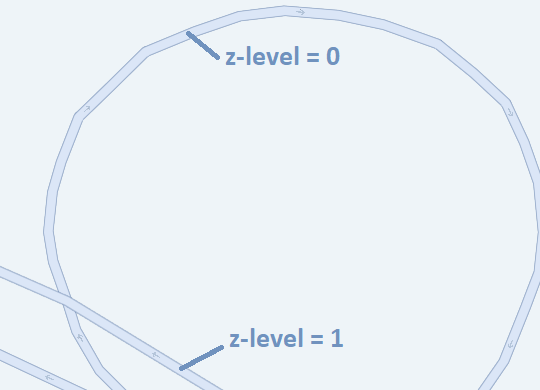
is_bridge- Set totrueand present only if the road is part of a bridge.is_link- Set totrueand present only if the road is part of a highway link or ramp.is_tunnel- Set totrueand present only if the road is part of a tunnel.is_present_in_landuse- Indicates whether the road has a detailed polygonal representation within various landuse categories, such asexpressway,urban_expressway,national_road,major_road, orother_road. Alternatively, it might be formed as an area not covered by specific landuse categories for minor roads. This property exists solely within thecoremap parameter and has limited coverage for Japan at zoom level14. facilitates the filtering of road centerlines while displaying comprehensive road geometries derived from landuse data. For more information, see Polygonal roads.is_present_in_city- Set totrueif the rail is integrated into the city rail network. This property is available exclusively within thecoremap parameter, with restricted coverage applicable to Japan at zoom 14 and higher. Rails possessing this property are solely employed for labeling purposes when displaying line geometries derived from the city rail network. This property is applicable only to therailkind.pedestrian_zone- Set totrueif a pedestrian road is part of a pedestrian zone.public_access- Set totrueif the public has an official and legally protected right to access the element.private- Set totrueif the element is not open to the public, and access is only granted with individual permission.delivery_road- Set totrueif access to the element is only allowed when making deliveries to it.through_traffic- Set totrueif passage is permitted through the road exclusively when both the origin and destination points are situated outside the current road.fclass- This property indicates a functional class numeric value for roads withkind_detail:motorwayandkind_detail:motorway_link. For more information, seefclassvalues.under_construction- Set totrueand present when the road is under construction and may not be accessible to some or all types of traffic.surface- Set tounpavedand present only if the road is unpaved.oneway- An optional property that indicates if traffic is one-way and travels in the same direction as thelinestring. This property can only have theyesvalue.toll- An optional boolean property that indicates if a fee must be paid by general traffic to use the feature. This property can only have thetruevalue.z_level- An optional property to manage the loading and rendering order of features on the map, mirroring the above/below relationships observed in reality. If the property is absent, it defaults to a value of0. Roads with higherz_levelshould be drawn after roads with smaller values. The current allowable range forz_levelvalues is-4to5.
The following figure illustrates a map featuring sample features with varying z_level values. This example showcases how features with a higher z_level value are depicted "above" features with a lower z_level value.
kind values for the roads layer
kind values for the roads layerThe following list provides detailed explanations for each available type of the roads layer feature, and the supported geometry type:
| Feature | Geometry | Description |
|---|---|---|
aerialway | Line | Represents aerial transportation systems such as gondolas, chairlifts, or cable cars. |
ferry | Line | Denotes ferry routes or paths across bodies of water. Represented as lines indicating ferry travel routes. |
highway | Line | Represents roads, streets, or thoroughfares designed for vehicular traffic. |
major_road | Line | Represents roads of significant importance or size within a road network. Often characterized by higher traffic volume or crucial connections. |
minor_road | Line | Denotes roads of lesser significance or size within a road network. Typically includes smaller streets or roads with lower traffic volume. |
path | Line | Represents pathways or trails designated for pedestrians, cyclists, or specific non-motorized transport. |
rail | Line | Depicts railway tracks or routes for trains or other rail transport. |
piste | Line | Denotes ski slopes or trails for skiing or snowboarding. |
kind_detail values for the roads layer
kind_detail values for the roads layerThe following table provides the kind_detail values that can provide additional information about a road kind:
kind | Available kind_detail values |
|---|---|
ferry | ferry |
highway | motorway, trunk |
major_road | primary, secondary, tertiary |
minor_road | residential, service, unclassified |
path | pedestrian, footway |
rail | rail |
aerialway | chair_lift |
piste | downhill |
service values for kind_detail: service
service values for kind_detail: serviceThe roads with kind:minor_road and kind_detail:service can have the following additional property:
parking_aisle- Typically refers to the designated area within a parking lot or structure that serves as the driving lane for accessing parking spaces.
Japan-specific kind_detail values
kind_detail valuesThe following table provides Japan-specific kind_detail values within the core map. For more information, see Map parameter.
light_rail- for therailkindsubway- for therailkindspeed_rail- for high-speed railroads with therailkindprivate_rail- for privately owned railroads with therailkindstate_rail- for state-owned railroads with therailkindmonorail- for monorails with therailkindroller_coaster- for roller coaster with therailkindcable_car- for theaerialwaykindgondola- for theaerialwaykind
fclass values
fclass valuesRoads in the HERE Vector Tile API are traditionally categorized into so-called functional classes, which do not match one-to-one Tilezen's roads categorization. The mapping from one to the other are as follows.
| Tilezen Road properties | Functional Class |
|---|---|
kind is highway and kind_detail is motorway and fclass is N | N |
kind is highway and kind_detail is trunk | 1 |
kind is highway, kind_detail is motorway_link, is_link is true and any fclass | 1 |
kind is major_road and kind_detail is primary | 2 |
kind is major_road and kind_detail is secondary | 3 |
kind is major_road and kind_detail is tertiary | 4 |
kind is minor_road and kind_detail is (residential or service) | 5 |
kind is path and kind_detail is (footway or pedestrian) | 5 |
Japan-specific fclass values
fclass valuesThe following table provides Japan-specific fclass values within the core map. For more information, see Map parameter.
| Tilezen Road properties | Functional Class |
|---|---|
kind is highway, and kind_detail is motorway | 1 |
kind is highway and kind_detail is motorway | 2 |
kind is highway and kind_detail is motorway | 3 |
kind is major_road and kind_detail is primary | 3 |
kind is major_road and kind_detail is secondary | 4 |
kind is major_road and kind_detail is secondary | 5 |
kind is major_road and kind_detail is tertiary | 6 |
kind is major_road and kind_detail is tertiary | 7 |
kind is minor_road and kind_detail is resedential | 8 |
kind is path and kind_detail is pedestrian | 8 |
kind is minor and kind_detail is (resedential or service) | 9 |
kind is minor_road and kind_detail is (resedential or service) | 10 |
kind is path and kind_detail is (footway or pedestrian) | 10 |
kind is minor_road and kind_detail is (resedential or service) | 11 |
kind is path and kind_detail is (footway or pedestrian) | 11 |
Next steps
- For more information about other layer feature types available in the HERE Vector Tile API, see Tile layers.
Updated 6 days ago