

Personalize the map language
The HERE Map Image API offers language customization, allowing you to localize map labels and text elements to a specific language. This feature is especially beneficial for applications and websites serving an international audience or targeting multilingual regions. By presenting maps in the user's preferred language, you improve the user experience, making the maps more accessible and relevant.
Explore the HERE Map Image API v3 with this interactive example. Test parameters and see real-time results:
Try It OutBy default, the HERE Map Image API displays map labels, in each country's local language, depending on the data availability. The labels for ocean, sea, and bay features are shown in the language of the country a specific water body is adjacent to.
The following figure demonstrates the default map behavior for label languages:
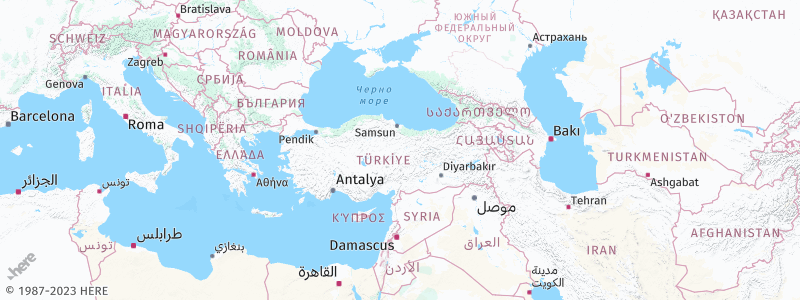
This default behavior ensures that the map displays relevant labels in the appropriate language for each country, while also providing consistency for common geographical features across regions.
Understand language customization options
The HERE Map Image API, uses the lang and lang2 parameters to specify the primary and secondary languages for label customization in the map images.
lang- Sets the primary language for map labels. The parameter accepts the two-letter ISO-639-1 language code, for example,frforFrench.lang2- Sets the secondary language for map labels. This parameter follows the same format as thelangparameter and allows you to display an additional label in the specified language.
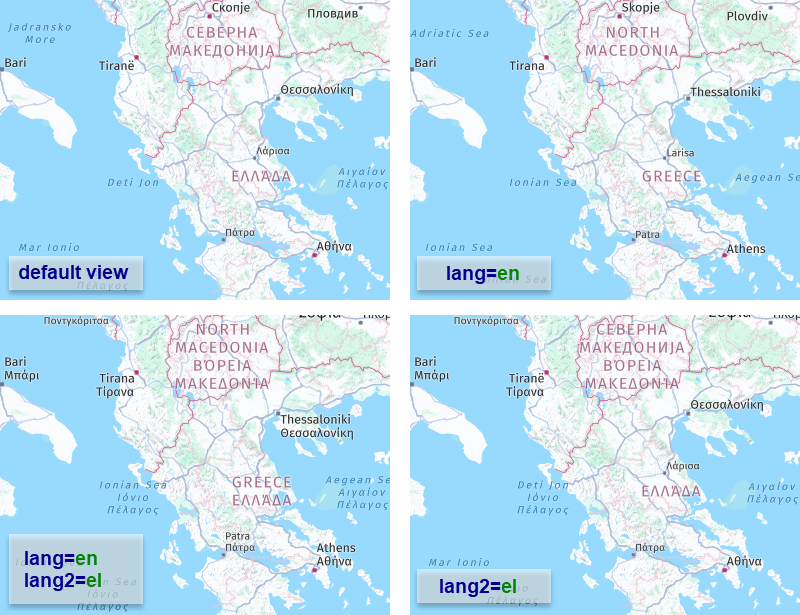
The following figure shows examples of how the HERE Map Image API displays map labels for various combinations of settings that include the English (ISO-639-1 code: en) and Greek (ISO-639-1 code: el) languages:
Note
- When you specify only the secondary language in an API request (for example,
lang2=el), the map displays the default local language as the primary language.- In cases where the secondary language is the same as the default local language, the API displays only a single label.
For reference, see the preceding example.
Optional: Get the list of supported languages
To obtain the current list of supported resource types in the HERE Map Image API, make a request to the /languages endpoint, as shown in the following example:
https://image.maps.hereapi.com/mia/v3/languages?apiKey={YOUR_API_KEY}Result: The response body is a JSON file that provides a list of language codes following the ISO-639-1 schema. Each code corresponds to a language available for a given map resource type. The following snippet provides a sample JSON response from the /languages endpoint:
{
  "background": [
    "ar", "as", "az", "be", "bg", "bn", "bs",
    "ca", "cs", "cy", "da", "de", "el", "en",
    "es", "et", "eu", "fi", "fo", "fr", "ga",
    "gl", "gn", "gu", "he", "hi", "hr", "hu",
    "hy", "id", "is", "it", "ja", "ka", "kk",
    "km", "kn", "ko", "ky", "lt", "lv", "mk",
    "ml", "mr", "ms", "mt", "my", "nl", "no",
    "or", "pa", "pl", "pt", "ro", "ru", "sk",
    "sl", "sq", "sr", "sv", "ta", "te", "th",
    "tr", "uk", "uz", "vi", "zh", "zh-Hant"
  ],
  "base": [
    "ar", "as", ...
  ],
  "blank": [
    "ar", "as", ...
  ],
  "label": [
    "ar", "as", ...
  ]
}
You can use the language codes from the respective arrays to set the languages for label display according to your chosen map resource type.
Adjust map languages
For example, you can use the HERE Map Image API to personalize the map display and offer map labels in Hindi and English, which are the official languages of India.
Consider the following request:
https://image.maps.hereapi.com/mia/v3/base/mc/center:15.377024,74.010758;zoom=9/300x300/png8
?apikey={YOUR_API_KEY}
&style=lite.day
This request obtains a 300x300 pixel map that focuses on the state of Goa, India, with the zoom level of 9, as shown in the following example:
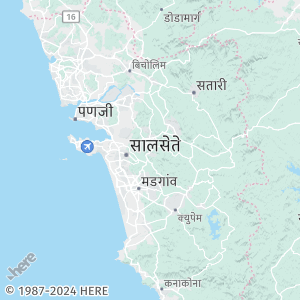
The map displays labels in the default local language, which is Hindi (ISO-639-1 code: hi).
Sample request #1:
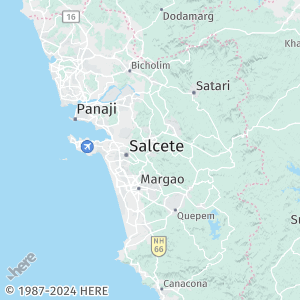
To customize the map and display labels in English, include the lang parameter in your request with the value en, which corresponds to the ISO-639-1 language code for English. See the following example:
https://image.maps.hereapi.com/mia/v3/base/mc/center:15.377024,74.010758;zoom=9/300x300/png8
?apikey={YOUR_API_KEY}
&style=lite.day
&lang=enResponse: The map displays labels in the English language, as shown in the following figure:
Sample request #2:
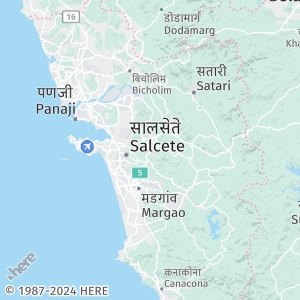
To display map labels in both English and Hindi, you can include the lang2 parameter along with the lang parameter. Assign the language code for the secondary language to the lang2 parameter. In the following example, Hindi is the primary language, while English is the secondary language:
https://image.maps.hereapi.com/mia/v3/base/mc/center:15.377024,74.010758;zoom=9/300x300/png8
?apikey={YOUR_API_KEY}
&style=lite.day
&lang=hi
&lang2=enResponse: The map uses dual language labels, with the label in the primary language on top of the label in the secondary language, as shown in the following figure:
Next steps
- To explore all supported endpoints and parameters, see the API Reference.
- To gain more hands-on experience with the HERE Map Image API see the
Tutorialssection of this guide.
Updated 7 months ago