

Adjust label density
HERE Raster Tile API provides a ppi parameter to render labels and icons in different sizes helping you find the right balance in label and icon size for the screen's resolution.
The following ppi values are available:
| PPI Value | Description | Best for |
|---|---|---|
ppi=100 | Default value that prioritizes a denser display with smaller yet clearer labels and icons. Condenses more information into a limited space. | Smaller, more intricate displays |
ppi=200 | Middle ground for label sizing. Ideal solution when ppi=100 results in labels that are too small, and ppi=400 produces labels that are overly large. Ensures optimal readability and precision. | General-purpose use with balanced readability |
ppi=400 | Larger labels and icons that emphasize visibility and clarity. Ensures clearer and more visible details. | Larger screens where details need to be easily discernible |
Examples
See the following examples for how to get various label and icon sizes for a 512x512 pixel tile. Try each of the following ppi values on your target display to find the setting that works best for your use case:
Default size (ppi=100)
The following example shows how to obtain a tile with the default label and icon size:
GET https://maps.hereapi.com/v3/base/mc/14/9327/4742/png?size=512&style=explore.satellite.day&apiKey={YOUR_API_KEY}
Medium size (ppi=200)
The following examples shows how to obtain a tile with medium label and icon size:
GET https://maps.hereapi.com/v3/base/mc/14/9327/4742/png?size=512&style=explore.satellite.day&apiKey={YOUR_API_KEY}&ppi=200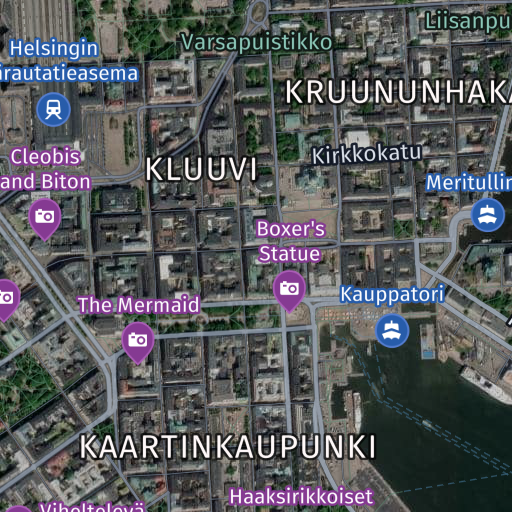
Large size (ppi=400)
The following example shows how to obtain a tile with large label and icon size:
GET https://maps.hereapi.com/v3/base/mc/14/9327/4742/png?size=512&style=explore.satellite.day&apiKey={YOUR_HERE_API_KEY}&ppi=400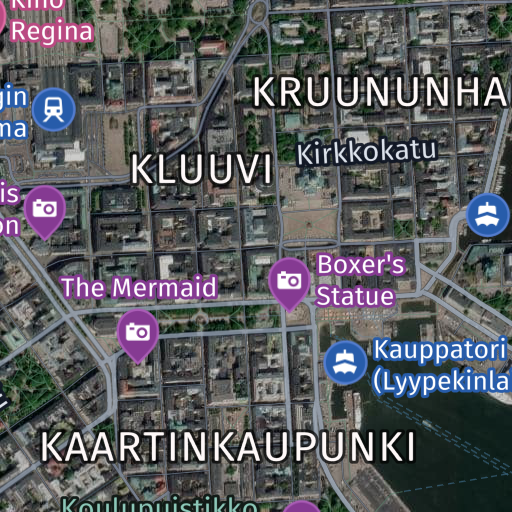
Next steps
- For more information on tile dimensions, see Set tile size.
- For more information on high-resolution displays, see Show high-resolution tiles.
- For more information on API endpoints and request parameters, see the API Reference.
Updated last month
Did this page help you?