

Enhance map borders with padding
Padding allows you to specify the amount of space or margin around the edges of the map image. Padding is especially useful when working with custom overlays, such as markers, polygons, or lines on a map because it prevents overlay features from being cut off or obscured by the map's edges.
You can control padding through the padding parameter, which ranges from 0 pixels (default) to one-fourth of the lower image dimension value. For example, if the image dimensions are 300x400, then the maximum padding value is 300/4, which equals 75 pixels.
Note
Negative values for the
paddingparameter are not supported.
The following figure shows the importance of padding when overlaying additional information on map images:
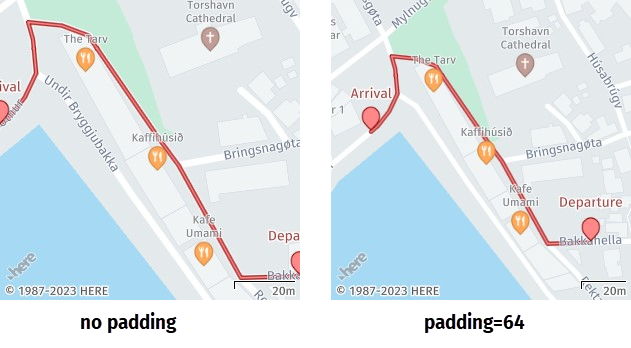
In the preceding image, adding padding automatically decreases map zoom to accommodate additional routing information and prevent map edges from cutting off markers, labels, or lines.
Sample request #1:
Consider the following request:
https://image.maps.hereapi.com/mia/v3/base/mc/overlay/300x300/png8
?apikey={YOUR_API_KEY}
&scalebar=km
&features=pois:disabled
&geojson={
  "type": "FeatureCollection",
  "features": [
    {
      "type": "Feature",
      "properties": {
        "label":"Point A",
        "size":"large"
      },
      "geometry": {
        "coordinates": [
          19.934432,
          50.061023
        ],
        "type": "Point"
      }
    },
    {
      "type": "Feature",
      "properties": {
        "label":"Point B",
        "size":"large"
      },
      "geometry": {
        "coordinates": [
          19.938893,
          50.062473
        ],
        "type": "Point"
      }
    }
  ]
}
This request places two markers called Point A and Point B on the map image at the specified coordinates. The {camera} parameter in the request path is set to overlay to allow the API to automatically calculate the image zoom and bounding box based on GeoJSON coordinates.
Response:
The API returns the following response:
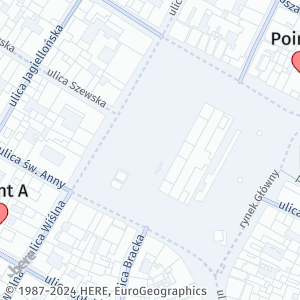
As demonstrated in the preceding response, the absence of padding in a map display can result in overlay features, such as markers, polygons, lines, or labels, being partially or fully cut off at the edges of the map.
Sample request #2:
To ensure that all map features are fully visible on map images, add the padding parameter in the camera position calculation, as shown in the adjusted request from the previous example:
https://image.maps.hereapi.com/mia/v3/base/mc/overlay:padding=64/500x300/png8
?apikey={YOUR_API_KEY}
&scalebar=km
&features=pois:disabled
&geojson=...
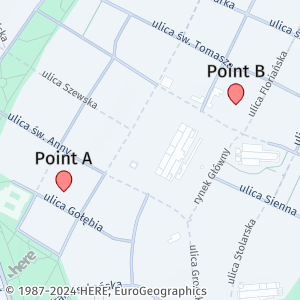
The previous request now includes the padding parameter with the value of 64 pixels.
Response:
The API adds the requested space to the specified coordinates, making all overlay features fully visible, as shown in the following example:
Note
The inclusion of a padding value in your map configuration doesn't automatically ensure that all map features will be visible in the generated map image. To achieve the best results, determine the optimal padding value for your map images through testing and experimenting with various combinations of overlay features and padding values.
Next steps
For more information on how to explore other map parameters related to map readability, see Adjust map readability.
Updated 7 months ago