

Explore advanced raster tile features
HERE uses the pay-per-transaction model for the HERE Raster Tile API, which means that you are charged based on the number of tile requests (transactions) made. The type of requested features is another factor that affects pricing as using certain advanced features in your requests can result in your account being placed in a different pricing category and lead to additional charges in accordance with the HERE pay-per-transaction model.
In the HERE Raster Tile API, tile requests that include certain features like the display of vehicle restriction data or specific logistics-related styles fall under the Advanced Raster Tile pricing category of HERE Map Rendering.
For more information, see HERE platform pricing.
Features
vehicle_restrictions
The use of the vehicle_restrictions feature places your account in the Advanced Raster Tile pricing plan.
The vehicle_restrictions feature highlights the display of roads based on the restrictions and displays road signs specific to trucks or other special vehicles.
Example
The following request shows how to obtain a tile displaying vehicle restrictions:
GET https://maps.hereapi.com/v3/base/mc/13/4323/2647/png?apiKey={API_KEY}&size=512&features=vehicle_restrictions:active_and_inactive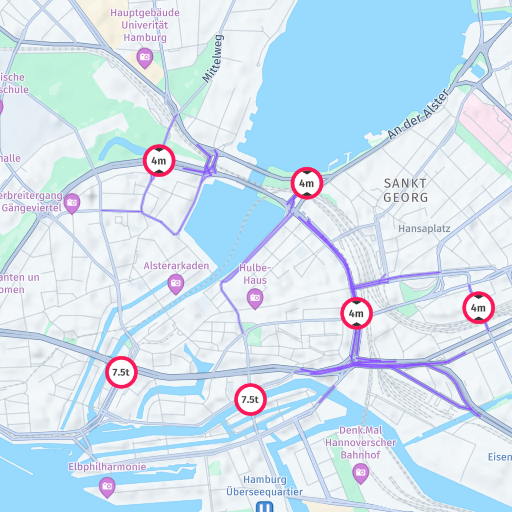
truck_preferred_roads
The use of the truck_preferred_roads feature places your account in the Advanced Raster Tile pricing plan.
The truck_preferred_roads feature highlights roads that should be preferred for trucks or other heavy vehicle traffic.
Example
The following request shows how to obtain a tile displaying preferred truck roads:
GET https://maps.hereapi.com/v3/base/mc/13/4323/2647/png?apiKey={API_KEY}&size=512&features=truck_preferred_roads:allStyles
The use of the following style types places your account in the Advanced raster tile pricing plan:
These styles are optimized to provide clear and relevant information to facilitate efficient route planning, navigation, and logistics operations.
Example
The following request shows how to obtain a tile in one of the logistics styles:
GET https://maps.hereapi.com/v3/base/mc/13/4323/2647/png?apiKey={YOUR_API_KEY}&size=512&styles=logistics.day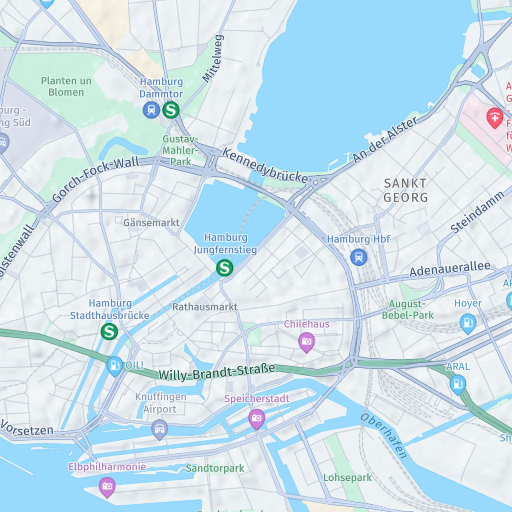
Next steps
- For more information on available features and the
vehicle_restrictionsfeature, see Control features. - For more information on the logistics styles mentioned, see Apply styles.
- For more information on API endpoints and request parameters, see the API Reference.
Updated 3 days ago