

Show high-resolution tiles
You can obtain map tiles of high DPI (dots per inch) in cases where good visualization of details like street names or landmarks is crucial or the support for high-resolution map displays is required. Use cases include:
- Display maps on high-DPI screens (retina, 4K displays)
- Print high-quality maps
- Show detailed street names and landmarks
Syntax
In the HERE Raster Tile API, you control the level of detail and clarity of an image by adjusting the scale parameter, which can have the following values:
1: The default resolution for map tiles.2: The high-resolution setting for map tiles.
In addition to setting the scale parameter to 2, to maintain the extent of geographical area captured by high-resolution tiles, you need to adjust their size according to the following pattern:
- default resolution:
size=256,scale=1 - high DPI:
size=512,scale=2
For example, if you want to increase the resolution of a tile whose size is the default 256 pixels, you must change the value of its size parameter to 512 pixels, and then increase the value of the scale parameter to 2 to make sure that the physical size of the tile remains the same, but with a higher density of detail.
Examples
The following examples demonstrate different combinations of size and scale parameters to obtain tiles of various resolutions:
Standard resolution tile
As the baseline for comparison, the following snippet shows how to obtain a standard-resolution tile:
GET https://maps.hereapi.com/v3/base/mc/14/3147/6645/png?style=explore.satellite.day&apiKey={YOUR_API_KEY}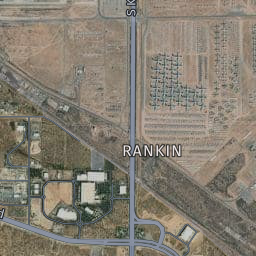
High-resolution tile
The following request shows how to doubles the pixel density while maintaining the same geographic area by using scale and size parameters:
GET https://maps.hereapi.com/v3/base/mc/mc/14/3147/6645/png?style=explore.satellite.day&size=512&scale=2&apiKey={YOUR_API_KEY}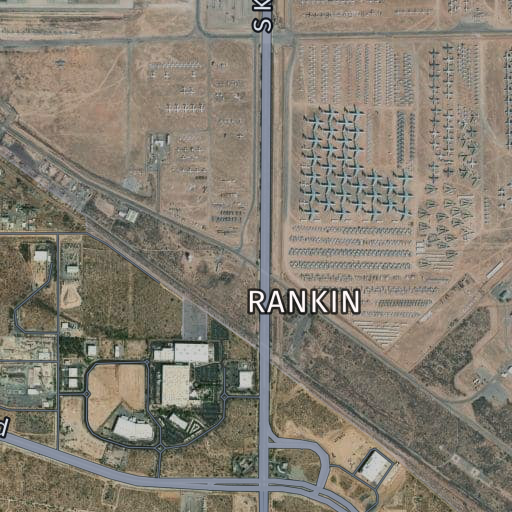
High-resolution without size adjustment
The following request shows how to get a larger geographic area on a tile at standard resolution instead of higher detail.
GET https://maps.hereapi.com/v3/base/mc/mc/14/3147/6645/png?style=explore.satellite.day&size=512&scale=1&apiKey={YOUR_API_KEY}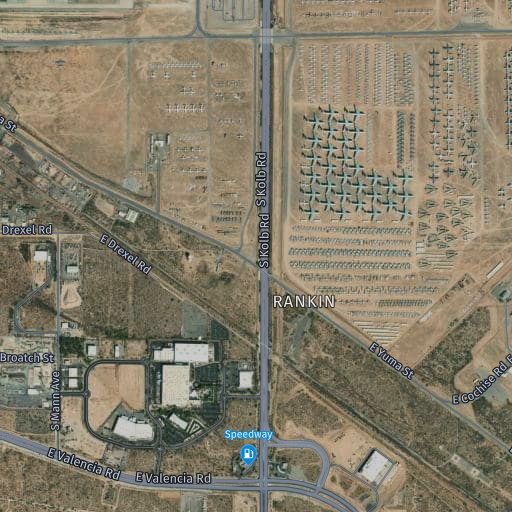
Next steps
- For more information about the available tile sizes, see Set tile size.
- For more information about the icon and label size, see Specify the label and icon size.
Updated last month