

Use POST method for large overlays
While the standard request format for retrieving images is a GET request with parameters in the URL, the HERE Map Image API supports POST requests specifically for handling large polyline requests or complex overlay data that might exceed URL length limits.
Use the POST method when:
- Your overlay data exceeds the URL length limit of 8,192 characters
- You are working with complex routing scenarios that include many waypoints or detailed polylines
- You are displaying large MultiLineString or MultiPoint geometries that are difficult to compress
For smaller datasets, consider using flexible polyline encoding with standard GET requests.
The POST request uses the same URL path and query parameters as GET, but moves the overlay geometry data from URL parameters into the request body. POST requests work just like GET in terms of the response. When you send a valid POST request, the API immediately returns the image binary in the response body.
The following sections provide request samples for each overlay encoding method as well as specify the rules for the expected request format:
GeoJSON
For GeoJSON-based custom overlays you must specify Content-Type as application/geo+json, as shown in the following example:
Request example
curl 'https://image.maps.hereapi.com/mia/v3/base/mc/overlay/300x300/png8?apiKey={YOUR_API_KEY}' \
  -H 'Content-Type: application/geo+json' \
  --data-raw '{
  "type": "FeatureCollection",
  "features": [
    {
      "type": "Feature",
      "geometry": {
        "type": "MultiPoint",
        "coordinates": [
          [-0.02, 51.485],
          [0, 51.485],
          [0.02, 51.485]
        ]
      },
      "properties": {
        "style": "circle",
        "color": "#fff",
        "width": 10,
        "outline-color": "#f00",
        "outline-width": 3
      }
    }
  ]
}' -o image.png
Response
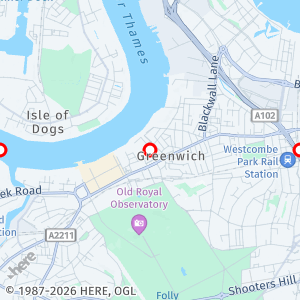
The API responds with the following image:
Compact overlay encoding
For requests using compact encoding for defining custom overlays you must specify Content-Type as text/plain, as shown in the following example:
Request example
curl 'https://image.maps.hereapi.com/mia/v3/base/mc/overlay/300x300/png8?apiKey={YOUR_API_KEY}' \
  -H 'Content-Type: text/plain' \
  --data-raw 'point:52.523882,13.366267;color=#FF0000;size=small' -o image.png
Response
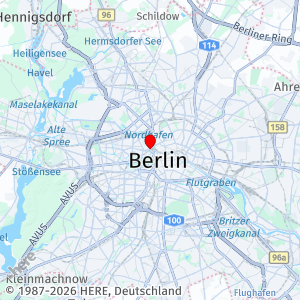
The API responds with the following image:
Multiple geometries in a single request
You can combine multiple geometries in a single request by specifying one complex geometry per line, as shown in the following example:
curl 'https://image.maps.hereapi.com/mia/v3/base/mc/overlay/300x300/png8?apiKey={YOUR_API_KEY}' \
--header 'Content-Type: text/plain' \
--data-raw 'point:52.5238826,13.3662667;color=#FF0000;size=small
line:52.5238826,13.3662667,52.520409,13.367164;color=#0000FF;width=4' -o image.png
How to format a Map Image API POST request
Follow these key rules while using the POST method for your requests:
- Set the
Content-Typeheader to match the request body format: useapplication/geo+jsonfor GeoJSON ortext/plainfor compact encoding - Because the
Content-Typeheader value is different for each overlay encoding method, you can use only a single method per request (unlike GET, where you could combine bothoverlay=andgeojson=methods) - Use only one overlay format per POST request. Unlike GET requests, POST requests cannot combine
overlay=andgeojson=methods. - Do not include
overlay=orgeojson=query parameters in the URL when using POST because thebodyreplaces them - Make sure to add the
-o image.{format}to specify the output type, for example,-o image.png - All other URL parameters (
style,center,zoom,padding, and so on) remain in the query string as with GET
Payload limits for the POST method
While the POST method supports significantly larger custom overlay data payloads than the GET method, POST requests are subject to the following limits:
- Maximum size of GeoJSON content: 7 MB
- Maximum size of custom encoding content: 1 MB
- Maximum number of features in a request: 1000
Understand feature counting
The 1000-feature limit is calculated differently depending on your geometry type:
- For
PointandMultiPointgeometries: Each individual point element counts as one feature - For all other geometry types: Each feature in the
FeatureCollectioncounts as one feature
For example, a MultiPoint with 100 coordinates counts as 100 features toward the limit, while a single LineString feature counts as 1 feature.
Next steps
You can use the POST method in scenarios involving substantial data volume or inherent complexity, such as those requiring sophisticated routing or complex polylines, as described in the following articles:
Updated 3 months ago