

Obtain high-resolution map images
You can obtain static map images of high DPI (dots per inch) in cases where good visualization of details like street names or landmarks is crucial or the support for high-resolution map displays is required.
In the HERE Map Image API, you control the level of detail and clarity of an image by adjusting the scale parameter, which can have the following values:
1: The default resolution setting for map images.2: The high-resolution setting for map images.
In addition to setting the scale parameter value to 2, to maintain the extent of geographical area captured by high-resolution images, you need to adjust their pixel resolution accordingly, compared to corresponding images rendered with the default scale setting, according to the following pattern:
- default resolution:
size=X,scale=1 - high DPI:
size=2*X,scale=2
For example, to obtain a high-resolution version of a map image in 256x256 pixels, you must double the width and height dimensions of that image (to 512x512 pixels), and then increase the value of the scale parameter to 2 to make sure that the physical size of the map remains the same, while getting a higher density of detail.
Sample request #1:
Consider the following request that obtains a map image with the default scale value:
https://image.maps.hereapi.com/mia/v3/base/mc/center:53.556046,9.993457;zoom=15/256x256/png8
?apiKey={YOUR_HERE_API_KEY}Note
The lack of the
scaleparameter in the request means that the API returns the corresponding image in the default resolution.
Response:
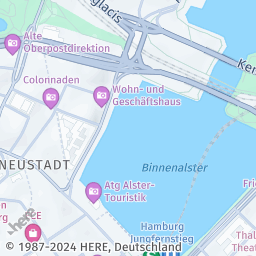
The API responds with the following image in 256x256 pixels:
Sample request #2:
To obtain a high-resolution version of the image from the preceding example, double the width and height pixel dimensions, and then increase the scale parameter value to 2, as shown in the following request:
https://image.maps.hereapi.com/mia/v3/base/mc/center:53.556046,9.993457;zoom=15/512x512/png8
?apiKey={YOUR_HERE_API_KEY}
&scale=2Response:
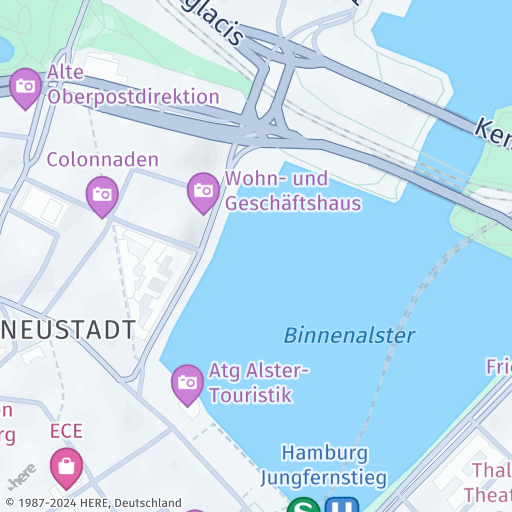
The API responds with a high-resolution version of the image, preserving the extent of the geographical area captured, but with increased DPI:
Note
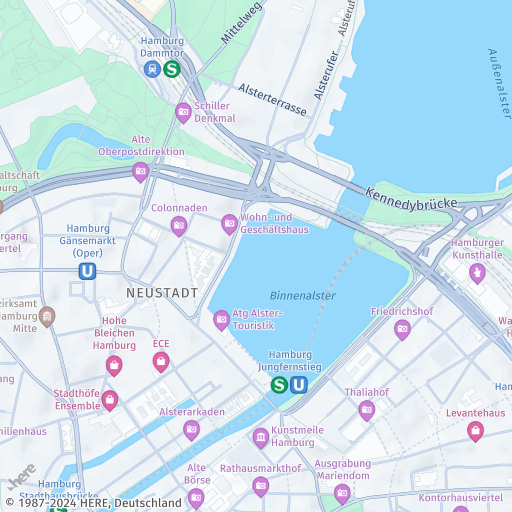
For comparison, the following figure shows the image generated in the previous step, except with the
scaleparameter set to1:
Next steps
- To explore all supported endpoints and parameters, see the API Reference.
- To gain more hands-on experience with the HERE Map Image API see the
Tutorialssection of this guide.
Updated 7 months ago