

Respect geopolitical views
Maps show political boundaries differently depending on the country viewing them. Some border regions are disputed, meaning different countries claim the same area. The HERE Raster Tile API solves this with the pview parameter, which lets you specify which country's perspective to use when rendering the map.
Using pview, you can:
- Show borders as they appear to a specific country
- Handle disputed regions appropriately for your users
- Use country codes (ISO 3166-1 alpha-2 format) to specify the geopolitical perspective
For example, if you request a tile with pview=IN (India's perspective), you see the India-Pakistan border as India defines it. With pview=PK (Pakistan's perspective), you see the same region as Pakistan defines it. If you don't specify pview, you get the default international view.
Syntax
The following snippet shows a sample request including pview parameter:
GET https://maps.hereapi.com/v3/base/mc/6/21/31/png?pview=GY&apiKey={YOUR_API_KEY}where pview=GY produces the map that assumes the geopolitical perspective of Guyana.
The pview parameter uses ISO 3166-1 language codes as accepted values, for example, AR, PK, IN, and so on.
Request the list of supported geopolitical views
To obtain the current list of all available geopolitical views, make a request to the /politicalViews endpoint, as shown in the following example:
GET https://maps.hereapi.com/v3/politicalViews?apiKey={YOUR_API_KEY}The response body is a JSON file that provides a list of country codes following the ISO 3166-1 alpha-2 schema. Each code corresponds to a geopolitical view available for a given map resource type. The following snippet provides a simplified example of JSON response from the /politicalViews endpoint:
{"background":["AB","AE","AR","BR","CY","EG","EH","GE","GF","GR","GY","HR","IL","IN","KE","MA","MW","NT","OS","PK","PS","RS","RU","SD","SR","SS","SY","TR","TZ","US","UY","VN","XK"],"base":["AB","AE","AR","BR","CY","EG","EH","GE","GF","GR","GY","HR","IL","IN","KE","MA","MW","NT","OS","PK","PS","RS","RU","SD","SR","SS","SY","TR","TZ","US","UY","VN","XK"],"blank":["AB","AE","AR","BR","CY","EG","EH","GE","GF","GR","GY","HR","IL","IN","KE","MA","MW","NT","OS","PK","PS","RS","RU","SD","SR","SS","SY","TR","TZ","US","UY","VN","XK"],"label":["AB","AE","AR","BR","CY","EG","EH","GE","GF","GR","GY","HR","IL","IN","KE","MA","MW","NT","OS","PK","PS","RS","RU","SD","SR","SS","SY","TR","TZ","US","UY","VN","XK"]}Examples
The following examples demonstrate how different geopolitical perspective settings affect map borders and territories. Each example shows the same geographic location rendered with different pview parameter values, allowing you to compare how different countries' perspectives present the same regions.
International perspective
When viewing a specific location in the Kashmir region on the Indian subcontinent, the initial request shows the default international view. This view includes a dashed border between India and Pakistan, highlighting the Jammu and Kashmir and Ladakh territories:
GET https://maps.hereapi.com/v3/base/mc/4/11/6/png?size=512&apiKey={YOUR_API_KEY}&lang=en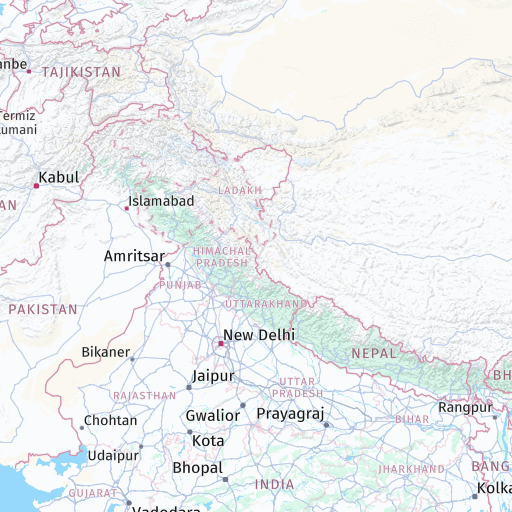
Pakistani perspective
Requesting the same tile using the Pakistani view shows a solid border, representing Pakistan's political stance on these territories:
GET https://maps.hereapi.com/v3/base/mc/4/11/6/png?size=512&apiKey={YOUR_API_KEY}&lang=en&pview=PK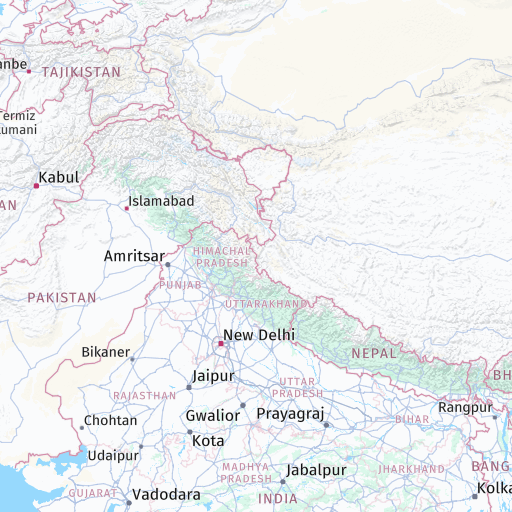
Indian perspective
You can also request the tile using the Indian view, as shown in the following example:
GET https://maps.hereapi.com/v3/base/mc/4/11/6/png?size=512&apiKey={YOUR_API_KEY}&lang=en&pview=IN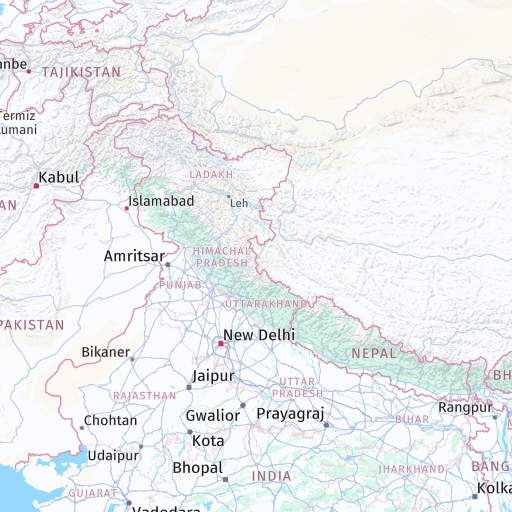
Next steps
- For information on localizing map labels, see Set label languages.
- For information on the available visual themes, see Apply styles.
- For more information on API endpoints and request parameters, see the API Reference.
Updated 29 days ago