

Set label languages
Control the language of map labels using the lang and lang2 parameters.
The HERE Raster Tile API supports multiple languages to help you deliver localized map experiences to users worldwide. The following scenarios highlight common use cases for language configuration:
- Multilingual apps - Display maps in users' preferred languages for global audiences
- Travel apps - Show local language with English transliteration for navigation abroad
- Regional platforms - Localize maps based on user location or browser settings
- Accessibility - Provide labels in multiple scripts for better readability
Syntax
The following snippet shows a sample request including lang and lang2 parameters that produces labels in Hindi with English transliteration.
GET https://maps.hereapi.com/v3/base/mc/12/2926/1707/png?lang=hi&lang2=en&apiKey={YOUR_API_KEY}where:
lang- Primary label language (ISO 639-1 code)lang2- Secondary label language (ISO 639-1 code)
The lang and lang2 parameters use ISO 639-1 language codes as accepted values, for example, en, de, ja, zh.
Request the list of available languages
Use the /languages endpoint to query the list of supported languages per resource type:
GET https://maps.hereapi.com/v3/languages?apiKey={YOUR_API_KEY}Response example:
{"base":["ar","as","az","be","bg","bn","bs","ca","cs","cy","da","de","el","en","es","et","eu","fi","fo","fr","ga","gl","gn","gu","he","hi","hr","hu","hy","id","is","it","ja","ka","kk","km","kn","ko","ky","lt","lv","mk","ml","mr","ms","mt","my","nl","no","or","pa","pl","pt","ro","ru","sk","sl","sq","sr","sv","ta","te","th","tr","uk","uz","vi","zh","zh-Hant"]}Note
You can cache this list in your application and refresh every 24 hours.
Examples
The following examples demonstrate how different language configurations affect map labels. Each example shows a sample map request with different language parameter settings and the resulting tile for the same geographic location, allowing you to compare how different language options present the same map data.
Default language
If neither a primary nor a secondary language is explicitly specified, the map defaults to the local language, as shown in the following request example:
GET https://maps.hereapi.com/v3/base/mc/12/2926/1707/png?size=512&apiKey={YOUR_API_KEY}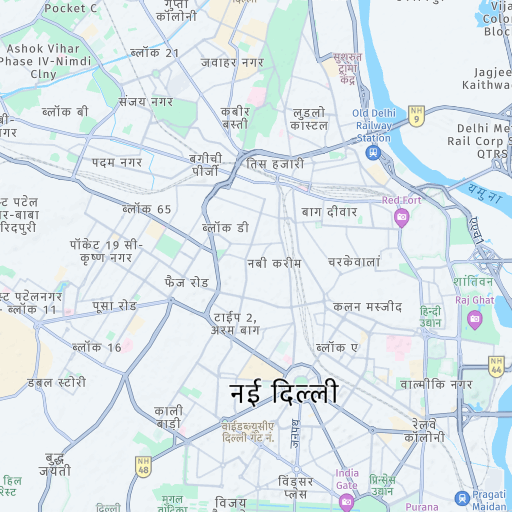
Primary language (English)
The following example shows a map with the primary language set to English (lang=en):
GET https://maps.hereapi.com/v3/base/mc/12/2926/1707/png?size=512&lang=en&apiKey={YOUR_API_KEY}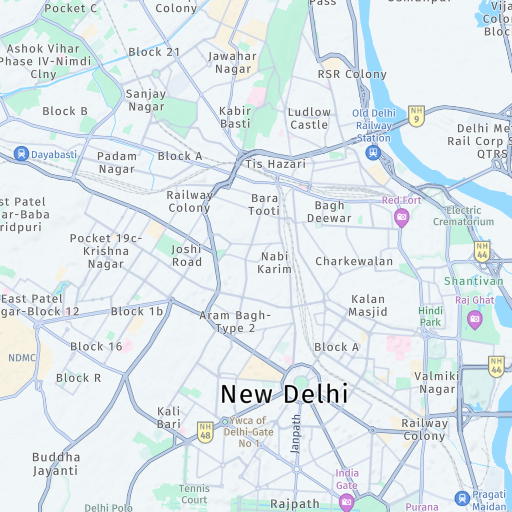
Primary and secondary languages
The following examples shows a map with the primary language set to English (lang=en) and the secondary language set to Hindi (lang2=hi):
GET https://maps.hereapi.com/v3/base/mc/12/2926/1707/png?size=512&lang=en&lang2=hi&apiKey={YOUR_API_KEY}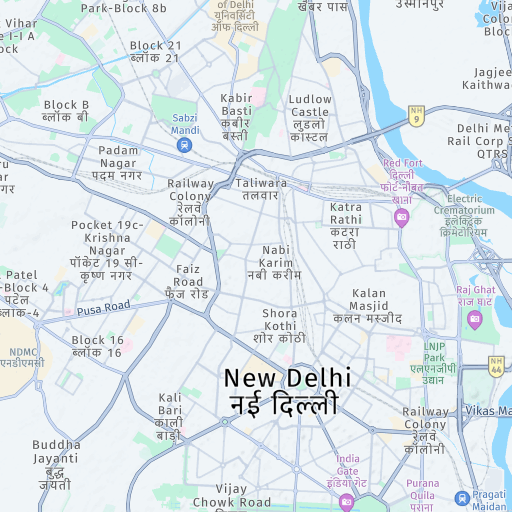
Secondary language only
The following examples shows a map with only the secondary language set (lang2=en). In that case the primary language of the map always defaults to the local language.
GET https://maps.hereapi.com/v3/base/mc/12/2926/1707/png?size=512&lang2=en&apiKey={YOUR_API_KEY}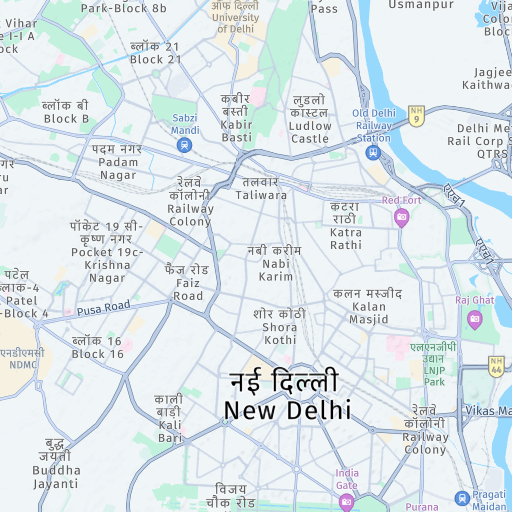
Next steps
- For more information on visual themes, see Apply styles.
- For more information on region-specific boundaries, see Respect geopolitical views.
- For more information on API endpoints and request parameters, see the API Reference.
Updated 29 days ago