

Get a Link Attribute with the Map Attributes API ?
Problem
=======
Map Attributes groups HERE core map data into thematic layers.
Each layer contains geographical tiles.
Each tile contains a list of data records.
Each data record contains attributes.
Map content is delivered per tile as JSON text, which affects the way you have to get link attributes such as speed limits, admin hierarchy and real time traffic flow information.
Below it is giving steps and examples requests to retrieve the Speed Limits, Admin hierarchy, Traffic flow data using Map Attributes API.
Solution Using Map Attributes
=============================
Pre-requisite
The Link ID is no longer available from the Routing API v8, but it is available from the Geocoder API v7 and Route Matching API. These services now also provide HMC topology segment IDs with offsets.
Geocoding and Search v7 API
Response from Reverse Geocoding API is available with the following information:
Map Reference
"links" retrieved from Reverse Geocoder Response is to be treated as linkids.
Example:
https://search.hereapi.com/v1/revgeocode?at=50.10772%2C8.66491&show=hmcReference&showMapReferences=links⟨=en-US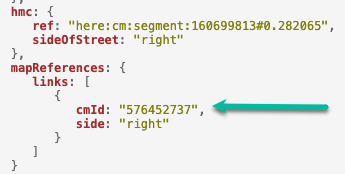
Or
Routing API
Response from Routing API is available with the following information:
segment Reference
Functional class
If not available from the response, add the parameters “&spans=segmentRef,functionalClass" to retrieve the same,
Example:
https://router.hereapi.com/v8/routes?apikey=YOUR_API_KEY&origin=52.5%2C13.4&destination=52.5%2C13.45&return=polyline&spans=segmentRef%2CdynamicSpeedInfo%2CfunctionalClass&transportMode=car
Or
Route Matching API
POST resquest:
curl 'https://routematching.hereapi.com/v8/match/routelinks?routeMatch=1&mode=fastest;car;traffic:disabled&&apikey=yourapikey' \
-H 'Content-Type: application/octet-stream' \
--data-raw $'LATITUDE,LONGITUDE50.10752,8.66507' \
--compressed
Example: https://demo.support.here.com/examples/v3.1_jp/rme_basic_jp
Remark:
Check please this new modern 'path' end-point of Map Attributes API as well: https://demo.support.here.com/examples/v3.1/map_attributes_path - getting map attributes by path.
Steps to be followed when using the API to retrieve the required data
1. Retrieve Tile information
If functional class and a link coordinate (e.g. reference node, check reference node details in the NOTE below) are available, then the tiles/level can be calculated as per the documentation:
tile size = 180° / 2level [degree]
tileY = trunc((latitude + 90°) / tile size)
tileX = trunc((longitude + 180°) / tile size)
level = functional class + 8<br />proc getTileXY*(level: int, lat, lng: float): (int, int) = let tileSize = 180 / (2 ^ level) (trunc( (lng + 180) / tileSize ).int, trunc( (lat + 90) / tileSize ).int)proc toTileId*(tileXy: (int, int), level: int): int = tileXy[1] * 2 * (2 ^ level) + tileXy[0]proc toTileIds(tileXys: seq[(int, int)], level: int): seq[int] = for tileXy in tileXys: result.add toTileId(tileXy, level)<br />
OR
The tile IDs have to be retrieved through the API “index” calls, Ignore the + and – signs if present when passing to the index layer.
As an example, we consider linkid = 576452737 retrieve from the Geocoder API.
https://smap.hereapi.com/v8/maps/index?layer=ROAD_GEOM_FCn&attributes=LINK_ID&values=576452737&apikey=your_apkey>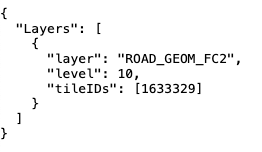
“ROAD_GEOM_FCn” for a given linkid the values for tile and level values remain same across layers except for ADMIN_PLACEn layer.
NOTE: Reference Node and non-reference node rules:
* The reference node is the node with the lower latitude. See Example 1 in Figure 1, where A is the reference node.
* If the latitudes of both end nodes are identical and their longitudes differ, the reference node is determined by the end node with the lower longitude. See Example 2 in Figure 1, where A is the reference node.
* If, however, the latitudes and longitudes of both end nodes are identical, but their Z-levels are different, the reference node is determined by the end node with the lower Z-level. See Example 3 in Figure 1.
Figure 1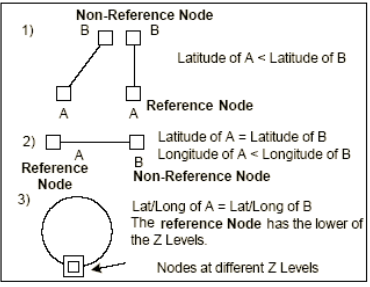
2. Retrieving Tiles for Speed Limit
From the response above retrieve the Layer, level and tileId information and pass it to tile end point of Map Attributes. As mentioned in documentation SPEED_LIMITS_FCx (general speed limits), SPEED_LIMITS_VAR_FCx (variable speed limits), SPEED_LIMITS_COND_FCx (conditional speed limits) and SPEED_LIMITS_TRUCK_FCx (in case of vehicle is a truck) need to be checked for speed limits. The lowest speed limit on a link is the legal one.
In this case assuming the use case if for car, we query the layers SPEED_LIMITS_FC2, SPEED_LIMITS_VAR_FC2, SPEED_LIMITS_COND_FC2
Please note multiple Layers and Tiles can be requested in a single request using comma separated layer names and tileIds, more details available in documentation
https://smap.hereapi.com/v8/maps/attributes?in=tile:1633329,1633329,1633329&layers=SPEED_LIMITS_FC2,SPEED_LIMITS_COND_FC2,SPEED_LIMITS_VAR_FC2&apiKey=
3. Parsing Speed Limit
From the previous response extract the values relevant to the Linkids.
As mentioned in Map Attributes documentation every road in HERE data is coded as a link or number of links, a Link has a Node at each end. The "lower left" Node is called Reference Node. The other Node is called Non-Reference Node. The default travel direction is from Reference Node to Non-Reference Node. Refer to the previous NOTE to know more about reference and non-reference node rules.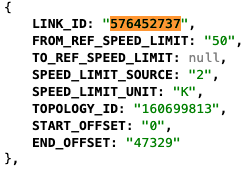
As mentioned in the Routing documentation, when a segment id has a minus sign as the first character, this ID indicates that the segment should be traversed in the opposite direction of its default coding. The direction specifies whether the route is using the segment in its canonical direction ('+' also known as traveling along the geometry's direction), or against it ('-' also known as traveling against the geometry's direction).
3.1. Get LinkId by SegmentId
Because one segment could be consist from many linkids then before we need to get linkid (with it's direction) by segmentId and offset e.g. 195029602#-0.36911806286524934..0.7263976730700576
In this case segment id is 195029602 then we can get tileId by request:
https://smap.hereapi.com/v8/maps/index?layer=TOPO_SEG_LINK_FCn&attributes=TOPOLOGY_ID&values=195029602&apikey=
Based on above response we can get the rows of topology segments and corresponded to their linkIds:
https://smap.hereapi.com/v8/maps/attributes?layers=TOPO_SEG_LINK_FC3∈=tile:6641816&apikey=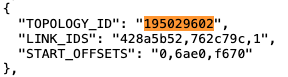
As you can see (in above result) the segment 195029602 consists from 3 linkids which hexadecimal coded.
Bellow two functions (fromHexStr and getLinkByOffset) can help you to get linkids by segment id and offset:<br />proc fromHexStr*(str: string, relativeToPrevious = true): seq[int64] = let strs = str.split"," var nc: int64 for s in strs: var st = s let sgn = if st[0] == '-': st = st[1..^1] #remove '-' -1 else: 1 var n: int64 discard st.parseHex n if relativeToPrevious: nc += n * sgn else: nc = n * sgn result.add ncproc getLinkByOffset*(linkIds, offsets: seq[int64], offset: string): seq[int64] = var offsTmp = offset let isInverted = if offset[0] == '-': true else: false if offset[0] == '-' or offset[0] == '+': offsTmp = offsTmp[1..^1] #remove '-' or '+' let offs = offsTmp proc offsetConvert(o: string, isInverted: bool): int {.inline.} = let normalOffset = if isInverted: 1.00 - o.parseFloat else: o.parseFloat result = (normalOffset * 100_000).<br />
Updated 23 days ago