

Matrix v8: Postman + curl examples - apikey authentication
---
Matrix v8: Postman and cURL Examples
====================================
Issue
-----
Users may experience difficulties calculating a Matrix route using an API key because it is unclear:
When HTTP redirection should be enabled or disabled
How to correctly use the statusUrl and resultUrl returned in the response
---
Resolution
----------
Use the attached Postman collection Matrix8_All.postman_collection.json to run and validate Matrix v8 requests.
Postman Procedure
- Submit the matrix request
* Run the request:2x5_submit
2. Check request status
* From the2x5_submitresponse, copy the value ofstatusUrl
* Replace the request URL in2x5_statuswith this value
* Keep theapikeyparameter unchanged
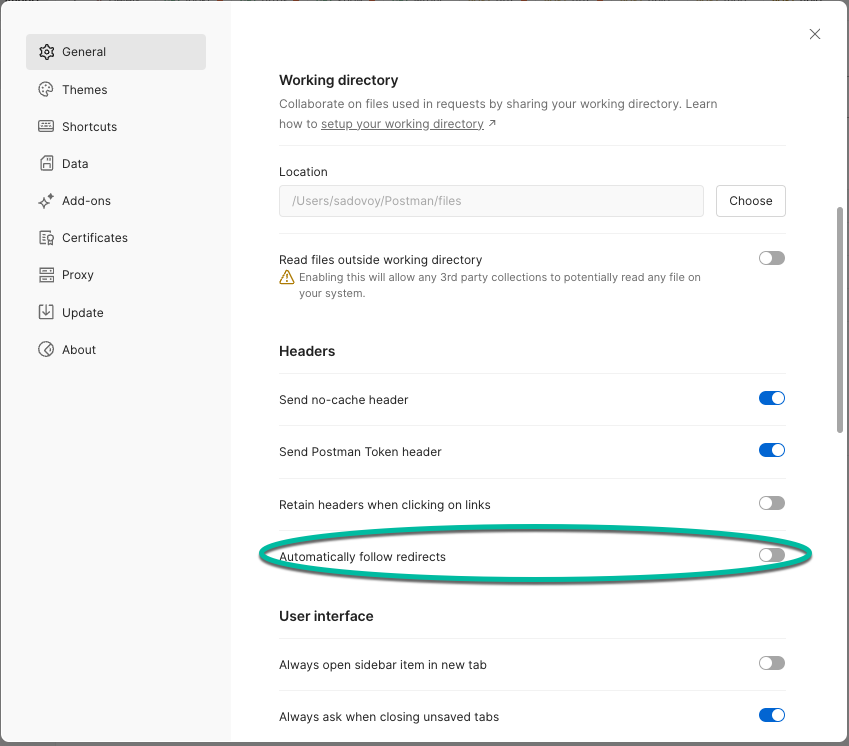
Important:
Before running this request, disable HTTP redirection in Postman settings (see screenshot).
3. Retrieve the result
* From the response, copy the value of resultUrl
* Replace the request URL in 2x5_result with this value
* Keep the apikey parameter unchanged
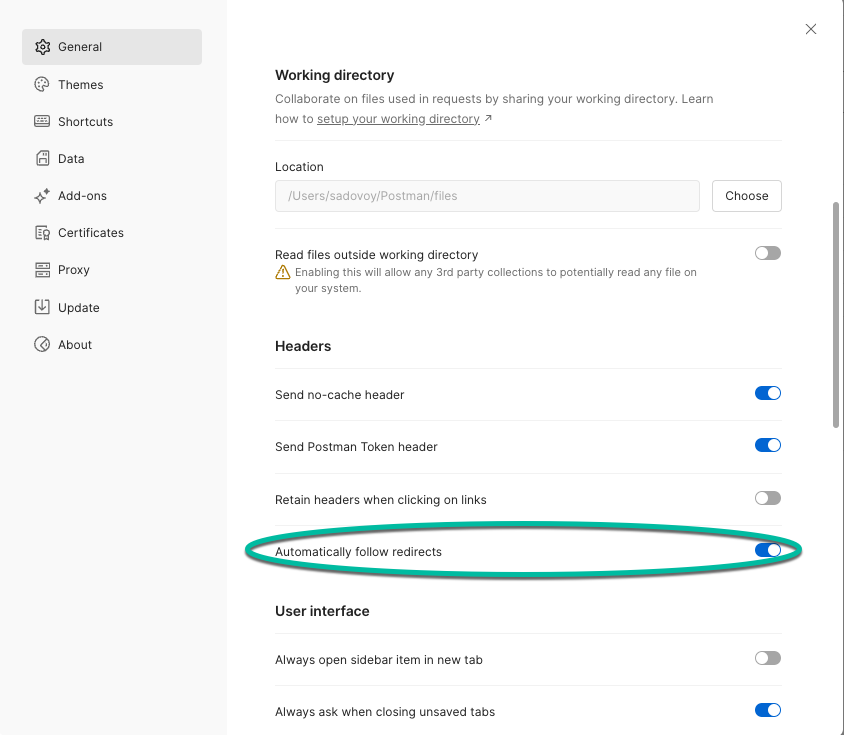
Important:
Before running this request, enable HTTP redirection in Postman settings (see screenshot).
---
cURL Examples
-------------
1. Submit matrix request
curl --location --request POST "https://matrix.router.hereapi.com/v8/matrix?async=true&apikey={apikey}"

--header "Content-Type: application/json"

--data-raw '{

"origins":[

{"lat":52.573349,"lng":13.371479},

{"lat":52.54176,"lng":13.511486}

],

"destinations":[

{"lat":52.432371,"lng":13.25283},

{"lat":52.431233,"lng":13.264396},

{"lat":52.426376,"lng":13.294547},

{"lat":52.417155,"lng":13.374063},

{"lat":52.406789,"lng":13.41287}

],

"transportMode":"truck",

"regionDefinition":{"type":"world"}

}'
---
2. Check request status
Use the statusUrl returned in the submit response:
curl --request GET "https://aws-eu-west-1.matrix.router.hereapi.com/v8/matrix/{matrixId}/status?apikey={apikey}"3. Retrieve the result
Use the resultUrl returned in the response:
Use the
resultUrl returned in the response:curl --location --output out.zip --request GET "https://aws-eu-west-1.matrix.router.hereapi.com/v8/matrix/{matrixId}?apikey={apikey}"
--header "Accept-Encoding: application/gzip"
---
Notes
-----
Replace {apikey} with your actual HERE API key
Replace {matrixId} with the ID returned in the submit response
The result is typically returned as a compressed (.zip) file
Ensure HTTP redirection is configured correctly depending on the step
---
Summary
-------
Submit request → receive statusUrl
2. Check status → receive resultUrl
3. Retrieve result → download the matrix output
Updated 23 days ago