

How to calculate "Radius of Curvature ROC" from RDF Curvature Value for statistical analysis
How to Calculate Radius of Curvature (ROC) from RDF Curvature Value
Summary
This article explains how to calculate the Radius of Curvature (ROC) from the RDF curvature value used in ADAS data. It also provides guidance on interpreting curvature values and understanding their practical meaning.
Problem / Context
ADAS links contain a curvature value at each shape point. This value does not directly represent the radius of curvature and must be converted to obtain the actual radius in meters.
Definition
Curvature is defined as the reciprocal of the radius of curvature (ROC) in meters, scaled by a factor of 1,000,000.
Curvature = (1 / ROC) × 1,000,000
Formula
To calculate the Radius of Curvature (ROC):
ROC = 1,000,000 / Curvature value
Interpretation of Curvature Values
- Positive values: Curve to the left
- Negative values: Curve to the right
- Value 0: Straight line (infinite radius)
Value Range
Curvature values range from -1,000,000 to +1,000,000, corresponding to radii from 1 meter to infinity (straight line).
Examples
Curvature = 500,000 → ROC = 2 m (left curve)
Curvature = -250,000 → ROC = 4 m (right curve)
Curvature = 0 → Straight line (infinite radius)
Diagram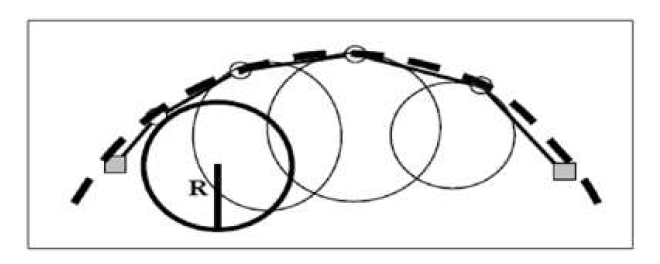
Figure: Illustration of local curvature along a road geometry. Each circle represents the radius of curvature (ROC) at a specific shape point. Smaller circles indicate sharper curves (higher curvature values), while larger circles represent flatter curves (lower curvature values). In the RDF data model, curvature is stored as the inverse of the radius (1/R) scaled by 1,000,000.
Expected Result
The calculation provides the radius of curvature in meters. The magnitude indicates curve sharpness, and the sign indicates curve direction.
Additional Information
- Use absolute ROC value for geometric calculations.
- Use curvature sign for direction interpretation.
- Avoid division by zero for curvature value 0.
Updated 23 days ago