

Show map features (e.g. vehicle restrictions, congestion/environmental zones, etc.) on satellite map as well
Vehicle restrictions and/or congestion and environmental zones — should also be shown on the satellite map.
Problem Description:
The example in Visualizing vehicle restrictions shows features on the standard map. When the base layer is changed to Satellite, the features are no longer rendered. Expected: the same features must be visible on the Satellite layer.
Solution:
As a first step, configure enabledFeatures on the defaultLayers.vector.normal.logistics and defaultLayers.hybrid.logistics.vector layers:<br />const READY = H.map.render.Style.State.READY;const enabledFeatures = [ { feature: 'vehicle restrictions', mode: 'active & inactive' }, { feature: 'congestion zones', mode: 'all' }, { feature: 'environmental zones', mode: 'all' }, { feature: 'road exit labels', mode: 'all' }, //{ feature: 'terrain', mode: 'hillshade' }];function makeReadyHandler(style, onReady) { const handler = () => { if (style.getState() === READY) { style.removeEventListener('change', handler); onReady(style); } }; style.addEventListener('change', handler); return handler;}let vectorLogistNormalStyle = defaultLayers.vector.normal.logistics.getProvider().getStyle();let vectorLogistHybridStyle = defaultLayers.hybrid.logistics.vector.getProvider().getStyle();[vectorLogistNormalStyle, vectorLogistHybridStyle].forEach(s => makeReadyHandler(s, (st) => { st.setEnabledFeatures(enabledFeatures); }));<br />
Second, when the base layer switches to defaultLayers.hybrid.day.raster, handle baselayerchange by swapping in defaultLayers.hybrid.logistics.raster and replacing defaultLayers.hybrid.day.vector with defaultLayers.hybrid.logistics.vector.<br />map.addEventListener("baselayerchange", e => { if(e.newValue && e.newValue === defaultLayers.hybrid.day.raster){ setTimeout(() => { map.setBaseLayer(defaultLayers.hybrid.logistics.raster); map.addLayer(defaultLayers.hybrid.logistics.vector); map.removeLayer(defaultLayers.hybrid.day.vector); }, 0); } if(e.newValue && e.newValue === defaultLayers.vector.normal.map){ setTimeout(() => { try{ map.setBaseLayer(defaultLayers.vector.normal.logistics); }catch(e){} map.removeLayer(defaultLayers.hybrid.logistics.vector); }, 0); }}`);<br />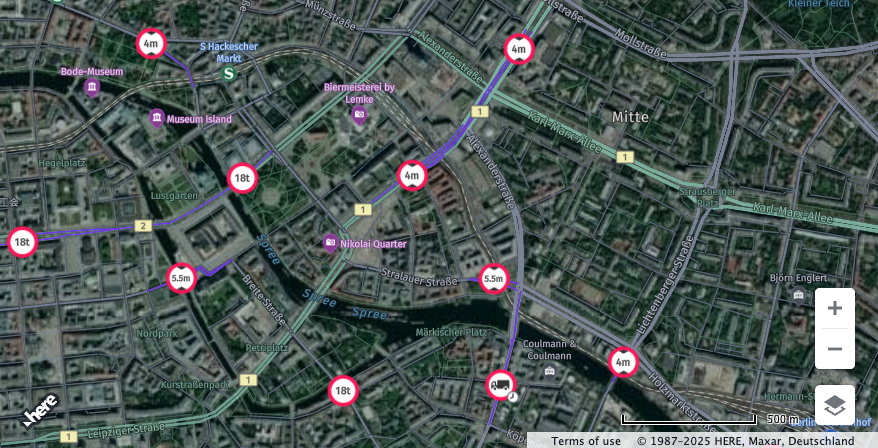
Full code is provided below:<br />window.apikey = 'you apikey';/** * Moves the map to display over Berlin * * @param {H.Map} map A HERE Map instance within the application */function moveMapToBerlin(map){ map.setCenter({lat:52.5159, lng:13.3777}); map.setZoom(14);}/** * Boilerplate map initialization code starts below: *///Step 1: initialize communication with the platform// In your own code, replace variable window.apikey with your own apikeyvar platform = new H.service.Platform({ apikey: window.apikey});const engineType = H.Map.EngineType['HARP'];var defaultLayers = platform.createDefaultLayers({ engineType: engineType});//Step 2: initialize a map - this map is centered over Europevar map = new H.Map(document.getElementById('map'), defaultLayers.vector.normal.map, { engineType: engineType, center: {lat:50, lng:5}, zoom: 4, pixelRatio<br />
Updated 23 days ago