

Why I got the error of signature of heresdk.xcframework is invalid
Issue
After updating the HERE SDK for iOS to the latest release, you have the following issue:<br />signature-collection failed: The operation couldn't be completed. (XCBUtil.CodeSignatureInfo. Error error 0.)/Users/[REDACTED] /git/ShiftTours/heresdk.xcframework:1:1: error: The signature of "heresdk xcframework" cannot be verified.dy (Description, mandatory: Font size 10)The signature of heresdk.xcframework cannot be validated and may have been compromisedValidation Error: A sealed resource is missing or invalid<br />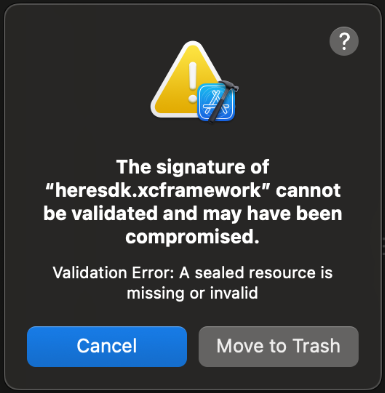
Cause
HERE SDK started signing the iOS frameworks starting 4.19.3 release, which prevents modification of the frameworks.
This is following Apple best practice and is the root cause that prevents the customer from modifying the HERE SDK files anymore.
Solution
Short answer is downloading the latest HERE SDK from HERE repository without modifying anything, then the issue should be resolved.
Some online AI assistant tools also recommend the following alternative solutions:
1. Ensure the Latest Version re-download the SDK:
* Make sure you are using the latest version of the HERE SDK. Sometimes, updating to the latest version can resolve the issue.
* Sometimes, the downloaded SDK file might be corrupted. Try re-downloading the HERE SDK from the official source.
2. Clean Build and Derived Data: -
* Clean your build folder and derived data in Xcode. This can help remove any corrupted files or caches that might be causing the issue.
+ In Xcode, go to Product > Clean Build Folder
* Also, delete the derived data by going to
+ In Xcode, go to Preferences > Locations > Derived Data > clicking the arrow to open the folder, then delete its contents.
3. Check Code Signing Settings:
* Ensure that your code signing settings are correctly configured in your Xcode project. This includes having valid provisioning profiles and certificates.
* Go to your project settings, select the Signing & Capabilities tab, and ensure that the correct team and provisioning profiles are selected.
From HERE support team, we also recommend sharing a replication of the issue if you need further technical support and subscribed to the HERE support plan
You can choose any app under here-sdk-examples/examples/latest/explore/ios at master · heremaps/here-sdk-examples such as the HellpMap app
Workaround
You can also try the following workaround by creating a local Swift Package for local development and CI/CD purposes:
1. Zip the xcframework and included it as the binary payload of a local Swift Package with the following Package.swift file:<br />// swift-tools-version: 5.6// The swift-tools-version declares the minimum version of Swift required to build this package.import PackageDescriptionlet version = "4.20.2.0.141526"let package = Package( name: "heresdk", products: [ .library( name: "heresdk", targets: ["heresdk"]), ], targets: [ .binaryTarget( name: "heresdk", path: "Sources/heresdk.xcframework.zip" ) ])<br />
2. Add the local package as a dependency through Swift Package Manage.
Then git-lfs can manage storing and retrieving the zipped framework and SPM takes care of expanding the payload and making the xcframework available to the app.
Note that HERE does not officially support this workaround, so you need to take the responsibility by yourself for using it.
Reference
Creating a multiplatform binary framework bundle | Apple Developer Documentation
HERE - Platform - Support Plans - Table | HERE
here-sdk-examples/examples/latest/navigate/ios at master · heremaps/here-sdk-examples
Tag
HERE SDK for iOS
Swift Package
Signature Error
Signature Invalid
heresdk.xcframework
Updated 23 days ago