

How to understand and calculate tile ID in HERE Maps
What is a tile
HERE Tile partitioning is a method for storing map data. In HERE Tile partitioning, layers contain rectangular geographic tiles that represent an area of the map. These tiles are also known as partitions. If you use HERE Tile partitioning, you can take advantage of the HERE platform libraries and APIs to perform geo-related tasks.
What is tile ID
Each tile in the map has an identifier called a HERE Tile ID. A HERE Tile ID is a 64-bit unsigned integer computed from the tile's quadkey. A quadkey is a string of numbers (0-3) which captures the hierarchy of parent-child tiles from level 1 to the target tile level.
How to calculate a tile ID
HERE Location Libraries provide a TileResolver that you can use to calculate HERE Tile IDs. If you are using Scala or Java, you can use the mapquad library for the same purpose. You can learn how to look up the Tiles that cover a certain area in a location using the HereTileResolver Java and HereTileResolver Scala classes from the Location Library by following this guide.
How to calculate a tile ID without using HERE Location Libraries
You need to know the LAT, LNG, and LEVEL on the HERE map that is in your concern to calculate the degrees first then calculate the tile ID. The steps are detailed and effective but not straightforward for missing some sample code. The following JavaScript code could be taken as an sample:
function tileIDCalc(lat, lng, level) {
    const degree = 360 / 2**level;
    const Y = Math.floor((90 + lat) / degree);
    const X = Math.floor((180 + lng) / degree);

    let interleaved = '';
    const x = X.toString(2).padStart(level, '0');
    const y = Y.toString(2).padStart(level, '0');
    for (let i = 0; i < level; i++) {
        interleaved += y[i] + x[i];
    }
    const decimalQK = parseInt(interleaved, 2);
    const quadkey = decimalQK.toString(4);
    const tileID = parseInt('1'+quadkey, 4);

    return {
        X: X,
        Y: Y,
        quadkey: quadkey,
        tileID: tileID
    };
}
You can validate it within the developer tool of your web browser by getting the tile ID 377894440 from LAT, LNG and LEVEL of (52.52507, 13.36937, 14).
Note the tile ID 377894440 and the LAT, LNG and LEVEL of (52.52507, 13.36937, 14) are all taken from HERE official documentation in reference.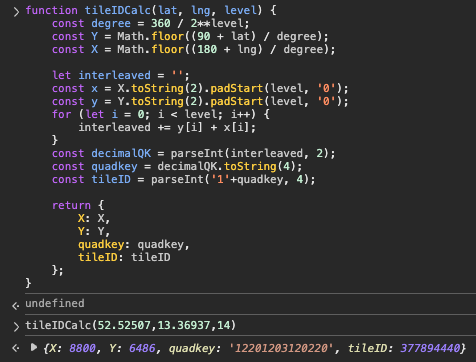
If you need the code in other programming languages such as Python, using some AI online tools such as chat.mistral.ai to convert it:
def tile_id_calc(lat, lng, level):
    degree = 360 / (2 ** level)
    Y = int((90 + lat) // degree)
    X = int((180 + lng) // degree)

    interleaved = ''
    x = format(X, f'0{level}b')
    y = format(Y, f'0{level}b')
    for i in range(level):
        interleaved += y[i] + x[i]

    decimal_qk = int(interleaved, 2)
    quadkey = ''
    while decimal_qk > 0:
        quadkey = str(decimal_qk % 4) + quadkey
        decimal_qk //= 4

    tile_id = int('1' + quadkey, 4)

    return {
        'X': X,
        'Y': Y,
        'quadkey': quadkey,
        'tileID': tile_id
    }

# Example usage
result = tile_id_calc(52.52507, 13.36937, 14)
print(result)
You may not get the correct code with the first-time response, validate the code and keep on asking until getting the following result:
{'X': 8800, 'Y': 6486, 'quadkey': '12201203120220', 'tileID': 377894440}
Reverse calculation from tile ID to Lat, Lng, and Map Level
If necessary, you can also calculate the Lat, Lng, and Map Level from a known tile ID. Only AI assistant can give you the reverse calculation methods by referring to the above JS and Python code.
/**
 * JavaScript
 * Convert HERE Tile ID -> quadkey -> (X, Y, level) -> geographic center & bounds.
 * Works with 64-bit tile IDs using BigInt internally (safest); accepts Number or BigInt input.
 */
function reverseFromTileID(tileID) {
  // --- helpers ---
  const toBigInt = (v) => (typeof v === 'bigint' ? v : BigInt(v));

  // Integer -> base-4 string via 2-bit chunks (BigInt-safe)
  function intToBase4Big(nBig) {
    if (nBig === 0n) return '0';
    let s = '';
    while (nBig > 0n) {
      const digit = Number(nBig & 3n);      // 0..3
      s = String(digit) + s;
      nBig >>= 2n;
    }
    return s;
  }

  // 1) TileID -> quadkey (drop the leading '1' that was prefixed during encoding)
  const idBig = toBigInt(tileID);
  const base4 = intToBase4Big(idBig);
  if (base4[0] !== '1') {
    throw new Error(`Invalid Tile ID encoding (base-4 must start with '1'): ${base4}`);
  }
  const quadkey = base4.slice(1);
  const level = quadkey.length;

  // 2) quadkey -> X,Y by deinterleaving (digit: 0..3; y_bit = high bit, x_bit = low bit)
  let X = 0, Y = 0; // keep as Number for downstream math
  for (let i = 0; i < level; i++) {
    const d = quadkey.charCodeAt(i) - 48; // '0'..'3' -> 0..3
    Y = (Y << 1) | ((d >> 1) & 1);  // high bit goes to Y
    X = (X << 1) | (d & 1);         // low bit goes to X
  }

  // 3) (X,Y,level) -> bounds and center in degrees
  const deg = 360 / (1 << level);
  const west  = -180 + X * deg;
  const east  = west + deg;
  const south =  -90 + Y * deg;
  const north = south + deg;

  const centerLat = (south + north) / 2;
  const centerLng = (west + east) / 2;

  return {
    lat: centerLat,          // center latitude
    lng: centerLng,          // center longitude
    level,
    X,
    Y,
    quadkey,
    bounds: { south, west, north, east },
    degreesPerTile: deg
  };
}
# Python
def tileID_to_lat_lng_level(tileID):

    # Convert integer tileID → base-4 string
    def int_to_base4(n):
        if n == 0:
            return '0'
        digits = []
        while n:
            digits.append(str(n & 3))   # extract 2 bits (base-4 digit)
            n >>= 2
        return ''.join(reversed(digits))

    # 1. TileID → quadkey (remove the leading '1')
    base4_str = int_to_base4(tileID)
    if base4_str[0] != '1':
        raise ValueError("Invalid Tile ID encoding.")
    quadkey = base4_str[1:]    # true quadkey
    level = len(quadkey)

    # 2. Quadkey → X,Y (deinterleave)
    x = 0
    y = 0
    for d in quadkey:
        d = int(d)
        y = (y << 1) | ((d >> 1) & 1)  # high bit
        x = (x << 1) | (d & 1)         # low bit

    # 3. Convert X,Y,level → lat/lng (tile center)
    deg = 360 / (1 << level)

    west  = -180 + x * deg
    east  = west + deg
    south =  -90 + y * deg
    north = south + deg

    lat = (south + north) / 2      # center latitude
    lng = (west + east) / 2        # center longitude

    return {
        'lat': lat,
        'lng': lng,
        'level': level,
        'X': x,
        'Y': y,
    }
Some use cases of tile IDs
Besides looking up the Tiles that cover a certain area in a location with HERE Location Library for Java and Scalar developers, you can also use tile IDs in some HERE Location Services API queries.
Such as the Map Attributes API for speed limit, road segment attribute lookups, or any other services requiring map partition references.
Do not misunderstand it with map tile for map rendering
You may notice the map tile introduced above is in the shape of rectangles but not squares, which is different from map rendering such as Raster Tile or Vector Tile services.
For example, you can get the map tile for Berlin with X, Y, Z values of 8800, 5373, 14 with the following Raster Tile API call: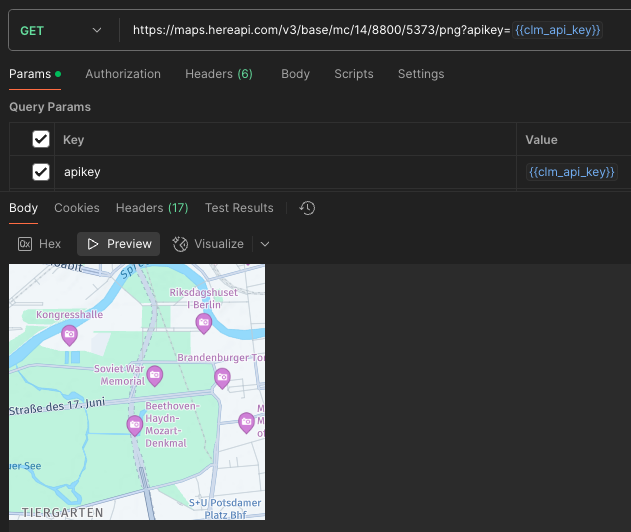
There is X, Y, and Level for each tile for map rendering purposes, but the tiling for partitions introduced in this article is a different concept.
Reference
- https://www.here.com/docs/bundle/data-api-developer-guide/page/rest/partitions.html
- https://www.here.com/docs/bundle/here-workspace-developer-guide-java-scala/page/here-tile-resolver/README.html
- https://demo.support.here.com/examples/v3.1/simple_map_incl_overlay_geohash
Updated 23 days ago