[Geofencing] How to upload a map layer, check asset, and view the layer online
Geofencing allows you to track whether an asset is located within specified geographic areas.
This article shows how to upload a layer, check an asset's location, and view the layer online.
Upload a new layer
The official guide is available at https://www.here.com/docs/bundle/geofencing-api-developer-guide/page/topics/example-layer-upload.htmlcurl --location 'https://geofencing.hereapi.com/v8/geofence/upload?layerId=RneE0AvR7qJi24WZX5ZL..5398&apikey=dAaF****flGk' \--form 'zipfile=@"/Users/jiangling/Downloads/5398.zip"'
Note, the layer ID is "RneE0AvR7qJi24WZX5ZL..5398" following the syntax of {app ID}.{map name}.{layer name}.
App ID - the app from which the API key dAaF**__flGk is generated.
Map Name - is omitted here as we are using the default map, or you can use "default" as the map name.
Layer Name - is customizable and should be unique within your organization, here we use random number 5389.
The zip file 5398.zip is zipped from a WKT file named as 5398.wkt and uploading as a zipped file is mandatory.
This request in Postman has screenshots as follows: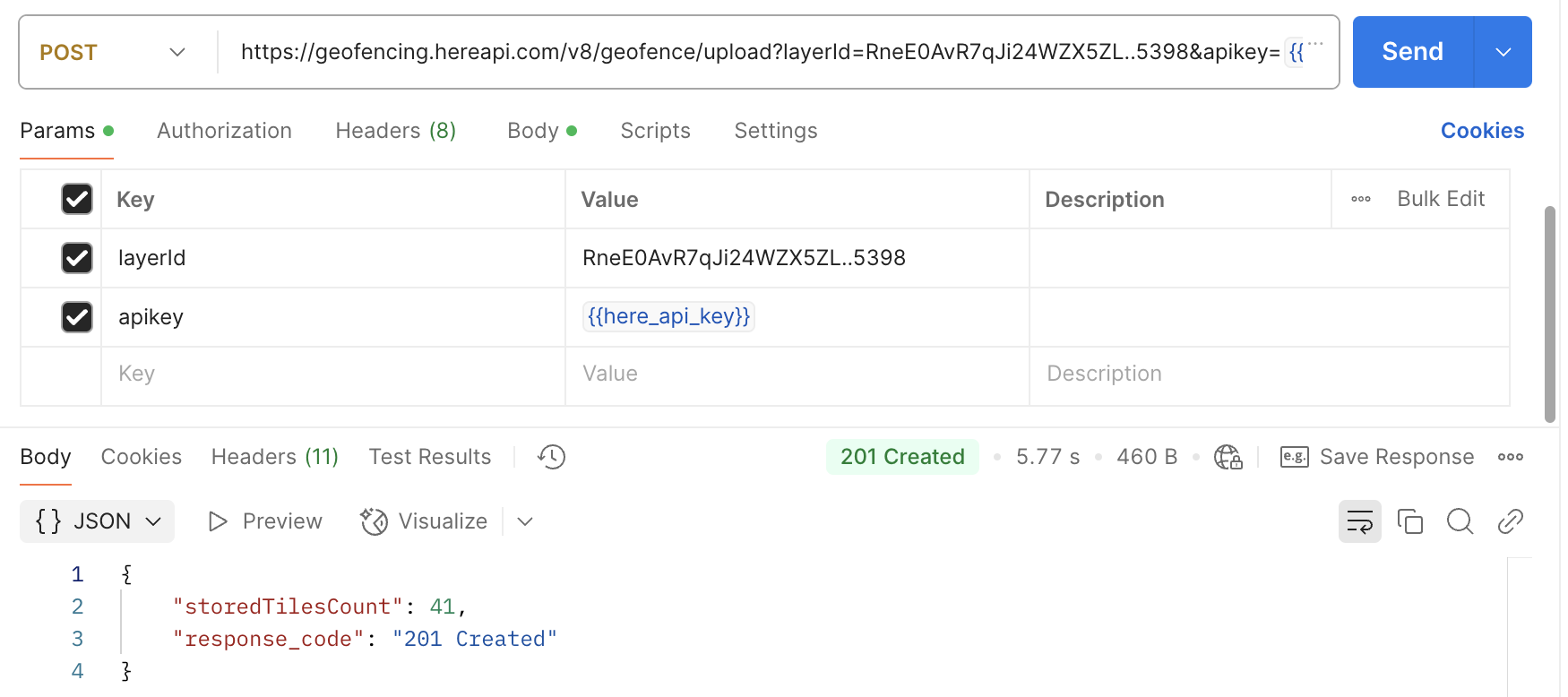
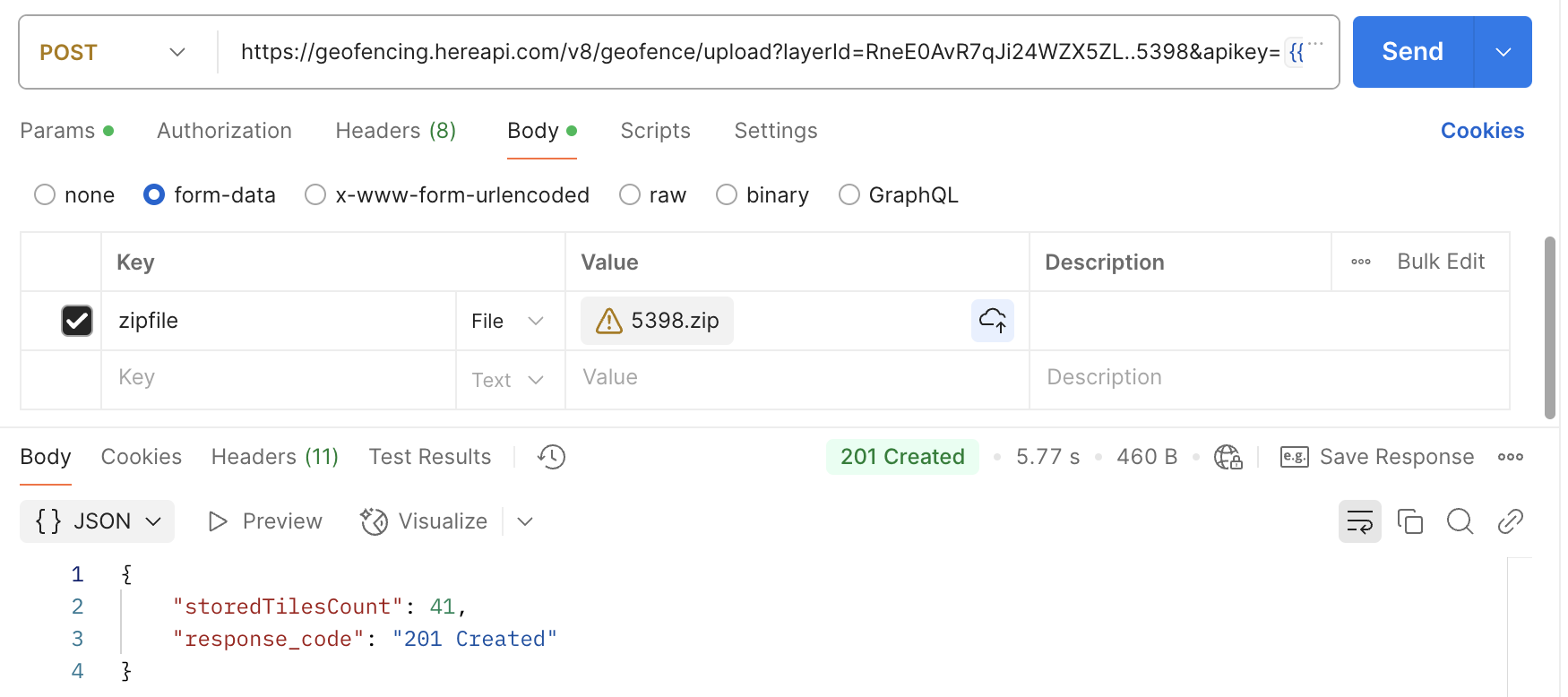
As you can see, there should be the following response if things are going on well:"storedTilesCount":41,"response_code":"201 Created"}
Check if the asset's position is inside the geofences
The official guide is available at https://www.here.com/docs/bundle/geofencing-api-developer-guide/page/topics/example-search-proximity.htmlcurl --location 'https://geofencing.hereapi.com/v8/geofence?apikey=dAaF****flGk∈=point%3A50.11208%2C%208.68341%3Br%3D500&layers=5398'
Note, you only need to provide the layer name but not like the layer ID used in uploading that contains app ID and map name.
The request in Postman has screenshot as follows: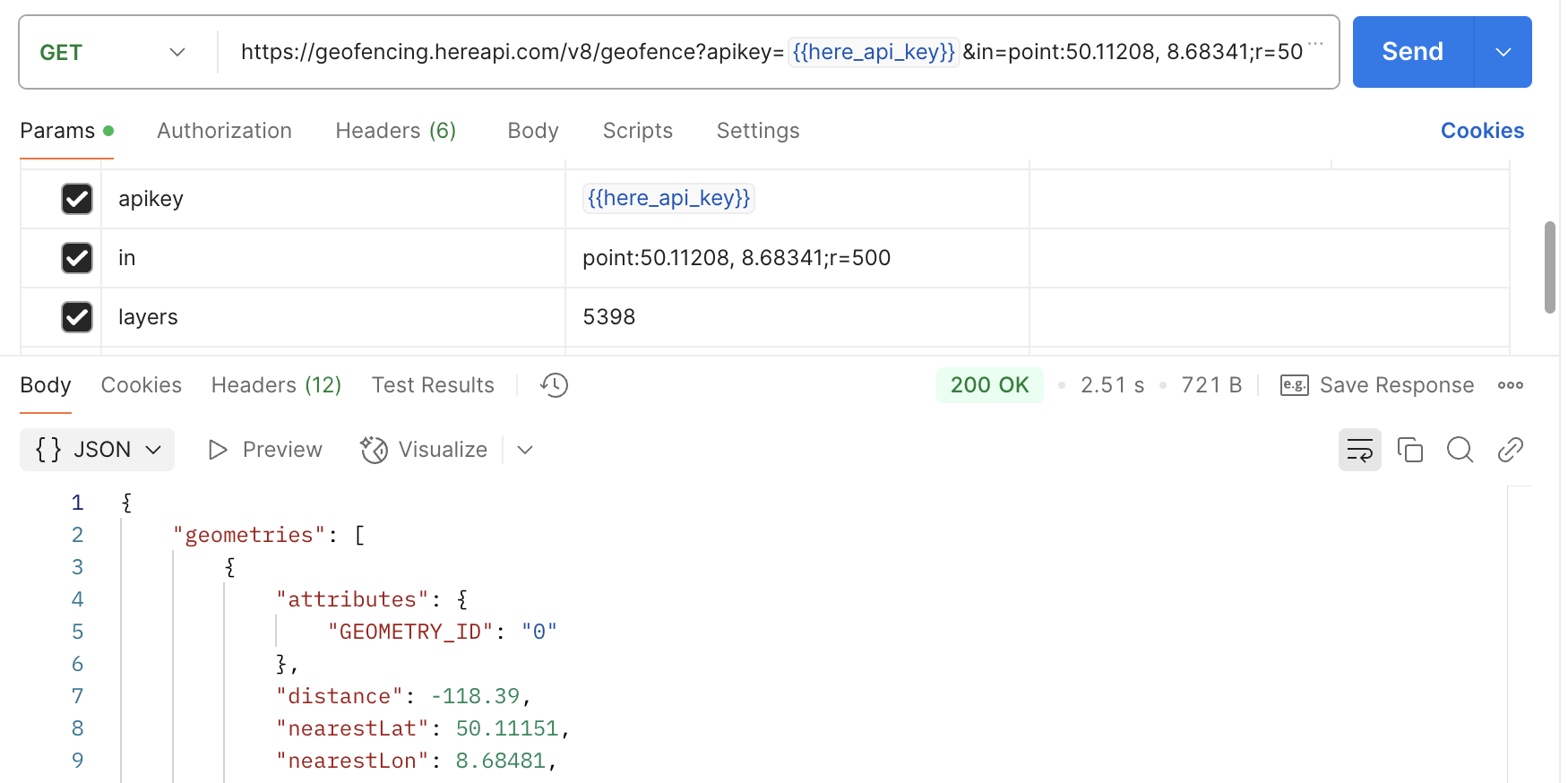
The response shows the distance of your specified location of your asset from the previously uploaded geofencing:
{
  "geometries": [
    {
      "attributes": { "GEOMETRY_ID": "0" },
      "distance": -118.39,
      "nearestLat": 50.11151,
      "nearestLon": 8.68481,
      "originalLat": 50.11208,
      "originalLon": 8.68341,
      "layerId": "5398",
      "geometry": "MULTIPOLYGON(((8.69293 50.1416,8.69156 50.14023,8.69156 50.13748,8.69568 50.13611,08.70117 50.13611,8.70117 50.12237,8.6998 50.121,8.69156 50.11826,8.68332 50.11002,8.6792 50.10864,8.67371 50.10864,8.66959 50.10727,8.66684 50.10452,8.6586 50.10178,08.65723 50.1004,08.65723 50.1416,8.69293 50.1416)))"
    }
  ],
  "meta": [{ "layerId": "5398", "lastUpdateTimeStamp": 1741850855214 }]
}
Positive distance means your asset is outside the geofencing area, while a negative distance means your asset is inside the geofencing area.
View the WKT file online
The WKT file and its zip file are attached to this article, but you may want to know what it is looked like on HERE maps.
There is a HERE demo app https://demo.support.here.com/examples/v3.1/spatial_tools can display the WKT on maps: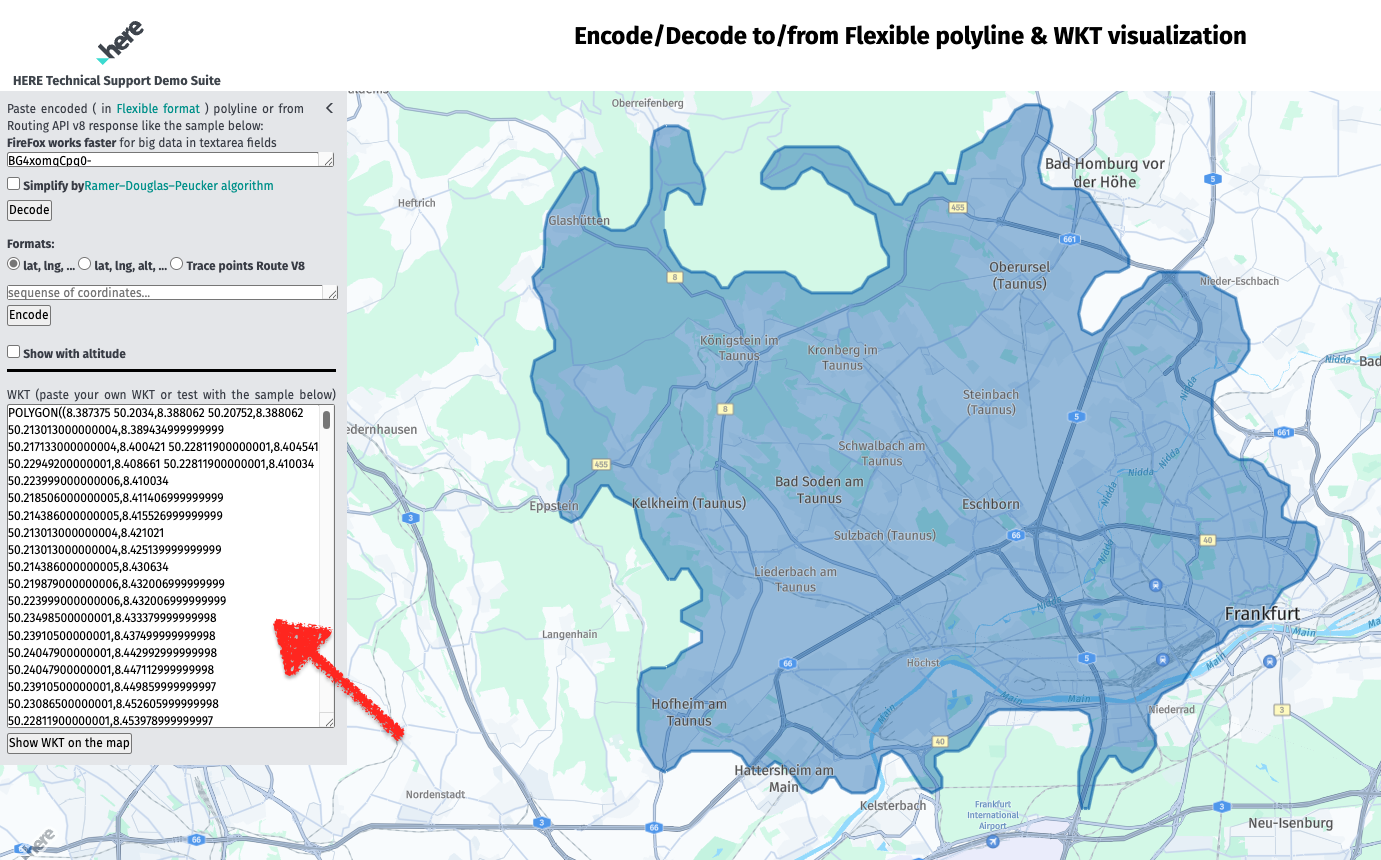
Some online tools from the 3rd parties, such as https://wktmap.com, can also show it as follows: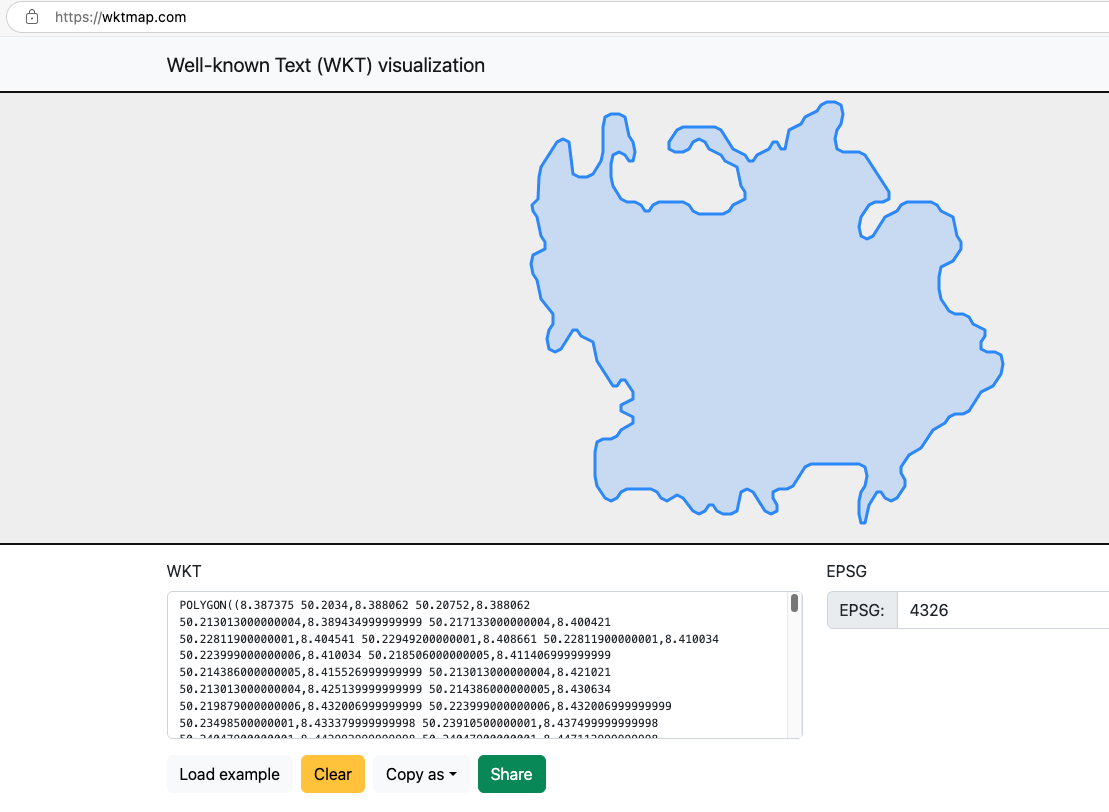
The sample WKT file used in the above test is available here and in attachment:
POLYGON((8.387375 50.2034,8.388062 50.20752,8.388062 50.213013000000004,8.389434999999999 50.217133000000004,8.400421 50.22811900000001,8.404541 50.22949200000001,8.408661 50.22811900000001,8.410034 50.223999000000006,8.410034 50.218506000000005,8.411406999999999 50.214386000000005,8.415526999999999 50.213013000000004,8.421021 50.213013000000004,8.425139999999999 50.214386000000005,8.430634 50.219879000000006,8.432006999999999 50.223999000000006,8.432006999999999 50.23498500000001,8.433379999999998 50.23910500000001,8.437499999999998 50.24047900000001,8.442992999999998 50.24047900000001,8.447112999999998 50.23910500000001,8.449859999999997 50.23086500000001,8.452605999999998 50.22811900000001,8.453978999999997 50.223999000000006,8.452605999999998 50.219879000000006,8.449859999999997 50.219879000000006,8.447112999999998 50.222626000000005,8.442992999999998 50.223999000000006,8.438872999999997 50.222626000000005,8.437499999999998 50.218506000000005,8.437499999999998 50.213013000000004,8.438872999999997 50.208893,8.444365999999997 50.2034,8.448485999999997 50.202026000000004,8.453978999999997 50.202026000000004,8.458098999999997 50.200653,8.460845999999997 50.197906,8.463592999999996 50.197906,8.466338999999996 50.200653,8.470458999999996 50.202026000000004,8.486937999999997 50.202026000000004,8.491057999999997 50.200653,8.493804999999996 50.197906,8.497924999999997 50.196533,8.514403999999997 50.196533,8.518523999999998 50.197906,8.521270999999997 50.200653,8.529509999999997 50.2034,8.529509999999997 50.206146000000004,8.526763999999996 50.208893,8.524016999999997 50.217133000000004,8.515777999999997 50.219879000000006,8.513030999999998 50.222626000000005,8.504790999999997 50.22537200000001,8.502044999999997 50.22811900000001,8.497924999999997 50.22949200000001,8.493804999999996 50.22811900000001,8.491057999999997 50.22537200000001,8.486937999999997 50.223999000000006,8.481444999999997 50.223999000000006,8.477324999999997 50.22537200000001,8.477324999999997 50.22811900000001,8.482818999999997 50.23361200000001,8.486937999999997 50.23498500000001,8.508910999999996 50.23498500000001,8.513030999999996 50.23361200000001,8.521270999999997 50.22537200000001,8.529509999999997 50.222626000000005,8.532256999999996 50.219879000000006,8.535003999999995 50.219879000000006,8.537749999999996 50.222626000000005,8.545989999999996 50.22537200000001,8.548736999999996 50.22811900000001,8.551482999999996 50.22811900000001,8.554229999999995 50.22537200000001,8.556975999999995 50.22537200000001,8.559722999999995 50.23361200000001,8.567962999999995 50.23635900000001,8.570708999999995 50.23910500000001,8.578948999999996 50.24185200000001,8.581695999999996 50.24459800000001,8.585814999999995 50.24597200000001,8.591308999999995 50.24597200000001,8.595427999999995 50.24459800000001,8.596801999999995 50.24047900000001,8.595427999999995 50.23635900000001,8.592681999999995 50.23361200000001,8.591308999999995 50.22949200000001,8.592681999999995 50.22537200000001,8.596801999999995 50.223999000000006,8.607787999999996 50.223999000000006,8.611907999999996 50.222626000000005,8.628386999999996 50.206146000000004,8.628386999999996 50.2034,8.624267999999997 50.202026000000004,8.618773999999997 50.202026000000004,8.614654999999997 50.200653,8.609160999999997 50.19516,8.607787999999998 50.19104,8.609160999999997 50.18692,8.613280999999997 50.185547,8.617400999999997 50.18692,8.625640999999998 50.19516,8.633880999999999 50.197906,8.636626999999999 50.200653,8.640747 50.202026000000004,8.657226999999999 50.202026000000004,8.661345999999998 50.200653,8.664092999999998 50.197906,8.672332999999998 50.19516,8.675078999999998 50.18692,8.677825999999998 50.184174,8.677825999999998 50.181427,8.672332999999998 50.175934,8.664092999999998 50.173187,8.662719999999998 50.169067,8.662719999999998 50.163574,8.664092999999998 50.159454,8.669585999999997 50.153960999999995,8.673705999999997 50.152587999999994,8.679198999999997 50.152587999999994,8.683318999999997 50.15121499999999,8.686065999999997 50.148467999999994,8.694304999999996 50.145720999999995,8.694304999999996 50.14297499999999,8.691558999999996 50.14022799999999,8.691558999999996 50.13748199999999,8.695678999999997 50.13610799999999,8.701171999999996 50.13610799999999,8.705291999999996 50.13473499999999,8.706664999999996 50.13061499999999,8.705291999999996 50.12649499999999,8.699798999999997 50.12100199999999,8.691558999999996 50.11825599999999,8.683318999999996 50.11001599999999,8.679198999999995 50.10864299999999,8.673705999999996 50.10864299999999,8.669585999999995 50.10726899999999,8.666839999999995 50.104522999999986,8.658599999999995 50.10177599999999,8.650359999999994 50.093535999999986,8.642119999999993 50.090789999999984,8.636626999999994 50.08529699999998,8.636626999999994 50.08254999999998,8.639373999999993 50.079802999999984,8.639373999999993 50.07705699999998,8.633880999999993 50.07156399999998,8.629760999999993 50.07018999999998,8.625640999999993 50.07156399999998,8.622893999999993 50.07430999999998,8.620147999999993 50.07430999999998,8.614654999999994 50.06881699999998,8.611907999999994 50.06057699999998,8.609160999999995 50.06057699999998,8.607787999999996 50.06469699999998,8.607787999999996 50.07018999999998,8.609160999999995 50.07430999999998,8.611907999999994 50.07705699999998,8.613280999999994 50.08117699999998,8.611907999999994 50.08529699999998,8.607787999999994 50.086669999999984,8.574828999999994 50.086669999999984,8.570708999999994 50.08529699999998,8.562468999999993 50.07705699999998,8.558349999999994 50.07568399999998,8.552855999999993 50.07568399999998,8.548736999999994 50.07430999999998,8.548736999999994 50.07156399999998,8.551482999999994 50.06881699999998,8.551482999999994 50.06607099999998,8.547362999999994 50.06469699999998,8.543242999999993 50.06607099999998,8.535003999999994 50.07430999999998,8.530883999999993 50.07568399999998,8.526763999999993 50.07430999999998,8.524016999999994 50.06607099999998,8.519896999999993 50.06469699999998,8.514403999999994 50.06469699999998,8.510283999999993 50.06607099999998,8.507537999999993 50.06881699999998,8.504790999999994 50.06881699999998,8.502044999999994 50.06607099999998,8.497924999999993 50.06469699999998,8.493804999999993 50.06607099999998,8.491057999999994 50.06881699999998,8.486937999999993 50.07156399999998,8.482818999999994 50.07293699999998,8.480071999999995 50.07156399999998,8.475951999999994 50.07018999999998,8.471831999999994 50.07156399999998,8.469085999999994 50.07430999999998,8.464965999999993 50.07568399999998,8.448485999999994 50.07568399999998,8.444365999999993 50.07430999999998,8.441619999999993 50.07156399999998,8.437499999999993 50.07018999999998,8.433379999999993 50.07156399999998,8.427886999999993 50.07705699999998,8.426513999999994 50.08117699999998,8.426513999999994 50.092162999999985,8.427886999999993 50.096282999999985,8.432006999999993 50.097655999999986,8.437499999999993 50.097655999999986,8.441619999999993 50.099029999999985,8.444365999999993 50.10177599999999,8.452605999999994 50.104522999999986,8.452605999999994 50.10726899999999,8.444365999999993 50.11001599999999,8.444365999999993 50.11276199999999,8.452605999999994 50.11550899999999,8.452605999999994 50.11825599999999,8.447112999999995 50.12374899999999,8.444365999999995 50.12374899999999,8.441619999999995 50.12100199999999,8.438872999999996 50.12100199999999,8.427886999999995 50.13198899999999,8.425139999999995 50.14022799999999,8.416900999999996 50.14297499999999,8.414153999999996 50.145720999999995,8.411406999999997 50.145720999999995,8.403167999999997 50.13748199999999,8.399047999999997 50.13610799999999,8.394927999999997 50.13748199999999,8.393554999999997 50.14160199999999,8.394927999999997 50.145720999999995,8.397674999999996 50.148467999999994,8.397674999999996 50.152587999999994,8.393554999999996 50.156707999999995,8.389434999999995 50.159454,8.386687999999996 50.167694,8.383941999999996 50.170441,8.382567999999996 50.174561,8.383941999999996 50.17868,8.392180999999995 50.181427,8.392180999999995 50.184174,8.389434999999995 50.18692,8.386687999999996 50.19516,8.383941999999996 50.197906,8.383254999999997 50.200653,8.387374999999997 50.2034))
Note that your uploaded WKT file should contain column names and IDs separated by TAB but the WKT data for map visualization should be pure WKT.
For example, the sample uploaded WKT file is as follows while the WKT data for visualization should only be MULTIPOLYGON(((8.387375 50.203...
GEOMETRY_ID WKT
0 MULTIPOLYGON(((8.387375 50.203...
View previously uploaded layers online
There is also a specific HERE online resource that could be used to check all uploaded layers and visualize them on HERE maps.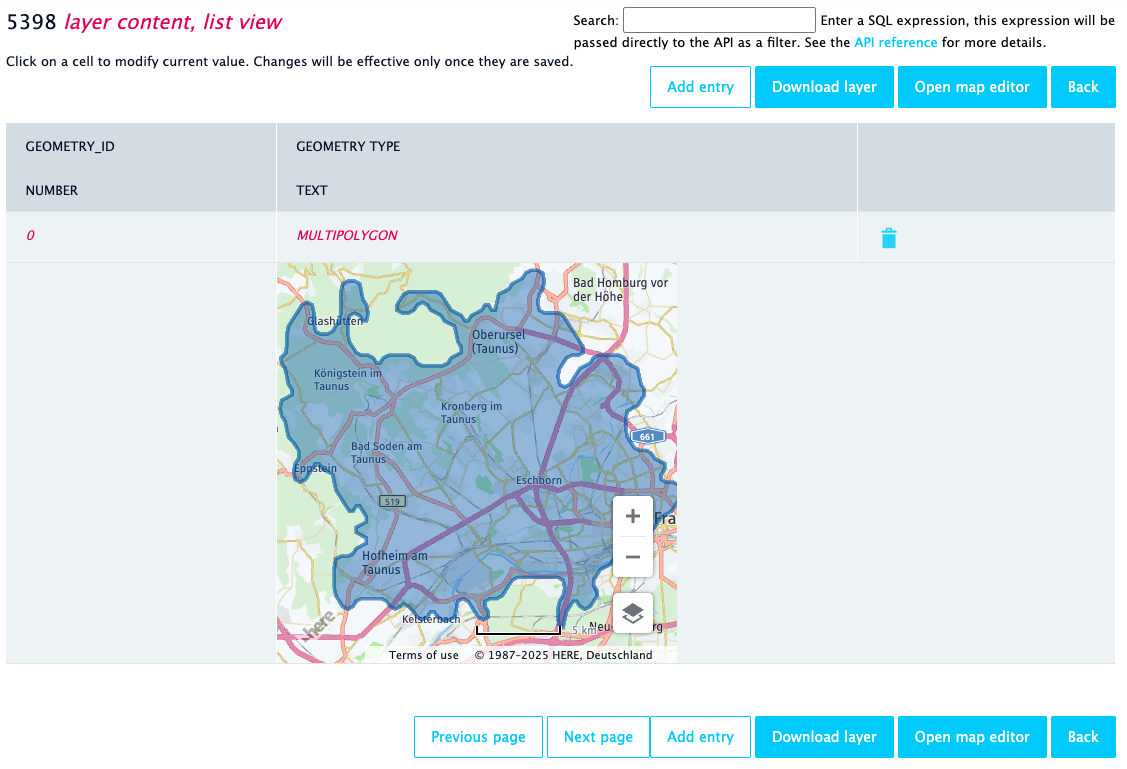
This website is available at https://enterprise.here.com/#!/login and you need to use the API key as login credentials:
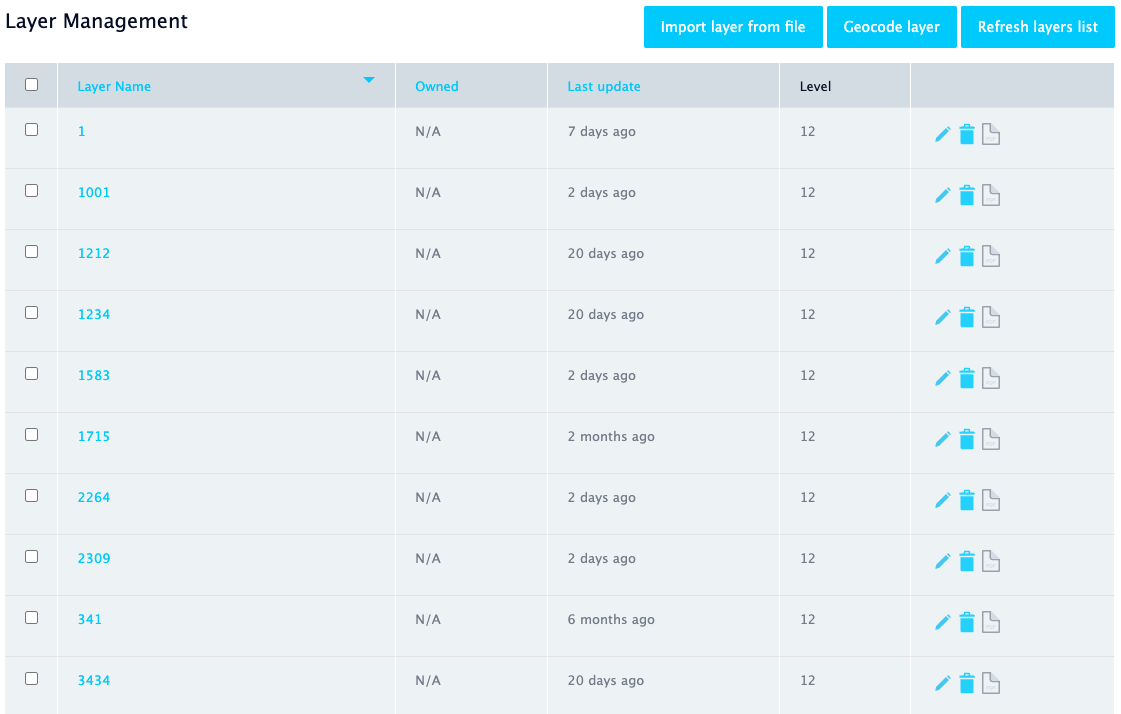
After logging in, you can find all previously uploaded layers and manage them: